Film-Tech Cinema Systems
Film-Tech Forum ARCHIVE


my profile | my password | search | faq & rules | forum home
  next oldest topic   next newest topic
» Film-Tech Forum ARCHIVE   » Operations   » Film Handlers' Forum   » DTS trailer files - can they be copied to another DTS disk? (Page 2)

 
This topic comprises 3 pages: 1  2  3 
 
Author Topic: DTS trailer files - can they be copied to another DTS disk?
Mike Blakesley
Film God

Posts: 12767
From: Forsyth, Montana
Registered: Jun 99


 - posted 04-06-2001 09:42 PM      Profile for Mike Blakesley   Author's Homepage   Email Mike Blakesley   Send New Private Message       Edit/Delete Post 
Thing is, that text file doesn't tell the system where to look for FILES, but rather the address within the one file that holds all the trailers, snipes, etc....so if we put the needed file on disk B, how we tell the system where to look within that file?

<scratching head>

I wonder if it would be possible to get the trailer sound files off of a DTS "trailers" disk. I don't have one of those here.

Come to think of it, why don't they just cram as many trailers as they possibly can onto each set of disks? Since trailers from competing companies are being shipped in the cans these days, it seems like a logical step.

 |  IP: Logged

Adam Martin
I'm not even gonna point out the irony.

Posts: 3686
From: Dallas, TX
Registered: Nov 2000


 - posted 04-06-2001 09:45 PM      Profile for Adam Martin   Author's Homepage   Email Adam Martin       Edit/Delete Post 
If I remember correctly, the text file also lists the start position and length of data for each trailer in relation to the .aud file. Hypothetically, I suppose you could create a new .txt file (if this does, indeed, control the file structure) and rebuild the .aud data block with the segments you want. Of course, by that time, the movie is gone.

Is it possible to just add a third drive to the SCSI daisy chain and run the ribbon cable to a drive outside the chassis? Or is there a proprietary BIOS-type thing with one of the DTS cards set to use just two drives?

 |  IP: Logged

Scott Norwood
Film God

Posts: 8146
From: Boston, MA. USA (1774.21 miles northeast of Dallas)
Registered: Jun 99


 - posted 04-06-2001 10:02 PM      Profile for Scott Norwood   Author's Homepage   Email Scott Norwood   Send New Private Message       Edit/Delete Post 
The newer DTS units do use three drives (the third is for the trailer disks), although I don't know if there's any reason why a third drive couldn't be added on the old 2-disk units.

Do both units use the same type of SCSI card?

 |  IP: Logged

Darryl Spicer
Film God

Posts: 3250
From: Lexington, KY, USA
Registered: Dec 2000


 - posted 04-07-2001 12:15 AM      Profile for Darryl Spicer     Send New Private Message       Edit/Delete Post 
Yes you can add a drive to the two disk units. In the picture wharehouse there is a picture of a two disk unit that has an extra drive added. You will have to search for it because I do not remember where it was located.

The units do provide an extra power cable but I am not sure about the scsi daisy chain cable you may have to purchas this cable.

Important the third drive must be the same type of drive that the other two are. Big problem is that the older units use the toshiba drives. Dts no longer uses these drives they now use teac. So if you were going to do this I would order the three drive upgrade kit that also upgrades the firmware chip and scsi card was also updated I do believe along with another card that was added.

But how important is this. I have found with our automations that when a cue is placed on a trailer that is playing in dts it will kick the sound format back to stereo thus taking the system out of digital until it either stops reading a related timecode and then starts again or you manually push the digital button on format card.

For me the only way around this is to be sure that there is a non digital trailer between the last active trailer and the active policy trailer. Placing the cue on the non active trailer. That way it automaticaly goes to digital when active policy starts going thru.


 |  IP: Logged

Randy Stankey
Film God

Posts: 6539
From: Erie, Pennsylvania
Registered: Jun 99


 - posted 04-07-2001 03:15 AM      Profile for Randy Stankey   Email Randy Stankey   Send New Private Message       Edit/Delete Post 
Darryl,

CFS automation, right? There's a fix for that, but it involves cutting a wire. What I do is cut said wire and then install a crimp-on wire connector. That way you can reconnect the wire if needed.

It's the wire that goes to the CENTER terminal of the MONO/STEREO switch. It's white with an orange stripe if I remember. What it does is send the pulse to the stereo processor when the cue goes through. You don't really need that wire anymore since we always play trailers in stereo now.

I think I have a pic of the wire in question. Let me know if you want to do this and I'll give you some better info.

 |  IP: Logged

Darryl Spicer
Film God

Posts: 3250
From: Lexington, KY, USA
Registered: Dec 2000


 - posted 04-07-2001 03:38 AM      Profile for Darryl Spicer     Send New Private Message       Edit/Delete Post 
Yes Randy we have cfs automations. Are you refering to the wires on the back of the ultra-stereo processor. Right now both mono and stereo pulse wires are connected to stereo terminal. If I remove the wire from said terminal that would pulse stereo at cue this will eliminate problem. Leaving start up pulse wire connected (that which used to send pulse to mono) and Dts pulse wire for back-up. I will take a look at it tonight and try some things. Been meaning to talk to Bob about this but never think of it when I see him.

Do you know of any fixes, other than adding an extra inboard cue at the end of the movie, to keep the nsync from switching back to stereo. When the 4 second delay times out on the dts it will kick it out and back to stereo. Only selution has been to add the extra cue.

 |  IP: Logged

Aaron Sisemore
Flaming Ribs beat Reeses Peanut Butter Cups any day!

Posts: 3061
From: Rockwall TX USA
Registered: Sep 1999


 - posted 04-07-2001 11:47 AM      Profile for Aaron Sisemore   Email Aaron Sisemore   Send New Private Message       Edit/Delete Post 
Unless you modify the auto to repulse the non-sync cue without needing to add the extra cue, you are pretty much stuck with that setup.(you COULD change the timing of the cue pulses with the dual-function board(s) but you run the risk of burning up dowser coils if you do) As far as cueing to keep the auto from switching out of DTS at the cue (which is a common occurrence with USL processors with ANY automation, not just CFS) the best way is to do as it appears you have been doing: run all the analog trailers first, cue at the end of the LAST analog trailer and let the DTS take it from there. Back to the end of show: I have never had any trouble adding the extra cue at the tail of the print to keep it in non-sync.

Suggestion for Karen: Why not make a tiny change to DTS feature programming to either discontinue timecode at the tail of the print (Must the 'Visit Universal Studios' or the rating tag have timecode if it is silent[with rare exceptions] anyways?) or just truncate the file on the discs so that once there is no longer a sound recording to be played the DTS player just stops, keeping the USL processors from reverting back to stereo/SR after being cued into non-sync?

Aaron

 |  IP: Logged

Adam Martin
I'm not even gonna point out the irony.

Posts: 3686
From: Dallas, TX
Registered: Nov 2000


 - posted 04-07-2001 12:16 PM      Profile for Adam Martin   Author's Homepage   Email Adam Martin       Edit/Delete Post 
I thought that (at least with the 6D's I had) there was now an "end of feature" at the end of timecode, which pulsed nonsync instead of stereo. I specifically remember being in the auditorium when the NS came on, but the (crappy) failsafe didn't pick up the dowser/NS cue and the tail showed on screen. Or was that just a CP55 thing?


 |  IP: Logged

Mark Gulbrandsen
Resident Trollmaster

Posts: 16657
From: Music City
Registered: Jun 99


 - posted 04-07-2001 12:36 PM      Profile for Mark Gulbrandsen   Email Mark Gulbrandsen   Send New Private Message       Edit/Delete Post 
I have burned copies of the DTS test disk for my own use. I always carry one of the copies with me in the field and keep the original by my desk in the office.
Mark @ GTS


 |  IP: Logged

Randy Stankey
Film God

Posts: 6539
From: Erie, Pennsylvania
Registered: Jun 99


 - posted 04-07-2001 01:27 PM      Profile for Randy Stankey   Email Randy Stankey   Send New Private Message       Edit/Delete Post 
No, cut the wire inside the console that feeds the switch that lets you select whether the OB cue pulses the STEREO or MONO line.
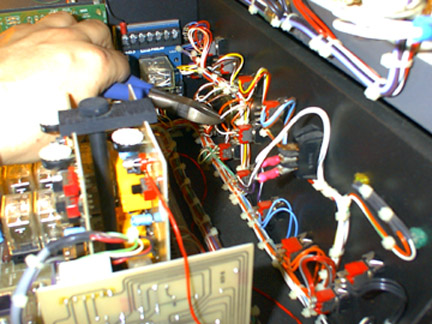
Sorry about the picture quality. It's really hard to take a pic like this in such cramped corners and under booth lighting conditions. Still, I think you get the picture.


For the DTS going back into digital after the IB cue... The reason that happens is because there is more time DTS time code after the blue band and when the machine sees that, it thinks it needs to play something again. It just ends up playing silence until the film tails out. Then it's left in digital.

There are four solutions that I tell people:


  1. Put another IBQ on at the tail of the film.
  2. Take a black SharpieŽ marker and blot out all the time code after the end of the blue band.
  3. Cut off the tail of the film after the blue band and splice on a piece of black leader, etc.
  4. Check the revision number of your DTS firmware. The newer versions don't seem to do this. Maybe you can get the upgrade and cure this once and for all, without having to screw around with the film

(You'll probably need to get that upgrade sooner or later when your disk drives crap-out on you so my vote is for #4... IF you can get "Da Boss" to spring for it )


PS: Mark, can you just make a straight disk-for-disk copy of that test disk? I have been meaning to do that but I haven't quite figured it out. I should probably do this soon because I use that disk a lot and I don't want to "wear it out".


 |  IP: Logged

Adam Martin
I'm not even gonna point out the irony.

Posts: 3686
From: Dallas, TX
Registered: Nov 2000


 - posted 04-07-2001 02:21 PM      Profile for Adam Martin   Author's Homepage   Email Adam Martin       Edit/Delete Post 
I "borrowed" the empirical disc from my tech and made a straight copy of it for my use ("reserve" tech) when I got called out of my theater for emergencies and installs. Worked fine. Don't forget to photocopy the track listing, too, or it'll drive you nuts trying to find what you're looking for. Also make sure you get the current one ... there was a SPL change a while back.


 |  IP: Logged

Karen Hultgren
Master Film Handler

Posts: 492
From: Agoura Hills, CA, USA
Registered: Mar 2000


 - posted 04-11-2001 12:41 PM      Profile for Karen Hultgren   Author's Homepage   Email Karen Hultgren   Send New Private Message       Edit/Delete Post 
No Mike, the trailers are complied into one file (Reel 14) and you cannot extract just one.

Karen at DTS

 |  IP: Logged

Karen Hultgren
Master Film Handler

Posts: 492
From: Agoura Hills, CA, USA
Registered: Mar 2000


 - posted 04-11-2001 12:44 PM      Profile for Karen Hultgren   Author's Homepage   Email Karen Hultgren   Send New Private Message       Edit/Delete Post 
The trailer disc is a subscribed disc that the studios sign up for and the disc is always changing.

Movie discs are a different story. A studio will let us a film but only wants trailers from THEIR upcoming films on it. They don't want other studios' films on their discs.

The feature discs belong to the studios, not DTS. However, the trailer discws belong to us.

Karen at DTS

 |  IP: Logged

Mike Blakesley
Film God

Posts: 12767
From: Forsyth, Montana
Registered: Jun 99


 - posted 04-12-2001 01:11 AM      Profile for Mike Blakesley   Author's Homepage   Email Mike Blakesley   Send New Private Message       Edit/Delete Post 
Karen, Thanks for the answers. That's what I thought about reel 14.

Surprising though that the studios are OK with putting other studios' trailers in with their films in the cans, but don't want them on the disks!


 |  IP: Logged

Adam Wilbert
Jedi Master Film Handler

Posts: 590
From: Bellingham, WA, USA
Registered: Mar 2002


 - posted 06-30-2002 09:12 PM      Profile for Adam Wilbert   Author's Homepage   Email Adam Wilbert   Send New Private Message       Edit/Delete Post 
bumping this up for myself. It doesn't really answer the question i just posted (Custom DTS trailer discs). But its in the ball park.

 |  IP: Logged


All times are Central (GMT -6:00)
This topic comprises 3 pages: 1  2  3 
 
   Close Topic    Move Topic    Delete Topic    next oldest topic   next newest topic
 - Printer-friendly view of this topic
Hop To:


Powered by Infopop Corporation
UBB.classicTM 6.3.1.2

The Film-Tech Forums are designed for various members related to the cinema industry to express their opinions, viewpoints and testimonials on various products, services and events based upon speculation, personal knowledge and factual information through use, therefore all views represented here allow no liability upon the publishers of this web site and the owners of said views assume no liability for any ill will resulting from these postings. The posts made here are for educational as well as entertainment purposes and as such anyone viewing this portion of the website must accept these views as statements of the author of that opinion and agrees to release the authors from any and all liability.

© 1999-2020 Film-Tech Cinema Systems, LLC. All rights reserved.