Film-Tech Cinema Systems
Film-Tech Forum ARCHIVE


my profile | my password | search | faq & rules | forum home
  next oldest topic   next newest topic
» Film-Tech Forum ARCHIVE   » Operations   » Film Handlers' Forum   » Christie P-35 Rotary Douser Installation (Page 2)

 
This topic comprises 2 pages: 1  2 
 
Author Topic: Christie P-35 Rotary Douser Installation
Paul Konen
Jedi Master Film Handler

Posts: 981
From: Frisco, TX. (North of Dallas)
Registered: Jun 99


 - posted 08-12-2007 12:21 AM      Profile for Paul Konen   Email Paul Konen   Send New Private Message       Edit/Delete Post 
So I worked on a couple more today, but an stopping pending advise from my engineer. All of the solenoids that I have are the creme colored ones with the clear circuit board. I was lucky to have a couple actually fire correctly, but others just didn't have the mustard to fire to cause the movement to fully swing open. I had a couple of replacement solenoid units that worked wonderfully. It doesn't seem like the rod binds on the old solenoids, they just fire slower or something. Don't know. I don't want to do any others until I have better solenoid assys.

They take about 30-45 minutes to put in once you get the hang of it.

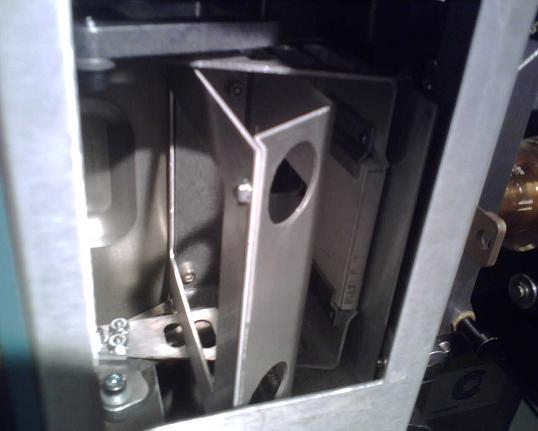
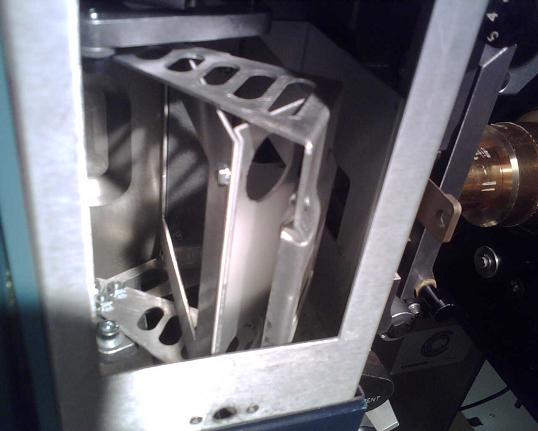
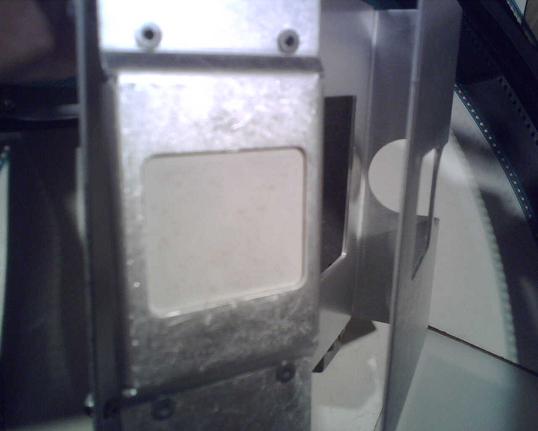
Here are a couple of pics of the device.

Installed in closed position
 -

Installed in the open position
 -

Outside the unit looking at the ceramic (?) douser.
 -

Mark, I didn't pull the front panels off at all. I am able to move the snood out of the way just enough to get that one allen screw off that releases the top shroud. It is hard to get those back allens off when you are dealing with an SLC-30. Not much space to get meaty fingers in and handle a 7/32 or similar to remove 2 more allen screws.

 |  IP: Logged

Mark Gulbrandsen
Resident Trollmaster

Posts: 16657
From: Music City
Registered: Jun 99


 - posted 08-12-2007 08:45 AM      Profile for Mark Gulbrandsen   Email Mark Gulbrandsen   Send New Private Message       Edit/Delete Post 
Its good that you had allen screws!! I had an older machine with philips scrrews.

The problem is not really with the creame colored solonoids themselves but with folks operating the equipment that hold the C/O button on for too long a period. Granted the old C/O shutters would bind and such but holding the manual button down longer isn't going to make it open or close. What it does is to heat up and damage the coils making them seem weak. All of the coils in use have one major fault and that is that the bobbin they are wound on has a plastic stator. If the plastic gets too hot they warp, thats when the rod sticks. I've removed both types of solonoids that have been damaged by careless operators this way. Christie would have been even further ahead had they gone to a rotary solonoid along with the rotary douser. It could have been mounted right below the douser mechanism itself. Almost all automations will accomodate a hold type C/O.

Also, are you able to see the shadow of the douser opening very briefly on the left side of the screen... when the douser is near its full open position? As fast as it moves I could and I don't think these new dousers would work too favorably in a C/O house.

Mark

 |  IP: Logged

Paul Konen
Jedi Master Film Handler

Posts: 981
From: Frisco, TX. (North of Dallas)
Registered: Jun 99


 - posted 08-12-2007 11:35 AM      Profile for Paul Konen   Email Paul Konen   Send New Private Message       Edit/Delete Post 
I didn't see any "fogging" of the image on the left side. It seems to clear the light path totally.

Also, thanks for the explanation about the solenoid issue. It does explain why some are probably worse off than other ones. You also cleared up the issue with the screw in that they used phillips, then converted to allen at some point.

 |  IP: Logged

Mark Gulbrandsen
Resident Trollmaster

Posts: 16657
From: Music City
Registered: Jun 99


 - posted 08-12-2007 11:52 AM      Profile for Mark Gulbrandsen   Email Mark Gulbrandsen   Send New Private Message       Edit/Delete Post 
It wasn't a fogging issue that I noticed, they doi completely clear the light path... just that you can see the shadow of the dowser move out of the way on the left side of the screen. This is when the dowser is almost at its fully open travel. Run white light on the screen and do a few open/closes and I think you'll see the same thing I am seeing.

Mark

 |  IP: Logged

Paul Konen
Jedi Master Film Handler

Posts: 981
From: Frisco, TX. (North of Dallas)
Registered: Jun 99


 - posted 08-12-2007 11:55 AM      Profile for Paul Konen   Email Paul Konen   Send New Private Message       Edit/Delete Post 
Ok.

 |  IP: Logged

Darryl Spicer
Film God

Posts: 3250
From: Lexington, KY, USA
Registered: Dec 2000


 - posted 08-12-2007 12:19 PM      Profile for Darryl Spicer     Send New Private Message       Edit/Delete Post 
quote:
It wasn't a fogging issue that I noticed, they do completely clear the light path... just that you can see the shadow of the dowser move out of the way on the left side of the screen. This is when the dowser is almost at its fully open travel. Run white light on the screen and do a few open/closes and I think you'll see the same thing I am seeing.


I have seen this before, especially if it is a bright scene that it opens on. We don't use the green bands so it is not as noticeable if the bands were used. I have also noticed the dowser bounce on the Christie cp2000 digital projector, since it is a free falling dowser when it opens. you can even hear it bounce.

 |  IP: Logged

Paul Konen
Jedi Master Film Handler

Posts: 981
From: Frisco, TX. (North of Dallas)
Registered: Jun 99


 - posted 08-12-2007 01:55 PM      Profile for Paul Konen   Email Paul Konen   Send New Private Message       Edit/Delete Post 
Darryl, how soon before the first trailer do you command the douser to open? Yes, it is someone noisy when it opens, but I haven't seen the bounce as I open well before the first trailer hits.

 |  IP: Logged

Darryl Spicer
Film God

Posts: 3250
From: Lexington, KY, USA
Registered: Dec 2000


 - posted 08-12-2007 02:37 PM      Profile for Darryl Spicer     Send New Private Message       Edit/Delete Post 
Paul,

After noticing that early on I reset things up so that the douser opens before any image hits the screen. I have it timed for scope so that it is open with an extra 5 seconds of black and I have the delay set on the DCA-21 automation so that the masking comes all the way down and the pre-show cuts off and picture hits the screen all in one smooth stroke.

 |  IP: Logged

Mark Gulbrandsen
Resident Trollmaster

Posts: 16657
From: Music City
Registered: Jun 99


 - posted 08-12-2007 06:45 PM      Profile for Mark Gulbrandsen   Email Mark Gulbrandsen   Send New Private Message       Edit/Delete Post 
Daryl,
I did a similar thing where I installed just one. That works fine for a single projector but I'd like to see a pair of these in action in a two projector booth. I think the C/O would be very obvious.

Mark

 |  IP: Logged

Carey Barber
Expert Film Handler

Posts: 143
From: Newport News, VA, USA
Registered: Jan 2003


 - posted 08-13-2007 04:46 PM      Profile for Carey Barber   Email Carey Barber   Send New Private Message       Edit/Delete Post 
Regarding the fan on top of the projector...

For some reason, my larger houses have the larger "squirrel cage" type fan underneath while my smaller houses have the smaller muffin fans on top.

So, installing the new dowser in the larger houses is a simpler task.

Here's the question --- Is it possible to move the smaller muffin fan to the bottom of the projector, or do you have to install the larger impeller style fans?

I would hate to have to order new fans to go along with these new dowsers.

 |  IP: Logged

Paul Konen
Jedi Master Film Handler

Posts: 981
From: Frisco, TX. (North of Dallas)
Registered: Jun 99


 - posted 08-14-2007 09:59 AM      Profile for Paul Konen   Email Paul Konen   Send New Private Message       Edit/Delete Post 
Carey, my SLC-30's have the muffin fan under the analog sound head. You may have to see if there are mounting holes and if the power cord can reach. They run continuously.

The SLC-40's have the cage fan that you refer to and only run while the projector is in operation.

 |  IP: Logged

Carey Barber
Expert Film Handler

Posts: 143
From: Newport News, VA, USA
Registered: Jan 2003


 - posted 08-14-2007 03:11 PM      Profile for Carey Barber   Email Carey Barber   Send New Private Message       Edit/Delete Post 
Paul,

That's funny...My small houses have the muffin fan on top rather than the bottom.

But, it sounds like that smaller muffin fan will fit underneath and that's what I really needed to know.

Thanks...

 |  IP: Logged

Mark Gulbrandsen
Resident Trollmaster

Posts: 16657
From: Music City
Registered: Jun 99


 - posted 08-14-2007 04:16 PM      Profile for Mark Gulbrandsen   Email Mark Gulbrandsen   Send New Private Message       Edit/Delete Post 
Ya have to move the muffin fan to the bottom of the projector. I had to drill holes in the bottom of machine I did to mount it. Can't say if later machines already have holes or not....

Mark

 |  IP: Logged


All times are Central (GMT -6:00)
This topic comprises 2 pages: 1  2 
 
   Close Topic    Move Topic    Delete Topic    next oldest topic   next newest topic
 - Printer-friendly view of this topic
Hop To:


Powered by Infopop Corporation
UBB.classicTM 6.3.1.2

The Film-Tech Forums are designed for various members related to the cinema industry to express their opinions, viewpoints and testimonials on various products, services and events based upon speculation, personal knowledge and factual information through use, therefore all views represented here allow no liability upon the publishers of this web site and the owners of said views assume no liability for any ill will resulting from these postings. The posts made here are for educational as well as entertainment purposes and as such anyone viewing this portion of the website must accept these views as statements of the author of that opinion and agrees to release the authors from any and all liability.

© 1999-2020 Film-Tech Cinema Systems, LLC. All rights reserved.