Film-Tech Cinema Systems
Film-Tech Forum ARCHIVE


my profile | my password | search | faq & rules | forum home
  next oldest topic   next newest topic
» Film-Tech Forum ARCHIVE   » Operations   » Film Handlers' Forum   » Kelmer cleaner tutorial (Page 2)

 
This topic comprises 2 pages: 1  2 
 
Author Topic: Kelmer cleaner tutorial
Chris Nolan
Film Handler

Posts: 16
From: Fairfax, Va, USA
Registered: Jun 2008


 - posted 08-13-2008 02:18 PM      Profile for Chris Nolan   Email Chris Nolan   Send New Private Message       Edit/Delete Post 
OK, as an update, the Kelmar cleaners having been working well, and I have even received compliments from kids that come to our Rocky Horror midnight show that the picture has gotten clearer and brighter.

I have noticed on one of our Kelmar units, though, that both media rollers do not move in sync with each other. In one particular case, while playing Indy Jones I notices that one media pad was nearly depleted whereas the other one seemed to only be half-way through. Is this cause for alarm? Can I, myself, adjust it? As a precaution I have not used it since the incident.

And about re-using the pads: I've seen a lot of stuff coming off my prints, especially from our rolling stock (no surprise), is it still OK for me to rewind the media pads and use them again?

 |  IP: Logged

Brad Miller
Administrator

Posts: 17775
From: Plano, TX (36.2 miles NW of Rockwall)
Registered: May 99


 - posted 08-13-2008 07:07 PM      Profile for Brad Miller   Author's Homepage   Email Brad Miller       Edit/Delete Post 
With the takeup thumbscrew tightened down, can you physically grab the takeup core and turn it? If so, you've got a problem and it is slipping.

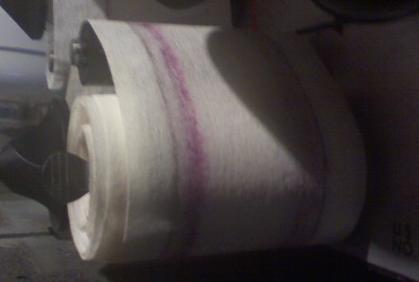
Post a picture of the dirty media if you can.

 |  IP: Logged

Chris Nolan
Film Handler

Posts: 16
From: Fairfax, Va, USA
Registered: Jun 2008


 - posted 08-13-2008 10:30 PM      Profile for Chris Nolan   Email Chris Nolan   Send New Private Message       Edit/Delete Post 
Yes, I definitely can spin the core when the thumbscrew is tightened.

This isn't the worst that we've had, but it's the norm for the first time we run the film through the cleaner.
 -

 |  IP: Logged

Brad Miller
Administrator

Posts: 17775
From: Plano, TX (36.2 miles NW of Rockwall)
Registered: May 99


 - posted 08-14-2008 12:48 AM      Profile for Brad Miller   Author's Homepage   Email Brad Miller       Edit/Delete Post 
That amount of dirt even on a brand new print s very normal. Most people don't realize how dirty their films actually are until they have seen them totally clean. Anyway you're fine.

quote: Chris Nolan
Yes, I definitely can spin the core when the thumbscrew is tightened.
That's your problem. The takeup core isn't gripping the rubber insert and is physically slipping during a movie. That could lead to scratching, so you need to swap out the takeup core with one where you can tighten down the thumbscrew and grab the core firmly. If that doesn't work, its time to change out the rubber insert on the takeup shaft.

Tip - once you find a pair of takeup cores that work well with a machine, don't remove them! Just yank the old media off when it comes time to change out the cloth.

 |  IP: Logged

Chris Nolan
Film Handler

Posts: 16
From: Fairfax, Va, USA
Registered: Jun 2008


 - posted 08-14-2008 03:00 PM      Profile for Chris Nolan   Email Chris Nolan   Send New Private Message       Edit/Delete Post 
Cool, thanks Brad. I'll check to see if we have any spare rubber in my booth, if not I'm sure my tech, Dave Ayers can get some to me.

Yeah, you should've seen how dirty our print on Rocky Horror was, we've had it for five years, and it had never been cleaned. I'm talking clumps were coming off at some points...

 |  IP: Logged

John Wilson
Film God

Posts: 5438
From: Sydney, Australia.
Registered: Dec 1999


 - posted 08-14-2008 04:21 PM      Profile for John Wilson   Email John Wilson   Send New Private Message       Edit/Delete Post 
As a short term fix, pull the core off the take-up in question and wrap a small piece of masking tape around the take-up. This should be enough to keep it tight and hold the core in place for the moment and get it back in service.

[ 08-14-2008, 07:33 PM: Message edited by: John Wilson ]

 |  IP: Logged

Martin McCaffery
Film God

Posts: 2481
From: Montgomery, AL
Registered: Jun 99


 - posted 08-14-2008 07:26 PM      Profile for Martin McCaffery   Author's Homepage   Email Martin McCaffery   Send New Private Message       Edit/Delete Post 
quote: Chris Nolan
if not I'm sure my tech, Dave Ayers can get some to me.
If that's the same Dave Ayers who used to work the Tyson Twin, tell him his old relief projectionist says hello.

 |  IP: Logged

Mike Baer
Film Handler

Posts: 51
From: Winterthur, Switzerland
Registered: Dec 2002


 - posted 10-08-2008 02:41 AM      Profile for Mike Baer   Author's Homepage   Email Mike Baer   Send New Private Message       Edit/Delete Post 
I received my first Kelmar Cleaner yesterday. [Smile]
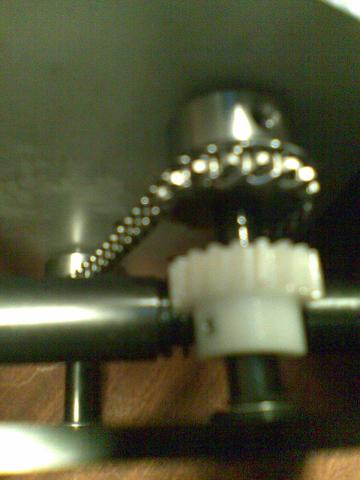
But when i tested it, i noticede that the wind up cores didn't turn. I opened the back and saw that the white plastic "thingey" wont turn. The main drive and the main axis turn normal.
What is the problem,am i making something wrong?
Here's a pic of the thing i mean:
 -

 |  IP: Logged

Robert Minichino
Master Film Handler

Posts: 350
From: Haskell, NJ, USA
Registered: Dec 2005


 - posted 10-08-2008 12:06 PM      Profile for Robert Minichino   Author's Homepage   Email Robert Minichino   Send New Private Message       Edit/Delete Post 
Are you sure it's not just turning very slowly?

 |  IP: Logged

Phil Ranucci
Expert Film Handler

Posts: 236
From: Carpinteria,CA, United States
Registered: May 2006


 - posted 10-08-2008 01:47 PM      Profile for Phil Ranucci   Email Phil Ranucci   Send New Private Message       Edit/Delete Post 
It does turn very very slowly. Try it on some scrap trailers and mark the take-up spindles so you can tell if they move. Since you have the machine open, you might want to make sur all the setscrews on the gears are tight.

 |  IP: Logged

Brad Miller
Administrator

Posts: 17775
From: Plano, TX (36.2 miles NW of Rockwall)
Registered: May 99


 - posted 10-09-2008 12:48 AM      Profile for Brad Miller   Author's Homepage   Email Brad Miller       Edit/Delete Post 
1. Tighten the takeup thumbscrews snug and make sure that once these are tightened that you can NOT spin the takeup core by hand. Assuming you can't...

2. Load up some media like normal.

3. With a pair of scissors make a tiny snip in the edge of the media beside the idler roller (or make a mark on the edge of the media with a Sharpie).

4. Run at least 5 minutes of film through the machine. This can be junk film, or you can sit there and spin the drive wheel a couple of hundred times by hand quickly.

Did the media move? If so, you don't have a problem. If not, we will go to the next step.

 |  IP: Logged

Mike Baer
Film Handler

Posts: 51
From: Winterthur, Switzerland
Registered: Dec 2002


 - posted 10-10-2008 09:55 AM      Profile for Mike Baer   Author's Homepage   Email Mike Baer   Send New Private Message       Edit/Delete Post 
Okay i checked it today and it runs fine. I just didn't know that it moves so slow.
Thanks for your infos.

 |  IP: Logged


All times are Central (GMT -6:00)
This topic comprises 2 pages: 1  2 
 
   Close Topic    Move Topic    Delete Topic    next oldest topic   next newest topic
 - Printer-friendly view of this topic
Hop To:


Powered by Infopop Corporation
UBB.classicTM 6.3.1.2

The Film-Tech Forums are designed for various members related to the cinema industry to express their opinions, viewpoints and testimonials on various products, services and events based upon speculation, personal knowledge and factual information through use, therefore all views represented here allow no liability upon the publishers of this web site and the owners of said views assume no liability for any ill will resulting from these postings. The posts made here are for educational as well as entertainment purposes and as such anyone viewing this portion of the website must accept these views as statements of the author of that opinion and agrees to release the authors from any and all liability.

© 1999-2020 Film-Tech Cinema Systems, LLC. All rights reserved.