|
|
This topic comprises 2 pages: 1 2
|
|
Author
|
Topic: Several questions regarding DTS XD10
|
|
|
Leo Enticknap
Film God

Posts: 7474
From: Loma Linda, CA
Registered: Jul 2000
|
 posted 03-04-2015 08:20 PM


Steve - thanks. Useful to know in case ours starts to act up.
On Brad's point about being screwed if the hard drive fails during a DTS 70 show, you're equally screwed if there is a serious CD read error when playing a show using a 6D.
We have two 6Ds and a failsafe board in one of our theaters, and a solo XD-10 in the other. I did once have a sound dropout during Lawrence of Arabia on the 6Ds, I suspect because of a scratched disc in one player and the failsafe not switching over, for whatever reason. Since then I've always burnt two fresh sets of discs for every show, which is obviously a time-consuming exercise.
I'm not sure, statistically, what is the greater risk - a CD read error playing from a 6D or a hard drive failure on an XD-10 or 20, but suspect that as long as the hard drive is replaced at regular intervals (I would be inclined to go for every five years, which is how long a consumer grade HDD is typically designed to last, assuming average use), the risk of failure is negligible. DTS must have thought that the risk of failure was very low, because if they'd judged it to be significant, surely they'd have designed it with a RAID 1 rather than a single hard drive?
I also like the XD-10's display telling you how long is left on a reel, because I can get ready for the changeover with only a minute or so to go and not have to be standing around for 2-3 minutes waiting for it.
Of course what would be the perfect solution is a modification to the XD-10/20, such that it has enough RAM on the motherboard to hold the complete show in memory (4GB should be enough, even for a three-hour 70mm epic), meaning that it wouldn't have to read from the hard drive at all during an actual screening. Assuming that the motherboard is capable of holding that much RAM, achieving this should be a relatively simple software patch, I'd guess.
Alternatively, I may just put a SSD in ours when the time comes for the next drive replacement.
| IP: Logged
|
|
Brad Miller
Administrator

Posts: 17775
From: Plano, TX (36.2 miles NW of Rockwall)
Registered: May 99
|
posted 03-04-2015 08:41 PM
quote: Leo Enticknap
Since then I've always burnt two fresh sets of discs for every show, which is obviously a time-consuming exercise.
Surely you mean you burn a fresh set of discs for every engagement and not every performance, right??? (The discs won't get scratched sitting in the CD trays.)
quote: Leo Enticknap
I'm not sure, statistically, what is the greater risk - a CD read error playing from a 6D or a hard drive failure on an XD-10 or 20, but suspect that as long as the hard drive is replaced at regular intervals (I would be inclined to go for every five years, which is how long a consumer grade HDD is typically designed to last, assuming average use), the risk of failure is negligible.
I find it interesting that all of the XD10s I have are still on their original IDE hard drives. Not a single one has failed yet (but that doesn't stop me from installing them in a failsafe manner). Let's face it, the hard drives from several years ago are simply better built than the ones being made today. (For the record most consumer drives are now 3 years and some are down to 1 year warranty, whereas several years ago they were all 5 year warranties.)
quote: Leo Enticknap
DTS must have thought that the risk of failure was very low, because if they'd judged it to be significant, surely they'd have designed it with a RAID 1 rather than a single hard drive?
Well, GDC seems to have the same thought process, because every GDC server out there is running the operating system with one non-RAIDed hard drive...which is just fine and dandy until the day it isn't.
It should be noted that dts DID make RAID1 an option on the XD20, but very few went out the door configured for it because hey, cheaper is better!
That being said I was sad to hear when I tried to order some hard drive mounting brackets to upgrade some XD20s I had to a RAID1, datasat didn't have any left and wouldn't be making any more. HOWEVER I did arrive at a solution, and it's all about those thin Seagate drives.
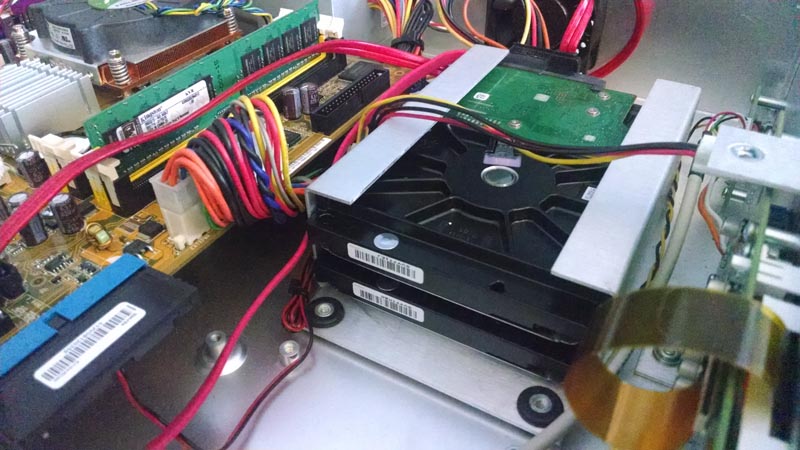
Basically the bracket inside a XD20 is oversided for a normal 3.5" SATA drive, but it just so happens that two of the thin Seagate drives fit in there perfectly! (I had to put a strip of gaffer tape on each side, at which point it fit in there quite snugly and in no way would ever slide.) Then it was just a matter of adding another SATA cable to the motherboard and to use the extra power plug that was already there.
While I'm sure Steve Guttag will be along shortly to tell me how awful Seagate drives are, I'll take "awful Seagate drives" in a RAID1 configuration over an enterprise WD or whatever Steve prefers on its own anyday. ![[Wink]](wink.gif)
| IP: Logged
|
|
|
|
|
|
|
|
|
|
All times are Central (GMT -6:00)
|
This topic comprises 2 pages: 1 2
|
Powered by Infopop Corporation
UBB.classicTM
6.3.1.2
The Film-Tech Forums are designed for various members related to the cinema industry to express their opinions, viewpoints and testimonials on various products, services and events based upon speculation, personal knowledge and factual information through use, therefore all views represented here allow no liability upon the publishers of this web site and the owners of said views assume no liability for any ill will resulting from these postings. The posts made here are for educational as well as entertainment purposes and as such anyone viewing this portion of the website must accept these views as statements of the author of that opinion
and agrees to release the authors from any and all liability.
|

 Home
Home






 Printer-friendly view of this topic