|
|
This topic comprises 2 pages: 1 2
|
|
Author
|
Topic: Looking for some DCP expertise.
|
|
|
|
|
|
|
Carsten Kurz
Film God
Posts: 4340
From: Cologne, NRW, Germany
Registered: Aug 2009
|
 posted 04-26-2017 08:34 PM


I looked at the video and it appears fine to me. As long as you are doing this for your own cinema only, you can do whatever works for you. The SX3000 will do 30fps.
If you start doing this for other cinemas, you should stay at 24 fps, because some cinemas are limited to 24fps.
I suggest you download DCP-o-matic and throw your WMV to it. Set DCP-o-matic to SMPTE, create a 2k 30fps DCP with stereo audio, and try it on your system.
Do you know wether you can create the Powerpoint export at 24fps? It would be better to keep all source, intermediate and final footage at the same frame rate. Audio should be 48KHz, but DCP-o-matic will resample if needed. For this kind of work, stereo is fine. If you stay in Premiere for the finishing, you could as well route the voice audio to a separate channel and create a discrete center channel, which is a nice to have, but not a must in this case.
Put the finished DCP folder onto an NTFS formatted USB stick and try to ingest it. Note the DCP is not the full DCP-o-matic project folder, but a single folder within it. If you choose 'Show DCP' from DCP-o-matics 'Jobs' menu, you will see exactly that folder being highlighted.
I am kind of a DCP-o-matic promoter, but at our cinema, we do the preshow stuff directly from Powerpoint. We play it directly from a PC sitting next to the projector through DVI/HDMI. The same PC is playing iTunes playlists during admission.
Powerpoint is a pain in the ass in general, but it is very handy for this task - it will render to a secondary monitor, which can be set to a black background, so no desktop symbols etc. will ever show up on screen. Plus, it is very easy to add, remove, or shift individual slides day to day. You can even correct a typo or change a date or misspelling while the show is running. Also, we receive many slides already in PP format from our advertising clients, so we can just copy/paste them in. You do not need to put special music into powerpoint, as iTunes is playing in the background anyway on our system. Having an iTunes playlist on shuffle allows for more variation.
- Carsten
| IP: Logged
|
|
|
|
|
|
Leo Enticknap
Film God

Posts: 7474
From: Loma Linda, CA
Registered: Jul 2000
|
posted 04-27-2017 10:14 AM

Our publicity officer often makes slide shows for walkins by exporting .wmv Powerpoint from Office 2013 (for Windows), which creates DCPs that look good to me, as long as I don't try to change the frame rate (which will make the transitions look jagged).
The Powerpoint video export option won't let you change the frame rate (it will only do 30), but it will allow you to select the resolution from two options. It exports at something like 1440x780 by default, but you can select 1920x1080, and I have to keep asking her to do that. I then make a F-178 DCP from it, stretch it to F or pillarbox it to S-178, depending on what is needed to avoid having to do a lens and/or masking change immediately after it.
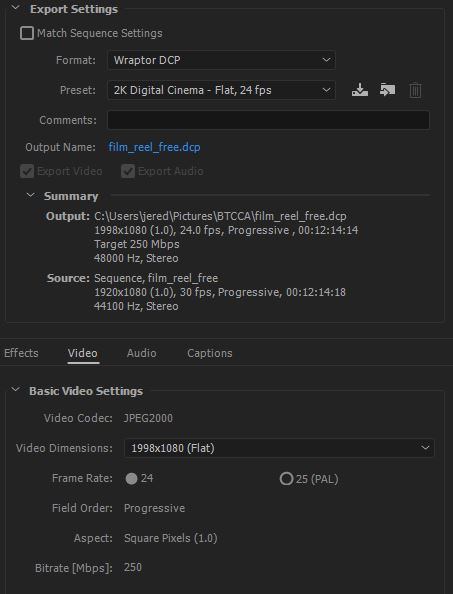
Jared - I noticed from your screen grab that you're rendering your DCPs at 250mbps. That is way bigger than you need for a slide show DCP, and will give you lots of unnecessary gigabytes to wrangle. Unless this is a fixed value that the free version of Wraptor won't let you change, I'd suggest lowering it. As a rough rule of thumb I've found by trial and error, Powerpoint-derived DCPs look fine at 75mbps in our smaller screen (about 30ft across in 1.85) and 100 in our larger one (40ft across in 1.85). Below those, you start to see digital noise, especially in decent resolution photos that have been used in the original Powerpoint.
I have gone below those bitrates when I've had to do last minute DCPs to upload from home into the server to save upload time, and if there is just text and non-photographic images in the Powerpoint, you can get away with it.
quote: Carsten Kurz
There is a nag box - the trouble is, you can choose to have it not show up anymore, and while I personally hate nag boxes, I think it should always come up with warnings/hints.
I'd suggest that the nag box system perhaps wants to distinguish between issues that might degrade the viewing/listening experience, but won't stop a DCP from playing at all (e.g. the nag you get when you try to make a DCP in an aspect ratio other than F or S, or one with 2.0 audio), and one which will potentially stop the DCP from being played at all (e.g. an Interop DCP with a frame rate that isn't 24). Maybe nags for the former could be disabled by user choice, but for the latter you have to click an "I understand the risks" button before it lets you start to render, like the one that appears when you enter about:config in Firefox.
quote: Carsten Kurz
As long as you are doing this for your own cinema only, you can do whatever works for you.
This is a very important general rule, the violation of which gives us trouble at many of the regular festivals we host.
Professional DCP-making post houses, e.g. Deluxe/Technicolor, Indie DCP, Simple DCP, etc., ensure that their DCPs are playable anywhere in two ways: they author them to the absolute letter of the relevant DCI, ISDCF and SMPTE requirements, and they then test them on a variety of servers, media blocks/IMBs and projectors at their facility before they ship out. Someone rendering a DCP on their home or booth PC doesn't have the ability to do the latter.
So, as you say, if the DCP is only going to play in your booth, make it whichever way you like, test it in your booth, and if it plays as you want it to, you're good to go. But if it has to play anywhere else, you really have to be careful not to go off piste with any of the variables (bitrate over 250, Interop at 25fps, on a drive that isn't MBR + ext2 or ext3, etc.), because if you do, you're at the mercy of whoever made the equipment in the booth it's going to, to support the non-compliant element you introduced into the authoring process.
I can't tell you how much pain the DCPs we receive from semi-professional moviemakers, doing all the post on their Macs in their bedroom, who don't understand what most of the options in DCP-o-Matic do, don't bother to take the time to educate themselves, don't know that many DCP servers can't read exFAT drives or ones that have an EFI partition at the start, etc. etc., cause us. A big part of this problem is that, unlike the professional post houses, they don't have cinema equipment to test their DCPs on (and neither do the print traffic operations of all but the most lavishly budgeted festivals), and so have no way of knowing that their DCP won't work until it gets to the theater.
| IP: Logged
|
|
|
|
|
|
|
|
|
|
All times are Central (GMT -6:00)
|
This topic comprises 2 pages: 1 2
|
Powered by Infopop Corporation
UBB.classicTM
6.3.1.2
The Film-Tech Forums are designed for various members related to the cinema industry to express their opinions, viewpoints and testimonials on various products, services and events based upon speculation, personal knowledge and factual information through use, therefore all views represented here allow no liability upon the publishers of this web site and the owners of said views assume no liability for any ill will resulting from these postings. The posts made here are for educational as well as entertainment purposes and as such anyone viewing this portion of the website must accept these views as statements of the author of that opinion
and agrees to release the authors from any and all liability.
|

 Home
Home






 Printer-friendly view of this topic