Film-Tech Cinema Systems
Film-Tech Forum ARCHIVE


my profile | my password | search | faq & rules | forum home
  next oldest topic   next newest topic
» Film-Tech Forum ARCHIVE   » Operations   » Digital Cinema Forum   » DCP pixel dimensions for aspect ratios narrower than 1.85 (Page 2)

 
This topic comprises 3 pages: 1  2  3 
 
Author Topic: DCP pixel dimensions for aspect ratios narrower than 1.85
Brian Guckian
Jedi Master Film Handler

Posts: 594
From: Dublin, Ireland
Registered: Apr 2003


 - posted 09-24-2011 02:41 PM      Profile for Brian Guckian   Email Brian Guckian   Send New Private Message       Edit/Delete Post 
Steve, just tying with Scott's question on standardisation of ratios, can you comment on any recent SMPTE activity in this area? Just curious - thanks

 |  IP: Logged

Monte L Fullmer
Film God

Posts: 8367
From: Nampa, Idaho, USA
Registered: Nov 2004


 - posted 09-24-2011 04:23 PM      Profile for Monte L Fullmer   Email Monte L Fullmer   Send New Private Message       Edit/Delete Post 
quote: Ron Funderburg
So there is separate lens for the 3d format. What about scope and flat on those is it a single lens solution on them?
3D basic, basic primer: single lens - each of the frames is flashed three times in a LRLRLR (L-left, R-right) eye through the single lens and polarizer. Sony does the "over/under" trick in having two separate images on the chip, one above the other, that is dedicated per each lens.

Who wins ... prob the viewer who likes 3D that can't tell the difference between the two production formats..or even cares to know how it works.

 |  IP: Logged

Brian Guckian
Jedi Master Film Handler

Posts: 594
From: Dublin, Ireland
Registered: Apr 2003


 - posted 09-26-2011 05:11 PM      Profile for Brian Guckian   Email Brian Guckian   Send New Private Message       Edit/Delete Post 
quote: Scott Norwood
Doing math gives the following:

1260x1080 - 1.17:1 (Movietone)
1440x1080 - 1.33:1 (silent)
1480x1080 - 1.37:1 (Academy)
1793x1080 - 1.66:1 (European widescreen)
1920x1080 - 1.78:1 (HDTV)

Are these values correct? Are they standardized anywhere?

Here is some updated information, Scott.

The Commission Supérieure Technique de l’Image et du Son / CST and the Fédération Nationale des Cinémas Français / FNCF published this document on May 5th, 2011:

Technical Guide for the Projection Booth in Digital Cinema

On Page 21 they quote the following values (2K and 4K) for these ratios:

1.33 ........ 1440 x 1080 ......... 2872 x 2160
1.37 ........ 1480 x 1080 ......... 2959 x 2160
1.66 ........ 1792 x 1080 ......... 3585 x 2160
1.78 ........ 1920 x 1080 ......... 3844 x 2160

Perhaps this could presently be treated as a "Standard" in the (to be confirmed) absence of any other relevant Standards documentation (e.g. SMPTE, ISO).

BTW, the website of the European Digital Cinema Forum / EDCF from which the CST / FNCF publication is sourced, contains several other very useful publications (usual disclaimer).

The Numerical SMPTE Standards List gives a range of recent D-Cinema Standards (ST 428-1 thru ST 433; not including related documents), but it is difficult to tell which ones might contain Aspect Ratio information (ST 428-1:2006 D-Cinema Distribution Master – Image Characteristics looks most promising), and more to the point, any values for the narrower ratios.

Unfortunately these are somewhat costly for the average user to obtain.

 |  IP: Logged

Scott Norwood
Film God

Posts: 8146
From: Boston, MA. USA (1774.21 miles northeast of Dallas)
Registered: Jun 99


 - posted 09-26-2011 06:46 PM      Profile for Scott Norwood   Author's Homepage   Email Scott Norwood   Send New Private Message       Edit/Delete Post 
Many thanks, Brian!

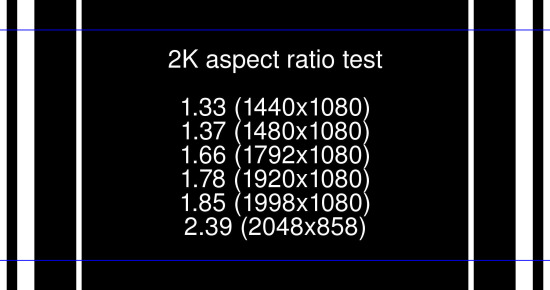
So, how does this chart look?

 -

If anyone is interested, I'll supply a full-res and/or DCP version.

This was created with the Imagemagick tools and should be simple enough for anyone to modify at will. Here were the commands used to create it:

convert -background black -fill white -font Helvetica -gravity center -size 800 label:'2K aspect ratio test\n\n1.33 (1440x1080)\n1.37 (1480x1080)\n1.66 (1792x1080)\n1.78 (1920x1080)\n1.85 (1998x1080)\n2.39 (2048x858)' -extent 1260x1080 artest.jpg

mogrify -background black -gravity center -extent 1440x1080 artest.jpg

mogrify -background white -gravity center -extent 1480x1080 artest.jpg

mogrify -background black -gravity center -extent 1792x1080 artest.jpg

mogrify -background white -gravity center -extent 1920x1080 artest.jpg

mogrify -background black -gravity center -extent 1998x1080 artest.jpg

mogrify -background white -gravity center -extent 2048x1080 artest.jpg
mogrify -fill white -stroke blue -strokewidth 3 -draw "line 0,111 2048,111" artest.jpg
mogrify -fill white -stroke blue -strokewidth 3 -draw "line 0,969 2048,969" artest.jpg

 |  IP: Logged

Steve Guttag
We forgot the crackers Gromit!!!

Posts: 12814
From: Annapolis, MD
Registered: Dec 1999


 - posted 09-27-2011 06:14 AM      Profile for Steve Guttag   Email Steve Guttag   Send New Private Message       Edit/Delete Post 
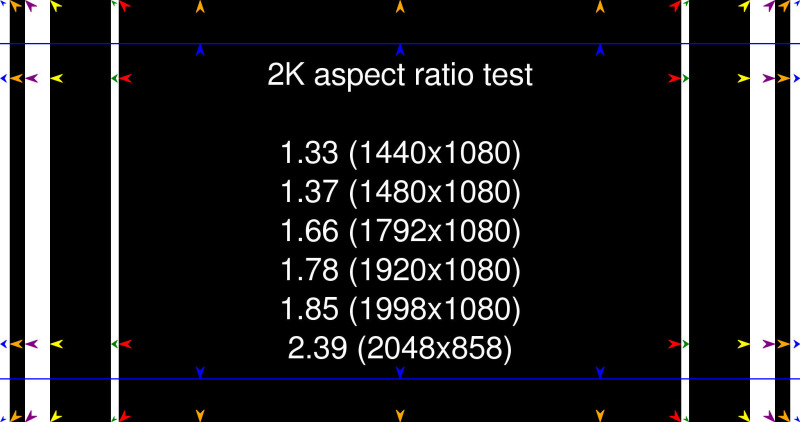
Get arrows pointing to the actual line one is trying to hit so you know how close to the "cliff" you are.

Color coordinate said arrows too.

 |  IP: Logged

Scott Norwood
Film God

Posts: 8146
From: Boston, MA. USA (1774.21 miles northeast of Dallas)
Registered: Jun 99


 - posted 09-27-2011 10:51 AM      Profile for Scott Norwood   Author's Homepage   Email Scott Norwood   Send New Private Message       Edit/Delete Post 
Good idea on the arrows. How does this look?

 -

Any other suggestions?

 |  IP: Logged

Brian Guckian
Jedi Master Film Handler

Posts: 594
From: Dublin, Ireland
Registered: Apr 2003


 - posted 09-27-2011 11:24 AM      Profile for Brian Guckian   Email Brian Guckian   Send New Private Message       Edit/Delete Post 
Great work!

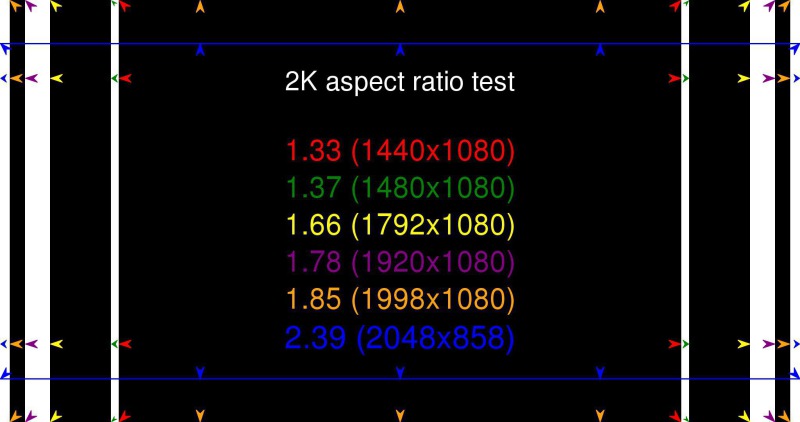
How about colouring the number values on the chart to match the colours of the arrows for easy visual reference?

So - "1.33 (1440 x 1080)" in red, "1.37 (1480 x 1080)" in green, "1.66 (1792 x 1080)" in yellow, and so on.

Numerals that do not stand out well on a black background (blue for example) could be edged in white perhaps.

All you need now is the F-T logo! [Wink]

 |  IP: Logged

Scott Norwood
Film God

Posts: 8146
From: Boston, MA. USA (1774.21 miles northeast of Dallas)
Registered: Jun 99


 - posted 09-27-2011 12:47 PM      Profile for Scott Norwood   Author's Homepage   Email Scott Norwood   Send New Private Message       Edit/Delete Post 
Like this?

 -

I tried outlining the blue text with white, but it looks odd when compared to the other colors, If it's not sufficiently visible, that could be added.

Edit: fixed position of corners for scope image.

 |  IP: Logged

Brian Guckian
Jedi Master Film Handler

Posts: 594
From: Dublin, Ireland
Registered: Apr 2003


 - posted 09-27-2011 02:53 PM      Profile for Brian Guckian   Email Brian Guckian   Send New Private Message       Edit/Delete Post 
Yes, IMO that works really well, Scott, and noted the fix to the corner arrows for the 'Scope ratio.

It's probably the purple 1.78 ratio numerals that may look a little dark, but of course how the test pattern appears on a computer monitor will be significantly different to how it appears on a cinema screen.

Some field tests of course will iron out any issues that may not be apparent here.

Great work again!

 |  IP: Logged

Scott Norwood
Film God

Posts: 8146
From: Boston, MA. USA (1774.21 miles northeast of Dallas)
Registered: Jun 99


 - posted 09-27-2011 06:23 PM      Profile for Scott Norwood   Author's Homepage   Email Scott Norwood   Send New Private Message       Edit/Delete Post 
Here is the DCP. (edit: don't use this one; use the new and improved version below; original version is gone)

File is just under 350MB, so it will take most people a while to download it. It should fit easily on a CD or USB flash drive. It will need to be unzipped and the files will need to be in the root directory of whatever removable media are being used to transfer it to a server.

I have not actually tested this, but the same methods used to create it have created DCPs that work fine on a Dolby server (which is the only one that I have access to). If anyone does test this, please post here and let me know if there are any issues.

Due to large DCP file sizes, it only shows the chart for about eight seconds; presumably, most people will want to freeze-frame it to do whatever needs to be done in the way of masking, etc.

Does anyone want a 4K version? It should be fairly trivial to throw that together if there is any demand.

As always, many thanks to those who offered help and suggestions for this.

[ 10-06-2011, 11:53 AM: Message edited by: Scott Norwood ]

 |  IP: Logged

Paul H. Rayton
Expert Film Handler

Posts: 210
From: Los Angeles, CA , USA
Registered: Aug 2003


 - posted 10-04-2011 08:23 PM      Profile for Paul H. Rayton     Send New Private Message       Edit/Delete Post 
Hi, Scott -- Downloaded it, and successfully ingested it into my "antique" Quvis Cinema Player. And it plays OK!

Many thanks for this -- I'm not sure exactly when we'll need to use it, but as a venue that plays lots of older movies, both on film and digitally, I'm sure it will come in handy.

FWIW, I regard the Quvis as a really good test of the architecture of any DCP. If things are not formatted **exactly** right, it won't see it and won't load it. This worked perfectly. So, to expropriate one famous line from West Side Story, "Ya done good!".

 |  IP: Logged

Scott Norwood
Film God

Posts: 8146
From: Boston, MA. USA (1774.21 miles northeast of Dallas)
Registered: Jun 99


 - posted 10-05-2011 10:27 AM      Profile for Scott Norwood   Author's Homepage   Email Scott Norwood   Send New Private Message       Edit/Delete Post 
Thanks, Paul.

It turns out that the arrows and text were not as clear as they should have been in the first version.

Revised DCP is here

The size is now down to about 200MB.

Let me know if there are any other comments or suggestions. If not, we'll call this the final version and I will ask Brad to add it to the downloads page.

edit: I have tested this on the Dolby server. It works.

[ 10-06-2011, 11:53 AM: Message edited by: Scott Norwood ]

 |  IP: Logged

Scott Jentsch
Phenomenal Film Handler

Posts: 1061
From: New Berlin, WI, USA
Registered: Apr 2003


 - posted 10-06-2011 09:53 AM      Profile for Scott Jentsch   Author's Homepage   Email Scott Jentsch   Send New Private Message       Edit/Delete Post 
If the blue is too low of a contrast, you may want to try a cyan (RGB: 0, 204, 255). Against black, that's going to be much more readable than pure blue.

Would it help to place a perfect circle in the center to make it easy to judge the aspect ratio visually as well?

 |  IP: Logged

System Notices
Forum Watchdog / Soup Nazi

Posts: 215

Registered: Apr 2004


 - posted 10-10-2012 02:11 PM      Profile for System Notices         Edit/Delete Post 

It has been 370 days since the last post.


 |  IP: Logged

Richard May
Phenomenal Film Handler

Posts: 1057
From: Floral Park, NY USA
Registered: Aug 2004


 - posted 10-10-2012 02:11 PM      Profile for Richard May   Email Richard May   Send New Private Message       Edit/Delete Post 
Great job Scott. Just what we were looking for. One more thing though regarding ratios. We have been getting a lot of 1.89 (2048X1080) movies in. Why is this ratio special? It sucks because our trailers are all 1.85 and you get the few people that bitch about the TINY bit of black on either side.

 |  IP: Logged


All times are Central (GMT -6:00)
This topic comprises 3 pages: 1  2  3 
 
   Close Topic    Move Topic    Delete Topic    next oldest topic   next newest topic
 - Printer-friendly view of this topic
Hop To:


Powered by Infopop Corporation
UBB.classicTM 6.3.1.2

The Film-Tech Forums are designed for various members related to the cinema industry to express their opinions, viewpoints and testimonials on various products, services and events based upon speculation, personal knowledge and factual information through use, therefore all views represented here allow no liability upon the publishers of this web site and the owners of said views assume no liability for any ill will resulting from these postings. The posts made here are for educational as well as entertainment purposes and as such anyone viewing this portion of the website must accept these views as statements of the author of that opinion and agrees to release the authors from any and all liability.

© 1999-2020 Film-Tech Cinema Systems, LLC. All rights reserved.