|
|
This topic comprises 2 pages: 1 2
|
|
Author
|
Topic: Serial to Ethernet bridge for automation
|
|
|
Stephen Furley
Film God

Posts: 3059
From: Coulsdon, Croydon, England
Registered: May 2002
|
 posted 05-29-2013 07:53 AM


Ethernet to controller then some sort of serial to the devices being controlled is very common. The serial isn't always RS-232; RS-422 is often used for greater distances, and RS-485 for multiple devices on a serial bus.
This is how our entrance barriers are controlled, and our lighting in the new and refurbished parts of the building, and the few CCTV cameras which have pan, tilt and zoom.
All of these systems are managed by outside companies; we provide them with an Ethernet connection wherever they want to put their controllers, and usually with a VPN connection which allows connection only to the system which their company manages. Most problems are dealt with by one of their engineers coming in over the Internet from whereever they happen to be on their laptop. We certainly have hundreds, possibly over a thousand, devices controlled in this way.
The lighting is DALI lighting will come up as someone enters an area, and go down again a few minutes after they leave. The DALI controllers talk to each other via Ethernet and the whole lot talks to a control and monitoring station in the office of one of our premesis staff, and via the VPN to the lighting company.
Works well in our situation, but seems like overkill if all you want to control is one device, in the same room.
| IP: Logged
|
|
Stephen Furley
Film God
Posts: 3059
From: Coulsdon, Croydon, England
Registered: May 2002
|
posted 05-29-2013 09:44 AM
Here are some pictures of some of this equipment, Ethernet to single port and multi-port serial, and Ethernet to serial to DALI. These are the barriers:
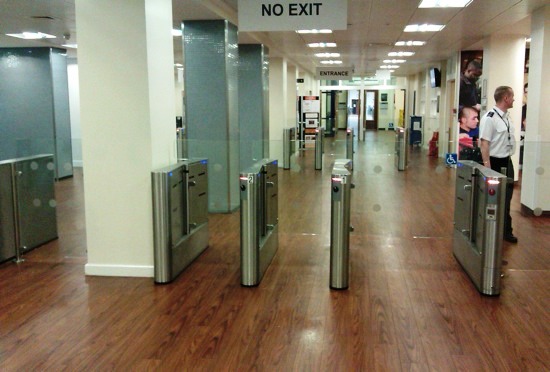
There are five lanes, two out of sight to the left. In the distance are another, similar set. Each of the ten has two contactless smart card readers, one inside and one outside.
This is what controls them:
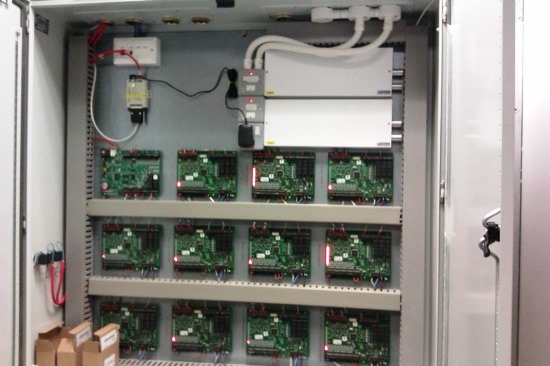
The white box at the top left has four Ethernet ports in it, two in use. One red cable feeds the small grey box just below it, which is a single port serial gateway device with an external power supply; I'm not sure what it is used for. This is the sort of thing that James was asking about.
The other red Ethernet cable is connected to the top left large card. These cards are all connected together in a daisy-chain, via RS-485 I think, and then the cards connect to the barriers via twisted pairs, presumably RS-422. This thing is huge, the cards are almost as big as a sheet of Letter size paper. I've no idea why they're so big. The two large white boxes are power supplies and the thick red cables on the left side are connected into the fire alarm loops, so that all of the barriers open if the fire alarm is activated.
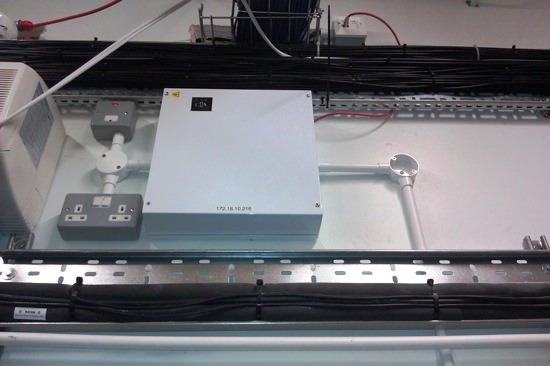
A single card of the type with an Ethernet connection is also installed in white boxes around the building to control access to various doors. Most are hidden above ceilings, but this one is visible, in our PABX room:
Finally, a lighting controller box, there are about a dozen of these located in various service risers around the building:
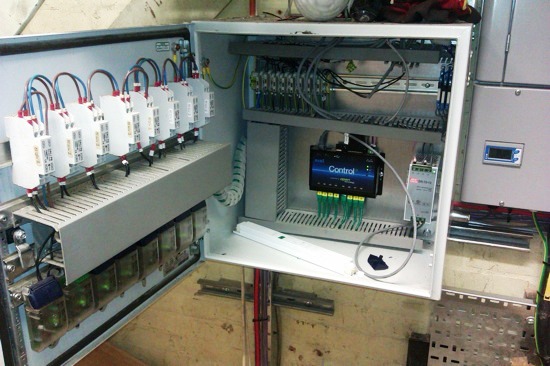
This time the Ethernet cable is grey, and comes into the black box near the centre, with 'Control' on it. The eight green cables coming out of the bottom of this are eight serial ports, which go just a short distance, to the devices with the green lights, mounted on the bottom of the box door; these are the DALI controllers. The white things above them are their power supplies, with brown and blue mains wires looped into each.
Each DALI controller can talk to up to 64 devices, lamp ballasts, sensors etc. The DALI bus uses just two wires for data, rather than a wire, or pair of wires, to each device, as with 0-10 V or 1-10 V analogue lighting control systems.
| IP: Logged
|
|
|
|
|
|
|
|
|
|
|
|
|
|
All times are Central (GMT -6:00)
|
This topic comprises 2 pages: 1 2
|
Powered by Infopop Corporation
UBB.classicTM
6.3.1.2
The Film-Tech Forums are designed for various members related to the cinema industry to express their opinions, viewpoints and testimonials on various products, services and events based upon speculation, personal knowledge and factual information through use, therefore all views represented here allow no liability upon the publishers of this web site and the owners of said views assume no liability for any ill will resulting from these postings. The posts made here are for educational as well as entertainment purposes and as such anyone viewing this portion of the website must accept these views as statements of the author of that opinion
and agrees to release the authors from any and all liability.
|

 Home
Home









 Printer-friendly view of this topic