Film-Tech Cinema Systems
Film-Tech Forum ARCHIVE


my profile | my password | search | faq & rules | forum home
  next oldest topic   next newest topic
» Film-Tech Forum ARCHIVE   » Operations   » Digital Cinema Forum   » 7.1 and 5.1 using Doremi Showvault and Cp750 (Page 2)

 
This topic comprises 2 pages: 1  2 
 
Author Topic: 7.1 and 5.1 using Doremi Showvault and Cp750
Owen Morgan
Film Handler

Posts: 41
From: Gosport Hampshire UK
Registered: Sep 2013


 - posted 09-14-2013 08:27 AM      Profile for Owen Morgan   Email Owen Morgan   Send New Private Message       Edit/Delete Post 
Hi,

Cheers for the information. I must admit we only had the Cp750 as it was part of the package we bought!

It's worth keeping other processors in mi d for the future! I'm sure the dolby is the most expensive....

Thanks, I've (as is the way with this forum) learnt so much thank you.

Owen.

 |  IP: Logged

Dave Macaulay
Film God

Posts: 2321
From: Toronto, Canada
Registered: Apr 2001


 - posted 09-14-2013 01:36 PM      Profile for Dave Macaulay   Email Dave Macaulay   Send New Private Message       Edit/Delete Post 
You can leave the Doremi in 7.1 channel mapping. That eliminates the HI/VI output which almost nobody uses -there are ways to get them back if you really need them though; ask if that's an issue.
Go into control panel/audio and set up a custom channel map. Map output 7 to input 11, output 8 to input 12.
You now just have to switch the CP750 between 5.1 and 7.1 with the commands Steve gave you.
I set up new "show start 7.1" flat/scope/3D flat/3D scope macros with the CP750 "7.1" command, to use only for 7.1 features. This disables the rear surrounds for 5.1 trailers in that show but who cares. In the "show end" macro I put a command switching the 750 back to 5.1, and add a 5.1 command to the original "show start" macros for good measure.
If you leave the Doremi channel map unchanged and go into 7.1 you will hear any HI/VI narration from the rear surround channels. Setting the server to always swap the channels is safest as there's no other audio on 11/12.
If you forgot to do the channel map swap (as suggested previously) but do go into CP750 7.1 mode, you would hear the narration instead of the actual BSL/BSR audio.
I believe SMPTE packages can have a channel mapping specified which will avoid all this nonsense - if your server will do what that asks. SMPTE packages are still mostly vaporware though. Hopefully whatever approach we kludge together to get 7.1 with Interop packages will still work with SMPTE ones.

 |  IP: Logged

Owen Morgan
Film Handler

Posts: 41
From: Gosport Hampshire UK
Registered: Sep 2013


 - posted 09-14-2013 02:29 PM      Profile for Owen Morgan   Email Owen Morgan   Send New Private Message       Edit/Delete Post 
Hi,

Once again Thanks for the amazing amount of info I've learnt!

We hope to use the AD more often (more so than with the old DTS CSS, as even though I got a direct download from datasat, less and less prints had them..... And my understanding is that most dcp's nowadays come with some form of AD) due to our proximity to a RNIB college (of which their student's are also a part oofthe student's union of which our Cinema’s management committee is made up of (myself included) along with the majority of our Patrons.

The process would be the same of moving the Ad track to the aes pair attached to Digital 2. Although rewiring the aes pairs to hardwire the channel swaps, I think it much easier to assign a custom map to the CPL and then switch the cp750 as you suggest. This means only 7.1 films need the extra step and 5.1 films need no special steps at all (I assume the doremi would automatically apply the right default 6 channel map!).

Thanks for you time and effort I've personally learnt a lot!

Thank you,

Owen.

 |  IP: Logged

Pete Naples
Phenomenal Film Handler

Posts: 1565
From: Dunfermline, Scotland
Registered: Feb 2001


 - posted 09-16-2013 03:35 AM      Profile for Pete Naples   Email Pete Naples   Send New Private Message       Edit/Delete Post 
 -

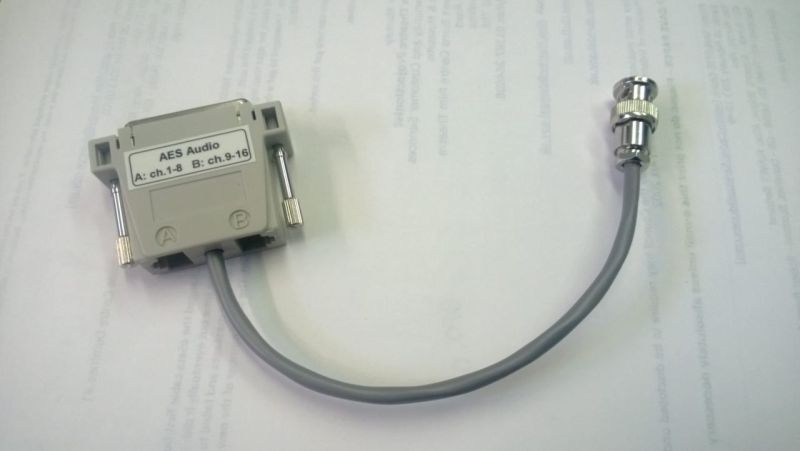
With one of these, life becomes rather easier.

 |  IP: Logged

System Notices
Forum Watchdog / Soup Nazi

Posts: 215

Registered: Apr 2004


 - posted 12-29-2018 03:12 PM      Profile for System Notices         Edit/Delete Post 

It has been 1930 days since the last post.


 |  IP: Logged

Max M. Fuhlendorf
Film Handler

Posts: 12
From: São Caetano do Sul, SP, Brazil
Registered: Jun 2011


 - posted 12-29-2018 03:12 PM      Profile for Max M. Fuhlendorf   Email Max M. Fuhlendorf   Send New Private Message       Edit/Delete Post 
Hi.

I'm working part time at a movie theater (so I can't rewire anything...) with 7.1 sound with a terrible implementation. They had to rent an emergency system due to projector issues, and the installer brought a Dolby IMS2000 and wired it to the CP750 with a single ethernet cable (ch1-8).

When I got here the projectionists had turned off the amps to the back surrounds, as all HI/VI audio was being routed to the auditorium. So I went into the IMS2000 Channel Mapping tab and adjusted Ch1-6 to input channels 1-6, channel 7 to input 11 and channel 8 to input 12.

For Interop DCPs it worked perfectly, with 7.1 sound as expected and no HI/VI played in the theater auditorium, but SMPTE DCPs keep using a passthrough configuration (inputs 1-16 going to channels 1-16 respectively), so that SMPTE DCPs still require that we turn off the amps for the back channels...

Is there a configuration panel I'm missing, or any other way to force the IMS2000 (soft. version 2.8.2-0) to use my custom channel routing for ALL DCPs, be it IOV or SMPTE?

Thanks in advance!

 |  IP: Logged

Carsten Kurz
Film God

Posts: 4340
From: Cologne, NRW, Germany
Registered: Aug 2009


 - posted 12-29-2018 03:18 PM      Profile for Carsten Kurz   Email Carsten Kurz   Send New Private Message       Edit/Delete Post 
The mapping window should offer separate channel labels for interop and smpte input labels. That said, Doremis/Dolbys documentation on interop vs. SMPTE channel handling is completely opaque.

In a training document I saw this screenshot:

http://www.film-tech.com/ubb/f16/t003381.html

but I have never found that dialog on a real Doremi system. Maybe it didn't make it into production software.

- Carsten

 |  IP: Logged

Max M. Fuhlendorf
Film Handler

Posts: 12
From: São Caetano do Sul, SP, Brazil
Registered: Jun 2011


 - posted 12-29-2018 03:43 PM      Profile for Max M. Fuhlendorf   Email Max M. Fuhlendorf   Send New Private Message       Edit/Delete Post 
quote: Carsten Kurz
The mapping window should offer separate channel labels for interop and smpte input labels. That said, Doremis/Dolbys documentation on interop vs. SMPTE channel handling is completely opaque
I think so too, and the IMS2000 installation manual (page 93) seems to imply it does offer separate options for IOV and SMPTE but I can't find them on this software version at least (2.8.2-0)...

And I agree the documentation is paltry [Frown]

 |  IP: Logged

Dave Macaulay
Film God

Posts: 2321
From: Toronto, Canada
Registered: Apr 2001


 - posted 12-31-2018 09:43 AM      Profile for Dave Macaulay   Email Dave Macaulay   Send New Private Message       Edit/Delete Post 
To eliminate channel mapping problems, rewire the cabling to the CP750 so the 11/12 AES signal goes to the 7/8 input. Odyssey has a 2xRJ45 to DB25 adapter that handles this so you avoid the hassle.

 |  IP: Logged

Max M. Fuhlendorf
Film Handler

Posts: 12
From: São Caetano do Sul, SP, Brazil
Registered: Jun 2011


 - posted 01-02-2019 09:21 PM      Profile for Max M. Fuhlendorf   Email Max M. Fuhlendorf   Send New Private Message       Edit/Delete Post 
quote: Dave Macaulay
To eliminate channel mapping problems, rewire the cabling to the CP750 so the 11/12 AES signal goes to the 7/8 input. Odyssey has a 2xRJ45 to DB25 adapter that handles this so you avoid the hassle.

You're absolutely right! I wish I could do that and rewire it correctly, but due to the contract signed with the projector leaser, I couldn't touch the hardware. It's a shame [Frown]

 |  IP: Logged


All times are Central (GMT -6:00)
This topic comprises 2 pages: 1  2 
 
   Close Topic    Move Topic    Delete Topic    next oldest topic   next newest topic
 - Printer-friendly view of this topic
Hop To:


Powered by Infopop Corporation
UBB.classicTM 6.3.1.2

The Film-Tech Forums are designed for various members related to the cinema industry to express their opinions, viewpoints and testimonials on various products, services and events based upon speculation, personal knowledge and factual information through use, therefore all views represented here allow no liability upon the publishers of this web site and the owners of said views assume no liability for any ill will resulting from these postings. The posts made here are for educational as well as entertainment purposes and as such anyone viewing this portion of the website must accept these views as statements of the author of that opinion and agrees to release the authors from any and all liability.

© 1999-2020 Film-Tech Cinema Systems, LLC. All rights reserved.