Film-Tech Cinema Systems
Film-Tech Forum ARCHIVE
Topic Closed  Topic Closed


my profile | my password | search | faq & rules | forum home
  next oldest topic   next newest topic
» Film-Tech Forum ARCHIVE   » Operations   » Digital Cinema Forum   » Replacing HDD on Doremi (Page 2)

 
This topic comprises 2 pages: 1  2 
 
Author Topic: Replacing HDD on Doremi
Amanda Mundin
Expert Film Handler

Posts: 122
From: Belper, Derbyshire, UK
Registered: Sep 2005


 - posted 12-31-2013 10:12 AM      Profile for Amanda Mundin   Email Amanda Mundin   Send New Private Message       Edit/Delete Post 
We have had a recent problem with a DCP 2000 saying one of the hard drives was degraded, we thought it was the hard drive that had failed at first, the drive wasn't being recognized at all, so knowing that the internal SATA cables have had problems in the past, and having a spare old yellow one we swapped the cable, rebuilt the raid and all seems well at the moment, have been playing fine for the last few days and have ingested a couple of features with out problems.
Why do the internal SATA cables stop working?
Also are they anything special or could they be replaced with any SATA cable you can buy from Amazon or similar?
Are the Yellow cables any different to the Orange, to the Red?

 |  IP: Logged

Steve Moore
Expert Film Handler

Posts: 211
From: Leeds, West Yorks, UK
Registered: Apr 2008


 - posted 12-31-2013 03:02 PM      Profile for Steve Moore   Email Steve Moore   Send New Private Message       Edit/Delete Post 
It's beyond me too why sata cables would fail, especially when they are never unplugged.

David, these servers were bought 2nd hand so not sure if they will have warranty, they are the old black intel board ones. I have bought 3x WD 2TB brand new enterprise discs for my own, when i have a quieter week and little content in use, however this server is a fair way away and ideally i just want to swap the cables out and replace the degraded drive

Pete, what is or was the thermal upgrade?

 |  IP: Logged

Dave Macaulay
Film God

Posts: 2321
From: Toronto, Canada
Registered: Apr 2001


 - posted 12-31-2013 04:01 PM      Profile for Dave Macaulay   Email Dave Macaulay   Send New Private Message       Edit/Delete Post 
The thermal upgrade applies to the black front Intel SE7221 motherboard servers. It includes a Dolphin card cooling fan with plastic air guide, and a pair of smaller fans. You remove a couple of small fans as well. The idea is to improve CPU and Dolphin cooling and to reduce fan vibration at the RAID drives. All the old servers should have had it done quite some time ago. With this kit, the airflow is pretty much the same as on a new model server.

 |  IP: Logged

Carsten Kurz
Film God

Posts: 4340
From: Cologne, NRW, Germany
Registered: Aug 2009


 - posted 01-01-2014 08:54 AM      Profile for Carsten Kurz   Email Carsten Kurz   Send New Private Message       Edit/Delete Post 
3TB drives are still not supported on Doremis, not internal/RAID, not external for ingest. Reason is that Doremis still run on a fairly old Linux kernel version. It's actually a driver/kernel, not a mainboard issue.

I guess though, that they are already working on support for larger drives.

- Carsten

 |  IP: Logged

Brad Miller
Administrator

Posts: 17775
From: Plano, TX (36.2 miles NW of Rockwall)
Registered: May 99


 - posted 01-01-2014 02:15 PM      Profile for Brad Miller   Author's Homepage   Email Brad Miller       Edit/Delete Post 
If you want larger drives, the Dolby DSS200 is the machine. It will take up to 4TB drives and be happy as can be. It's also a hardware raid, so you don't have to put tons of money into enterprise drives. I've ran torture tests on these machines with the most mixed-matched junk drives I could get my hands on and they just keep on trucking without even the slightest hiccup. Of every server and IMS type of solution out there, nothing else has come close to the quality and reliability of this model (including Dolby's other models).

Regarding Doremi, do NOT mix and match different types of hard drives. You will have problems. Even more important, don't use any drive not on their approved list. I've experimented with this and if you want reliability, their approved list is the ONLY way to get it.

The same thing goes for GDC as with Doremi, and Dolby's "cheaper" DSS220 model.

 |  IP: Logged

Steve Guttag
We forgot the crackers Gromit!!!

Posts: 12814
From: Annapolis, MD
Registered: Dec 1999


 - posted 01-01-2014 02:40 PM      Profile for Steve Guttag   Email Steve Guttag   Send New Private Message       Edit/Delete Post 
I have briefly mixed/matched drives in a GDC SX-2001 system (normal mediablock) without incident.

The key is to have identical read/write speeds. The drives have to function as a single unit.

Note, Dolby also has a list of "approved" drives.

 |  IP: Logged

Steve Moore
Expert Film Handler

Posts: 211
From: Leeds, West Yorks, UK
Registered: Apr 2008


 - posted 01-01-2014 03:41 PM      Profile for Steve Moore   Email Steve Moore   Send New Private Message       Edit/Delete Post 
Thank you everyone for your input. Extra capacity is not really an issue in any of our screen, it's reliable operation. Thank you Brad for your mention of your Doremi tests with "random" drives; I think that has put me off that idea. In the short term to get this server operational again, I will opt for locating a suitable 2nd hand drive and clear its MBR - and replace all SATA cables as a matter of course.

However - as the Doremi manuals and documents from their website do not make things 100% clear; if I was just to replace the leads and run a "Repair" on the raid would that leave content in place on the drives? This might be worth a try in the short term? It's just a time issue and I would rather not have to re-ingest if possible - two reasons I would have to go over on a night/early after they close to perform this and second deluxe in the UK claim back a lot of the drives within days of receiving and we may not have the content on site.

The joys of computers... you know I never had to replace a sata lead or a drive on any of my Cinemeccanica Victoria's EVER! [Smile]

 |  IP: Logged

Brad Miller
Administrator

Posts: 17775
From: Plano, TX (36.2 miles NW of Rockwall)
Registered: May 99


 - posted 01-01-2014 04:18 PM      Profile for Brad Miller   Author's Homepage   Email Brad Miller       Edit/Delete Post 
At least you won't have to change the oil, belts or gears on your Doremi.

 |  IP: Logged

Dave Macaulay
Film God

Posts: 2321
From: Toronto, Canada
Registered: Apr 2001


 - posted 01-01-2014 10:35 PM      Profile for Dave Macaulay   Email Dave Macaulay   Send New Private Message       Edit/Delete Post 
Replacing the SATA cables doesn't change the RAID, you won't lose content. Do not power up the server with the drives removed or disconnected though.
If, after replacing the SATA cables, it still shows a drive as bad... you can try "repair". It may not let you do that though; if not, and you believe the bad drive is really OK, you can wipe its MBR and try a repair with it in place.
Only "initialize" will destroy the content.
Avoid "manage", that's for messing with stuff you shouldn't be messing with... if you want to add a 4th drive to the array (possible on the 4-bay servers) I think this is where you would do that.

 |  IP: Logged

Carsten Kurz
Film God

Posts: 4340
From: Cologne, NRW, Germany
Registered: Aug 2009


 - posted 01-02-2014 07:10 AM      Profile for Carsten Kurz   Email Carsten Kurz   Send New Private Message       Edit/Delete Post 
Well, sure enough, with these very old drives, I would at least try to source 3 new/current consumer grade drives (not the very cheapest 'green' types, of course) in order to be prepared for a fatal drive loss. Put them on the shelf. In case you're running into trouble, it will be hard to source one or two old drives to be paired with the existing ones in short time.

You could prebuild a RAID from these three drives, mark their number/RAID sequence on them, and of something happens, your server will at least be up again for ingest within a few minutes.

Remember, these drives are old. Rebuilding a RAID creates a heavy load on all drives. It is not unlikely that rebuilding will cause another existing drive to fail.

- Carsten

 |  IP: Logged

Amanda Mundin
Expert Film Handler

Posts: 122
From: Belper, Derbyshire, UK
Registered: Sep 2005


 - posted 01-02-2014 11:26 AM      Profile for Amanda Mundin   Email Amanda Mundin   Send New Private Message       Edit/Delete Post 
Here is a current list of approved drives, recently sent from Doremi:

1TB
Hitachi 0A35772 HUA721010KLA330 HT1TB-SATA
Hitachi 0A38028 HDE721010SLA330 HT1TB-SATA
Hitachi 0A39289 HDU722010CLA330 HT1TB-SATA
Western Digital WD1002FBYS-02A6B0 WD1002FBYS
Western Digital WD1003FBYX-01Y7B0 WD1003FBYX

2TB
Western Digital WD2003FYYS-02W0B0 WD2003FYY
Western Digital WD2002FYPS-01U1B1 WD2002FYPS

 |  IP: Logged

Steve Moore
Expert Film Handler

Posts: 211
From: Leeds, West Yorks, UK
Registered: Apr 2008


 - posted 01-02-2014 11:51 AM      Profile for Steve Moore   Email Steve Moore   Send New Private Message       Edit/Delete Post 
thanks everyone for your input! I think best action is replace leads, see if it improves, try a repair if allowed. Failing that replace all for new at a week that no content is required and only one film needs to go on, though i realise fairly soon.

Brad, I was changing the oil in my Doremi... Just realised that they are USB ports on the front and not oil filling holes... no wonder the drives failed. Though in my defence, the manual doesn't mention "do not fill with oil"!

(of course I am joking!)

 |  IP: Logged

Marco Giustini
Film God

Posts: 2713
From: Reading, UK
Registered: Nov 2007


 - posted 01-03-2014 05:13 PM      Profile for Marco Giustini   Email Marco Giustini   Send New Private Message       Edit/Delete Post 
Steve,

Apparently the yellow cables were poorly made and the contacts were eventually developing a tiny layer of oxide. Doremi are replacing them with better quality ones, but in theory you could just reseat them - to clean the contacts - and that should clear the problem.

Please also mind that CRC errors on the SMART table won't reset when the cable is replaced.

 |  IP: Logged

Steve Moore
Expert Film Handler

Posts: 211
From: Leeds, West Yorks, UK
Registered: Apr 2008


 - posted 01-28-2014 04:48 PM      Profile for Steve Moore   Email Steve Moore   Send New Private Message       Edit/Delete Post 
Well thanks for everyone's help so far, however the saga continues. I did the 200 miles trip today to our cinema armed with a 2nd Hand identical Hitachi drive, which I had tested and then wiped the MBR and also an brand new Western Digital Doremi approved 1TB drive. I also took new SATA leads.

I swapped out the leads, booted the server, no change.

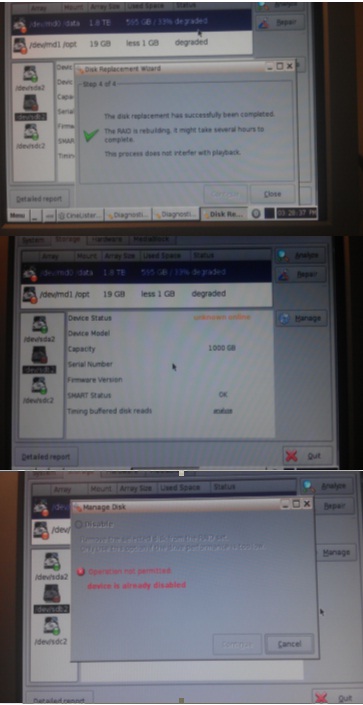
I followed the Doremi "repair" process which takes drive "B" out of service, swapped the disk, let it mount that drive and it said "The disc replacement has been successful - The raid is rebuilding" and a green tick

However when you go back to the diagnostic tools, the Raid says it is degraded and no drive info comes up, nor does it say rebuilding raid and a % done
Then I tried removing the Hitachi and swapping for a Doremi approved Western Digital BRAND NEW sealed 1TB drive and did the same process and again it said successful however it did't actually rebuild the raid again.

I looked in the Bios and also did a detailed report which i uploaded to Doremi and received the report back. It did claim it could see either of the new discs with correct serial numbers. However in diagnostic tools a yellow dot and degraded Raid status.

After all that went into drive manage and it said the drive "B" operation not permitted - Device already disabled

I have a photo (not too clear of the screens if that helps
 -

Sorry that was a long one. I'm a bit stuck now.

Just out of interest, could I power off the server and fit three brand new matching drives, reboot and try build a raid to see if it can do that. Then if that didn't work simply power down and put the three original drives back in and be back where I was; or would it need to re-register the old drive, so to speak, thus possibly rendering them useless.

Sorry that was a long Post, but any help would be appreciated.

 |  IP: Logged

Brad Miller
Administrator

Posts: 17775
From: Plano, TX (36.2 miles NW of Rockwall)
Registered: May 99


 - posted 01-29-2014 12:21 AM      Profile for Brad Miller   Author's Homepage   Email Brad Miller       Edit/Delete Post 
Steve please do not make a new thread, continue the discussion here. Unfortunately there are already posts on the new thread, so this one must be shut down.

Go here.

 |  IP: Logged


All times are Central (GMT -6:00)
This topic comprises 2 pages: 1  2 
 
   Open Topic    Move Topic    Delete Topic    next oldest topic   next newest topic
 - Printer-friendly view of this topic
Hop To:


Powered by Infopop Corporation
UBB.classicTM 6.3.1.2

The Film-Tech Forums are designed for various members related to the cinema industry to express their opinions, viewpoints and testimonials on various products, services and events based upon speculation, personal knowledge and factual information through use, therefore all views represented here allow no liability upon the publishers of this web site and the owners of said views assume no liability for any ill will resulting from these postings. The posts made here are for educational as well as entertainment purposes and as such anyone viewing this portion of the website must accept these views as statements of the author of that opinion and agrees to release the authors from any and all liability.

© 1999-2020 Film-Tech Cinema Systems, LLC. All rights reserved.