|
|
This topic comprises 3 pages: 1 2 3
|
|
Author
|
Topic: Ingestion Dolby DSS220 CRU Dataport
|
|
|
|
|
|
|
Jim Cassedy
Phenomenal Film Handler

Posts: 1661
From: San Francisco, CA
Registered: Dec 2006
|
 posted 01-24-2019 12:01 PM


quote: Leo Enticknap
It seems that someone tried to pull a connector out at an awkward
angle, and destroyed one of the jacks
One of the USB ports on the front of the DSS-200 at one of the screening
rooms I work at got broken when somebody smashed into a thumbdrive that
was sticking out the front. I was told by one of the guys I work with with at
Dolby that the USB port was part of a larger assembly & that the only way to
'fix' it was to replace the large (expensive) circuit board that it was attached to...
assuming I could get a replacement at all.
This DSS 200 has a CRU port for DCP ingestion, but I was nervous about only
having one working USB port on front to ingest keys or occasional non-CRU
drive content. So, I wound up getting a short USB M-F extension cable
which I leave connected to the DSS200 at all times, and use the female end
for all USB key or content ingestion so as to put less wear on the one, good
remaining USB port.
Which brings me to this question:
> I would like to be able to push keys to the DSS 200 using a spare laptop
I have in the booth.
This is a screening room. There is no TMS. It's a 'closed' network, connected
only with the server, projector, & 3D controller. (All via Cat5)
There is no TMS or automation. Everything is run manually.
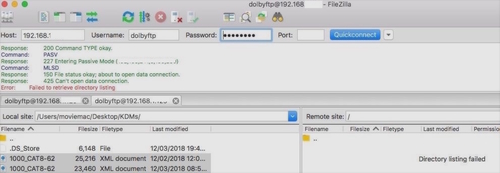
I can successfully connect to the to the dolbydigitalserverthingy using FileZila,
but I can't see the Dolby's directory listing, or transfer files.
I know it's probably some simple setting I've got wrong in FileZilla, or the
laptop (MacbookPro) network settings that I"m just not seeing.
Here are the error messages I get when I try to connect.
(IP Addresses Removed For Security)
Here's the FileZilla Screen:
And also this message, which is why I think I have some setting wrong:

>What am I doing wrong?<
Tnx!
| IP: Logged
|
|
Leo Enticknap
Film God

Posts: 7474
From: Loma Linda, CA
Registered: Jul 2000
|
posted 01-24-2019 12:25 PM

The front panel USB jack is the cat915Z board. They're not that pricey, and pretty easy to swap out. Dolby no longer formally support the DSS200, but I suppose it might be worth contacting them to see if they have any remaining in stock.
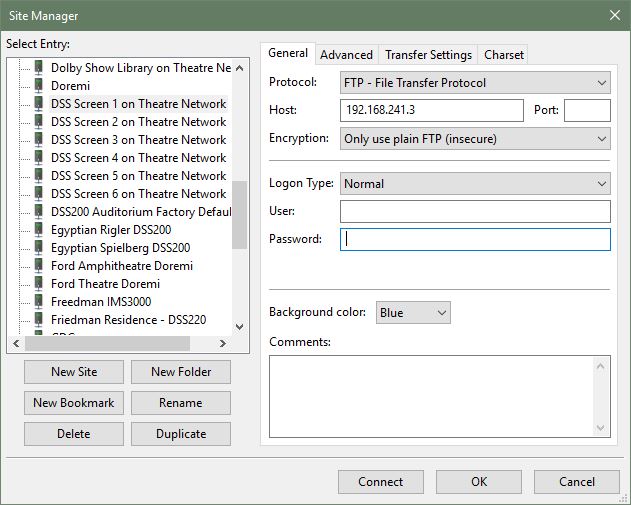
For Filezilla, you need the following settings. In the Filezilla site manager entry for your server, ensure that in the general tab, the encryption type is set to "Only use plain FTP," and the logon type is "normal."
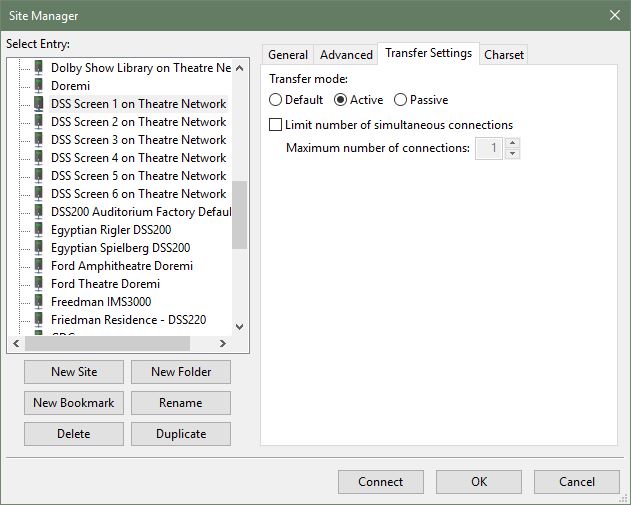
In the transfer settings type, the transfer mode should be set to active. If it's set to default, it'll use the global setting in tools > options, which I believe is passive unless you change it.
You should then be all set.
| IP: Logged
|
|
|
|
|
|
|
|
All times are Central (GMT -6:00)
|
This topic comprises 3 pages: 1 2 3
|
Powered by Infopop Corporation
UBB.classicTM
6.3.1.2
The Film-Tech Forums are designed for various members related to the cinema industry to express their opinions, viewpoints and testimonials on various products, services and events based upon speculation, personal knowledge and factual information through use, therefore all views represented here allow no liability upon the publishers of this web site and the owners of said views assume no liability for any ill will resulting from these postings. The posts made here are for educational as well as entertainment purposes and as such anyone viewing this portion of the website must accept these views as statements of the author of that opinion
and agrees to release the authors from any and all liability.
|

 Home
Home



![[thumbsup]](graemlins/thumbsup.gif)



 Printer-friendly view of this topic