Film-Tech Cinema Systems
Film-Tech Forum ARCHIVE


my profile | my password | search | faq & rules | forum home
  next oldest topic   next newest topic
» Film-Tech Forum ARCHIVE   » Operations   » Digital Cinema Forum   » Barco DP2K-10S: Cropping around image? (Page 2)

 
This topic comprises 3 pages: 1  2  3 
 
Author Topic: Barco DP2K-10S: Cropping around image?
Dave Macaulay
Film God

Posts: 2321
From: Toronto, Canada
Registered: Apr 2001


 - posted 05-05-2015 07:35 AM      Profile for Dave Macaulay   Email Dave Macaulay   Send New Private Message       Edit/Delete Post 
If you select the preset you want, then go to configuration/screen you can select a full screen file (2048x1080 no crop) and it will project the full uncropped image so you can zoom and shift the lens to see what looks best to you. This does not modify the preset, select it again and the original zoom/shift and cropping will be back. To make "permanent" changes you need to link new screen and lens files to the preset macros.

 |  IP: Logged

Marlon Martins
Film Handler

Posts: 78
From: Torres, RS, Brazil
Registered: Apr 2015


 - posted 05-05-2015 05:21 PM      Profile for Marlon Martins   Email Marlon Martins   Send New Private Message       Edit/Delete Post 
SUCCESS!!!

was able to remove the crop, and adjusted the zoom a liiitle bit (no pixel left behind [Big Grin] )

tested the lens change process a few times to make sure nothing was wrong there.

saved the new setting, changed the macros (thanks for the tip Dave) and now works fine with no change in the programming lists.

Also fixed the electrical wiring problem ;P

A big thank-you guys for your time and expertise to help me in this problem [thumbsup]

Now i can see Avengers "uncropped" version [beer]

 |  IP: Logged

Marlon Martins
Film Handler

Posts: 78
From: Torres, RS, Brazil
Registered: Apr 2015


 - posted 05-07-2015 12:39 AM      Profile for Marlon Martins   Email Marlon Martins   Send New Private Message       Edit/Delete Post 
Well, turns out the audio is not so great either.

the voices where sometimes hard to understand (volume was too low) but in action scenes was OK.

don't know if is the original audio is like that (i believe the CP750 decoder only convert the D>A and do a bit of processing to 5.1 > 7.1 in Surround EX no?) or its the volume settings on the amplifiers/CP750. Maybe the dubbing to Portuguese is bad quality...

well, here we go again on the manuals and search for the CP750 software (looks like the notebook does not have it)

will also made a audio test to do a bit of "analysis" on the audio

what a crap installers... [Frown]

 |  IP: Logged

Carsten Kurz
Film God

Posts: 4340
From: Cologne, NRW, Germany
Registered: Aug 2009


 - posted 05-07-2015 05:14 AM      Profile for Carsten Kurz   Email Carsten Kurz   Send New Private Message       Edit/Delete Post 
Channelwise, cinemaprocessors will do a 1:1 translation from the audio channels contained in the DCP to the audio channels installed in the cinema. The only exception is 5.1 vs. 7.1, if 7.1 is installed at all.

When playing 7.1, the processor will feed 7.1 to the auditorium speakers, in detail: Left surround to Left surround, Right Surround to Right Surround, Left Backsurround to left Backsurround, Right Backsurround to Right Back Surround. When Playing 5.1 over the 7.1 system, the processor has to copy the audio from Left Surround to Left Backsurround, and from Right Surround to Right Backsurround, and adjust the level slightly so the surrounds do not come up to loud. If you have only a 5.1 system installed, you should not play 7.1 DCPs (back surrounds would be silent then). Most likely, you will never receive a 7.1 key to play it anyway. All 7.1 features also come with 5.1 versions, but both use/need separate keys to play.

The CP will also do EQ and level for all channels. If the installers were not skilled, the EQ will probably be bad just as well.

You should probably check speech intelligibility by using local native language, as well as original english language movies or trailers.

It's never a good idea to change EQ settings based on a single feature.

Dolby manuals are hard to find. If you need one for the 750, send me a private mail. Get at least issue5 of the CP750 manual.

- Carsten

 |  IP: Logged

Marlon Martins
Film Handler

Posts: 78
From: Torres, RS, Brazil
Registered: Apr 2015


 - posted 05-07-2015 12:30 PM      Profile for Marlon Martins   Email Marlon Martins   Send New Private Message       Edit/Delete Post 
thanks again Carsten for the technical info.

will do a comparison with avengers with original audio/subtitles and avenges dubbed (PT-BR) to see if its the original mixing. as the decoder has the "VU", i think i can get a comparison on same scene to see if its the movie itself the problem.

will make also a "test audio" to see if everything is working correctly ("we never know"...)

 |  IP: Logged

Marlon Martins
Film Handler

Posts: 78
From: Torres, RS, Brazil
Registered: Apr 2015


 - posted 05-08-2015 03:58 PM      Profile for Marlon Martins   Email Marlon Martins   Send New Private Message       Edit/Delete Post 
The Subwoofer is burned and i believe some speakers for the surround that are connected in pairs are out of phase...

This keeps getting better and better [Eek!]

 |  IP: Logged

Marcel Birgelen
Film God

Posts: 3357
From: Maastricht, Limburg, Netherlands
Registered: Feb 2012


 - posted 05-09-2015 11:47 PM      Profile for Marcel Birgelen   Email Marcel Birgelen   Send New Private Message       Edit/Delete Post 
It's even better to disconnect those out of phase speakers than to leave them in the array... Out of phase speakers do more harm than dead speakers. On the other hand, fixing this takes roughly the same amount of time as disconnecting them. [Smile]

I guess none of the speakers are bi-amped?

 |  IP: Logged

Sam D. Chavez
Film God

Posts: 2153
From: Martinez, CA USA
Registered: Aug 2003


 - posted 05-10-2015 01:03 AM      Profile for Sam D. Chavez   Author's Homepage     Send New Private Message       Edit/Delete Post 
IMHO Phase of surround speakers boxes one to another is not all that critical. It's ideal of course but often not verified.

 |  IP: Logged

Marcel Birgelen
Film God

Posts: 3357
From: Maastricht, Limburg, Netherlands
Registered: Feb 2012


 - posted 05-10-2015 02:16 AM      Profile for Marcel Birgelen   Email Marcel Birgelen   Send New Private Message       Edit/Delete Post 
How critical it is probably depends a lot on the actual situation and what content is being played. If it's not heavy on the surrounds and there's just a single surround speaker out of phase, the effects are probably just minimal.

Still, I prefer no or less evenly dispersed sound over the weird side effects out-of-phase speakers can produce.

 |  IP: Logged

Marlon Martins
Film Handler

Posts: 78
From: Torres, RS, Brazil
Registered: Apr 2015


 - posted 05-10-2015 03:57 PM      Profile for Marlon Martins   Email Marlon Martins   Send New Private Message       Edit/Delete Post 
The speakers weren't out of phase. the dolby decoder was the culprit. the equalizer was ALL OVER THE PLACE, like you give a 200 knob equalizer and child played over it all day long. i Have no idea how they did something like that. that was the cause of the weird effect on the speakers, that i mistake as phase problems.

i will add a few mid-range speakers with another amplifier to help center channel, to improve voice clarity. then i believe the audio will be good enought [Wink]

thanks again for the tips guys.

I just don't know if this "saga" is over yet [Big Grin]

 |  IP: Logged

Carsten Kurz
Film God

Posts: 4340
From: Cologne, NRW, Germany
Registered: Aug 2009


 - posted 05-11-2015 02:47 AM      Profile for Carsten Kurz   Email Carsten Kurz   Send New Private Message       Edit/Delete Post 
EQ all over the place is the most typical indication for a non-skilled technician having done the install.

- Carsten

 |  IP: Logged

Marlon Martins
Film Handler

Posts: 78
From: Torres, RS, Brazil
Registered: Apr 2015


 - posted 05-14-2015 02:45 AM      Profile for Marlon Martins   Email Marlon Martins   Send New Private Message       Edit/Delete Post 
Today i believe we are "finished" (phew!)

the reason i believe the EQ was all over the place was the room, it wasn't isolated, causing resonance i believe in some frequencies, causing dialog to be hard to understand.

some test tones, sine swipe, some recording tests with a large diaphragm condenser mic, i was able to get a good equalization, to improve voice clarity and reduce a bit the resonance.

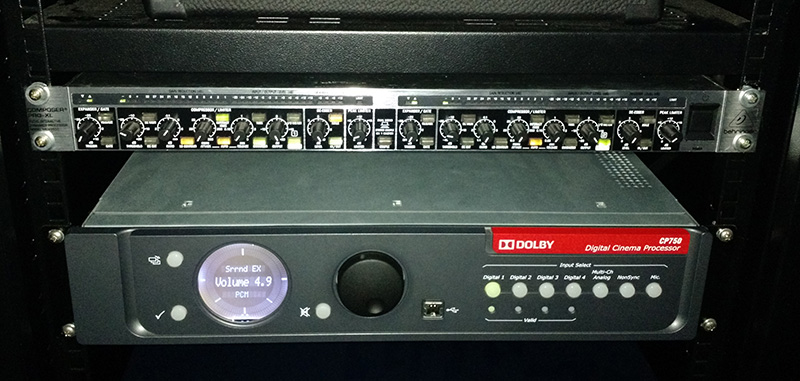
we also improved the LFE with another 18" speaker, and we HAD to get a compressor for the center channel. some movies (mainly dubbed ones) the difference between quiet and loud scenes was just too much. or we let the audio hard to understand in some scenes, or we let the speakers blow the ears to make better in quiet scenes. installed a behringer compressor, now the audio has less dynamic. i didn't like the idea of change the "originality" of the audio, but we really didn't have a choice. i could not recognize speech properly in some scenes on Avengers, and my ears are A+ [Big Grin]

today we will test Mad Max and tweak a bit more the audio settings.

thanks again to you guys, now my little town have a proper cinema that i can go and be proud of [Wink]

 |  IP: Logged

Marlon Martins
Film Handler

Posts: 78
From: Torres, RS, Brazil
Registered: Apr 2015


 - posted 05-15-2015 10:39 PM      Profile for Marlon Martins   Email Marlon Martins   Send New Private Message       Edit/Delete Post 
Alll goooood [Wink]

Thanks again guys!

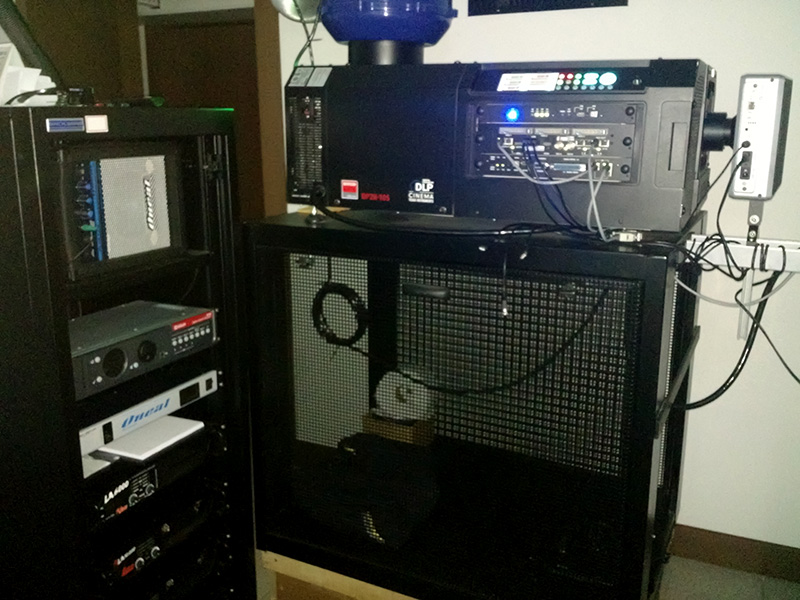
"The Room":

 -

 -

 |  IP: Logged

Marco Giustini
Film God

Posts: 2713
From: Reading, UK
Registered: Nov 2007


 - posted 05-16-2015 11:13 AM      Profile for Marco Giustini   Email Marco Giustini   Send New Private Message       Edit/Delete Post 
Questions:

What is that thing in front of the projector?
Why your CP650 is set to Surround EX?
Why there's toiler paper underneath the projector?

 |  IP: Logged

Marlon Martins
Film Handler

Posts: 78
From: Torres, RS, Brazil
Registered: Apr 2015


 - posted 05-16-2015 11:55 AM      Profile for Marlon Martins   Email Marlon Martins   Send New Private Message       Edit/Delete Post 
1: is a polariser for the 3D
2: some movies came in 5.1, so Surround EX "expand" to 7.1
3: is the backup TP for the projectionist bathroom [Wink]

 |  IP: Logged


All times are Central (GMT -6:00)
This topic comprises 3 pages: 1  2  3 
 
   Close Topic    Move Topic    Delete Topic    next oldest topic   next newest topic
 - Printer-friendly view of this topic
Hop To:


Powered by Infopop Corporation
UBB.classicTM 6.3.1.2

The Film-Tech Forums are designed for various members related to the cinema industry to express their opinions, viewpoints and testimonials on various products, services and events based upon speculation, personal knowledge and factual information through use, therefore all views represented here allow no liability upon the publishers of this web site and the owners of said views assume no liability for any ill will resulting from these postings. The posts made here are for educational as well as entertainment purposes and as such anyone viewing this portion of the website must accept these views as statements of the author of that opinion and agrees to release the authors from any and all liability.

© 1999-2020 Film-Tech Cinema Systems, LLC. All rights reserved.