|
|
This topic comprises 2 pages: 1 2
|
|
Author
|
Topic: Audio Description and 7.1 Sound
|
|
|
|
|
|
|
|
|
|
|
|
|
|
|
Harold Hallikainen
Jedi Master Film Handler
Posts: 906
From: Denver, CO, USA
Registered: Aug 2009
|
 posted 11-21-2017 07:16 PM


The CP750 started as an 8 channel processor, so you could do 7.1 OR VI, but not both. But, several years ago, they did a firmware upgrade that let you use 8 channels of the Digital 1 input while simultaneously sending the Digital 2 input to the CH7/CH8 RCA connectors. As I recall, the Digital 2 input is unbalanced, so a transformer is required to take AES/EBU pair 4 from the server and drive the Digital 2 input. I imagine Dolby makes a board that includes the transformer and does the appropriate routing such that server output channels 7 and 8 end up on the Digital 2 input, and sever output channels 11 and 12 end up on the CP750 channel 7/8 input. The end result is 7.1 audio from the digital 1 input ending up on the main analog outputs. The server output channels 7 and 8 (AES/EBU pair 4) go through a digital to analog conversion between the Digital 2 input and the CH7/CH8 outputs. These outputs can drive the IRC-28C. For the HI input of the IRC-28C, you can use either the HI output of the CP750 or the CH7 output. The HI output is generated in the CP750 and will always be present no matter what the content is. The CH7 output is HI delivered in the DCP, but not all content has an HI track, and not all content is DCP. Therefore, I think it's generally better to use the HI output. The CH8 output can drive the VI input of the IR-28C.
I ASSUME there is an adapter that handles the required split of AES/EBU and provides the transformer for driving the digital 2 input. Does anyone know where to get this?
Thanks!
Harold
| IP: Logged
|
|
|
|
Steve Guttag
We forgot the crackers Gromit!!!

Posts: 12814
From: Annapolis, MD
Registered: Dec 1999
|
posted 11-22-2017 06:39 AM
A couple of corrections.
Yes, the CP750 came out as an 8-channel processor BEFORE 7.1 so AES Pairs 1-3 would come out of the Main output and pair 4 could come out of the Aux 7/8. WHEN 7.1 came out, the software update came out with it to allow all 8 channels to be used on the 4xAES input and output and usurp Digital 2 as the D/A decoder to feed Aux 7/8. On the General Settings Tab of the CP750 set up software, you can configure the CP750 as a 5.1 or 7.1 processor and how to decode it. You can tell the CP750 that you will use an external AES decoder and merely mute Aux 7/8 or that you want to use the Digital 2 decoder.
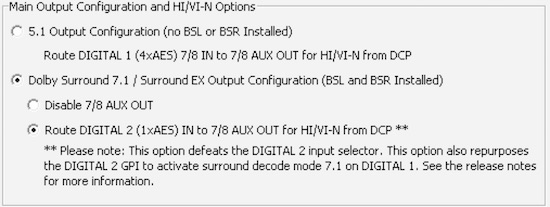
Harold is correct that Digital 2 is an unbalanced input (AES3-id) so you should convert AES3 (balanced 110-Ohm to 75-Ohm unbalanced). It being a BNC type input implies that it is looking for a 1V nominal signal too.
Odyssey does make a board for the CP750 that will allow one to run two RJ45 (CAT) cables (and when they are carrying AES audio, they are supposed to be shielded, by the way) to the CP750 and it will break out pair-4 to a terminal block (it is selectable to be pair 4 or pair 8). You then have to convert it, as mentioned above to the proper impedance and go from balanced to unbalanced. In the Odyssey documentation, they show one merely taking an ordinary video cable and cutting an end off to jam the wires to the + and - terminals (no conversion). I have complained to Odyssey about this "design." I believe, now, that Odyssey has a proper transformer option that will take you from BNC to a terminal block so you just have to run a pair of wires a few inches. (The transformer part gets attached to the CP750 via the BNC.
Canarie has in-line transformers that can do the job that have XLR inputs and BNC outputs. Canarie also has a version that has a 10dB pad in it to get the voltage into the proper range. They work fine if one is using conventional AES cable but are a bit bulky/heavy to break out typical CAT cable pairs.
Another option that Odyssey has, if the server has a normal pin configuration on the DB25 connector (e.g. a Dolby DSS configuration) is a breakout board that will divert pair 4 to an RJ45 connector and let the rest pass through (it is a small board with a male/female DB25 and the RJ45 between them). You then run an ordinary CAT cable to the sound rack where they have another module that is RJ45 in and BNC out (again, it connects directly to Digital 2). It takes pair 4 (the white/brown and Brown) and sends it out of the Coax.
| IP: Logged
|
|
|
|
All times are Central (GMT -6:00)
|
This topic comprises 2 pages: 1 2
|
Powered by Infopop Corporation
UBB.classicTM
6.3.1.2
The Film-Tech Forums are designed for various members related to the cinema industry to express their opinions, viewpoints and testimonials on various products, services and events based upon speculation, personal knowledge and factual information through use, therefore all views represented here allow no liability upon the publishers of this web site and the owners of said views assume no liability for any ill will resulting from these postings. The posts made here are for educational as well as entertainment purposes and as such anyone viewing this portion of the website must accept these views as statements of the author of that opinion
and agrees to release the authors from any and all liability.
|

 Home
Home





 Printer-friendly view of this topic