Film-Tech Cinema Systems
Film-Tech Forum ARCHIVE


my profile | my password | search | faq & rules | forum home
  next oldest topic   next newest topic
» Film-Tech Forum ARCHIVE   » Operations   » Digital Cinema Forum   » Help:error securing connection between DSS200 and NC900-C? (Page 2)

 
This topic comprises 2 pages: 1  2 
 
Author Topic: Help:error securing connection between DSS200 and NC900-C?
Michael Qu
Film Handler

Posts: 43
From: shanghai shanghai china
Registered: Jan 2012


 - posted 11-02-2015 08:34 PM      Profile for Michael Qu   Email Michael Qu   Send New Private Message       Edit/Delete Post 
quote:
Michael - for two projectors to work on a CAT862, BOTH projectors need an enigma board installed. As such, trying to bypass an Enigma board is useless, no matter if an Enigma board is installed in the projector or not. The NEC engineer obviously did not understand your problem.

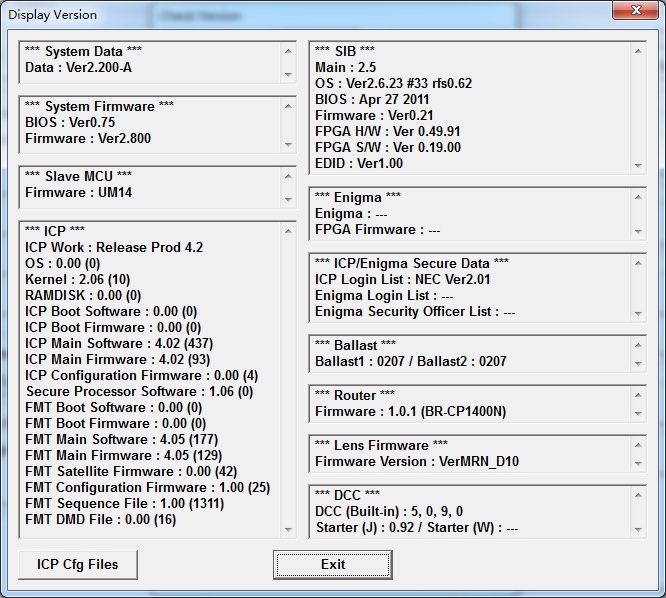
Start DCC, connect to both projectors, choose display software versions, and read what it says mid-right. This is also a good time to check wether your Enigma firmware is up to date at 1.8, because earlier versions will cause problems.
If DCC only displays an Enigma software version for one of your NECs, you need to order another one to retrofit the second.

- Carsten

thanks Carsten,I check it.No enigma info.So it is not installed.
 -

 |  IP: Logged

Marco Giustini
Film God

Posts: 2713
From: Reading, UK
Registered: Nov 2007


 - posted 11-03-2015 05:34 AM      Profile for Marco Giustini   Email Marco Giustini   Send New Private Message       Edit/Delete Post 
Then you cannot use a DSS200 - or any Digital Cinema server - with your projectors, single or dual mode.

 |  IP: Logged

Marin Zorica
Jedi Master Film Handler

Posts: 671
From: Biograd na Moru, Croatia
Registered: May 2003


 - posted 11-03-2015 04:32 PM      Profile for Marin Zorica   Email Marin Zorica   Send New Private Message       Edit/Delete Post 
Without LD, is it possible to use DSS200 in non TLS mode? As i know for series 1 there is option you can switch to non encryptior, or DH other TLS II cinelink?

 |  IP: Logged

Michael Qu
Film Handler

Posts: 43
From: shanghai shanghai china
Registered: Jan 2012


 - posted 11-03-2015 05:31 PM      Profile for Michael Qu   Email Michael Qu   Send New Private Message       Edit/Delete Post 
quote: Marin Zorica
Without LD, is it possible to use DSS200 in non TLS mode? As i know for series 1 there is option you can switch to non encryptior, or DH other TLS II cinelink?
Yes,turn the encrypt to Off.

 |  IP: Logged

Marco Giustini
Film God

Posts: 2713
From: Reading, UK
Registered: Nov 2007


 - posted 11-03-2015 06:32 PM      Profile for Marco Giustini   Email Marco Giustini   Send New Private Message       Edit/Delete Post 
yes but only with a non-dci version. Not sure it would work with a dual projector though since, as Mike said, enabling dual projector mode will also enable TLS.

 |  IP: Logged

Mike Renlund
Film Handler

Posts: 71
From: San Francisco
Registered: Feb 2008


 - posted 11-03-2015 08:47 PM      Profile for Mike Renlund   Email Mike Renlund   Send New Private Message       Edit/Delete Post 
You can disable link encryption on the CAT862 Media Block in any version of software, including DCI compliant software.

Once you do that, you will not be able to select or play encrypted content. The system will only play unencrypted content. You can have the CAT862 in single projector mode at that point as you will not be using Link Encryption.

For this particular issue, you would need a Link Decryptor in both projectors to have full functionality and playback encrypted content.

Mike Renlund
Dolby Laboratories

 |  IP: Logged

Marco Giustini
Film God

Posts: 2713
From: Reading, UK
Registered: Nov 2007


 - posted 11-04-2015 05:41 AM      Profile for Marco Giustini   Email Marco Giustini   Send New Private Message       Edit/Delete Post 
Thanks Mike. I keep forgetting that you can still disable the encryption on any version. I was mixing up with using non-TLS encryption.

 |  IP: Logged

Marin Zorica
Jedi Master Film Handler

Posts: 671
From: Biograd na Moru, Croatia
Registered: May 2003


 - posted 11-05-2015 04:54 PM      Profile for Marin Zorica   Email Marin Zorica   Send New Private Message       Edit/Delete Post 
Just one note Mike, can we (except disabling encryption) chose between other level of security, like in older firmware version (DH, cinelink, TLS II)?

 |  IP: Logged

Mike Renlund
Film Handler

Posts: 71
From: San Francisco
Registered: Feb 2008


 - posted 11-05-2015 09:51 PM      Profile for Mike Renlund   Email Mike Renlund   Send New Private Message       Edit/Delete Post 
Cinelink II DH had to be removed from the system for DCI compliance. That is really the only change from pre-DCI versions.

 |  IP: Logged

Michael Qu
Film Handler

Posts: 43
From: shanghai shanghai china
Registered: Jan 2012


 - posted 11-19-2015 07:20 PM      Profile for Michael Qu   Email Michael Qu   Send New Private Message       Edit/Delete Post 
Hi buddy,finally I got two enigma models.The NEC engineer installed them and now the Encrypt link works.
But another issues comes.Only the projector 1 display the image,the projector 2 show green light and no image.
The left projector of the 3D system is set to 192.168.1.133 and the right progjector is set to 192.168.1.137.
In default setting of DSS200,the 192.168.1.133 is the projector1 and 137 is the projector2.In default mode the 192.168.1.133 projector works good.
Then I modified the projector1 ip setting to 192.168.1.137(projector2 to 192.168.1.133),now the 192.168.1.137 projector works good.
So both projector seen ok,but only the projector1 in DSS200 setting works,the projector2 do not.
As most use in single project 3D,the NEC engineer didn't know why this happed.
During the playback,I swap the input cable between two projectors,the image do no swap to another projector,still the projector1 has image.So I think the output of DSS200 is ok,but the projector didn't work.
Any one know something can help?Thanks

 |  IP: Logged

Stephan Shelley
Jedi Master Film Handler

Posts: 854
From: castro valley, CA, usa
Registered: Nov 2014


 - posted 11-19-2015 08:42 PM      Profile for Stephan Shelley   Email Stephan Shelley   Send New Private Message       Edit/Delete Post 
Make sure the cat 862 is set to dual projector. I do dual projector 3D with a pair of Christie 2220s and ZXs.

Are you saying the same projector worked with both IP address and the other projector did not ever give an image? If so you have an issue with the title configuration in the second projector or you have the HDSDI plugged into the wrong input.

 |  IP: Logged

Michael Qu
Film Handler

Posts: 43
From: shanghai shanghai china
Registered: Jan 2012


 - posted 11-19-2015 10:51 PM      Profile for Michael Qu   Email Michael Qu   Send New Private Message       Edit/Delete Post 
quote: Stephan Shelley
Make sure the cat 862 is set to dual projector. I do dual projector 3D with a pair of Christie 2220s and ZXs.
Hi,I think the 3D setting of
Cat.862 is ok because if I turn the encryption off,both projectors show normal image.
quote: Stephan Shelley
Are you saying the same projector worked with both IP address and the other projector did not ever give an image? If so you have an issue with the title configuration in the second projector or you have the HDSDI plugged into the wrong input.
No,I mean it is which projector works normal is decided by which projector is setting as projector1 in DSS200.Only projector1 works normal,no matter which physical projector it is.

 |  IP: Logged

Stephan Shelley
Jedi Master Film Handler

Posts: 854
From: castro valley, CA, usa
Registered: Nov 2014


 - posted 11-19-2015 11:32 PM      Profile for Stephan Shelley   Email Stephan Shelley   Send New Private Message       Edit/Delete Post 
Check with Dolby Mediablock program that it is set to dual projector. This is different than the 3D/2D setting. If it is not it does not send cinelink keys to the second projector. When you change this setting you may need to power cycle the server.

 |  IP: Logged

Michael Qu
Film Handler

Posts: 43
From: shanghai shanghai china
Registered: Jan 2012


 - posted 11-20-2015 04:12 AM      Profile for Michael Qu   Email Michael Qu   Send New Private Message       Edit/Delete Post 
quote: Stephan Shelley
Check with Dolby Mediablock program that it is set to dual projector. This is different than the 3D/2D setting. If it is not it does not send cinelink keys to the second projector. When you change this setting you may need to power cycle the server.
Thanks for helping.
When I try to use mediablock setup to set the CAT.862,it cannot be connected.Then I notice in the info,the CAT.862 last upgrade status is failure. So I upgrade the system and mediablock version to 4.7.2.After that,the Cat.862 is available to connect.Then enable the 3D funture. All done.Works peefect.
So the issue is cause by the failure upgrade of Cat.862.
Thanks all for you helping.

 |  IP: Logged


All times are Central (GMT -6:00)
This topic comprises 2 pages: 1  2 
 
   Close Topic    Move Topic    Delete Topic    next oldest topic   next newest topic
 - Printer-friendly view of this topic
Hop To:


Powered by Infopop Corporation
UBB.classicTM 6.3.1.2

The Film-Tech Forums are designed for various members related to the cinema industry to express their opinions, viewpoints and testimonials on various products, services and events based upon speculation, personal knowledge and factual information through use, therefore all views represented here allow no liability upon the publishers of this web site and the owners of said views assume no liability for any ill will resulting from these postings. The posts made here are for educational as well as entertainment purposes and as such anyone viewing this portion of the website must accept these views as statements of the author of that opinion and agrees to release the authors from any and all liability.

© 1999-2020 Film-Tech Cinema Systems, LLC. All rights reserved.