Film-Tech Cinema Systems
Film-Tech Forum ARCHIVE


my profile | my password | search | faq & rules | forum home
  next oldest topic   next newest topic
» Film-Tech Forum ARCHIVE   » Operations   » Digital Cinema Forum   » NEC NC2000C problem - red lights (Page 2)

 
This topic comprises 2 pages: 1  2 
 
Author Topic: NEC NC2000C problem - red lights
Gronw Roberts
Film Handler

Posts: 60
From: Y Felinheli, Gwynedd, Wales
Registered: Oct 2015


 - posted 01-11-2016 04:58 AM      Profile for Gronw Roberts   Email Gronw Roberts   Send New Private Message       Edit/Delete Post 
I don't think the server is connected to the internet, it was never mentioned to me.

Would the DCC run on the server or would I need a seperate computer connected to the projector? At the moment I don't have a computer as a part of the server/projector setup.

 |  IP: Logged

Carsten Kurz
Film God

Posts: 4340
From: Cologne, NRW, Germany
Registered: Aug 2009


 - posted 01-11-2016 08:22 AM      Profile for Carsten Kurz   Email Carsten Kurz   Send New Private Message       Edit/Delete Post 
DCC runs on a separate windows machine. Normally you don't need it for daily operations, but it would be good to have it on a personal laptop if needed.

You can definitly screw up things with it, so, I would try to find someone who can guide you into it.

- Carsten

 |  IP: Logged

Mark Gulbrandsen
Resident Trollmaster

Posts: 16657
From: Music City
Registered: Jun 99


 - posted 01-11-2016 09:54 AM      Profile for Mark Gulbrandsen   Email Mark Gulbrandsen   Send New Private Message       Edit/Delete Post 
You can use any Win 7 laptop that has an Ethernet jack on it and no need to worry about messing up any adjustments unless you log on using the two highest service level passwords. You do not need to log in to get the logs. Just connect DCC. I will post how to pictures this afternoon if no one else does by then.

Mark

 |  IP: Logged

Mark Gulbrandsen
Resident Trollmaster

Posts: 16657
From: Music City
Registered: Jun 99


 - posted 01-11-2016 01:29 PM      Profile for Mark Gulbrandsen   Email Mark Gulbrandsen   Send New Private Message       Edit/Delete Post 
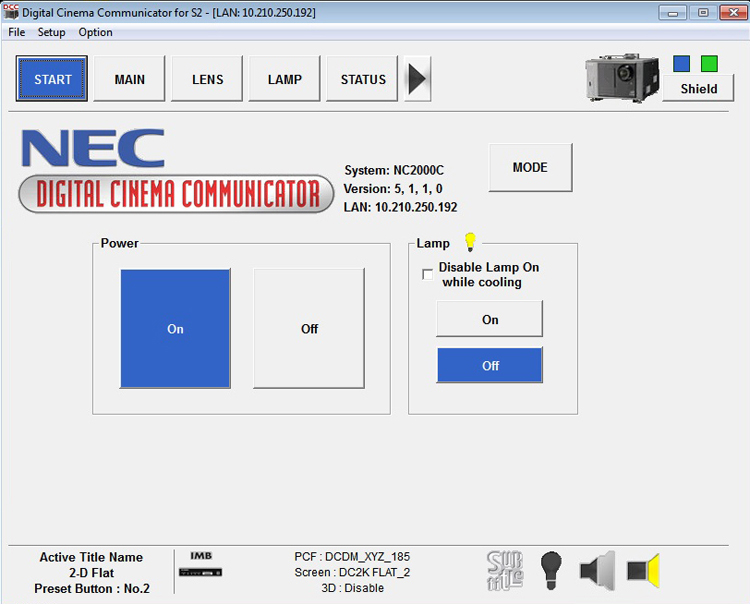
Here is how it works...

Connect to DCC on using the IP address of your projector. You'll arrive at the main screen.

 -

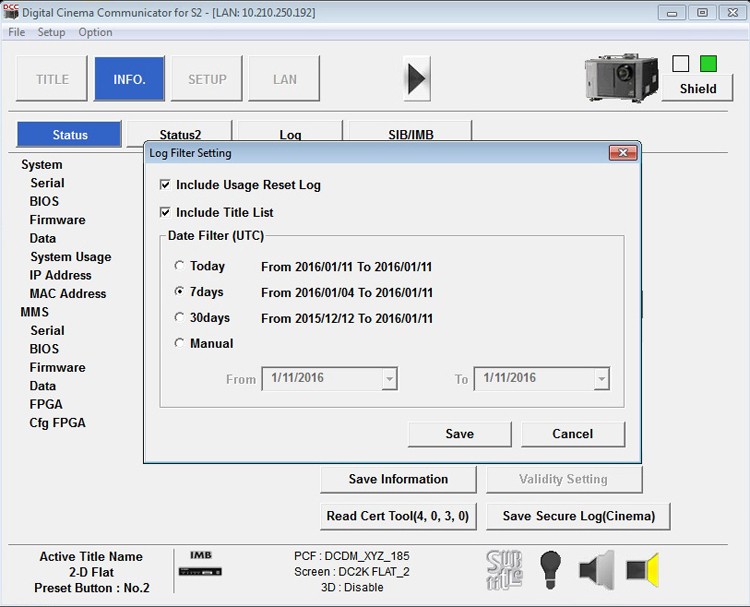
Using the black arrow to the right of the Status button at the top scroll to the Info Tab. Once there click "Save Information" button near bottom center and then select the range of logs you want to keep on the pop up screen and where you want to put them. Try to be somewhat date specific as there can be a lot to wade through.

 -

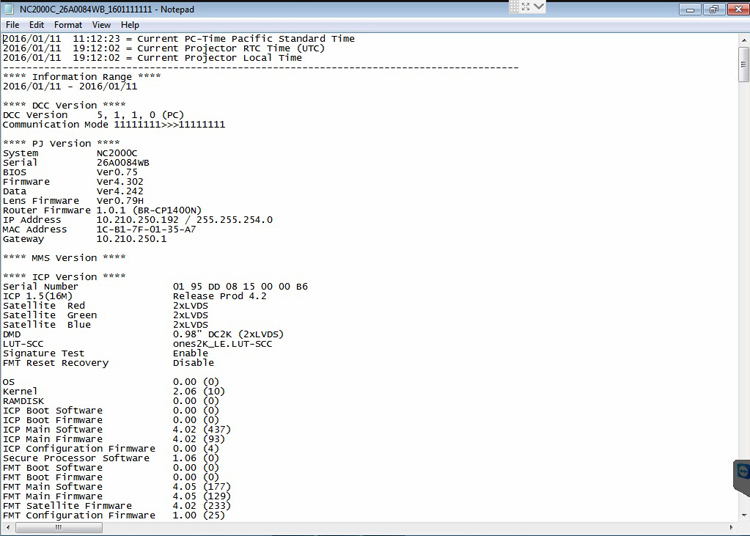
To open up the logs simply double click on the logs file and it will open for you to read. They look like this. Scroll down to the error log.

 -

Don't ask for any passwords or anything related. None of us will give out that info to anyone. You'll have to get that from your service tech. I have provided this because NEC may actually ask you do do it to send them the logs if you are having issues. That's why NEC provides the DCC download button in the projector web server.

Mark

 |  IP: Logged

Leo Enticknap
Film God

Posts: 7474
From: Loma Linda, CA
Registered: Jul 2000


 - posted 01-11-2016 02:05 PM      Profile for Leo Enticknap   Author's Homepage   Email Leo Enticknap   Send New Private Message       Edit/Delete Post 
quote: Mark Gulbrandsen
You can use any Win 7 laptop that has an Ethernet jack on it...
However, if you are connecting the laptop directly to the Ethernet jack on the projector itself (i.e. not via a router or switch), you'll need an Ethernet crossover cable, not a patch cable.

Incidentally and FWIW, Digital Cinema Communicator also works fine under Ubuntu and WINE, for any Windows-phobes out there. As the Dolby Show Manager Java app can also be run under Linux/Debian, it is perfectly possible to use a 10-year old laptop that came with Windows XP, of the sort that are now almost being given away on Ebay with the hardware in perfectly good condition, as a remote control terminal for an NEC/Dolby server setup. As the Doremi servers have a built-in VNC server, they'd also be good for that.

 |  IP: Logged

Mark Gulbrandsen
Resident Trollmaster

Posts: 16657
From: Music City
Registered: Jun 99


 - posted 01-11-2016 06:55 PM      Profile for Mark Gulbrandsen   Email Mark Gulbrandsen   Send New Private Message       Edit/Delete Post 
quote: Leo Enticknap
However, if you are connecting the laptop directly to the Ethernet jack on the projector itself (i.e. not via a router or switch), you'll need an Ethernet crossover cable, not a patch cable.

Actually you don't need a crossover cable. The NEC's internal router automatically takes care of that for you as a switch would. I actually use a wireless node myself and simply plug that into the theater's main Management switch at a site and access any piece of gear that way (or through the TMS or booth computer). At single screen sites I can access by connecting to the local switch or the projector itself with either the wireless node or direct connection.

All my sites except one drive in have booth computers or TMS.

Now I can't speak for the Series 1 NEC stuff. That may well require a crossover cable.

Mark

 |  IP: Logged

Leo Enticknap
Film God

Posts: 7474
From: Loma Linda, CA
Registered: Jul 2000


 - posted 01-11-2016 10:01 PM      Profile for Leo Enticknap   Author's Homepage   Email Leo Enticknap   Send New Private Message       Edit/Delete Post 
I've never tried to connect a computer directly to our series 1 (2500) NEC: it's connected to a router/firewall which also handles wireless access and the Internet connection, along with all the other networked devices and computers in the booth.

So, yes, sorry, I was assuming that his projector's NIC does not have auto MDI-X capability and thus that he'd need a crossover cable to connect a laptop to it directly, without knowing that for sure.

If he has a patch cable lying about but not a crossover cable (which I'd guess is quite likely, as patch cables are far more commonly found), then he can't break anything by trying it and then getting a crossover cable if it doesn't work.

 |  IP: Logged


All times are Central (GMT -6:00)
This topic comprises 2 pages: 1  2 
 
   Close Topic    Move Topic    Delete Topic    next oldest topic   next newest topic
 - Printer-friendly view of this topic
Hop To:


Powered by Infopop Corporation
UBB.classicTM 6.3.1.2

The Film-Tech Forums are designed for various members related to the cinema industry to express their opinions, viewpoints and testimonials on various products, services and events based upon speculation, personal knowledge and factual information through use, therefore all views represented here allow no liability upon the publishers of this web site and the owners of said views assume no liability for any ill will resulting from these postings. The posts made here are for educational as well as entertainment purposes and as such anyone viewing this portion of the website must accept these views as statements of the author of that opinion and agrees to release the authors from any and all liability.

© 1999-2020 Film-Tech Cinema Systems, LLC. All rights reserved.