|
|
This topic comprises 3 pages: 1 2 3
|
|
Author
|
Topic: Pro hardware video players 2016!
|
|
|
Scott Norwood
Film God

Posts: 8146
From: Boston, MA. USA (1774.21 miles northeast of Dallas)
Registered: Jun 99
|
 posted 04-12-2016 08:46 AM


I think that VLC may work better with some graphics cards and worse with others, as I have heard good things about it from people who have used it successfully. As I said, I didn't spend much time with it. I have used "mplayer" before with good results, but that uses a command-line interface and is not something to spring on the uninitiated. It runs on Windows and Linux...not sure about the Mac.
Blackmagic and AJA are the two best-known manufacturers of SDI I/O cards. There are various "playout" programs that can be used to send video files to them. Sound needs to come from the SDI signal, not from the computer sound card (due to latency issues), so you need a disembedder and D/A converter. I have used the "MLT" software for Linux for playout purposes and had mixed results. There also exist component analog I/O cards, but they seem somewhat obsolete in today's digital world.
One issue with playing back to the computer output is that everything gets displayed at the computer's refresh rate (usually 60p, but not necessarily so), rather than its native frame rate. SDI will output in the correct frame rate, but, again, mixing frame rates in a single program can cause issues.
As for HDCP--it can come into play even if you are not showing "protected" content. Mac laptops often have issues with it, and there is a reason why most scalers have a "disable HDCP" option. Add in the short cable length limit and the non-locking connector, and you have something that really is not suitable for professional use.
| IP: Logged
|
|
Carsten Kurz
Film God
Posts: 4340
From: Cologne, NRW, Germany
Registered: Aug 2009
|
posted 04-12-2016 09:28 AM
Depending on the projector you need to use and media type you get, you may actually be glad that the computer output has a fixed rate...
That said, some players have options to adjust the display rate according to the file framerate if needed.
HDMI cable length issues can easily be overcome with extensions, CAT-Converters, etc. Yes, I would love to have a more solid signal connection, but 'after the long run', the benefits usually outweigh the disadvantages. Depends a lot on the festival profile and 'grade' of the participants.
Good planing and media qc is always advised, there are lot's of other issues besides the image or frame rates. Lot's of festival entries get mixed on laptop or iMac speakers nowadays. These kids have no idea what goes on in the bottom department of their 'location sound'. A realtime EQ (either digital, like VLC offers it), or between the computer audio and auditorium sound system (small mixing desk) can be a life saver...
- Carsten
| IP: Logged
|
|
Marcel Birgelen
Film God
Posts: 3357
From: Maastricht, Limburg, Netherlands
Registered: Feb 2012
|
posted 04-12-2016 05:15 PM
For the real ghetto setups, I prefer using MediaPlayer Classic instead of VLC. VLC, although being a swiss army knive in regards to playback, has issues. I've had issues with flashes in between movies and also erratic output window switches.
I've also used ScreenMonkey, but didn't really find it all that intuitive. QLab is more intuitive, but limited to MacOS X. If you're looking for a cheap/free P.C.-based show control software, you might check out OpenLP, which is essentially open source Church worship software, but can be used for unholy things just as well. I've actually used different worship software packages as cheap show control solution in the past.
| IP: Logged
|
|
|
|
|
|
Carsten Kurz
Film God
Posts: 4340
From: Cologne, NRW, Germany
Registered: Aug 2009
|
posted 04-13-2016 05:01 AM
It is rather low cost and you won't regret having bought it, but your choices of playout software and codecs is limited against other solutions. Audio will come out up to 8 channels through HDMI and SDI, but you need systems to split it out of the video path.
Some professional playout software will support it. Otherwise you are limited to BMDs Media Express.
That said, if you use a MacBook Pro, then you have the choice of both - thunderbolt/display port/HDMI, and SDI/HDMI through the BMD. Not so bad. You may still end up with VLC, Qlab, or Quicktime Player Pro more or less often.
Keep in mind that some MacBooks come with proprietary SSDs, and so storage space for many video files could be very limited (or costly). You may need an external thunderbolt drive as well.
What kind of projection system and cinema audio processor will this be connected to?
- Carsten
| IP: Logged
|
|
Dennis Fung
Film Handler
Posts: 11
From: Kwun Tong, Kowloon, Hong Kong
Registered: Jul 2014
|
posted 04-14-2016 08:03 AM
My experience, you should aware the VNC with additional monitor. It's really rely on computer CPU and GPU. If the computer didn't fast enough, you may not able to playback Pro Formats (i.e. ProRes) smoothly.
For BMD ultrastudio solution, I may say mp, unless you have professional software on hard. Otherwise you drag in the videos into Resolve, just like a preview monitor when you on editing. But I don't think this is a proper way for screening.
BMD Media Express can't handle some rare codecs, it will create another problems.
I got many bad experiences on VNC with Mac Mini. And I saw some terrible error on Playback Pro with Macbook Pro. Not just the hardware or software problems. All about the files are not complete.
Again, there are no way to make sure everything all right on video playback, unless you convert into DCP.
| IP: Logged
|
|
Javier Plano
Film Handler
Posts: 13
From: Ramos Mejía, Buenos Aires, Argentina
Registered: Apr 2016
|
posted 04-16-2016 04:58 PM
guys, I want to thank all of you for your replies, it clarified so much for me
I'm going to propose this configuration for the festival, let me know what you think:
-MacBookPro i7 - 2.5 Ghz, 16Gb DDR3 1600 Mz RAM, 15,4" (2880x1800) Iris pro display, GeForce GT 750M 2 Gb ram, 500Gb SSD, thunderbolt ports
-Blackmagic ultrastudio mini monitor adapter to SDI and HDMI
-Panasonic PT DZ870 projector, 8.500 ANSI, Full HD, 1.7-2.4:1 lens, SDI input
-PlaybackPro Plus software
-limit the types of files accepted for screening (mostly mac supported formats, making a concession on HQ H.264 AAC when nothing else is available)
my only doubt is about the sound. if I understand correctly, I can get digital audio from the HDMI output of the blackmagic adapter, right?
if I can only send analog audio (audio setup is provided by the theater, and I still don't know for sure which is going to be), I should convert that digital audio through another adapter? or am I gonna be able to use the earphone jack of the mac? I assume the first option is better and I can have less risk of having latency, am I right?
thanks for all your help, really appreciated
| IP: Logged
|
|
|
|
|
|
Jim Cassedy
Phenomenal Film Handler
Posts: 1661
From: San Francisco, CA
Registered: Dec 2006
|
posted 04-17-2016 04:01 PM
quote: Leo Enticknap
There is - Playback Pro - but it's quite pricey
quote: Richard Fowler
I ran an entire four day festival using Playback Pro
several years ago without problems.
I got used to seeing Playback Pro at many of the big Union convention
& trade show jobs I sometimes work at. (Apple, Facebook,Oracle, etc)
I also got used to using it for some corporate presentations at
Dolby. Yes, it's expensive, but it does so much and I liked it so much
that I not only went out & bought my own copy, but also got a dedicated
Macbook Pro to run it on. It's much more versatile & stable than Keynote,
and the ability to match black levels, audio & re-size pictures and even
re-arrange content "on the fly" makes it worth every penny to me.
I've never had a show hang or crash, nor had it unexpectedly put the
"desktop" on screen. It's almost impossible to muck-up a show.
Here's (part!) of the setup I used at a big Asian-American Film Festival
here in San Francisco recently. Content was a mix of DCP, HDCAM, Blu-Ray
& Computer files. I actually had 2 Macbook Pros running Playback Pro here.
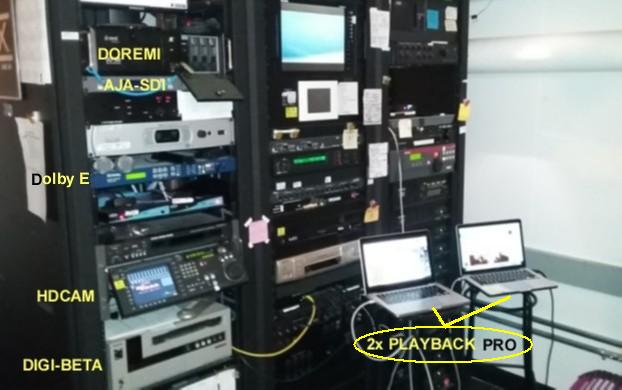
The sharp-eyed might even notice there's even a Laser-Disk player in that rack!
This particular room can pretty much do everything, including 16 & 35mm
| IP: Logged
|
|
|
|
|
|
Javier Plano
Film Handler
Posts: 13
From: Ramos Mejía, Buenos Aires, Argentina
Registered: Apr 2016
|
posted 04-18-2016 03:20 PM
thanks for your input Marcel
SDI uses BNC connectors, wich are safer than a hdmi plug (I never really liked it, I think it's a bad, unsafe design for non home configurations)
also, through PlaybackPro I can use the SDI as a dedicated video output, so I only send video to the projector, instead of an extended desktop
and also, I think the macbook pro doesn't have a hdmi output, so I have to put something to adapt the thunderbolt to anything, SDI, hdmi or DVI
am I wrong on something?
I think I don't want to use a show control software, but something simple, easy to understand and operate for anyone (I'm not going to be that person). I only need it to make playlist, smooth transitions, and be stable. that's it
| IP: Logged
|
|
|
|
All times are Central (GMT -6:00)
|
This topic comprises 3 pages: 1 2 3
|
Powered by Infopop Corporation
UBB.classicTM
6.3.1.2
The Film-Tech Forums are designed for various members related to the cinema industry to express their opinions, viewpoints and testimonials on various products, services and events based upon speculation, personal knowledge and factual information through use, therefore all views represented here allow no liability upon the publishers of this web site and the owners of said views assume no liability for any ill will resulting from these postings. The posts made here are for educational as well as entertainment purposes and as such anyone viewing this portion of the website must accept these views as statements of the author of that opinion
and agrees to release the authors from any and all liability.
|

 Home
Home



 Printer-friendly view of this topic