Film-Tech Cinema Systems
Film-Tech Forum ARCHIVE


my profile | my password | search | faq & rules | forum home
  next oldest topic   next newest topic
» Film-Tech Forum ARCHIVE   » Operations   » Digital Cinema Forum   » Sony SRX R 515 yellow spot on the screen (Page 2)

 
This topic comprises 3 pages: 1  2  3 
 
Author Topic: Sony SRX R 515 yellow spot on the screen
Jerzy Gwizdz
Film Handler

Posts: 25
From: Nowy Sacz Malopolska Poland
Registered: Apr 2015


 - posted 02-19-2019 09:16 AM      Profile for Jerzy Gwizdz   Author's Homepage   Email Jerzy Gwizdz   Send New Private Message       Edit/Delete Post 
Trouble repaired
The stain visible only with the open douser, much better colors and brightness.
The question is how long ?
software 1.54 sorry for the mistake
Thank you all for your suggestions and help [Smile] [beer]

Jerzy

 |  IP: Logged

Alan Gouger
Jedi Master Film Handler

Posts: 501
From: Bradenton, FL, USA
Registered: Jul 2000


 - posted 02-19-2019 12:00 PM      Profile for Alan Gouger   Author's Homepage   Email Alan Gouger   Send New Private Message       Edit/Delete Post 
Good news. Any chance you can provide an updated picture, thank you.

 |  IP: Logged

Marco Giustini
Film God

Posts: 2713
From: Reading, UK
Registered: Nov 2007


 - posted 02-19-2019 12:49 PM      Profile for Marco Giustini   Email Marco Giustini   Send New Private Message       Edit/Delete Post 
‘Visible only with open dowser’?

You should have your projector serviced every 12 months and keep it in a clean environment. That’s a must with sony.

 |  IP: Logged

Marcel Birgelen
Film God

Posts: 3357
From: Maastricht, Limburg, Netherlands
Registered: Feb 2012


 - posted 02-19-2019 04:03 PM      Profile for Marcel Birgelen   Email Marcel Birgelen   Send New Private Message       Edit/Delete Post 
I guess that the calibration helped to fix most of it. But either the calibration wasn't entirely successful or there is some T-Core damage already done.

 |  IP: Logged

Carsten Kurz
Film God

Posts: 4340
From: Cologne, NRW, Germany
Registered: Aug 2009


 - posted 02-19-2019 04:42 PM      Profile for Carsten Kurz   Email Carsten Kurz   Send New Private Message       Edit/Delete Post 
I have setup a 'TCore Saver' Macro on our Sony to help reduce the panel aging. It is simple to do, and it also saves quite a bit of electrical power and lamp runtime. I would suggest you do that, too in order to give your light engine a bit more life time. It' so simple I'm wondering why Sony/techs do not implement it as an install default.

You should also talk to your tech about the cooling scheme. Although I guess, in PL, the standard scheme should be okay for you.

- Carsten

 |  IP: Logged

Marco Giustini
Film God

Posts: 2713
From: Reading, UK
Registered: Nov 2007


 - posted 02-20-2019 12:02 AM      Profile for Marco Giustini   Email Marco Giustini   Send New Private Message       Edit/Delete Post 
What are the settings of that macro, Carsten?

 |  IP: Logged

Alan Gouger
Jedi Master Film Handler

Posts: 501
From: Bradenton, FL, USA
Registered: Jul 2000


 - posted 02-20-2019 02:52 AM      Profile for Alan Gouger   Author's Homepage   Email Alan Gouger   Send New Private Message       Edit/Delete Post 
quote: Marco Giustini
What are the settings of that macro, Carsten?

Would like to know as well. Are you running a full raster 40 or 50% IRE pattern for a few minutes?

 |  IP: Logged

Carsten Kurz
Film God

Posts: 4340
From: Cologne, NRW, Germany
Registered: Aug 2009


 - posted 02-20-2019 05:33 AM      Profile for Carsten Kurz   Email Carsten Kurz   Send New Private Message       Edit/Delete Post 
Hi Alan,

no, it's not a 'burn out' scheme, I just reduce the light level into the T-Core as much as possible for as long as possible.

Does the 815 still have the two 'slide-in grills' between Light-Source and Light-Engine? I would assume they are no longer necessary for a laser light source?
They were built into the UHP 51x machines because initially the intention was to always run them with all lamps on (best uniformity), with lamp choice (450/330) and lamp current alone not being sufficient to control brightness levels as necessary. I assume the laser light source has a larger control range?

Will get back later.

- Carsten

 |  IP: Logged

Marco Giustini
Film God

Posts: 2713
From: Reading, UK
Registered: Nov 2007


 - posted 02-20-2019 01:31 PM      Profile for Marco Giustini   Email Marco Giustini   Send New Private Message       Edit/Delete Post 
Do UHP lamps like to be turned up and down in power all the time?

 |  IP: Logged

Carsten Kurz
Film God

Posts: 4340
From: Cologne, NRW, Germany
Registered: Aug 2009


 - posted 02-20-2019 01:58 PM      Profile for Carsten Kurz   Email Carsten Kurz   Send New Private Message       Edit/Delete Post 
They don't mind. The software limits lowest current to a reasonable value anyway. You get longer life out of UHP lamps at lower currents. When they age, they may start to flicker at low current settings, but, typically later than as if they had been operated at full current all the time. I get much longer life out of our 450W bulbs (and many more ignitions) since I apply that scheme.

But the reduced current is only half of the bill. The two light absorbing grills account for most of it. They act sort of like a dowser before the light enters the light engine. Whereas in most projectors (also DLP), the actual dowser is behind the light engine and doesn't protect it while closed.

Keep in mind, the audience never get's to see the reduced light in that mode. It is only active when no light is on screen. Not completely true for us, as we also show our preshow slides during admission through HDMI in that mode. Which accounts for a lot of the savings, as it is nearly one hour per day.

- Carsten

 |  IP: Logged

Marco Giustini
Film God

Posts: 2713
From: Reading, UK
Registered: Nov 2007


 - posted 02-21-2019 02:18 PM      Profile for Marco Giustini   Email Marco Giustini   Send New Private Message       Edit/Delete Post 
Indeed the two dowsers must help. Interesting technique. Thanks.

Only small catch - if I really want to be fussy - is that those lamps will take some minutes to stabilise the colours once the brightness is changed. At least that was happening when I checked.
That said, nobody will likely notice and brightness changes anyway between formats.

 |  IP: Logged

Jerzy Gwizdz
Film Handler

Posts: 25
From: Nowy Sacz Malopolska Poland
Registered: Apr 2015


 - posted 02-21-2019 02:46 PM      Profile for Jerzy Gwizdz   Author's Homepage   Email Jerzy Gwizdz   Send New Private Message       Edit/Delete Post 
Hey
Alan: Photos soon [Smile]
Marco: I will definitely repeat the calibration, I will be watching and I hope that the year will be ok.
Marcel: I think the calibration was successful, but the remains are damaged by the t-core. It's good that the viewer can not see it [Smile]
Carsten: I think that this is a good idea especially for the brightness of the lamp, because after 2000 hours the brightness of the projection is very losing.
At the beginning are too bright in 2D

Greetings

 |  IP: Logged

Jerzy Gwizdz
Film Handler

Posts: 25
From: Nowy Sacz Malopolska Poland
Registered: Apr 2015


 - posted 02-22-2019 10:13 AM      Profile for Jerzy Gwizdz   Author's Homepage   Email Jerzy Gwizdz   Send New Private Message       Edit/Delete Post 
Hey
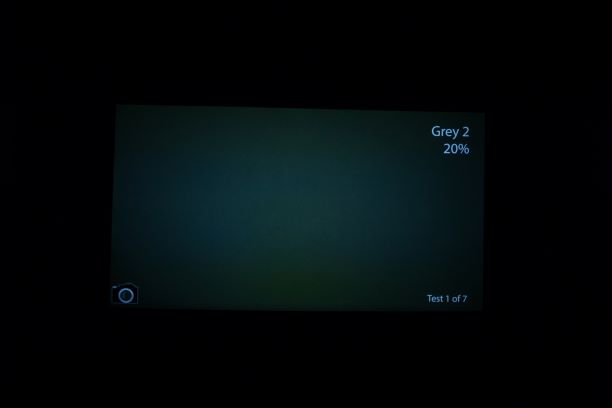
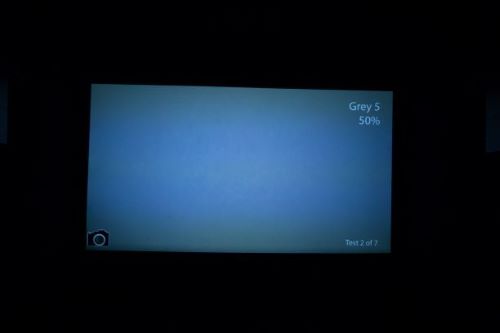
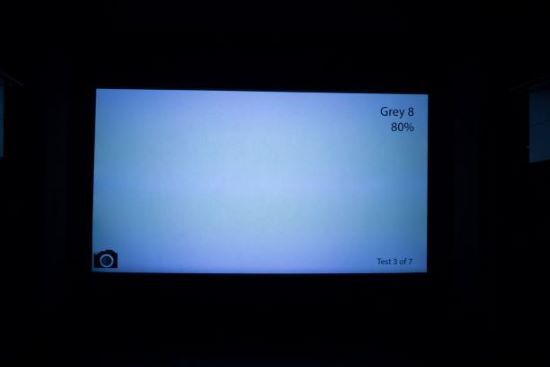
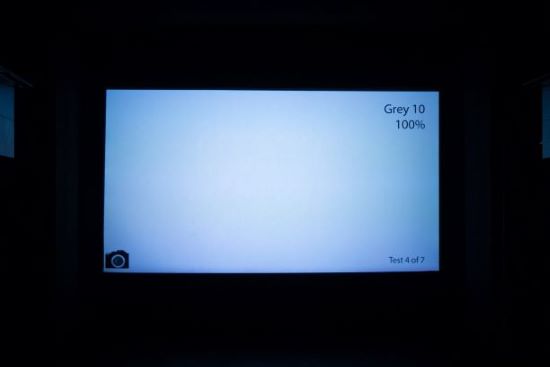
Unfortunately, after taking pictures, it's not as beautiful as it seemed to me.
It's better but not perfect
Here are the pictures:
 -

 -

 -

 -

and open douser

 -

 |  IP: Logged

Carsten Kurz
Film God

Posts: 4340
From: Cologne, NRW, Germany
Registered: Aug 2009


 - posted 02-22-2019 10:56 AM      Profile for Carsten Kurz   Email Carsten Kurz   Send New Private Message       Edit/Delete Post 
It would be interesting to see the actual calibration pattern (there is a CSV file).

It's hard to say from the distance, but if the tech knew what he was doing, he might have done as much as possible, but your T-Core could sooner or later be up for a replacement. I know that Sony still sells extended warranties, but I don't know under which conditions. It might be possible that a later T-Core replacement could become a lot cheaper with one of these warranties. You need to talk to Sony or your distributor.

@Marco - yes, these lamps need to stabilise a bit, but of course, that goes much faster from reduced to full current than from initial power on. Also, in many systems, lamps are running with somewhat reduced current anyway to meet screen brightness (e.g. between flat or scope). It's up to the installers personal preference wether he uses lamp current, light grills, or both to meet brightness specs. The control range is similar for both, but, current of cause is continuous, while the grills have only two discrete steps.

In our case, every regular playlists starts with either a standard slide, or dark frame/dowser closed over something like 10-15 seconds, so, there is probably enough time for the bulbs to come to specs. We never start a feature immediately from the standby function, there is always something 'in-between'.

It depends on the scheduling habits of specific cinemas, but in general, projectors always run a considerable amount of time before, between, and after shows, and that can sum up to quite a bit of runtime where you can protect your light-engine. We also have rentals, alternative content, etc. where all the projector is doing is projecting a slide as a backdrop for multiple hours consecutively. Even with the auditorium lights up, the standby pattern applied to e.g. the HDMI input will still deliver enough punch, but without full light levels entering the T-Core. And, aside from the protection, it also saves electricy and lamp runtime/ignitions noticeably.

It's also nearly effortless. At show end, there are usually cues for audio, auditorium lights, masking, etc. , and one can also enter Protection-Macro within these cues. When you power up the projector the next day, the same macro will automatically be active without anyone having to think about it. So, for how long the machine will be running after power up, it will always run with protection macro until the first show starts, and will enter protection macro when the show finishes. I set this up on our system 2 years ago and there wasn't even a need to tell staff about it. It works without anyone taking special notice. All you need to do is e.g. copying the standard flat/preshow macro, rename it to 'StandBy' or whatever you like, adjust lamp current to 80%, activate both grills, save. Then add this macro to your show end cues.
I have one StandByDCI macro, and one StandByHDMI macro, the latter one can be used to show slides, long backdrops, etc. The StandByDCI macro also has the regular real dowser closed, as it is never meant to show actual DCI content.

DLPs/Xenons do not suffer as the Sonys do, but, from the standpoint of electricity saving and bulb runtime, one could even use the same for DLP UHPs and Xenons as well. They all benefit to a certain extent from reduced lamp current, at least if you don't overdo it.
Should also be very effective in systems with 3D run at max light power. It doesn't make sense to run them at full power before, between and after shows.

- Carsten

 |  IP: Logged

Alan Gouger
Jedi Master Film Handler

Posts: 501
From: Bradenton, FL, USA
Registered: Jul 2000


 - posted 02-22-2019 03:15 PM      Profile for Alan Gouger   Author's Homepage   Email Alan Gouger   Send New Private Message       Edit/Delete Post 
Do LCOS panels suffer image retention? Wondering if a cinema running primarily scope features or worse leaving the 3D lens in place full time would cause uneven wear that would show up down the road.

 |  IP: Logged


All times are Central (GMT -6:00)
This topic comprises 3 pages: 1  2  3 
 
   Close Topic    Move Topic    Delete Topic    next oldest topic   next newest topic
 - Printer-friendly view of this topic
Hop To:


Powered by Infopop Corporation
UBB.classicTM 6.3.1.2

The Film-Tech Forums are designed for various members related to the cinema industry to express their opinions, viewpoints and testimonials on various products, services and events based upon speculation, personal knowledge and factual information through use, therefore all views represented here allow no liability upon the publishers of this web site and the owners of said views assume no liability for any ill will resulting from these postings. The posts made here are for educational as well as entertainment purposes and as such anyone viewing this portion of the website must accept these views as statements of the author of that opinion and agrees to release the authors from any and all liability.

© 1999-2020 Film-Tech Cinema Systems, LLC. All rights reserved.