Film-Tech Cinema Systems
Film-Tech Forum ARCHIVE


my profile | my password | search | faq & rules | forum home
  next oldest topic   next newest topic
» Film-Tech Forum ARCHIVE   » Operations   » Digital Cinema Forum   » Connect Wii U to Christie Solaria One+ (Page 2)

 
This topic comprises 2 pages: 1  2 
 
Author Topic: Connect Wii U to Christie Solaria One+
Jake Sinn
Film Handler

Posts: 14
From: Mahwah, US, NJ
Registered: Oct 2019


 - posted 10-22-2019 08:17 AM      Profile for Jake Sinn   Email Jake Sinn   Send New Private Message       Edit/Delete Post 
Sounds good. Why is there a exclamation point next to the screen file in image one and next to measured color in image two?

And what is screen file and measured color?

 |  IP: Logged

Carsten Kurz
Film God

Posts: 4340
From: Cologne, NRW, Germany
Registered: Aug 2009


 - posted 10-22-2019 09:14 AM      Profile for Carsten Kurz   Email Carsten Kurz   Send New Private Message       Edit/Delete Post 
I'd say, call up the channel config you used for the DVD player - that should work. All you need to change is HDMI-A to HDMI-B.

Do you have that Wii U on site already? Because you could already try now with the existing HDMI-DVI cable between DVD-Player and projector (except for audio). That would give you some peace of mind.

- Carsten

 |  IP: Logged

Sean McKinnon
Phenomenal Film Handler

Posts: 1712
From: Peabody Massachusetts
Registered: Sep 2000


 - posted 10-22-2019 09:30 AM      Profile for Sean McKinnon   Author's Homepage   Email Sean McKinnon   Send New Private Message       Edit/Delete Post 
quote: Jake Sinn
Why is there a exclamation point next to the screen file in image one and next to measured color in image two?
usually that icon indicates that the selected file has not been setup. Is it possible the actual measured colors are saved under a different file name? Same thing with the screen file.

 |  IP: Logged

Carsten Kurz
Film God

Posts: 4340
From: Cologne, NRW, Germany
Registered: Aug 2009


 - posted 10-22-2019 09:45 AM      Profile for Carsten Kurz   Email Carsten Kurz   Send New Private Message       Edit/Delete Post 
Jake - give us screen shots of the actual channel config you use for DVD playback (HDMI-A)! It's useless to talk about that Twin-DVI setup you're never going to use.

- Carsten

 |  IP: Logged

Jake Sinn
Film Handler

Posts: 14
From: Mahwah, US, NJ
Registered: Oct 2019


 - posted 10-22-2019 10:03 AM      Profile for Jake Sinn   Email Jake Sinn   Send New Private Message       Edit/Delete Post 
No, we don't have anything set up yet. We are going to test everything tomorrow. I am not at the theater right now, but will look tomorrow. I will try the one I showed first, but change DVI Twin to HDMI B and see if that works. I will also change the data format to 8-bit 4:2:2 (YCbCr).

 |  IP: Logged

Carsten Kurz
Film God

Posts: 4340
From: Cologne, NRW, Germany
Registered: Aug 2009


 - posted 10-22-2019 11:53 AM      Profile for Carsten Kurz   Email Carsten Kurz   Send New Private Message       Edit/Delete Post 
But - you did show DVDs before? So, which channel profile did you use for that?

Not saying that we can't talk you through adjusting that Twin-DVI setup - but it would be easier if you started with a channel profile that is closer to your needs or is known to be working with the DVD player.

- Carsten

 |  IP: Logged

Jake Sinn
Film Handler

Posts: 14
From: Mahwah, US, NJ
Registered: Oct 2019


 - posted 10-22-2019 12:30 PM      Profile for Jake Sinn   Email Jake Sinn   Send New Private Message       Edit/Delete Post 
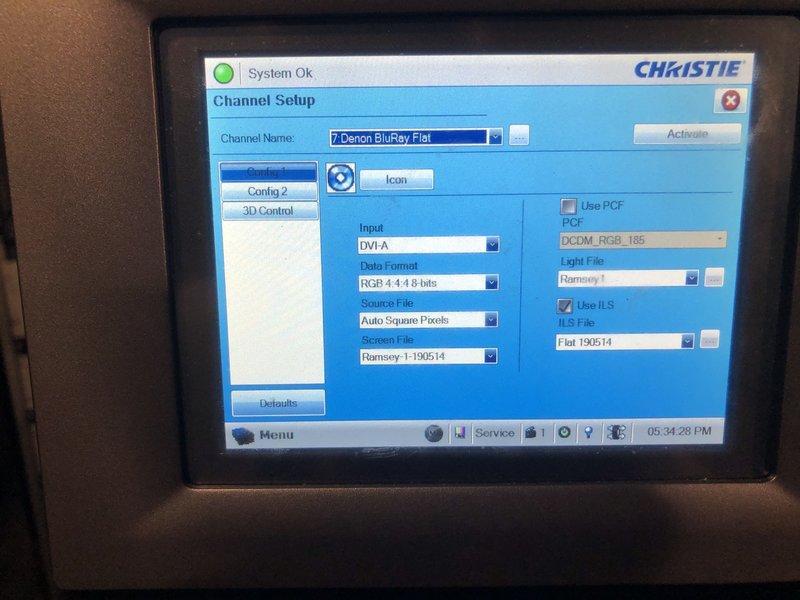
Yes, we do show DVDs for birthday parties and private showings. That is what those 2RCA cables are plugged into from the cinema processor. I think the channel is called Denon DVD or something like that. I will take a look at the configuration of that channel tomorrow and just copy all the settings from that into the channel I showed in the previous picture, but of course just change the input to HDMI B. So you're saying that all the same settings that are set for the DVD channel should be set for the Wii U (besides the input)?

That DVD player channel settings should be great. We use it multiple times a month.

 |  IP: Logged

Carsten Kurz
Film God

Posts: 4340
From: Cologne, NRW, Germany
Registered: Aug 2009


 - posted 10-22-2019 12:35 PM      Profile for Carsten Kurz   Email Carsten Kurz   Send New Private Message       Edit/Delete Post 
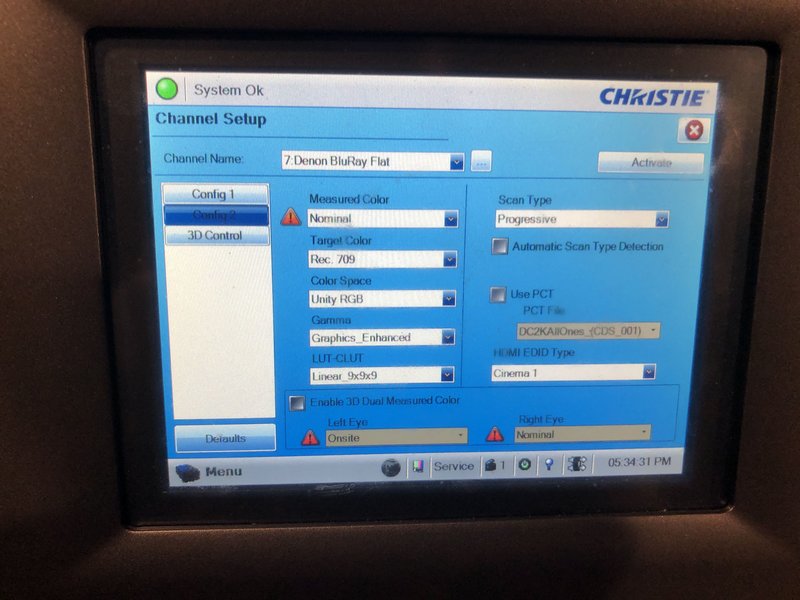
Yes. a DVD player signal timing may be a bit different compared to a Bluray player (is it ACTUALLY a DVD player, or a Bluray player?), but the config should be very close if not identical to what you need for the Wii U. 4:2:2, YCbCr, rec.709, 1080p. etc.

But let us have a look when you're there again.

- Carsten

 |  IP: Logged

Jake Sinn
Film Handler

Posts: 14
From: Mahwah, US, NJ
Registered: Oct 2019


 - posted 10-22-2019 12:48 PM      Profile for Jake Sinn   Email Jake Sinn   Send New Private Message       Edit/Delete Post 
Of course. I will send pictures of the configuration of the DVD player.

I'm not entirely sure if it is just a DVD player or if it is Blue-Ray as well. I think it is Blue-Ray as well. It is built into the projector pedestal and brand is Denon.

Edit: Do you think we should play in flat or scope?

 |  IP: Logged

Carsten Kurz
Film God

Posts: 4340
From: Cologne, NRW, Germany
Registered: Aug 2009


 - posted 10-22-2019 02:58 PM      Profile for Carsten Kurz   Email Carsten Kurz   Send New Private Message       Edit/Delete Post 
I don't know what the Wii U allows, or the specific game, but I am pretty sure that 16:9 is the default for games, so, use flat (or 16:9 if there is an actual 16:9 config).

- Carsten

 |  IP: Logged

Jake Sinn
Film Handler

Posts: 14
From: Mahwah, US, NJ
Registered: Oct 2019


 - posted 10-22-2019 03:45 PM      Profile for Jake Sinn   Email Jake Sinn   Send New Private Message       Edit/Delete Post 
We will see. We will be playing Super Smash Bros.

I will get back to you tomorrow with pictures of config for DVD player and let you know how our testing went.

 |  IP: Logged

Jake Sinn
Film Handler

Posts: 14
From: Mahwah, US, NJ
Registered: Oct 2019


 - posted 10-23-2019 06:21 PM      Profile for Jake Sinn   Email Jake Sinn   Send New Private Message       Edit/Delete Post 
Hi all,

I will attach images of config for BlueRay channel below

 -
 -

Everything worked! I changed the settings to the HDMI B channel and everything works good. The controllers even worked from in the theater with no problems. The audio sounds great and video looks crisp.

 |  IP: Logged

Marcel Birgelen
Film God

Posts: 3357
From: Maastricht, Limburg, Netherlands
Registered: Feb 2012


 - posted 10-23-2019 06:54 PM      Profile for Marcel Birgelen   Email Marcel Birgelen   Send New Private Message       Edit/Delete Post 
Great to see that everything is working.

One thing to remember: Those controllers will consume more juice if they need to bridge a bigger gap. Having some charged spares could be a good idea.

Also, those things run on Bluetooth, I've seen those things fail on longer distances, with many people in the room using Bluetooth gadgets. For example, we had someone using a Bluetooth airmouse to control his presentation on a notebook that was located in the booth. It worked beautifully in an empty room, but in a room filled with mobile phones, it simply stopped working. We switched to a sign language where I was pushing buttons on command.

Sign language will not be the best way to control Super Smash Bros. (If there is something to control at all, for me that game was always just random button pushing. [Wink] )

But I don't want to raise too much concerns, most likely, stuff will just work, but if you run into non-responsive controllers, this might be the cause...

PS: Don't forget to try Mario Kart on the big screen. [Wink]

 |  IP: Logged

Jake Sinn
Film Handler

Posts: 14
From: Mahwah, US, NJ
Registered: Oct 2019


 - posted 10-23-2019 06:55 PM      Profile for Jake Sinn   Email Jake Sinn   Send New Private Message       Edit/Delete Post 
Thank you for letting me know. Maybe we will tell everyone to turn off their Bluetooth before entering the theater.

 |  IP: Logged


All times are Central (GMT -6:00)
This topic comprises 2 pages: 1  2 
 
   Close Topic    Move Topic    Delete Topic    next oldest topic   next newest topic
 - Printer-friendly view of this topic
Hop To:


Powered by Infopop Corporation
UBB.classicTM 6.3.1.2

The Film-Tech Forums are designed for various members related to the cinema industry to express their opinions, viewpoints and testimonials on various products, services and events based upon speculation, personal knowledge and factual information through use, therefore all views represented here allow no liability upon the publishers of this web site and the owners of said views assume no liability for any ill will resulting from these postings. The posts made here are for educational as well as entertainment purposes and as such anyone viewing this portion of the website must accept these views as statements of the author of that opinion and agrees to release the authors from any and all liability.

© 1999-2020 Film-Tech Cinema Systems, LLC. All rights reserved.