|
|
This topic comprises 2 pages: 1 2
|
|
Author
|
Topic: Can I Put Two LAN Circuits On One CAT 5 Cable?
|
|
|
Marcel Birgelen
Film God
Posts: 3357
From: Maastricht, Limburg, Netherlands
Registered: Feb 2012
|
 posted 12-17-2014 07:12 PM


quote: David Buckley
And, time being money, I'd rather drive down the road and lose 20 bucks then lose an hour traveling to somewhere cheaper. Your mileage may, of course, vary.
As an ex-networking professional, don't you have accounts at wholesalers that deliver those things to your doorstep?
quote: David Buckley
If you are aware of a standard that port splitters "cheat", I'd like to hear about it. It certainly doesn't increase the chances of interference, and its a good job really, as there are networking cables with far more than the four pairs of copper that cat 5/6 uses.
As an ex-networking professional, you might know that 100BaseTX (which some ex-networking professionals might see as some kind of standard), which covers about 95% or even more of the Fast Ethernet market out there expects a certain kind of wiring.
As an ex-networking professional you might also know that UTP stands for Unshielded Twisted Pair. Those twisted pairs are there to reduce crosstalk. In 100BaseTX over TIA/EIA-568 every data wire has its unused pair, therefore reducing crosstalk. If you share two connections over the same cable, your crosstalk will increase. Although it will work in most cases, it's something to keep in mind if stuff goes wrong.
Also, as an ex-networking professional, you might know that 802.3af PoE in Mode B actually uses those four otherwise "unused" wires?
Also, as an ex-networking professional, you probably also needed to certify networks, so it conforms to superfluous stuff like ISO/IEC 11801 or whatever your local counterpart is. How did those splitters fit into this?
quote: David Buckley
They certainly don't creeate a "confusing mess": under the desk in the kiosk there is less wiring and stuff with a port splitter than there is with a switch. And... less to go wrong.
As an ex-networking professional, you might know that lowly end-users often expect stuff to work consistently. If they see an RJ45 wall socket which looks like "the network", they will plug stuff into it in and expect it to work. Even the occasional network admin expecting to see a port coming up at the switch might forget or just not know those splitters are still applied at one side.
quote: David Buckley
Sure, one can put a toy switch under the counter, but it's a single point of failure that when it fails it'll take out both card machines. Or it could just have its wall wort knocked out when a box of ticket blanks is placed under the counter.
So, as an ex-networking professional, how many customers did you have with fully redundant networks, up to the links to the office and retail equipment?
Also, if both card readers, connected to the same switch fail, where do you start looking..?
And for the costs of those "toy switches", you can have one or two spares ready, for whenever one fails.
If you want to do it the only right, certified, stamped and approved way, you'll run another wire...
quote:
Cisco has nice little toys:
It's about time those Linksys devices stop using the Cisco brand. It's like putting a Ferrari sticker on a Fiat ![[Wink]](wink.gif) . .
And if I remember correctly, Cisco sold their Linksys business to Belkin about a year and a half ago. They seemingly produced massive overstocks of their Cisco branded products or Belkin still has a license to put Cisco stickers on their hardware.
Then again, those things are really good enough for most non-enterprise applications and sufficiently cheap to keep a few in stock.
| IP: Logged
|
|
David Buckley
Jedi Master Film Handler
Posts: 525
From: Oxford, N. Canterbury, New Zealand
Registered: Aug 2004
|
posted 12-17-2014 09:09 PM

I'm going to limit the time I take on this reply, and limit it to substantive stuff. I too am somewhat disappointment with the Cisco name on Linksys kit. Nowt wrong with Linksys kit, but it shouldn't be passed off as better than it really is.
You accuse me of violating standards, I ask you for which standards, and you throw some numbers about, specifically TIA/EIA-568 and ISO/IEC 11801. Both of these are wiring standards, and give no mandate to what you may plug into wiring installed in compliance with those standards.
quote: Marcel Birgelen
In 100BaseTX over TIA/EIA-568 every data wire has its unused pair...
Bullshit as written. I think you mean that there are two pairs used, two pairs unused.
quote: Marcel Birgelen
...therefore reducing crosstalk.
Nope.
quote: Marcel Birgelen
As an ex-networking professional, you might know that lowly end-users often expect stuff to work consistently. If they see an RJ45 wall socket which looks like "the network", they will plug stuff into it in and expect it to work. Even the occasional network admin expecting to see a port coming up at the switch might forget or just not know those splitters are still applied at one side.
Well, That is a fair point. However, it is moot, because even if the device end has lost its splitter and the punter just plugs into the wall jack, it'll work just fine with the splitter in place at the hub end. So, no dramas there.
quote: Marcel Birgelen
So, as an ex-networking professional, how many customers did you have with fully redundant networks, up to the links to the office and retail equipment?
None on RJ45. But, again, that isn't the point. Once one gets to the network edge (and most networks only have an edge, there is no core) the links to devices are almost always singular, and subject to failure. But loss of one device at the edge isn't usually the end of the world. So in this example, the kiosk might lose one terminal, and life in the kiosk is annoying. Lose ALL the terminals, its a pain. So there is redundancy, at the device level, but not at the networking level.
quote: Marcel Birgelen
Also, as an ex-networking professional, you might know that 802.3af PoE in Mode B actually uses those four otherwise "unused" wires?
Indeed I do, but mode A doesn't need the "spare" conductors; you can run a couple of Mode A devices with a splitter over a single Cat5, VoIP phones for example. All PoE devices have to be capable of operating on both mode A and mode . If PoE had been mentioned, then I would have been more careful with a recommendation. But in such a case a $20 switch wouldn't have been the answer either!
As I said, some while ago; this is a no brainer situation, use a splitter. You might disagree, and prefer to use a toy hub, and that's fine and dandy, but that is what it is, it's your preference, there is no science or engineering behind it.
| IP: Logged
|
|
Jim Cassedy
Phenomenal Film Handler

Posts: 1661
From: San Francisco, CA
Registered: Dec 2006
|
posted 12-19-2014 11:45 AM
Ta Dah: It's Done!
While I appreciate all the unsolicited superfluous advice about routers and
splitters, my basic question (Can I Put Two LAN Circuits On One CAT 5 Cable?)
was answered by Edgar in the very first response.
I know about all the other options- - and in a "normal" situation
they would have made perfect sense. But, in this case, all those other
suggestions, while useful, were impractical.
As just one example, - - there is NO SPACE to put a little LAN switch or
router. Really THERE IS NO FRIGGIN' SPACE. Not even a few square inches.
There's also no place to plug it in. The box office & concession area is
already an incomprehensible tangle of power cords, cube taps & soda hoses.
. . and trust me, I can guaran-damn-tee you that if I'd plugged in a
small switch or router box, it would only be a very short matter of time
before one of the box-office bozos unplugged it to charge their i-phone.
So, I did the "2-in-1-cable-split" trick and here's what I wound up with:
This is the end that is connected to their DSL wireless gateway/router.
(Which is actually attached to an upstairs office wall with SCOTCH TAPE!)
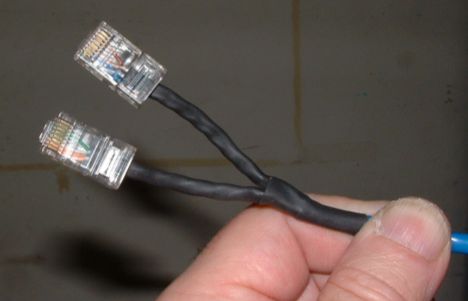
On the other end, I put a dual port RJ-45 jack-box
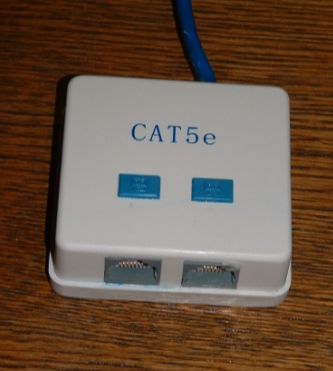
Just for the record, it was wired as follows.
CIRCUIT #1:
Jack & Plug Pin - - - - Wire Color
1.....................White & Orange
2.....................0range
3.....................White & Green
4.....................UNUSED
5.................... UNUSED
6.....................Green
7....................UNUSED
8....................UNUSED
CIRCUIT #2:
Jack & Plug Pin - - - - Wire Color
1.......................White & Blue
2 ......................Blue
3 .................. ...White & Brown
4 ......................UNUSED
5 ......................UNUSED
6 ......................Brown
7 ......................UNUSED
8 ......................UNUSED
> I ran some speed tests from a couple of websites, and the drop in
LAN speed between the gateway router and the end jack is negligible.
(For example, one test read 18.25mb/s at the router & 18.24 at the jack.)
There's only approximately 25 cable-feet between the router & jack.
Right now the jack-box is just "hanging" there at the end of the cable.
Once they decide exactly where they want to shove their credit card
machines (which should only take a few more weeks) I will find a
good place to screw it down permanently.
| IP: Logged
|
|
|
|
|
|
David Buckley
Jedi Master Film Handler
Posts: 525
From: Oxford, N. Canterbury, New Zealand
Registered: Aug 2004
|
posted 12-20-2014 06:30 PM
Not in any way certifiable, as there are no installation standards that cover that arragement! However, I suspect a Cat5 compliance tester might find it OK, other than what it will declare there to be missing pairs. But the pairs are optional anyway, there is still a world of Cat3 installed LAN cable that was two pair, not four. And two pair patch cable is fairly common, particularly in the boxes of DSL routers and the like.
I'm assuming the cable used was stranded not solid, as otherwise it would have been a bit hard to crimp the plugs on. But I am curious to see what is in the box, as its either a pair of punch-down sockets that are not designed for stranded wire, or breakouts to screw terminals, which have electrical issues.
But none of this detracts from the fact that it is in, works, and is likely to work for quite some time.
| IP: Logged
|
|
|
|
|
|
All times are Central (GMT -6:00)
|
This topic comprises 2 pages: 1 2
|
Powered by Infopop Corporation
UBB.classicTM
6.3.1.2
The Film-Tech Forums are designed for various members related to the cinema industry to express their opinions, viewpoints and testimonials on various products, services and events based upon speculation, personal knowledge and factual information through use, therefore all views represented here allow no liability upon the publishers of this web site and the owners of said views assume no liability for any ill will resulting from these postings. The posts made here are for educational as well as entertainment purposes and as such anyone viewing this portion of the website must accept these views as statements of the author of that opinion
and agrees to release the authors from any and all liability.
|

 Home
Home







 Printer-friendly view of this topic