Film-Tech Cinema Systems
Film-Tech Forum ARCHIVE


my profile | my password | search | faq & rules | forum home
  next oldest topic   next newest topic
» Film-Tech Forum ARCHIVE   » Community   » Film-Yak   » Scanner resolution? (Page 2)

 
This topic comprises 2 pages: 1  2 
 
Author Topic: Scanner resolution?
Phil Hill
I love my cootie bug

Posts: 7595
From: Hollywood, CA USA
Registered: Mar 2000


 - posted 12-18-2004 10:13 PM      Profile for Phil Hill   Email Phil Hill       Edit/Delete Post 
Joe, I'd recommend the Epson model #HEP2462-5. It is the best quality and value for the money! I'm SURE you wont be disappointed...

Your Friend,

>>> Phil

 |  IP: Logged

Joe Redifer
You need a beating today

Posts: 12859
From: Denver, Colorado
Registered: May 99


 - posted 12-18-2004 11:17 PM      Profile for Joe Redifer   Author's Homepage   Email Joe Redifer   Send New Private Message       Edit/Delete Post 
I'll be sure to get right on that one, Phil! [Razz]

 |  IP: Logged

William Hooper
Phenomenal Film Handler

Posts: 1879
From: Mobile, AL USA
Registered: Jun 99


 - posted 12-20-2004 02:02 AM      Profile for William Hooper   Author's Homepage   Email William Hooper   Send New Private Message       Edit/Delete Post 
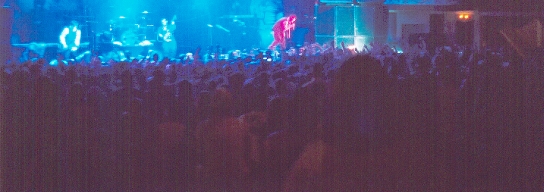
If you're getting the scanner for scanning prints of photos, either test it or get an example from someone who has one to see what it does with photos that have a significant areas of dark image in them. This is where many fall down - in the black & dark areas, there are obvious lighter linear scan streaks like bicycle tracks. It gets worse if you try to do things with the picture after scanning like reduce contrast to get some detail out, because it pulls out the scan marks. It's pretty much not worthwile to scan b&w arty stuff or things in high-contrast situations like theatre interiors, etc. on them, because cleanup is not worthwhile because of shadow detail.

I've got worse examples, here's just the first at hand:
 -

Apparently in scanning, as in photography, anything is easy if you've got enough light. Sometimes you get lucky & get it where you want it.

Sometimes you get luckier & get the right amount of light everywhere you want it. For no particular reason, here is a picture of a performer being obliterated onstage by a death ray.

 -

 |  IP: Logged

Joe Redifer
You need a beating today

Posts: 12859
From: Denver, Colorado
Registered: May 99


 - posted 12-20-2004 04:41 PM      Profile for Joe Redifer   Author's Homepage   Email Joe Redifer   Send New Private Message       Edit/Delete Post 
How about this one:

Epson Perfeckshun 3170 Photo Scanner

Optical resolution: 3200 X 3200 dpi(3200 x 6400 dpi hardware resolution)
Image Sensor: MatrixCCD line
Maximum scan size: 8.5 x 11.7 in
Bit depth: 48-bit
Interface: USB2.0
Dimensions(w x d x h): 10.9 x 18.1 x 4.6 in
Features: Exclusive one-touch color restoration with Epson Easy Photo Fix technology for restoring faded photos, 3200 x 6400 dpi hardware resolution, Fully automated operation, plus two advanced modes for greater scanning control, Built-in 35mm film strip/slide/medium format adapter for added versatility, Full-featured photo software solution.
PC and Mac compatibility

Will it work with my USB 1.0 jack? What if I want to scan something that is not a photo since the model says it is specifically a photo scanner?

 |  IP: Logged

Mark J. Marshall
Film God

Posts: 3188
From: New Castle, DE, USA
Registered: Aug 2002


 - posted 12-20-2004 05:49 PM      Profile for Mark J. Marshall     Send New Private Message       Edit/Delete Post 
I'd like to do some high quality scans of some 35mm film frames for training purposes, and I'm curious what you guys (Brad, Steve, etc) use for scanning the frames that you post here on Film-Tech.

 |  IP: Logged

Bobby Henderson
"Ask me about Trajan."

Posts: 10973
From: Lawton, OK, USA
Registered: Apr 2001


 - posted 12-20-2004 06:11 PM      Profile for Bobby Henderson   Email Bobby Henderson   Send New Private Message       Edit/Delete Post 
quote: Joe Redifer
Will it work with my USB 1.0 jack?
The scanner should, but I would not recommend it. The scanner would work very slowly. You would be better off spending $30 on a USB 2.0 add-in PCI card. USB 1.0/1.1 has a peak rate of only 10Mb/sec. USB 2.0 peaks at 480Mb/sec.

My slightly older Epson Perfection 2450 Photo scanner has both USB 2.0 and IEEE-1394 Firewire connections. I have mine hooked up via Firewire now since I'm running short of USB 2.0 connections. If you don't have a spare USB 2.0 jack, hook it up via Firewire if the scanner supports it.

quote: Mark J. Marshall
I'd like to do some high quality scans of some 35mm film frames
For professional work (stuff where you're going to get paid decently), send the negatives off to a service bureau that does drum scanning.

For the best possible results at home (provided you're willing to spend at least several hundred bucks) get a dedicated film scanner such as a Nikon Coolscan model. Such scanners have higher D/A ratings and scan the film directly without a pane of glass coming between the film and the CCD sensor. That's a pretty important thing. There's nothing like a dreaded "Newton Ring" for ruining a good scan.

The only bad thing about film scanners is you can't scan out to the perforated area. So for things like Brad's Reel ID, you have to use a flatbed scanner or some kind of scanner that will allow for the full strip to be exposed.

 |  IP: Logged

Ron Yost
Master Film Handler

Posts: 344
From: Paso Robles, CA
Registered: Aug 2003


 - posted 12-20-2004 06:35 PM      Profile for Ron Yost   Email Ron Yost   Send New Private Message       Edit/Delete Post 
Yep, it'll scan anything put on its glass, Joe, just like a copier. But, like Bobby says, with USB 1.0 it'll be sssslllllooooowwwwww. ('Consumer' scanners aren't exactly speed-demons, even with USB 2.0.)

I guess it says 'photo scanner' because that's what most folks use them for. You know, scanning old nudes of ex-g/f's and/or b/f's for posting on Usenet. [Big Grin] [Wink]

Ron Yost

 |  IP: Logged

Mark J. Marshall
Film God

Posts: 3188
From: New Castle, DE, USA
Registered: Aug 2002


 - posted 12-20-2004 08:29 PM      Profile for Mark J. Marshall     Send New Private Message       Edit/Delete Post 
Is there a trick to scanning the film with a flat bed scanner? Every time I try it, the image comes out quite dark and murky.

 |  IP: Logged

Phil Hill
I love my cootie bug

Posts: 7595
From: Hollywood, CA USA
Registered: Mar 2000


 - posted 12-20-2004 08:53 PM      Profile for Phil Hill   Email Phil Hill       Edit/Delete Post 
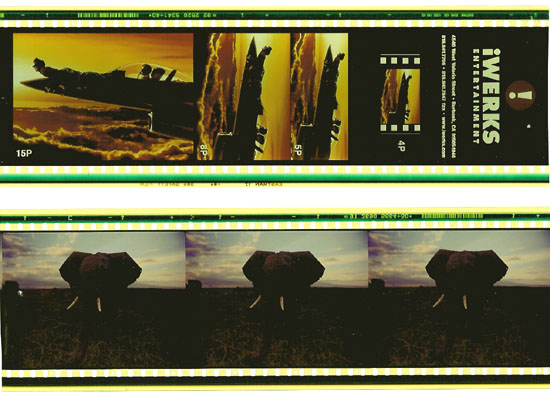
I agree about the crap ya get from a flat-bed scanner... below is an example. I think the high contrast/lackof detail is due to all the "white" area around the film. Perhaps the scan would be better if the film was surrounded by black paper? Dunno.

I still like the HP Photo Smart better for film scans.

 -

 |  IP: Logged

Joe Redifer
You need a beating today

Posts: 12859
From: Denver, Colorado
Registered: May 99


 - posted 12-20-2004 08:53 PM      Profile for Joe Redifer   Author's Homepage   Email Joe Redifer   Send New Private Message       Edit/Delete Post 
Well I got the Epson 4180 (Christmas present from just about the entire family) and so far so good! I have it plugged directly into my monitor's USB jack (Apple Cinema Display) so I'm not sure if that's USB 1 or 2. It is not incredibly slow nor incredibly fast. My scans are all 45.5 MB (Tifs) scanned at 400 DPI. From the time I press "SCAN" until the file is done and written to the hard disk, I'd say it is about 20, maybe 30 seconds at the very most.

 |  IP: Logged

Mike Heenan
Phenomenal Film Handler

Posts: 1896
From: Scottsdale, AZ, USA
Registered: Mar 2000


 - posted 12-20-2004 08:53 PM      Profile for Mike Heenan   Email Mike Heenan   Send New Private Message       Edit/Delete Post 
I have the same problems as mark, where a nice clear pic turns darker. What's a good setting to scan at?

 |  IP: Logged

Bobby Henderson
"Ask me about Trajan."

Posts: 10973
From: Lawton, OK, USA
Registered: Apr 2001


 - posted 12-20-2004 10:39 PM      Profile for Bobby Henderson   Email Bobby Henderson   Send New Private Message       Edit/Delete Post 
Forget about doing simple "one button" scans of film elements with flatbed scanners. To do so will guarantee that dark and murky look.

This is one area where choosing a better scanner model helps. You might get better hardware, but the scanning software is really important. Better quality scanning software will properly adjust curves according to what kinds of imagery you're trying to scan. My Epson scanner came with Lasersoft SilverFast SE, which has some pretty decent controls for a scanner package that runs under $500. It's not as fully developed as the ColorFactory Pro software that came with my old $1300 Linotype Hell Saphir SCSI-based scanner. But still pretty good.

To sum it up, you need good scanning software and need to be willing to get in there and tweak with things before you scan. You're going to get more out of the hardware that way. It is a lot harder to fix contrast, color and cast problems in a photo after it is scanned. You're dumping down from 36-bit or 48-bit bandwidth down to a 24-bit RGB file. I don't know of any affordable scanners that can scan directly into a 48-bit/16-bit per channel L*a*b file or anything like that. Until such capability is there, then you need to try to adjust images in "pre-scan" mode as much as possible.

 |  IP: Logged

John Hawkinson
Film God

Posts: 2273
From: Cambridge, MA, USA
Registered: Feb 2002


 - posted 12-20-2004 10:44 PM      Profile for John Hawkinson   Email John Hawkinson   Send New Private Message       Edit/Delete Post 
Some flatbed scanners come with backlight attachments for film. This works really well. (You could also try backlighting it yourself with a portable lamp...evenness of illumination would be the trick).

As for scanning outside the perfs on a film canner, well, you can use a medium-format scanner instead of a 35mm scanner...

--jhawk

 |  IP: Logged

William Hooper
Phenomenal Film Handler

Posts: 1879
From: Mobile, AL USA
Registered: Jun 99


 - posted 12-21-2004 12:59 AM      Profile for William Hooper   Author's Homepage   Email William Hooper   Send New Private Message       Edit/Delete Post 
To scan transparencies like 35mm film, negatives, x-rays, whatever on a flatbed, you must have a lot more light. Some scanners have an attachment in the lid for transparencies, with an additional light behind it.

There are also gable-shaped plastic doodads you can buy cheap at office supply stores that are just 2 mirrors edge to edge at about 90 degrees which are placed over the transparency to blast more light back down than the matte white scanner lid bottom.

I've seen pages on the net showing how to make them, they're basic.

/\ <-mirrors at about 90 degrees placed on the scanner over a slide or negative.

 |  IP: Logged

Bobby Henderson
"Ask me about Trajan."

Posts: 10973
From: Lawton, OK, USA
Registered: Apr 2001


 - posted 12-21-2004 12:03 PM      Profile for Bobby Henderson   Email Bobby Henderson   Send New Private Message       Edit/Delete Post 
quote: William Hooper
Some scanners have an attachment in the lid for transparencies, with an additional light behind it.
Just look for the technical term verbiage: transparancy adapter.

Scanners under $500 will usually have a fairly small transparancy adapter. More expensive models, especially in the $1000 and up class usually have transparancy adapters that cover the entire bay.

There are a couple higher end models out there which do transparancy scanning without a pane of glass in the way. The film elements are secured in holders. The downside to this approach is if you're using larger transparancies that can sag a bit out of the focal plane.

 |  IP: Logged


All times are Central (GMT -6:00)
This topic comprises 2 pages: 1  2 
 
   Close Topic    Move Topic    Delete Topic    next oldest topic   next newest topic
 - Printer-friendly view of this topic
Hop To:


Powered by Infopop Corporation
UBB.classicTM 6.3.1.2

The Film-Tech Forums are designed for various members related to the cinema industry to express their opinions, viewpoints and testimonials on various products, services and events based upon speculation, personal knowledge and factual information through use, therefore all views represented here allow no liability upon the publishers of this web site and the owners of said views assume no liability for any ill will resulting from these postings. The posts made here are for educational as well as entertainment purposes and as such anyone viewing this portion of the website must accept these views as statements of the author of that opinion and agrees to release the authors from any and all liability.

© 1999-2020 Film-Tech Cinema Systems, LLC. All rights reserved.