Film-Tech Cinema Systems
Film-Tech Forum ARCHIVE


my profile | my password | search | faq & rules | forum home
  next oldest topic   next newest topic
» Film-Tech Forum ARCHIVE   » Community   » Film-Yak   » Notebook harddrive upgrade (Page 2)

 
This topic comprises 4 pages: 1  2  3  4 
 
Author Topic: Notebook harddrive upgrade
Mark Gulbrandsen
Resident Trollmaster

Posts: 16657
From: Music City
Registered: Jun 99


 - posted 01-30-2007 10:35 AM      Profile for Mark Gulbrandsen   Email Mark Gulbrandsen   Send New Private Message       Edit/Delete Post 
Consider formatting the drive and installing a new copy of XP Pro, you'll probably get more on the drive this way. Its not unusual for a manufacturers drive to be partitioned the way yours is with the system recovery stuff installed. When I got my new Dell XPS I checked it and luckily its not partitioned so I left that laptop as-is but dumped all the usual junk they load in.

Mark

 |  IP: Logged

Mark Lensenmayer
Phenomenal Film Handler

Posts: 1605
From: Upper Arlington, OH
Registered: Sep 1999


 - posted 01-30-2007 10:41 AM      Profile for Mark Lensenmayer   Email Mark Lensenmayer   Send New Private Message       Edit/Delete Post 
That C: partition must be really small. I run GOLIVE which is much like DREAMWEAVER, and it doesn't take up much space at all. (Actually, I've come to prefer GOLIVE to Dreamweaver, but that is another matter.)

You might want to pick up a partition program that can repartition the machine without destroying the C: partition. That should give you the entire 40-gig's back. I haven't used any, so I'm hesitant to make a recommendation, but you can trial copies on most of the legal download sites.

 |  IP: Logged

Bobby Henderson
"Ask me about Trajan."

Posts: 10973
From: Lawton, OK, USA
Registered: Apr 2001


 - posted 01-30-2007 01:12 PM      Profile for Bobby Henderson   Email Bobby Henderson   Send New Private Message       Edit/Delete Post 
If Andrew is running Adobe Audition via a legal copy of Adobe Production Studio he will indeed be losing A LOT of disc real estate. The full install of Adobe Production Studio takes up more than 20GB of disc space (via 4 DVD-R install discs). That suite is just not practical at all to run on a notebook computer unless the notebook has at least a 100GB 7200rpm hard disc or larger.

The latest version of Audition alone takes up quite a lot of space.

 |  IP: Logged

Andrew McCrea
Jedi Master Film Handler

Posts: 645
From: Winnipeg, Manitoba, Canada
Registered: Nov 2000


 - posted 01-30-2007 02:09 PM      Profile for Andrew McCrea   Author's Homepage   Email Andrew McCrea   Send New Private Message       Edit/Delete Post 
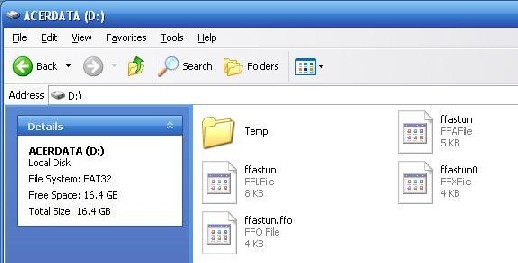
Here's what the partition looks like showing hidden files. Its 16.4 GB and the C:/ is 15.9GB, with 7.1GB free:
 -

I'd also like the extra storage so that I can eventually upgrade to Vista and still have enough room.

 |  IP: Logged

Scott Norwood
Film God

Posts: 8146
From: Boston, MA. USA (1774.21 miles northeast of Dallas)
Registered: Jun 99


 - posted 01-30-2007 02:16 PM      Profile for Scott Norwood   Author's Homepage   Email Scott Norwood   Send New Private Message       Edit/Delete Post 
Who is the manufacturer of the laptop? The extra partition likely contains the "system restore" information (because many manufacturers have become too cheap to send out CDs with their hardware). You should either make the restore CDs or order them from the manufacturer. Once you have done this, you can blow away the restore partition or even use a tool like Partition Magic to delete the restore partition and increase the size of your root partition to fill the entire disk.

The external USB/firewire disk would be the simplest (and maybe cheapest) way to increase your storage space, however.

 |  IP: Logged

Leo Enticknap
Film God

Posts: 7474
From: Loma Linda, CA
Registered: Jul 2000


 - posted 01-30-2007 02:54 PM      Profile for Leo Enticknap   Author's Homepage   Email Leo Enticknap   Send New Private Message       Edit/Delete Post 
I tend to split my laptop HDD into two partitions; one for the OS and applications, and the other for data. The volumes don't fragment as quickly, and don't take as long to defragment; plus if one partition gets corrupted or virus infected, there's a fair to good chance that the other one will still be intact. You can also restore the system from an image without affecting any document files. But it's quite likely that the partitioning on Andrew's machine has configured a much bigger system partition than he actually needs. On my desktop PC, the system partition is the first 20gb of a 200gb disc, and with XP Pro, Office plus several other major applications, it's still less than half full. For a laptop, I can't see how you'd need 15gb unless, as Bobby points out, you're trying to run the sort of stuff that most laptops simply weren't designed to run. If the total HDD size is 40gb, I'd be inclined to create a 15gb C: partition and a 25gb D: one.

Adobe Audition 1.5 (a legal, standalone copy) only occupies 41.5mb on my hard drive. It's not a massive resource hog, in my experience. But there again, I probably don't use its more system hungry functions.

 |  IP: Logged

Bobby Henderson
"Ask me about Trajan."

Posts: 10973
From: Lawton, OK, USA
Registered: Apr 2001


 - posted 01-30-2007 02:57 PM      Profile for Bobby Henderson   Email Bobby Henderson   Send New Private Message       Edit/Delete Post 
Dell does that sort of thing with both their desktop and notebook PCs. However, they usually do include discs for the OS and various drivers. Depending on the system you buy, you may have to pay an extra $10-$20 for those discs. Get them anyway.

In Dell's case, their system restore partition is supposed to function as a more easy way to get the system back to a "factory reset" with all drivers (and misc. junk software) installed in one fell swoop. Using the OS disc, it's not difficult to format the hard drive completely and get a "vanilla" version of XP Pro installed instead. You'll just have to manually reinstall all of the system's drivers afterward (even things like Bluetooth and WiFi chipset drivers).

 |  IP: Logged

Mark Gulbrandsen
Resident Trollmaster

Posts: 16657
From: Music City
Registered: Jun 99


 - posted 01-30-2007 04:31 PM      Profile for Mark Gulbrandsen   Email Mark Gulbrandsen   Send New Private Message       Edit/Delete Post 
Thats odd then that my XPS notebook doesn't have that partition nor did it have any option for the disks you mentioned. It's 80 gb hard drive comes in at 79.4 gig and that small part left is way too small to be partitioned for XP-Pro or anything important.

Mark

 |  IP: Logged

Monte L Fullmer
Film God

Posts: 8367
From: Nampa, Idaho, USA
Registered: Nov 2004


 - posted 01-30-2007 04:50 PM      Profile for Monte L Fullmer   Email Monte L Fullmer   Send New Private Message       Edit/Delete Post 
..with that 2nd partition, makes one wonder if that laptop was set up for dual boot option...running another version of Windows, or even stick Linux in that partition.

 |  IP: Logged

Bobby Henderson
"Ask me about Trajan."

Posts: 10973
From: Lawton, OK, USA
Registered: Apr 2001


 - posted 01-30-2007 04:58 PM      Profile for Bobby Henderson   Email Bobby Henderson   Send New Private Message       Edit/Delete Post 
I'm not sure what's going on with the "hidden" partitions on Dell hard discs. I know with mine, about 5GB of my 60GB hard drive was taken up with "hidden" stuff. That would seem to be more than enough room for a basic install of Windows XP Pro and the hardware drivers for my Inspiron 6000 notebook.

I can't remember for certain if it was an option I had to check in order to get physical CDs for all the software in my notebook when I ordered it online nearly 2 years ago. It is great having the discs though.

 |  IP: Logged

Cameron Glendinning
Jedi Master Film Handler

Posts: 845
From: West Ryde, Sydney, NSW Australia
Registered: Dec 2005


 - posted 01-31-2007 01:30 AM      Profile for Cameron Glendinning   Email Cameron Glendinning   Send New Private Message       Edit/Delete Post 
If you are going to use your computer for editing ect, dont use fat 32 NTFS is better, no 2 gigabite limit. I have a cheap acer, it has a 60 gig drive, 30 gigs in both c and d, which for me is really just enough. I like the idea that your 40Gig drive would move in to a small external case, perfect for hiding from your parents [Wink]

 |  IP: Logged

Darryl Spicer
Film God

Posts: 3250
From: Lexington, KY, USA
Registered: Dec 2000


 - posted 01-31-2007 10:00 AM      Profile for Darryl Spicer     Send New Private Message       Edit/Delete Post 
normally the second partition is set up for the purpose that everyone has stated. They use it for system restore information to eliminate all the extra CD's and supposedly help keep the price down since a lot of the programs are trial based software that feeds off that partition for install.

The second partition can be used for a second OS but that would be something that was set up by the user.

It can also be used for setting up a fat 32 partition and an NTFS partition. The downfall to that is supposedly once set up for NTFS you can't go back to fat 32. This was done a lot early on for older based programs that did not like to run on NTFS drives

I read somewhere to that by setting up a second partition and putting the OS on the d/ partition instead of setting it up on C/ as we normally would helps reduce the chances of your OS being corrupted by a virus. How true that is I don't know.

 |  IP: Logged

Leo Enticknap
Film God

Posts: 7474
From: Loma Linda, CA
Registered: Jul 2000


 - posted 01-31-2007 02:54 PM      Profile for Leo Enticknap   Author's Homepage   Email Leo Enticknap   Send New Private Message       Edit/Delete Post 
I guess some badly programmed malware might look for the OS files specifically on C:, and could therefore be fooled by putting Windows on a partition with another drive letter. But some badly programmed legitimate applications might do the same thing, meaning that they wouldn't work.

 |  IP: Logged

Andrew McCrea
Jedi Master Film Handler

Posts: 645
From: Winnipeg, Manitoba, Canada
Registered: Nov 2000


 - posted 01-31-2007 04:33 PM      Profile for Andrew McCrea   Author's Homepage   Email Andrew McCrea   Send New Private Message       Edit/Delete Post 
Update:

I talked to Best Buy's Geek Squad.

They told me to create recovery disks, then put the new hard drive (120GB) in and boot up the computer. They told me to put the first disk in, and press ALT+F10 (as per Acer's specs).

It recovered onto the new hard drive and everything turned out perfectly. It also does not have a partition now.

I then put Vista on (took about 90 minutes) and everything's running fine.

I have 512mb ram, so I'm going to upgrade it. This computer can go up to 2GB.

 |  IP: Logged

Mike Blakesley
Film God

Posts: 12767
From: Forsyth, Montana
Registered: Jun 99


 - posted 01-31-2007 06:32 PM      Profile for Mike Blakesley   Author's Homepage   Email Mike Blakesley   Send New Private Message       Edit/Delete Post 
How do you like Vista?

 |  IP: Logged


All times are Central (GMT -6:00)
This topic comprises 4 pages: 1  2  3  4 
 
   Close Topic    Move Topic    Delete Topic    next oldest topic   next newest topic
 - Printer-friendly view of this topic
Hop To:


Powered by Infopop Corporation
UBB.classicTM 6.3.1.2

The Film-Tech Forums are designed for various members related to the cinema industry to express their opinions, viewpoints and testimonials on various products, services and events based upon speculation, personal knowledge and factual information through use, therefore all views represented here allow no liability upon the publishers of this web site and the owners of said views assume no liability for any ill will resulting from these postings. The posts made here are for educational as well as entertainment purposes and as such anyone viewing this portion of the website must accept these views as statements of the author of that opinion and agrees to release the authors from any and all liability.

© 1999-2020 Film-Tech Cinema Systems, LLC. All rights reserved.