|
|
This topic comprises 2 pages: 1 2
|
|
Author
|
Topic: Mozilla vs. Opera and Open Office vs. MS Office
|
|
|
|
|
|
|
|
|
|
|
Michael Schaffer
"Where is the
Boardwalk Hotel?"

Posts: 4143
From: Boston, MA
Registered: Apr 2002
|
 posted 04-14-2007 03:36 PM


I have tried Thunderbird for a while now, and it is a really nice program. Not too bloated with unnecessary functions, but it still has everything needed to work with several pop accounts.
But one thing puzzles me: it is sloooooooooooow. When I have downloaded new messages and click on one to read or delete it, it sometimes takes 3 seconds or so for that action. No, I have not set it to "fetch only headers", so it isn't getting those messages from the server. They are already here.
There are also some other, minor, but still sometimes annoying bugs. For instance, when I open the program or click on "receive all messages" (or whatever it is called there), it only checks the mian server, not my other accounts. But I have checked all the relevant settings for the other servers as well. Those little bugs and problems make it less than optimal for me to work with.
| IP: Logged
|
|
|
|
|
|
Michael Schaffer
"Where is the
Boardwalk Hotel?"
Posts: 4143
From: Boston, MA
Registered: Apr 2002
|
posted 04-14-2007 06:57 PM
Thanks for the tips. There is something strange going on here. I have two accounts "GMX" and "UCS", private and work. I also have a GMAIL account, but I couldn't make that work with Thunderbird (I followed and triplechecked the instructions on the gmail webpage, enabling pop and all that, and it worked with Outlook, ).
So for now, I installed the gmail notifier which runs in the background and pops up when there is new mail, then I can go to the website and look at it there.
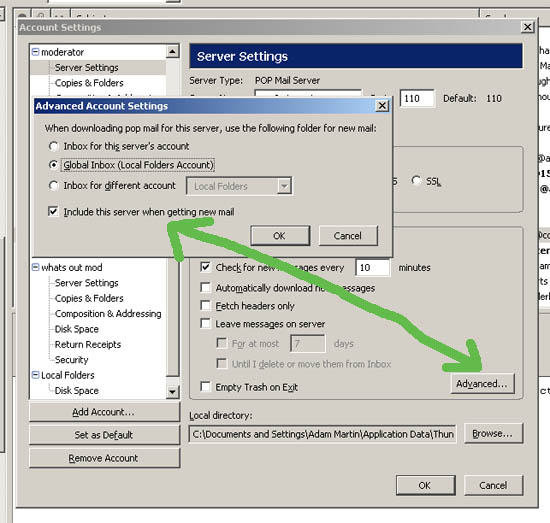
When I go to advanced account settings and check "global inbox", my work account simply disappears. When I check "inbox for this server's account", it reappears, but the "include" option is greyed out and not available anymore, and it doesn't check messages for that account. When I check "inbox for a different account", then I can check the "include" option, but obviously, I don't want to set it to put the mail in the other inbox. That's the whole point of having several separate accounts. So I check that and then go back to inbox for this servers account, the "include" option is greyed out again, but now it's still checked, and that seems to work now. I also checked "check for new meassages at startup", and that now seems to work for both accounts, too. The only thing that doesn't work still is that when I click on "get mail" on the top left, it only gets one account, I have to open the little dropdown menu there and select "get all". But that's not a big problem.
The speed issue is like this: when I click through already read messages, it goes very quickly. But when I mark and read or delete new messages, it takes a looooong time (really 3 seconds or so which tends to get on your nerves when you quickly want to go through some new mails and discard the ones you don't want).
It is version 1.5.0.10.
| IP: Logged
|
|
|
|
|
|
Michael Schaffer
"Where is the
Boardwalk Hotel?"
Posts: 4143
From: Boston, MA
Registered: Apr 2002
|
posted 04-15-2007 08:37 PM
That must be it. I use avast! antivirus, and when I stop the email and a few other scanners running in the background, going through the mails suddenly goes very fast. Oddly, with the scanners running, it also takes a while to delete messages. But why would they want to scan messages which are already in the inbox and have been scanned, especially when they are moved into the trash. Maybe avast! ad Thunderbird simply don't harmonize well. I also always had it running in the background with Outlook, but it didn't affect the speed noticeably.
Still, with the server settings now figured out, I like Thunderbird, and I think I will continue using it. Thanks for the tips!
| IP: Logged
|
|
|
|
All times are Central (GMT -6:00)
|
This topic comprises 2 pages: 1 2
|
Powered by Infopop Corporation
UBB.classicTM
6.3.1.2
The Film-Tech Forums are designed for various members related to the cinema industry to express their opinions, viewpoints and testimonials on various products, services and events based upon speculation, personal knowledge and factual information through use, therefore all views represented here allow no liability upon the publishers of this web site and the owners of said views assume no liability for any ill will resulting from these postings. The posts made here are for educational as well as entertainment purposes and as such anyone viewing this portion of the website must accept these views as statements of the author of that opinion
and agrees to release the authors from any and all liability.
|

 Home
Home







![[Razz]](tongue.gif)
![[Big Grin]](biggrin.gif) If you can manage that you can probably write your web pages with anything.
If you can manage that you can probably write your web pages with anything.



 Printer-friendly view of this topic