Film-Tech Cinema Systems
Film-Tech Forum ARCHIVE


my profile | my password | search | faq & rules | forum home
  next oldest topic   next newest topic
» Film-Tech Forum ARCHIVE   » Community   » Film-Yak   » My recovery D: drive is almost full, what?! (Page 3)

 
This topic comprises 3 pages: 1  2  3 
 
Author Topic: My recovery D: drive is almost full, what?!
Chris Slycord
Film God

Posts: 2986
From: 청주시, 경북도, South Korea
Registered: Mar 2007


 - posted 05-13-2008 03:04 PM      Profile for Chris Slycord   Email Chris Slycord   Send New Private Message       Edit/Delete Post 
Could be it was being used as the default location for restore points. And then she has several different old restore points.

 |  IP: Logged

Allison Parsons
Jedi Master Film Handler

Posts: 630
From: East Peoria, IL
Registered: Oct 2004


 - posted 05-14-2008 02:44 AM      Profile for Allison Parsons   Author's Homepage   Email Allison Parsons   Send New Private Message       Edit/Delete Post 
Hi guys,
Yes, I agree with Chris when he said that it was saving multiple restore points (probably when I would schedual weekly backups). I'm going to try to tinker with a few things tomorrow, since I will final have time to sit down and do some of your suggestions.

I just want to delete all the restore points and start over from scratch. Start over, meaning save a new restore point without my Recovery D: drive being almost full to capacity. I DO NOT want to my computer to be restored from a previous restore point.

(and my D: drive is NOT external)

 -

 |  IP: Logged

Charles Greenlee
Jedi Master Film Handler

Posts: 801
From: Savannah, Ga, U.S.
Registered: Jun 2006


 - posted 05-14-2008 06:18 AM      Profile for Charles Greenlee   Author's Homepage   Email Charles Greenlee   Send New Private Message       Edit/Delete Post 
Ack! Vista! [puke] Flee! Run away! Fast! I may grab a copy of vista after I give it another month or so to settle. Vista is like Disneyland.

"When they opened Disneyland nothing worked.", "Yes John. But when the Pirates of the Caribbean breaks down, the pirates don't eat the tourists." - Jurassic Park

 |  IP: Logged

Sean McKinnon
Phenomenal Film Handler

Posts: 1712
From: Peabody Massachusetts
Registered: Sep 2000


 - posted 05-14-2008 10:25 AM      Profile for Sean McKinnon   Author's Homepage   Email Sean McKinnon   Send New Private Message       Edit/Delete Post 
"I'm pleased to report that I've been error free for almost a week, I've been error free for almost a week, I've been error free for almost a week"

"Can somebody please restart him? It's painful to watch!"

 |  IP: Logged

Chris Slycord
Film God

Posts: 2986
From: 청주시, 경북도, South Korea
Registered: Mar 2007


 - posted 05-14-2008 11:51 AM      Profile for Chris Slycord   Email Chris Slycord   Send New Private Message       Edit/Delete Post 
To delete your restore points that are located on that drive:
1) Double-click on the "computer" icon
2) Right click on the D: drive and choose "properties"
3) Click on "cleanup"
4) Choose to clean up files from all users (probably will work with the other selection but this is just to be safe)
5) Select "More options" tab then click on "cleanup" icon in the "System Restore and Shadow Copies" section

 |  IP: Logged

Allison Parsons
Jedi Master Film Handler

Posts: 630
From: East Peoria, IL
Registered: Oct 2004


 - posted 05-14-2008 02:19 PM      Profile for Allison Parsons   Author's Homepage   Email Allison Parsons   Send New Private Message       Edit/Delete Post 
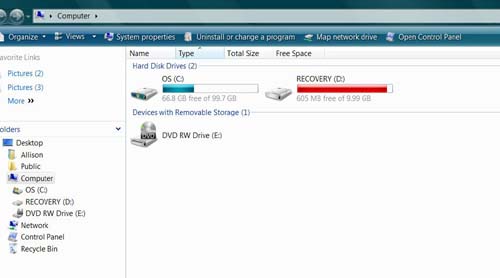
Thanks Chris. That worked somewhat. I now have 1.44G of free space instead of 604MB left. [Smile]

 |  IP: Logged

Chris Slycord
Film God

Posts: 2986
From: 청주시, 경북도, South Korea
Registered: Mar 2007


 - posted 05-14-2008 02:25 PM      Profile for Chris Slycord   Email Chris Slycord   Send New Private Message       Edit/Delete Post 
The rest of the used space is probably because the partition originally (before you had it used for restore points) contained a copy of your original C: drive.

Similar to that a lot of computers will come with a restore CD that installs everything that your PC came with exactly as it was when you started. Only now, they include too much stuff for it to easily fit on one CD so they use a partition for that.

 |  IP: Logged


All times are Central (GMT -6:00)
This topic comprises 3 pages: 1  2  3 
 
   Close Topic    Move Topic    Delete Topic    next oldest topic   next newest topic
 - Printer-friendly view of this topic
Hop To:


Powered by Infopop Corporation
UBB.classicTM 6.3.1.2

The Film-Tech Forums are designed for various members related to the cinema industry to express their opinions, viewpoints and testimonials on various products, services and events based upon speculation, personal knowledge and factual information through use, therefore all views represented here allow no liability upon the publishers of this web site and the owners of said views assume no liability for any ill will resulting from these postings. The posts made here are for educational as well as entertainment purposes and as such anyone viewing this portion of the website must accept these views as statements of the author of that opinion and agrees to release the authors from any and all liability.

© 1999-2020 Film-Tech Cinema Systems, LLC. All rights reserved.