|
|
This topic comprises 3 pages: 1 2 3
|
|
Author
|
Topic: How to get rid of an audio hum
|
|
|
|
|
|
|
|
|
|
|
|
|
|
|
|
|
Frank Cox
Film God

Posts: 2234
From: Melville Saskatchewan Canada
Registered: Apr 2011
|
 posted 08-28-2011 05:39 PM


Richard: I guess I'm not sufficiently knowledgeable about audio to understand what that gadget actually does. It's a replacement for my mixer board? Or something else? I really don't see how it fits into the circuit that I have set up. (Sorry to sound stupid but I've read that web page 3 times now and I still don't get it.
Kenneth: The hum is only present when the tuner is connected. And there is no hum if I swap the cables that connect the tuner to the mixer board over to a different audio source (CD player) and stream that instead of the radio station.
Interestingly enough, today the hum seems to be almost gone, and I have no idea why or what changed. It's still present but it seems very slight and I don't know if anyone would actually notice it if you weren't specifically looking for it.
The antenna feeds into the building with a standard coax cable and that coax cable has a grounding block on it. Like this one. After experimentation, I found that the hum is least when the ground wire is attached to the metal box that houses the power receptacle that the electronics are plugged into, so that's where it is grounded to right now. The ground wire is 14AWG stranded automotive wire.
It just now occurs to me to ask this question: The tuner, computer, etc. are all plugged into a UPS. The UPS plugs into the power receptacle on the wall, and the antenna is grounded to the box that houses that same receptacle. I wonder if it would be beneficial to hook the antenna ground wire to the ground terminal on a 3-prong plug and plug that into the UPS instead of grounding it to the receptacle box? Then everything would be grounded to the exact same point. I thought that grounding it to the receptacle box would amount to the same thing, but perhaps not?
The nature of the streaming is that the online stream runs about 30 seconds behind the live source. In other words, what is fed into the computer live right now is heard 30 seconds later on the Internet.
So.. the experiment:
Immediately after unhooking the antenna the hum increased greatly on the stream. When the 30 seconds were up and the setup ran out of "signal" there was such a huge blast of static and interference that there is no way to tell if there was still a hum or not; it was completely drowned out by the other noise.
That seems very odd to me; why would the hum increase immediately when the what you're listening to was actually encoded 30 seconds before I unhooked the antenna?
Again, the hum seems a lot less today and I don't know why because other than fiddling around with the wiring I haven't actually changed anything from what it was yesterday. But if it never gets any worse than it is right now this minute, I think I can live with it.
If any of you folks want to try it out and see what you think, you can access the stream through the CreekFM web page or you can connect directly to the streaming server here. Note that there is no hum in the intro, which is a pre-recorded file that's stored on the server.
Perhaps it will be easier to visualize how this is set up if you see what it actually looks like. Note that the tuner lives in a cupboard a few feet above the rest of the gadgetry (there was only so much room on the little table) so it doesn't actually show in this photo. The green wire that's attached to the top case screw on the computer goes to a case screw on the tuner; that's the ground wire that I said I put between them and it cut the hum by a significant amount.
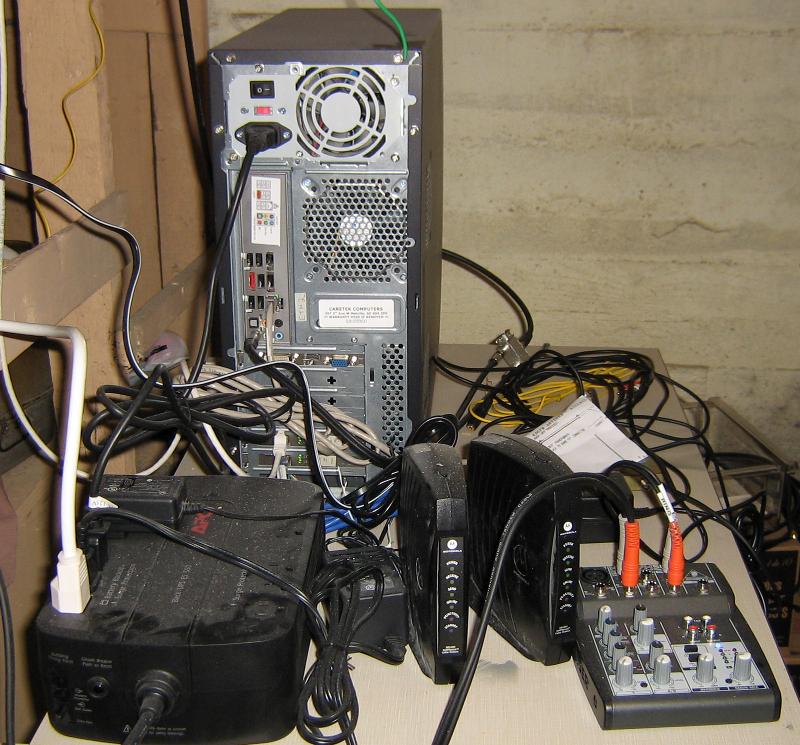
Once again I would like to thank everyone for their input and ideas. I am learning a lot about audio and ground loops!
| IP: Logged
|
|
|
|
|
|
|
|
|
|
Frank Angel
Film God

Posts: 5305
From: Brooklyn NY USA
Registered: Dec 1999
|
posted 08-29-2011 06:12 AM
I don't understand....the computer seems to have the standard configuration of audio jacks with a sound card on the mother board. The standard three jacks are visible -- a line output, the mic input that you are using, and a line input. Why doesn't the line input work? That can be as simple a fix as unmuting it in the Control Panel (assuming Windows). Or something more complicated, but it should be seriously looked into, going so far as to install a decent sound card and disabling the onboard circuit, because it could solve your problem so easily.
Kenneth is being very kind calling that a "lash up." No offense, but it is mess that invites induced hum and noise, with AC cables COILED running inches away from signal cables and equipment. Follow Ken's advice and straighten every out, uncoil the AC wires and try to isolate them from components and other signal cables; at the very least, keeping AC on one side of the table and everything else on the other.
The fact that the hum has changed and you "haven't done anything" points to one thing -- what you have done has affected it, and that would be that you have been moving around among the components and wiring. Just moving that stuff can very well be just enough to change the hum level, the way your wire is layed out there.
I would almost bet that if you turn up your audio and listen for the hum and just started to move all the that hodgepodge around, you will hear the hum level change.
BTW, I have found that the damn 1/8in mini plug and jack on the computer have always been a really nasty source of static and poor contact on a mic input. You should at the very least clean the plug and the jack itself with a good contact cleaner. The contact surfaces for something as high gain as a mic preamp input should have a much more substantial connector. The contact surfaces are so miniscule that they easily oxidize in the best of circumstances and not for nuthin and with all due respect, that setup doesn't scream "clean." Twist the mic connector plug and listen to all the noise. That almost always means there's poor contact there due to dirt and oxidation. And given the preamplification that follows, ANY induced AC right there can be the cuplrit.
| IP: Logged
|
|
|
|
|
|
All times are Central (GMT -6:00)
|
This topic comprises 3 pages: 1 2 3
|
Powered by Infopop Corporation
UBB.classicTM
6.3.1.2
The Film-Tech Forums are designed for various members related to the cinema industry to express their opinions, viewpoints and testimonials on various products, services and events based upon speculation, personal knowledge and factual information through use, therefore all views represented here allow no liability upon the publishers of this web site and the owners of said views assume no liability for any ill will resulting from these postings. The posts made here are for educational as well as entertainment purposes and as such anyone viewing this portion of the website must accept these views as statements of the author of that opinion
and agrees to release the authors from any and all liability.
|

 Home
Home










 Printer-friendly view of this topic