|
|
This topic comprises 6 pages: 1 2 3 4 5 6
|
|
Author
|
Topic: Are Apple products really worth it?
|
Bobby Henderson
"Ask me about Trajan."

Posts: 10973
From: Lawton, OK, USA
Registered: Apr 2001
|
 posted 07-28-2013 02:09 PM


quote: Randy Stankey
While I absolutely agree with you, I am not referring to just hardware longevity. I am also talking about the way that the operating system and applications software remains usable for a longer time.
It isn't difficult to keep a Windows-based PC's operating system usable for a really long time. But much of that comes down to how well the user takes care of the machine, how well he keeps his software organized and how well he backs up his data.
Given the behavior patterns of many "average" computer users, I'm not surprised to see computer systems brought to their knees in only a couple years. The person loses track of software discs, documentation, etc. to repair or "factory restore" the operating system. They have all kinds of stuff loaded onto the computer that aren't backed up to external drives. Many have copies of software given to them by a friend or whoever built the system they can't afford to lose in a hard drive format. There's no helping those users.
Many problems, including malware infections, are caused by user behavior. They visit risky web sites looking for pirated movies, music, software and porn. They don't consider the malicious payloads bundled in with a risky website or torrent download. They open e-mails they should simply delete. Basically they just do whatever they want and don't want to do any "homework" learning Internet street smarts or do any work at being careful.
With Windows-based machines, it's easy to get 7-10 years of productive use out of a PC -provided it is not a cheap, entry level model. With proper use, a simple factory restore procedure can have an old system running very fast again. It just starts getting dicey when the various Windows updates one must apply end up being the thing that slows the system to a crawl.
I think Microsoft probably could continue supporting Windows XP for a few more years. But their decision to end support next April is, IMHO, a business move to force many users to upgrade old computer hardware that is still working properly.
| IP: Logged
|
|
|
|
|
|
Leo Enticknap
Film God

Posts: 7474
From: Loma Linda, CA
Registered: Jul 2000
|
posted 07-28-2013 05:33 PM

quote: Bobby Henderson
With Windows-based machines, it's easy to get 7-10 years of productive use out of a PC -provided it is not a cheap, entry level model. With proper use, a simple factory restore procedure can have an old system running very fast again. It just starts getting dicey when the various Windows updates one must apply end up being the thing that slows the system to a crawl.
Agreed completely. For a long time now I've been refurb-ing older computers for friends, relatives and the occasional colleague. I am frequently met with disbelief when I claim to be able to restore someone's 2006 vintage computer to a state at which it'll be perfectly OK for MS Office, email, browsing and light photo editing duties, followed by the owner eating humble pie when it's done. My usual procedure is along the following lines:
Hardware refurb:
1. If the existing RAM is <2GB (XP), <3GB (Vista/7 32-bit) or <4GB (Vista/7 64-bit), recommend that the owner upgrades memory accordingly - big performance boost for very little outlay (older computers will have DDR2 at the very latest, ergo memory pretty cheap).
2. Ask the user to consider replacing the hard drive on spec if it's over five years old, pointing out that it could fail at any moment and that a new one will deliver a big capacity increase (compared to the old one) for very little money.
3. Open up the case, clean out crud with a combination of compressed air sprays and pastry brushes (removing cards, drives etc. as necessary), replace all fans and processor thermal paste, then reassemble.
Software Refurb:
1. Make system image of hard drive, exactly as I find it, onto an external portable.
2. If the factory restore discs are still extant, execute a factory restore using them. If not, reinstall Windows from scratch using Windows CD, and downloading drivers on another PC and installing them from a thumb drive as and when necessary.
3. If the factory restore discs were used, uninstall the crapware that will have been put back in the restore process.
4. Update Windows until it'll update no more.
5. Install necessary applications software that the owner wants (I would also recommend installing a good freeware antivirus/firewall, e.g. Comodo, at this stage), then configure to owner's taste.
6. Stop the Windows Update service, delete C:/Windows/SoftwareDistribution, then restart it (to get rid of unnecessary crap deposited on the hard drive during the update process).
7. Boot an Ubuntu CD, then using GPartEd, shrink the Windows partition and create two new ones: a D:/Data partition and an Ubuntu partition.
8. Install Ubuntu on the third partition, then set up a dual boot menu. We now have a way of retrieving the user's documents if the Windows partition ever gets corrupted and/or malware-ridden, that does not require transplanting the hard drive into another computer. Tell owner that (s)he doesn't have to worry about Ubuntu - just select Windows from the menu at every bootup - but that (s)he's welcome to have a play with it, and that it doesn't bite. Who knows - we might just win a Linux convert!
9. Reboot into Windows, then map the user's shell folders to D:.
10. Restore the user's documents and other data from the system image on the external HDD to D:. Keeping the user's data files on a separate partition from the operating system reduces fragmentation-related system degrading long term.
11. Defragment the system drive, then take a Clonezilla system image of the now finished re-installation, and give it to the user on a large thumb drive (32gb is normally enough, but sometimes a 64gb one is needed). Instruct user to put it in a safe place and not to lose it. Job done.
| IP: Logged
|
|
Mike Heenan
Phenomenal Film Handler

Posts: 1896
From: Scottsdale, AZ, USA
Registered: Mar 2000
|
posted 07-28-2013 06:23 PM
I can't figure
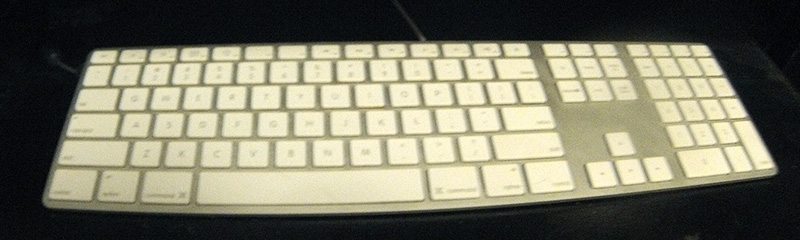
Scott, I like the "chicklet" keyboard, mainly because it's not noisy like regular keyboards. The sound of regular keyboards being typed on makes me want to murder the typer. ![[Smile]](smile.gif)
quote: Bruce
Apple crap is way too dumbed down for me. I cannot do what I want to do the way I want to do it. I must do everything the way some jerk at apple decided it should be done. NO THANK YOU! itunes is communist crap. It is VERY restructive. I made the mistake of buying an ipod some years ago. I had the way I was going to set it up all planed out, then I found out that was not going to happen. As I said above, I cannot do what I want to do, the way I want to do it. Then I tryed dealing with itunes CRAP. I throw the ipod in a drawer, and there it sat untill someone told me to get floola . I have used it on a few trips, but the ipod is still very poorly designed, andhard to use. I will never buy another piece of apple crap.
Wow... what on earth do you want iTunes to do? Granted it's extremely bloated, but for organzing music and making playlists, I like it..
| IP: Logged
|
|
|
|
|
|
|
|
|
|
Randy Stankey
Film God

Posts: 6539
From: Erie, Pennsylvania
Registered: Jun 99
|
posted 07-28-2013 09:36 PM
I don't take any computer (which I have administrative control over) as it comes. Apple or otherwise. I buy the basic hardware, stock, then add what I want. Memory, displays, hard drives, interface cards, etc. The OS gets installed from scratch and configured the way I want it to be or, if the computer is new, junk I don't want is unceremoniously dumped and replaced with what I want.
I'm sure that most of you guys do similar.
I don't see Apples as being any less configurable than many other computers, even my Bondi iMac or my Snow White iBook. The iMac was easy to take apart and reassemble. The iBook was a pain but no more difficult than any other small form factor laptop computer. My Power Mac is very easy to work on. You can change a hard drive, add memory or change an interface card, literally, in two minutes. I really don't understand why people say they aren't upgradeable. The only things you can't change (easily) are the soldered-in components. How many other computers, besides Apple, have a lot of soldered-in components? Quite a few.
In terms of operating system and software maintenance or longevity, I don't mean wiping the drive and installing Linux. I have ten-plus year old Dell Craptiplex computers running Linux and still going strong. I'm talking about Mac OS. Yes, computers get old and software gets more demanding. Any computer will eventually come to the end of its useful life as new and better software evolves but I find that my Macs have stayed useful, longer.
I thought the silver and white chicklet keyboard was stupid at first but soon discovered that it isn't all bad. It has a light touch and a short key travel. It's actually quite a bit sturdier and useful than it looks. Even if you don't like it, I think it would be worth a second look. On the other hand, depending on where and how it will be used, there's nothing wrong with getting another keyboard. I often do but, after giving my chicklet keyboard a second chance, I stuck with it. Five years and still going strong.
My biggest complaint in the human interface department is the mouse. I love the four-button "Mighty Mouse." I like using it. I use all four functions. I like the response of the scroll ball but I HATE how easily it gunks up. You really have to be conscientious to keep your hands clean or else it will stick and stop working. I keep a bottle of alcohol and a box of Kimwipes nearby at all times. If that one issue could be fixed, I'd give it an "A." I really don't care for the "Magic Mouse" at all. I prefer the Apple TrackPad for when I want to use gestures to control the computer. I have a Wacom pen tablet for drawing and precision work.
The "New" Power Mac? Yes, it does look like a trash can. Why does Apple seem to have a fetish with designing computers that look so weird? The first iMacs look like something out of a Russ Meyer film. (Set two of them side by side.) The first iBooks look like a toilet seat. Apple mice look like a giant suppository. Now, a trash can? I shudder to think what will be next!
If I could have my wish and make all computers be one way, I'd choose some flavor of Linux but, since Mac OS is Unix based, I can deal. I really do think Macs are the mainstream OS that works most efficiently and works closest to the way I like to work. However, as a fair disclaimer, I use Windows machines and Linux based machines for work and I like to resurrect old Windows boxes as Linux machines, as far as computers that I have bought for myself, I have never owned anything except an Apple. My first computer was an Apple ][e.
BTW: I have my iBook set up so I can boot it up in Yellow Dog Linux if I want to. If you set it up right, it makes a really great machine to hack a Windows network. ![[evil]](graemlins/evil.gif)
| IP: Logged
|
|
|
|
Bobby Henderson
"Ask me about Trajan."
Posts: 10973
From: Lawton, OK, USA
Registered: Apr 2001
|
posted 07-28-2013 10:50 PM
These are the Mac notebook models that have non-removable batteries (according to the Apple Support page:
All MacBook Air computers
All MacBook Pro with Retina display computers
MacBook (13-inch, Late 2009) and later
MacBook Pro (Early 2009) and later
Such notebook models should only have the built-in battery replaced by Apple personnel.
Apple says you can get a good 5 years or more of life out of their built-in notebook batteries. But here's my problem with that: I've seen a lot of notebook computers have issues, such as crashes or problems with certain applications, that could only be solved by removing the notebook battery and making stuff reset. How is one going to manage that if the notebook's battery is glued into the case and sealed shut out of reach?
My Dell XPS 15 notebook is has some pretty serious specs for a notebook. It's thicker than a Mac Book Air, and maybe even thicker than any Mac Book Pro. But it's not heavy or clunky. It might weight half as much as the Dell Inspiron 6000 notebook it replaced. One thing I don't like about it (and I blame this whole drive for thinness on it): you have to take out the keyboard to get to the hard drive in case it fails. WTF.
I like having an optical drive in my computer. I have some CD-R, DVD-R and even a few BD-R discs with data on them. I like playing Blu-ray disc movies in my notebook if I happen to be on a trip somewhere. I can patch the video to a TV set via the notebook's HDMI output.
Some people might not need an optical drive. It's true many software vendors are moving to downloadable installers. Microsoft is pushing it, especially with Office 365. At my work we have two "seats" of Adobe Creative Cloud. You get no discs with that. On the bright side I can install my license on my work PC and a 2nd computer at home, even a Mac if I choose to do so (although you can't have both computers using the apps at the same time). FYI, I'm still using my own personal license of Adobe Master Collection CS5.5 on my notebook. It seems to work just fine aside from the few new features the new CC apps have.
I still think the Internet has some serious improvements to make in terms of speed before all this cloud stuff and streaming will be totally practical. However, I still like having my data and photos backed up on physical discs that I possess and control. If the cloud breaks you can't get access to your data. Thankfully Adobe only makes their apps "phone home" once a month for validation. OTOH, the Typekit font service they're still working on will require an always online situation.
| IP: Logged
|
|
|
|
|
|
Edward Havens
Jedi Master Film Handler

Posts: 614
From: Los Angeles, CA
Registered: Mar 2008
|
posted 07-29-2013 06:08 AM
I'm a proud MacBook Pro user for several years, and a proud Apple stockholder. I don't give a flying flip about the Apple culture, or who designed my computer, or why an aluminum frame is better than a plastic one, why I can't watch a Blu-Ray on my Mac (and why the flip would I want to watch a movie on a 12.7" screen anyway?) or any of that crap. I am not a programmer. I am not a graphic artist. I don't sit in Starbucks all day, pretending I am writing a screenplay or somehow otherwise important. All I care about is overall functionality, ease of use, durability and value. Macs and OSX has all that over PC and Windows.
But the best part? I can dual boot OSX and Windows on my Mac, so I really have two computers, and Windows is stable on my MacBook. And never once have I seen the BSOD when using Windows on my MacBook. I guess there's a reason PC Magazine stated the the Mac was the best and most stabile Windows PC.
| IP: Logged
|
|
|
|
All times are Central (GMT -6:00)
|
This topic comprises 6 pages: 1 2 3 4 5 6
|
Powered by Infopop Corporation
UBB.classicTM
6.3.1.2
The Film-Tech Forums are designed for various members related to the cinema industry to express their opinions, viewpoints and testimonials on various products, services and events based upon speculation, personal knowledge and factual information through use, therefore all views represented here allow no liability upon the publishers of this web site and the owners of said views assume no liability for any ill will resulting from these postings. The posts made here are for educational as well as entertainment purposes and as such anyone viewing this portion of the website must accept these views as statements of the author of that opinion
and agrees to release the authors from any and all liability.
|

 Home
Home









 Printer-friendly view of this topic