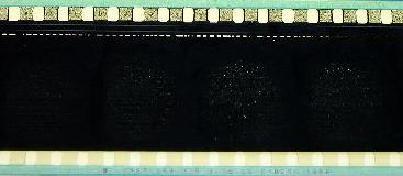
My force shipped batch of THX 2000 trailers were the worst. At first I thought it was just a bad batch of film, but there is something odd about this particular stock.
I'm thinking it is probably one of the static eliminating coatings being put on at the labs now that I've heard it from several people. But you are correct it does NOT affect the Premiere stock. If not that, then perhaps it is something in how a particular lab processes the prints (it doesn't show up on all Vision prints, just a few) and that it probably has something to do that is heat related. After all, it only shows up on BLACK film, which will trap the xenon heat. Hopefully Mr.Pytlak will be able to shed some light on this.
John, please post all info you can here so everyone who has been seeing this can check for patterns. Perhaps a listing of what static coatings have been implemented and when. Could you give us a list of all trailers printed on Vision stock and from what labs? There has got to be one particular thing causing this. (And yes, I know it's not FilmGuard because I took one of those THX2000 trailers and ran a full size loop "dry" during a late night screening only to return to a green THX trailer.)
Brad did not have a sample of the damaged film. If anyone has a few feet of film showing these "green spots", please send the sample to me for analysis. Thanks.
------------------
John Pytlak, Senior Technical Specialist
Worldwide Technical Services, Professional Motion Imaging
Research Labs, Building 69, Room 7419
Eastman Kodak Company
Rochester, NY 14650-1922 USA
Tel: 716-477-5325 Fax: 716-722-7243
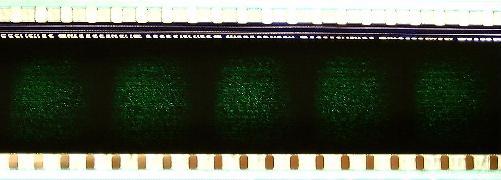
Here they are...
Why not take a leader or tail-piece, (with a black section) make a loop and run it under projection conditions for a few minutes. This would definitely prove that heat from the lamp is causing the problem.
One of the "quick-tests" that I use when determining if the lamp focus is too "hot" is to hold my fingers in scissor-like fashon on the film between the intermittent and sound-head. If the film is too hot to comfortably hold your fingers there for about ten seconds, better back off on the lamp focus or current. Also check that the heat filter is installed right-side-up.
If anyone can send similar film samples to me, Kodak can analyze the damage by microscopy and chemical analysis. We can also tell if there are other factors such as silver being left in the film after processing, or a harmful contaminant on the surface of the film.
To reduce the risk of this type of damage, be sure that the lamphouse is properly aligned (don't "hot spot" the output) and that efficient heat filters (dichroic mirrors) are being used.
------------------
John Pytlak, Senior Technical Specialist
Worldwide Technical Services, Professional Motion Imaging
Research Labs, Building 69, Room 7419
Eastman Kodak Company
Rochester, NY 14650-1922 USA
Tel: 716-477-5325 Fax: 716-722-7243
Whoever was kind enough to send those pictures, please post on the forum or send me a reply I can post via un-returnable email again.
I’m having a different problem with Vision stock here. 90% of the prints of Argentina are printed by the only existing lab, they use exclusively Kodak stock.
Since the new Vision stock appeared, we begun having troubles everywere. Some prints are “sticky” and make the platter to variate the speed a lot. The last minutes of session, when few film remains in the platter, it accelerates extremely fast and the film falls in the floor.
The problem happens on some movies but all around the country, no matter the brand of equipment or AC in the booth. It happens on dry or humid sites.
I tried an antistatic spray, nothing. If you put your arm close to the film, you don’t feel the static.
Some film handlers wiped the edges of the film with Xecote, and amazingly this reduced the problem...
I really think the problem has to do with lab proceesing, but I’m not experienced on that...
Does anyone have experienced this ?
Regards, Alex