This is topic Bad Tech Support from Christie and Pennywise in forum Film Handlers' Forum at Film-Tech Forum ARCHIVE.
To visit this topic, use this URL:
https://ft-forum.com/ft/cgi-bin/ubb/ultimatebb.cgi?ubb=get_topic;f=1;t=000562
Posted by Joe Redifer (Member # 3) on 01-15-2000, 04:13 AM:
The picture below happened at my theatre tonight when I was in another booth. Unbeknownst to me the film was running with the FAILSAFES DOWN onto the floor, even though the remote status panels indicated that everything was fine. I was alerted by a customer who complained about the lights not going down. This picture was taken right after I stopped the show, which of course was delayed while I picked everything back up. It was completely sold out and people were yelling at the assistant managers. I told them plain and clear over the walkie what the problem was, and the manager did not blame me. But now the customers know that we have crappy equipment. 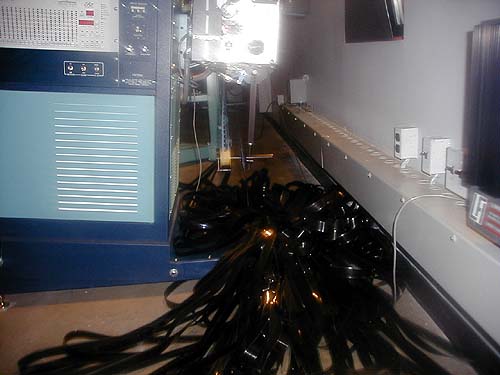
The cause of this is due to the fact that Christie's CA21 automation IGNORES the failsafes! Any real automation would have shut down and sounded the alarm. You can read my review of this unit by clicking here. The film piles onto the floor like this after a power surge as well, only ALL 16 of them do it simultaneously until we can manually stop them!
My point? I have been campaigning to Christie and Pennywise for several months now, and still have received no upgraded EPROM to fix the failsafe problems! It canbe fixed, but Christie and Pennywise simply do not care.
Beware if you buy ANY products from either of these companies. They do not love us. You think a big company like Christie would be able to solve something like this rather quickly. Whaddya think? Should Christie and/or Pennywise pay for a replacement reel 1 every time this happens? Should they pay for 16 replacement reels whenever we have a power surge and can't stop all of the projectors from dumping the prints quick enough? I think that would be fair.
Posted by Scott Ribbens (Member # 180) on 01-15-2000, 04:52 AM:
Hey Joe, Looks like that AW-3 decided that it did not want to take up. (as is clearly shown in the picture by way of the clear leader still in the lower guidance roller) Hard to tell from the angle of the picture, but it looks like there is tension on the leader. What's up with that? It looks like it was paying out, was it? Just wondering why the take-up deck was not running. ------------------
quote:
"More human than human" is our motto.
Scott
Posted by Joe Redifer (Member # 3) on 01-15-2000, 06:22 AM:
The leader was laying on the floor after the lower guidance roller. I started to fix the mess for about a second before I ran for the camera, which I always have with me and was only about 10 feet away. So about two turns had been taken up onto the platter by me before the pic was taken. Obviously the platter was paying out. The show was running onscreen until I stopped it. The platter failed to take up because of a defective control sensor assembly. The failsafes were up when the show was threaded and the timer was set (otherwise the status panel would have reflected that they were down, which it DOESN'T do when the show is running, for some kooky reason).This is another gripe I have with Christie. They have admitted to me that 30% of the control sensor assemblies are defective. Why they send them all to my theatre is beyond me. Actually 70% of mine work just fine. Probably more than that. But they fail without notice. Either the deck spins too fast or not fast enough. The resistance cannot be maintained and the assembly must be replaced.
The older, red LEDs seem to work just fine. I don't know why Christie can't make them work correctly anymore. I have personally spoken to the tech at Christie on the phone about this problem and his diagnosis was that somebody was running around tampering with the settings. He didn't feel that Christie could churn out any defective products like that. This was 2 years ago. It's still happening. It was another Christie staffer that told me about the 30% failure statistic.
But if the alarm had gone off when it tried to start I could have easilly made a temporary adjustment to get the show going, and it would have only been delayed a couple of minutes (if even that) and the customers wouldn't have known the difference since the picture wouldn't have hit the screen beforehand. The Control Sensor Assemblies are easilly replaced and set up, and we have weeded out most of the bad ones. But if somebody doesn't engage a platter (rare) or if there is a power surge, we're completely screwed.
Posted by Nicholas McRobert (Member # 205) on 01-15-2000, 07:09 AM:
Bit of a spooky one, this, but take a look at Kinoton's EMK1 automation.
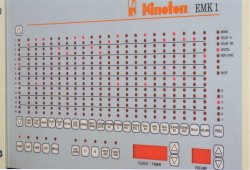
Now take a look at the picture of the Christie automation. Weird, huh?
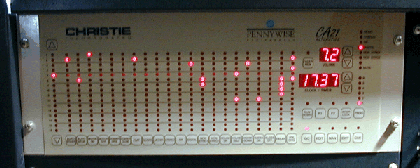
This particular design has been around for a few years now, and from reports at some of the sites in my circuits, the Kinoton version works quite well.
Still, the two are wayyyyyyyyyy too similar in design for my liking. Looks like Pennywise got hold of a set of dummy plans, tho 
Posted by Brad Miller (Member # 2) on 01-15-2000, 04:04 PM:
Wow. Nicholas, go to one of those theaters that have the Kinoton automation and ask to perform a test. String up some old trailer or something and hit start. About 2 seconds after the start button is hit, turn off the takeup platter...and let us all know if the projector keeps running!I was very strongly considering switching my screening room over to the CA-21 to be able to run automated changeovers due to it's fantastic flexibility, but after having worked several manual changeover booths where the damn takeup belt broke and started dumping leader all over the floor (and XL oil pans), I cannot take a chance on having the changeover automated if the damn failsafes are not going to work 100% of the time.
Posted by Ian Price (Member # 14) on 01-15-2000, 04:56 PM:
Hey Joe!I thought you told me to keep the film off the floor.
Posted by Scott Norwood (Member # 30) on 01-15-2000, 05:23 PM:
OK, please excuse my ignorance on this (having only worked in all-manual changeover booths with no failsafes).
What exactly _is_ a failsafe? I've seen them in other theatres--they're basically little things that go between the lower reel arm and the soundhead and are designed to shut down the projector in case of a film break. That's the extent of my knowledge. How do they work, though? Is it just a simple switch sort of thing that's "closed" when film is running normally and "open" when the tension on the rollers drops (or vice versa)? Or is it more (or less) complicated than that?
If it's just a switch, then why bother interfacing it to the automation at all? Why not just wire it to the projector motor directly (or through a separate relay which would also cut off the lamphouse)? Or wire it to a little red light in the booth or auditorium (or under the candy counter) that will blink when/if something goes wrong?
Sorry if all this sounds really stupid...I'm just not at all familiar with automation systems on anything more than a superficial level.
Posted by Ian Price (Member # 14) on 01-15-2000, 05:35 PM:
You have it exactly right. A failsafe is just a switch that when released, shuts down the film. But as automations get more complicated, like Joe's, there are a few steps between the switch and the action.My automation here at the Rialto is very simple. But when the past cinema tech couldn't get the failsafe powered when a fuse blew, he jury-rigged it by tying it into the exciter supply. The result was that when you hit the exciter lamp, the projector would start. We replaced the fuse and unhooked his rig.
Joe's automations are much more complicated and computerized. There are more ways for it to fail.
Posted by Scott Ribbens (Member # 180) on 01-15-2000, 06:30 PM:
Hey Brad, did you ever look into Xetron for a fully automated changeover? There is a wall mount unit that you could start on either projector #1 or #2, and run as many changovers as you need to on the automation. Or you can run a single projector with a platter, but it was made to do changeovers. I don't recall the model number. You might have to pick it up on the used market, but it was a very reliable and I never had a problem with them in the theatre that had them (four different booths two of them with platters and a single machine, one with two projectors and a platter, and the other was two projectors and no platters running 6k reels with changeover) the thing never missed a changeover, and it will not start a show with the failsafe down, and it will shut the show down if the failsafe drops as it always sees the failsafes!!!!------------------
quote:
"More human than human" is our motto.
Scott
Posted by Brad Miller (Member # 2) on 01-15-2000, 06:48 PM:
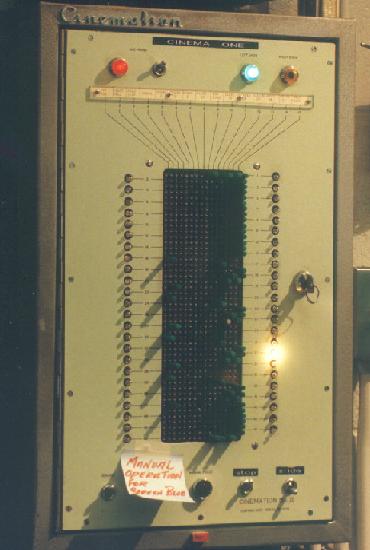
This is the only automation I'm aware of that can do what I want...but it doesn't do enough. There are not enough command lines across the board horizontally. Granted 48 action lines down is great, but I seek much more flexibility and would prefer not to have to keep pulling the plugging the diode pins to program each show. Joe tells me the CA-21 can have 5 programs in it's memory, which would suit my needs nicely.
Posted by Scott Ribbens (Member # 180) on 01-15-2000, 07:36 PM:
Well Brad, I was going to suggest that one too. If the Cinemation is not flexable enough for you, then that Xetron that I was talking about earlier won't cut it either. Just how flexible do you want this thing to be? You could go with something like a CPA-10. It has up to 10 programs with 70 command lines per program, and is very flexible. The only thing about it is you would have to figure out how to make it do changeovers, but as I recall, you should be able to make it work. PS. Could you fill us in on why you want automation in a changeover screening room in the first place. I have always perfered that changeover booths, screening room or not, be completly manual.
------------------
quote:
"More human than human" is our motto.
Scott
Posted by Scott Norwood (Member # 30) on 01-15-2000, 08:09 PM:
I like manual booths, too (maybe just because that's what I'm used to), but I would love automated changeover for home use.
Actually, my ideal (read: way too expensive for any normal human) home theatre would consist of a pair of Kinoton 16/35 machines with the remote-focus and remote-framing options. I'd store films on 6000' reels. With this sort of setup plus automated changeover, watching a movie would involve no more work than threading the projectors and hitting "start"; then I could sit back and watch the show (and tweak the focus by remote control as needed).
Posted by Nicholas McRobert (Member # 205) on 01-15-2000, 08:23 PM:
The failsafe on the Kinoton machines is a "split roller" at the bottom of the machine, measuring a little less than 35mm when closed. When film is running over this, the roller is held open or "split" and allows the machine to run normally. If there is a film drop-out, or break and the two halves of the roller spring together, the machine stops. It's definitely the simplest, and best system I have used and beats the hell out of the infra-red sensors (Component Engineering) I used to run on. The Kinoton platter is also connected to the projector and the projector motor will not <start> if the take-up platter control arm is not pulled across (ie: film loaded). So, in the case of a power-outage, the Kinoton motor takes so long to slow down and stop that the platter control arm ends up at the <no film> position and the projector simply WON'T start again when the power comes back on. That's my theory anyway.
Apart from this, I I will talk to one of the field engineers at the start of the week and ask him what would happen in a situation like the one mentioned. I seriously doubt, though , that Kinoton would make such a stupid mistake in the system's design. I can also say that their customer service (and that of their dealers) has been second-to-none so far.
Is it maybe possible that one designer has sold their system to both companies? On close inspection, they are too similar not to be related at all.
Just while we are on the subject, I saw the ASK-1 PC-based automation system working yesterday at a cinema in Scotland. Very impressive, with no problems reported so far!
Posted by Brad Miller (Member # 2) on 01-15-2000, 08:56 PM:
Well Scott, I think Scott has already answered your question. What better than a 2 projector situation that is fully automated for home use? Think about it, you've got a print on the shelf and you want to run it, but you're only going to run it once. At that point, it makes more sense to run it changeover than to load to the platter. If I was going to run a print 2-3 times, then it would be plattered. And who wants to sit in the booth at home running the film when both projectors could be threaded with the timer set so you could go into the auditorium and actually enjoy the movie uninterrupted? (Ok, I'm sure there are a few collectors who will disagree, but I think they are typically people who don't work in projection rooms everyday.)Anyway, the Cinemation only has 15 command lines across. Remember that 2 of those are taken away just for "projector 1 motor start" and "projector 2 motor start". Then you've got to dedicate 4 of them for sound format switching (8 if a CP-500 is used), screen lights up and down, house lights up, mid and down, possible side lighting as well up and down, flat format, scope format, douser open, douser close, possible slide or video projector on and off...basically I'm looking for whatever can handle the most variables as I'm getting tired of outgrowing systems. To date, Gary Stanley's UA barcode automation seems to be the superior system of choice (the cues on the film tells the automation what to do...no programming from show to show), but even that has it's quirks and was never intended to be used as an automation for changeover.
The bottom line here is I want an automation system that will have enough options on it to be able to do anything and everything. The presentation should look like there is an operator running the show, but with no one in the booth. Anyone have any recommendations as to what the most flexible automation system is?
Posted by George Roher (Member # 91) on 01-15-2000, 10:28 PM:
Joe, you should send that picture to Christie and let them see what they are doing to your theatre! I used to have problems with older AW3's not taking up properly. One would stop taking up half way through the show.
Posted by John Walsh (Member # 168) on 01-16-2000, 12:55 AM:
Brad;On the Cinemation I used, I was able to use some circuits differently. I had a CP200, and it was able to handle some of the functions that the Cinemation was originally supposed to do, I could connect some pin/circuits to a different function. For example, (in the original design) there were three pin/circuits just to switch in/out the intermission music. I had an extra relay contact on the "START 1" trigger the CP200 "MUTE." The relay that opened the proj #1 zipper also triggered the CP200 "GO" button, which took it out of "MUTE." The "STOP BOTH" on the Cinemation triggered format "D" and "GO." So that freed up 3 pins.
Could you do something like this with your automation
Posted by Brad Miller (Member # 2) on 01-16-2000, 01:11 AM:
John, an interesting idea indeed. I have done similar things in the past where I found a glitch or another way to wire something.My favorite was actually on the Gary Stanley UA barcode automation. When the SR cue is passed, for some reason the system pulses the processor into Dolby A for one second, then pulses into SR. Everyone I talk to thinks I'm crazy...but it happens. No one else is looking at the processor when the cue passes! Anyway, I moved commands around so now the A cue is hooked to toggle the remote/local fader. This way I can start the show with an SR cue and the remote fader is pulsed immediately followed by the SR. That eliminates needing two dedicated cues at the start to pulse into remote and then to pulse into SR.
If I end up crosswiring two of these UA units together, I'll definitely wire the audio changeover into the "manual cue" douser button, because as Joe has pointed out in the past, the douser opens and 10 seconds later the sound switches.
Posted by Joe Redifer (Member # 3) on 01-16-2000, 02:37 AM:
Actually Brad, the CA21 can hold 6 programs, not 5. So you could have a "spare" program just for flushing the toilet or something! 
It's too bad such a fabulous automation has such tremendous shortcomings.
Also I have had platters (AW3) that have stopped taking up about 15 minutes into the show. That is very rare, and I've only seen it once or twice.
Posted by Michael Cunningham (Member # 210) on 01-16-2000, 04:07 AM:
Hey Scott, The reason fail-safes must be run through the automation is that you need them to affect many different things at once. At startup, if the film isn't sitting correctly across the failsafe, you need it to signal "no start" back to the automation. In the case of a film break, you need it to shut down the motor, close the c/o douser, bring up the house lights, revert to non-synch (so you don't hear that odd slowing, tapering off sound) and, probably most important, sound an alarm of some kind. Now, granted, leads could be run from the failsafe to all these seperate devices, but it's much easier to start an automation program with one signal since the automation is already, by necessity, connected to every device you've got. Hope this helps.
-Mike
Posted by Steve Guttag (Member # 268) on 01-16-2000, 11:24 AM:
The old Xetron changeover automation was the Maxi 7 and the Maxi 7111B. They are no longer made.I have seen people try to use the Maxi 9DC for changeovers with some sucess.
Currently, we use Kelmar's automations with their "integrator." Bascially, you get two automations (either the Series 4 or Series 7) and the integrator. If you want to run platter, no problem, turn off the integrator and start up normally. If you want to run changeover, no problem turn on the integrator, press start on the first projector's automation and it will run the rest of the show. You can leave the integrator on since it is only activated by a unique cue (we use the triple cue detectors with the 3-7 expander) so there are enough combinations to perform all the normal functions plus a unique changeover command. The nice thing about this is that a print can be cued for auto changeover and eventually be placed in a platter theatre within the same complex and not cause problems.
To my knowledge, it has NEVER missed a changeover (the failsafes are always active on start up and after the changeover opens to allow for bobble, Joe). Cueing the film at 20 feet prior to last frame always gets you a perfect changeover (at least on Simplex PR-1014 w/ 5-stars).
Steve
------------------
"Old projectionists never die, they just changeover!"
Posted by Chris Erwin (Member # 176) on 01-16-2000, 11:29 AM:
Hmm...Should I rethink ever wanting to get an AW-3? I run an AW-2 now at the cinema I work in and have had no problems.I know for certain I don't want the CA21. I'll stick to the "Raven" by Uni-Pec before I change automations. It will properly shut down when the fail safe goes down.
--Chris
P.S. What's the word on Strong platters?
Posted by John Walsh (Member # 168) on 01-16-2000, 01:35 PM:
Brad;
Does that Cinemation have the two differently biased diode pins? One pin to 'latch' the relay, and the other way to 'unlatch?'If so, could you seperate the two and use them for different functions? Like a black diode for close curtian and a green diode for open curtian.
When I did the electrical set ups for our theater chain, I tried to make everything operate with only a pulse, rather than having a relay stay pulled in. By pulse, I mean a contact closes for only 1 sec or so, then opens up.
For example, most curtian motors only need a pulse on the common and "close" wire to close the curtian. Yet, there are several automations the will hold the "curtian close"
contacts together for a long time.
PS: Does that Cinemation have that little solder terminal block to terminate all the wires? And does it run on 220 VAC?
Posted by Brad Miller (Member # 2) on 01-16-2000, 02:11 PM:
Steve, what else can the Kelmars do? I doubt they will perform all the tasks I desire. (It must appear to my guests that Steve Guttag is personally running the show manually, switching this and changing that. )Chris, not to worry, I've ran plenty of AW3s and never ever had one die during a show. Occasionally I've had them fail on startup if the timing wasn't adjusted correctly or if the motor drive wheel was too worn down, but even that is rare. Get rid of that AW2.
John, I've never personally wired one of these babies up, but I'm pretty sure it runs off of 110V. All the pins were the same.
Posted by Joe Redifer (Member # 3) on 01-17-2000, 05:10 AM:
UPDATE:I just finished going over a long list of details with Pennywise. They seem confident that these problems can be worked out. If they are and the new chip does everything it looks like it will, the CA21 will be the best automation in the world.
I will re-review the unit as well once this happens.
Posted by Richard Hamilton (Member # 321) on 01-18-2000, 11:48 PM:
Hey Joe,
It appears to be a threading problem from the first glimpse of the picture. Why is the leader still threaded up? That is the prolem with timers. Someone may be miles away when a projector starts.
Posted by Scott Ribbens (Member # 180) on 01-19-2000, 02:05 AM:
Richard, the answers to all of your questions can be found in Joe's second post to this thread.
Posted by Gordon McLeod (Member # 33) on 01-19-2000, 11:48 AM:
Brad the Cinemation MK4 was also available with a double function section of 48 cuesx 24 functions. It also could use red and green pegs to acess to different layers of the matrix Red were hous functions for lobby etc and green were booth functions
Posted by Richard Hamilton (Member # 321) on 01-19-2000, 11:19 PM:
just curious as to what kind of failsafe you have? micro-switch, or proximity detectors?Rick