This is topic Help with a sound problem in forum Film Handlers' Forum at Film-Tech Forum ARCHIVE.
To visit this topic, use this URL:
https://ft-forum.com/ft/cgi-bin/ubb/ultimatebb.cgi?ubb=get_topic;f=1;t=001635
Posted by Andy Davis (Member # 262) on 11-08-2000, 11:32 AM:
I've been having problems with the sound in one of the auditoriums at my theatre. Periodically a loud buzzing, similar to the "motorboting" sound comes over the center and right channels. The buzzing is very loud and usually results in the show being cancelled. At first I thought it may be RF interference but the buzzing only exists when the film is moving. So then I thought maybe it was the soundtrack, but the buzzing occurs on several prints. So maybe it's the soundhead (Simplex). I checked the solar cell and without actually doing any alignments with a meter, it seems to me that it is aligned and the solar cell has no dust or scratches. The really annoying part is that the problem comes and goes randomly. It never happens on the same print or at the same part of the film and the problem goes away by it itself. It's hard to troubleshoot because I can't find a way to re-create the buzzing. During a couple of showings, I managed to stop the buzzing by rethreading the sound head. Yesterday I filled the projector with oil (which was almost bone dry) and made sure the projectionists were threading the sound head correctly.�The buzzing occurs in all analog sound formats, including the back-up mono. We have SDDS on this projector but the reader is unoperable (I'm waiting on a replacement part), so I can't test for the problem in a digital format. Any suggestions are greatly appreciated.
Posted by John Pytlak (Member # 331) on 11-08-2000, 12:24 PM:
I suspect the film is "wandering" side-to-side on the analog sound drum, allowing the perforations to be scanned. Standard SMPTE 203 specifies track 1 (left channel) is on the inboard side, and track 2 (right channel) is on the outboard (perforation) side, so it sounds like the film perforations are occasionally wandering into the scanned area for track 2, giving the "motorboat" sound on the right and (derived) center channel. The audio frequency the perfs make is 96pps (putts per second). (24fps x 4 = 96). 
Since you said that the problem is not confined to one print, or section of a print, and sometimes goes away when you rethread the soundhead, I suspect that the tensioning and postition of the film as it goes around the sound drum is incorrect. If you can provide the model number of the soundhead, I'm sure others more familiar with it can guide you on checking proper tension and alignment.
------------------
John P. Pytlak, Senior Technical Specialist
Worldwide Technical Services, Entertainment Imaging
Eastman Kodak Company
Research Labs, Building 69, Room 7419
Rochester, New York, 14650-1922 USA
Tel: 716-477-5325 Fax: 716-722-7243
E-Mail: john.pytlak@kodak.com
Posted by Rick Fowler (Member # 605) on 11-08-2000, 12:33 PM:
Is this a strong 5 star soundhead? buzzing that comes and goes in your center channel? there are a few things I can think of. Might be the Lateral Guide Roller needs replaced, have you run a buzz track? How old are you cell leads? check to make sure the insulation on the cell leads hasn't been damaged if so replace them. well without knowing any more about the system hard to tell you much else.
------------------
Regal Booth Certifier
Posted by Matt Ashburn (Member # 573) on 11-08-2000, 01:36 PM:
I'm not sure if this would apply, as this problem was experienced on some Century projectors this past summer.The problem on the Centurys was that the tension around the sound mecahnisms was too taunt, causing a sound that was described as a "train running" or a "lawnmower." Relieving some tension by squeezing together the rollers surrounding the drum or by rethreading solved this problem. Here's a diagram:
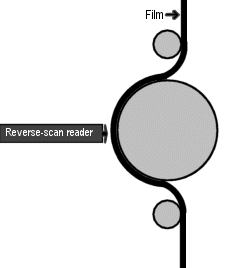
Like I said, I'm not sure if it applies to your setup, but I thought I'd throw it out for you.
Matt Ashburn,
Hollywood Cinema
Martinsville, VA
Posted by Brad Miller (Member # 2) on 11-08-2000, 04:42 PM:
Make yourself a loop of a silent green band (preferably with DTS timecode). Run it and listen for a bit. Whenever you hear that sound start in, stick your finger in the soundhead and push it in and out a little. If that exact same buzzing sound fluctuates while you do that, it's definitely a problem with the soundhead alignment.
Posted by Randy Stankey (Member # 64) on 11-08-2000, 06:53 PM:
Assuming you have threaded the projector right and closed the pinch roller... (Yeah, stupid question but I HAVE to ask  )
)
I'm in agreement with the rest of the pack. Check on your lateral alignment. Sometimes the mechanism gets loose or the spring doesn't push the arm out hard enough anymore. (Possibly some dirt in the mechanism?)
Do a lateral alignment (buzz track) and check to be sure the sound head isn't loose.
Oh! Yeah! What about the little lock screw on the adjustment knob? Is it in there and is it tight?
Posted by Rick Long (Member # 213) on 11-08-2000, 09:47 PM:
The intemittancy of this problem reminds me of a tip from the old Simplex sound-head manuals. When you close the guide rollers over the drum, the assembly is held there by a small pin under the sound drum. If this pin is allowed to become dry, it can impeade the rollers from springing back out to their proper position.
A small drop of oil on this pin will alleviate that problem.
Presumably this thing was once operating properly, so I do not recommend adjusting the lateral guide adjustment unless you have a good loop of Buzz-track, and know how to use it.
Posted by Rick Long Jr (Member # 541) on 11-08-2000, 10:01 PM:
If it's a 5 Star soundhead, check for lateral play in the fixed idler roller that the film goes over after it comes off the sound drum. I recently dealt with an identical problem at a theatre here in Toronto. There didn't seem to be enough play to cause a problem, but with the machine running, I could cause motorboating to come and go by simply pushing and pulling on the roller as it was running. Check the screw on the end of the shaft and make sure it's snug. Also make sure it spins freely and isn't binding. Another thing we've found that helps these heads maintain their lateral adjustment is to put a small drop of oil onto the pin in the casting that the lateral guide lever assembly catches on when you close it. As well as the main shaft that the entire assembly pivots on, but this is hard to do unless you remove the adjustment knob, which I don't recommend unless you have some Buzz Track. Hope this helps!
Rick!
Posted by Bill Purdy (Member # 202) on 11-09-2000, 10:03 AM:
I would like to add to Rick Long's comments as there has been a great deal of trouble with this problem. Look further at that roller in the upper right hand corner---the one over which the film goes after leaving the sound drum. The shaft for this roller is mounted to a stand-off which is screwed into the main housing. Ballantyne doesn't know how or when it happened, but for a long time the stand-off was made too short, by about 0.025". This means that the lateral guide roller is pushing the film one way and the next roller is pushing it the other way and film really does not like to bend sideways. So, there come times when the inner flange of the lateral guide roller is not strong enough to hold the film in position and it will ride inboard. Carefully put your fingers on the flanges of that aluminum roller and there is a good chance that the outboard one will have a much sharper edge than the inboard one. The quick fix is to loosen the screw holding the roller on the shaft and you will probably see the roller ride out as the film tries to align itself. Now turn your attention to the strip of metal which holds the sound head door from opening too far. You know, the one with the long slot in it. Take out the screw on the sound head end and steal the washer under the metal strip. Next, remove the roller in question and then the stand-off behind it. Put the stand-off back but with the washer shimming it out and then replace the roller. Good luck!
------------------
Bill Purdy
Component Engineering
Posted by John Pytlak (Member # 331) on 11-09-2000, 10:18 AM:
Bill:I knew an alignment issue could cause the film to wander inward. Your clear and concise explanation fits the symptoms.
But why do you recommend stealing the washer from the soundhead door stop, rather than finding a new washer with the correct thickness to use as the shim?
------------------
John P. Pytlak, Senior Technical Specialist
Worldwide Technical Services, Entertainment Imaging
Eastman Kodak Company
Research Labs, Building 69, Room 7419
Rochester, New York, 14650-1922 USA
Tel: 716-477-5325 Fax: 716-722-7243
E-Mail: john.pytlak@kodak.com
Posted by John Walsh (Member # 168) on 11-09-2000, 10:49 AM:
I think Bill was just trying to provide a quick fix (by suggesting to steal a washer from the soundhead door.) Easily avaiable, and free! Any washer can be used to replace the stolen one.Off hand, I don't know what the standard thickness for washers is, but if it's not 0.025" it can be a bit expensive to have made.
We've had a problem like this for quite awhile that no one has been able to figure out... A buzzing sound (like a 60hz hum); happens on some, but not all Five Star soundheads; most prints are OK- happens only on a few; pushing the film over can make it go away, but when alignment film is run, it tests OK. Our projectors were shipped about six years ago-- could this be part of that "short standoff" batch?
If this is our problem, I'm gonna be a happy camper!
Posted by Bill Purdy (Member # 202) on 11-10-2000, 09:57 AM:
I just grabbed a pair of dial calipers and looked at 0.025". Not enough, so, I guess I misled you. It needs to be more and that washer I suggested you "borrow" is thicker than normal which is why it works so well. For those who would like to pursue this further, the first thing to check is the sharpness of the flanges on a roller that has been in there for awhile. The aluminum is soft and wears easily, so one which is out of line will develop a sharp flange. To really prove the point you need to make a guage. If you have the facilities to make it yourself, or if you can get a machinist to make it for you, you need a piece of metal (preferably brass or aluminum) which is 0.330" thick. This is the distance from the outboard edge of the sound drum to the outboard edge of the film. You lay your gauge across the end of the sound drum and gently slide it until it touches the inner flange of the lateral guide roller. The inner flange (the one which determines film position) should just kiss the guage. If you have made your guage long enough, you then slide it up until it touches the aluminum roller and it should also line up. So, where does this 0.330" come from? When we were doing our original design work on our sound readers we wanted to know just where the film wanted to run. In other words, where was the original design point? After measuring numerous lens mounts we were able to get a pretty consistent number. This was confirmed (within 0.004") by Rick Sanjurjo at Ballantyne who started with the drawings for the picture head and traced the film center line down to the sound drum.
To be sure, there can be variations in the tolerances of the sound drum itself (although, LaVezzi is mighty good) and the machining of the bearing seats in the sound head casting, but they are really pretty close. At least, this gives you a starting point.
------------------
Bill Purdy
Component Engineering
Posted by Andy Davis (Member # 262) on 11-10-2000, 07:26 PM:
Today was my first day back at work since I posted my original message. The solar cell was in fact reading the sproket holes causing the motorboating. I played with the idler roller for quite some time and figured out the problem was coming from the lateral guide roller. I adjusted the alignment of the lateral guide roller and the buzzing went away! I fine tuned the alignment with a buzz track and there have been no more problems. This was my first time working on a Simplex 5-star since I had only worked on Cinemeccanica's before. I learned a lot listening to you guys and spending a couple hours tinkering with the soundhead. Thanks to everybody who posted!