This is topic Interlock setup in forum Film Handlers' Forum at Film-Tech Forum ARCHIVE.
To visit this topic, use this URL:
https://ft-forum.com/ft/cgi-bin/ubb/ultimatebb.cgi?ubb=get_topic;f=1;t=001916
Posted by George Roher (Member # 91) on 02-11-2001, 06:14 PM:
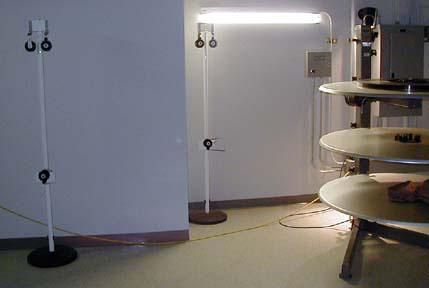
One of the theatres I work in has a rather odd system for interlock in one of it's booths. Instead of attaching a series of rollers to the wall and/or ceiling, they purchased a bunch of portable poles that have rollers on them. So when an interlock is setup in this booth, the operator has to grab a few poles and place them between the machines being interlocked. It can be a pain trying to align everything properly (especially when one is pressed for time). I much prefer having rollers permanently setup between the machines. Threading an interlock is simpler that way. Does anyone else use these poles for interlock?
Posted by John Pytlak (Member # 331) on 02-11-2001, 06:20 PM:
I don't favor the practice of interlocking, except as a last resort, but the rollers on poles idea seems very prone to misalignment. Do the poles have heavily weighted bottoms, so they don't move or tip over?------------------
John P. Pytlak, Senior Technical Specialist
Worldwide Technical Services, Entertainment Imaging
Eastman Kodak Company
Research Labs, Building 69, Room 7419
Rochester, New York, 14650-1922 USA
Tel: 716-477-5325 Cell: 716-781-4036 Fax: 716-722-7243
E-Mail: john.pytlak@kodak.com
Web site: http://www.kodak.com/go/motion
Posted by Brad Miller (Member # 2) on 02-11-2001, 06:23 PM:
Awwwwww, come on John. Interlocking is fun and "done right" will not damage the film in any way whatsoever. 
Those poles are typically weighted down at the base and commonly have a tire wrapped around them for tipping slightly and rolling into position. Rarely do I ever see them lined up properly.
Posted by John Pytlak (Member # 331) on 02-11-2001, 06:42 PM:
"Done Right" is the big question mark in most cases. Wouldn't you really like each screen to have its own print anyway??? 
------------------
John P. Pytlak, Senior Technical Specialist
Worldwide Technical Services, Entertainment Imaging
Eastman Kodak Company
Research Labs, Building 69, Room 7419
Rochester, New York, 14650-1922 USA
Tel: 716-477-5325 Cell: 716-781-4036 Fax: 716-722-7243
E-Mail: john.pytlak@kodak.com
Web site: http://www.kodak.com/go/motion
Posted by Joe Redifer (Member # 3) on 02-11-2001, 08:32 PM:
What would the purpose of that be? Interlocking a single print over at least 16 screens will keep the morons out of the booth!
Posted by Brad Miller (Member # 2) on 02-11-2001, 09:39 PM:
Actually no, I'd rather just have the one print. It's much more impressive to show someone a print that has been ran double or three times the amount of the other theaters in town...and for it to still look perfect.
Posted by John Eickhof (Member # 323) on 02-11-2001, 11:18 PM:
Come on Brad, you know that in the normal
'booth' environment of today, the result of no snafus when interlocking would be rare!
I agree with John P, that multi print screenings are more productive especially as far as the film companies are concerned, and the 'have it when you want it' attitude of the theatre going public! I must commend you on the rather interesting interlock you guys pulled off! However, I want to know two things...First, how long was your thread-up leader and how long did it take to fully lace the system? And second, how long was the feature you ran, and obviously, all projectors were equipped with sych motors on the same phase?------------------
John Eickhof President, Chief Slave
Northwest Theatre Equipment Co., Inc.
P.O.Box 258
Wendell, ID. 83355-0258
208-536-5489
email: jeickhof@nteequip.com
Posted by Brad Miller (Member # 2) on 02-12-2001, 12:33 AM:
Threading leader was a little over 2200 feet if memory serves. It took 45 mintues to thread all 16 machines. Normally though, I can string up an interlock through 2, 3, or 4 projectors quicker than I can thread each one individually. The secret is being able to "thread up" and doing the entire thing in reverse. The movie was somewhere around 1 hour 45 minutes long, give or take 10 minutes.I won't disagree with the notion of having multiple start times, though.
Posted by Gordon McLeod (Member # 33) on 02-12-2001, 08:31 AM:
Actually running reel to reel and circuiting the reels is the best as it prevents snackbar congestion with multiple start time and still a single print
Posted by Greg Mueller (Member # 17) on 02-12-2001, 08:59 AM:
Why not have one reel at each of 6 or 7 screens, and have the patrons run from one screen to the next as the reels run out. That could be fun. The ultimate in crowd control/processing. The last move could be out the back door. 
------------------
Greg Mueller
Amateur Astronomer, Machinist, Filmnut
Posted by Dave Bird (Member # 490) on 02-12-2001, 09:07 AM:
Yes, Greg! But each reel in a progressively smaller auditorium, like musical chairs for grownups!
Posted by Bill Purdy (Member # 202) on 02-12-2001, 10:15 AM:
I agree with Brad's "Awwwwww, come on John. Interlocking is fun and "done right" will not damage the film in any way whatsoever."I smile every time I remember a set-up in the old "Crest" theatre in north Seattle. Let's say that we are starting in house #1. From an old Potts platter (the ones that used Chrysler auto distributor points), through the first AA II, across the ceiling, through a hole in the wall, across the manager's office, a left turn and down a hall way, a right turn, through another hole in a wall, across a small booth, through the second AA II to take-up on a Drive-In platter. The two automations were totally different and special interface boxes had to be made. The building was undergoing alterations with all the attendant dust so we put a pair of opposed anti-static brushes in the middle of the run which really worked well. There was enough film in the air that it took 51 seconds from screen to screen which means a length of about 96 feet because this was in 70mm! Yup, it is fun!
------------------
Bill Purdy
Component Engineering
Posted by John Pytlak (Member # 331) on 02-12-2001, 11:31 AM:
Bill 
Again, "Done Right" is the big question mark. One badly aligned guide roller, or poor tensioning that drags the film across the floor, will forever leave its mark on the print. At least KODAK VISION Color Print film will not attract dirt on all that free-hanging film (2200 feet for the 16 screen world record, 96 feet for yours) with a static charge, because of it's transparent conductive backing layer. Older film was a shocking "dust magnet".
I can understand the need to interlock when a picture like "Hannibal" is selling out, and you haven't sold any tickets for the "dog" playing next door. But the scheduling flexibility and lower risk of having multiple prints for a hit movie is hard to argue with.
------------------
John P. Pytlak, Senior Technical Specialist
Worldwide Technical Services, Entertainment Imaging
Eastman Kodak Company
Research Labs, Building 69, Room 7419
Rochester, New York, 14650-1922 USA
Tel: 716-477-5325 Cell: 716-781-4036 Fax: 716-722-7243
E-Mail: john.pytlak@kodak.com
Web site: http://www.kodak.com/go/motion
Posted by Brad Miller (Member # 2) on 02-12-2001, 12:10 PM:
I've never had a problem with airborne dirt. The trick is to use a film cleaner, but when interlocking many people feel they have "enough to mess with" and will not run a cleaner. Most booths have major problems with grand openings from all of the construction dirt, but using cleaning machines will prevent that (which I have proved time and time again). Incidently, I only ran that 16 screen interlock through one cleaner, being the first one on #8, because I am strongly against placing film cleaners "between" projectors due to the slightly increased tension. When it got to the final projector, we watched the green bands and the film was absolutely immaculate. So my real point is that stretching film across the booth really is NOT an issue. I have done many overly lengthy interlocks in the past (most on new openings with ridiculous construction dirt) and have never had any dirt accumulation whatsoever. If airborne dust is bad enough to be a threat to the film, then I feel sorry for the projectionist who will have to breathe that air!
Posted by John Pytlak (Member # 331) on 02-12-2001, 12:31 PM:
The problem of static attraction of dirt with older films was not the airborne dirt, but dirt attracted to the print when is got close to a dirty surface like the floor or an unkempt rewind bench. You could literally watch dust and dirt "jump up" to the highly charged film. Fortunately, the new conductive VISION print stocks quickly dissipate any dirt-attracting static buildup. I totally agree that in addition to keeping the booth clean, on-line film cleaning is the best way to keep prints looking good, and avoid winding in abrasive particles that eventually will cause cinch marks. An on-line film cleaner for each projector is a good investment in "doing film right".
------------------
John P. Pytlak, Senior Technical Specialist
Worldwide Technical Services, Entertainment Imaging
Eastman Kodak Company
Research Labs, Building 69, Room 7419
Rochester, New York, 14650-1922 USA
Tel: 716-477-5325 Cell: 716-781-4036 Fax: 716-722-7243
E-Mail: john.pytlak@kodak.com
Web site: http://www.kodak.com/go/motion
Posted by Greg Pauley (Member # 503) on 02-12-2001, 12:34 PM:
I think interlocking is pretty safe because most people are scared of interlocking and triple check the film path before starting. It's the everyday threading you have to worry about!
Posted by Scott Norwood (Member # 30) on 02-12-2001, 01:14 PM:
Brad and John -- so it's a bad idea to use a cleaner on each machine when interlocking multiple screens? Does this apply to PTR rollers as well or just the Kelmar/Christie media cleaner?
Posted by John Pytlak (Member # 331) on 02-12-2001, 01:43 PM:
Scott:I read Brad's concern as the slightly increased tension from the film running through the cleaner building up through multiple projectors. My opinion is that since each projector is pulling the film through using sprockets, the cleaner's tension only affects the projector immediately following it, and doesn't cascade through the system.
Either type of film cleaner should be satisfactory, although I would not run a media cleaner in the "dry" mode, since abrasive dirt can get caught in the media and scratch the film. (This is especially a risk around new construction, where abrasive cement and plaster dust are plentiful). In a really dirty situation, PTRs will "load up" and become less effective, but the risk of scratching is low as long as they turn freely.
------------------
John P. Pytlak, Senior Technical Specialist
Worldwide Technical Services, Entertainment Imaging
Eastman Kodak Company
Research Labs, Building 69, Room 7419
Rochester, New York, 14650-1922 USA
Tel: 716-477-5325 Cell: 716-781-4036 Fax: 716-722-7243
E-Mail: john.pytlak@kodak.com
Web site: http://www.kodak.com/go/motion
Posted by Brad Miller (Member # 2) on 02-12-2001, 02:32 PM:
Yes, you read my concern correctly. My rule in training has always been to run the film cleaner on the payout platter and regardless of how many other projectors the film will run through to NEVER run the cleaner on the rest. For example on a 2 screen interlock, I always make my staff move the cleaner each show to wherever the print is originating from. That way the tension is exactly like a normal non-interlocked run.(Hey John, try that static test of yours on older film stocks with wet film. I think you'll see what I mean about airborne dirt not being a problem. Running FG is something I always do, so I frequently forget about other people speaking of something when they may have been running dry. Oops.)
Posted by Darryl Spicer (Member # 711) on 02-12-2001, 05:12 PM:
Most projectors I've interlocked have been 5. We had a large group, around 750 people for a special showing of The Lion King. No problems and the film looked as good as it did prior to showing. The problem I have with interlocking is that you usualy have at least one maybe two people who can run it correctly. Our company has made it a policy that no interlocking of films is allowed without first contacting the booking department. If you can get in touch with them their answer is usualy no the film companies do not want us to do that. Something to do with the money not being properly credited.
Posted by John Walsh (Member # 168) on 02-12-2001, 06:59 PM:
I'm not a big fan of interlocking, but I recognize it is a necessity in today's "get what you can, while you can" method of operating theaters.Properly done, I don't think it's much worse than what is already being done (with platters.)
Any theater that wants to run interlock should have rollers permanently mounted to the walls, ceiling, etc. to lessen the possibility of scratching. I never did care for those free-standing roller poles. I tell people to either hold up the end of the film as it runs out of each projector, or splice on a trailer, to keep the end cleaner. Also to check their threading carefully!
As with anything, a good operator would not have any problems using those interlock roller poles. It's the people who don't know (or care) that you have to watch for.
Posted by Randy Stankey (Member # 64) on 02-12-2001, 07:56 PM:
I have never had any problem interlocking prints. When my "home" theatre first opened, we were booked to play two prints of Eraser but ended up getting only ONE print. We interlocked that one print for every show of every day for about two weeks! I don't think we had ANY problems with that printWe were all shitting little green apples for the first few days until we got the hang of it. After that it was a pretty routine operation.
Even then we double checked and triple checked those projectors before every show and we doubled up on the check-ups of those houses.
My number one piece of advice to any would-be interlocker is to do one or two TEST RUNS before you run your go-show.
Posted by George Roher (Member # 91) on 02-12-2001, 08:05 PM:
Considering the amount of extra setup time it took me to get an interlock started using the poles (which I had never used before Saturday night), I would be very afraid of uncaring operators using them. It took a lot of tinkering before I was satisfied with the film path. The same night I had to thread an interlock in the older booth (with rollers permanently setup) and it took all of 3 minutes. I've never had any problems or damaged film from running interlock (the most I've ever done was 3 screens), but I really don't like the poles. They're weighted at the base but if someone bumped into one there could be a problem.