
Also... I even tried this trick that was shown to me by the man who passed on his projection knowladge to me. Wherever you are Mr.A, it doesn't work. (slip a white cotton glove on, pinch the film as its being feed out from the brain.)
This problem is just one more reason to hate that stupid, little, yellow creature.
------------------
Do a search on this forum for "FilmGuard" or click "Film Cleaning" below.
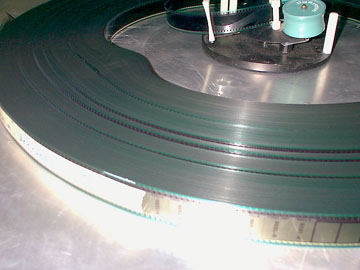
One thing that can happen is that your print has been "spiked". ("Roping" is the correct term but I think "spiked" is more descriptive.) Let's say that one of your pad rollers has somehow come loose. The film will jump partially off the sprocket and the teeth will put little dents in the film. This will cause the film to run throug the brain (payout control plate) all funky-like. Layers of film will be pulled off as the print unwinds on the payout platter. Is this what's happening to you?
Here is an example of what a roped print might look like:
One thing you can do really quick is to press on the print as it winds up on the take-up platter. Is it all spongy? If so, check your film for damage. You may also notice that when you are in the last one or two reels of the movie, the film starts looking like a many-sided polygon. There are other causes for this, like improper humidity levels but "spiking" can cause this too.
If you have verified that all this is true the first thing you need to do is to go over the projector with a fine-tooth comb and find out where the damage is occuring. You should be able to find the roller that's fouled up. Other possible causes for this are bad splices that cause the print to "jump the track" as it runs. A good indicator of this is when part of the print is OK and part of it is not. You'll find the bad splice right near the place where the damage starts. Look for lab splices (Some people call them "Chemical Splices" although that's not entirely correct.) Another thing to look for is one of your splices that didn't get all the holes punched out properly. Maybe there's a "flap" hanging off the film where the blade didn't cut the film off flush.
After that, the only thing left is that somebody made a Boo-Boo and didn't thread up properly. YOU HAVE TO CHECK THE PROJECTOR BEFORE YOU START THE MOVIE! Sorry if I sound like I'm dissing on you but I've seen this happen all too often. Somebody starts the projector and walks away, never to return. I know YOU didn't do this but now you have ammunition to get on somebody ELSE'S case. 
So... OK... what do we do if you do have damaged film? Pretty much there's nothing you can do.
You can filp the film over and run it with the soundtrack down (Or soundtrack UP) Sometimes that will help but not always. Another thing you can do is break the film down onto 6,000 foot reels. Take it over to the rewind bench and turn the tension on the payout spindle way up. What you hope to accomplish is to flatten the film out a little bit. Sometimes this works and sometimes it doesn't. This is a risky move as well. You can scratch the hell out of the film doing this and you can stretch it out as well. But if the film is already in crappy condition, what have you got to lose?
After all this the only option is to either live with it or replace the print. If you elect to live with it you'll have to keep a close eye on this print for as long as you have it. It's liable to wrap on you in a heartbeat. Your only hope is that MAYBE the damage will "Play itself out". (The film will flatten out again after many runs.) This isn't likely unless the damage is very slight.
Lastly you COULD try FilmGuard. I don't know if it will help or not. Again, you have little to lose at this point. Really, I hope you don't have damaged film. This would give you a good reason to try out FilmGuard and see how it works.
I wish you luck! I hope it's NOT really damaged! 
Being that you are in Florida, HIGH HUMIDITY can cause the film to be limp and sticky. Ideally, the humidity in the projection room should be between 50 and 60 percent.
Kodak VISION Color Print Film has a transparent conductive anti-static coating on the back side. Most laboratories also use a Kodak-recommended anti-static additive in their print film process. These measures have greatly reduced the incidence and severity of "static cling", but some platters are more prone to build up static on the print. If the problem is due to static, try some of the procedures recommended in my article in the September 1998 issue of Filmnotes for Reel People:
http://www.kodak.com/US/en/motion/newsletters/reel/september98/pppp.shtml
------------------
John P. Pytlak, Senior Technical Specialist
Worldwide Technical Services, Entertainment Imaging
Eastman Kodak Company
Research Labs, Building 69, Room 7419
Rochester, New York, 14650-1922 USA
Tel: 716-477-5325 Cell: 716-781-4036 Fax: 716-722-7243
E-Mail: john.pytlak@kodak.com
Web site: http://www.kodak.com/go/motion
So THAT's whats wrong with me!! Seriously, that shouldn't be a problem now. Florida is in the middle of the dry season, and temperatures are down.
Randy gave an excellent description of some of the things that can happen. I'm not sure about "ironing" the film by pressing it on the rewind bench though. That seems a little brutal, and I've seen the scratches that can occur when tightly wound film cinches on the reel, digging any stray dirt into the emulsion.
I suppose if you wanted to try to push the spikes back in, you could try running it between some free-rolling metal dowels. Maybe that is an idea for someone to invent, a spike-pusher-inner. It could go right next to the film stretcher.
------------------
John P. Pytlak, Senior Technical Specialist
Worldwide Technical Services, Entertainment Imaging
Eastman Kodak Company
Research Labs, Building 69, Room 7419
Rochester, New York, 14650-1922 USA
Tel: 716-477-5325 Cell: 716-781-4036 Fax: 716-722-7243
E-Mail: john.pytlak@kodak.com
Web site: http://www.kodak.com/go/motion
Otherwise, I agree that Florida can get very sticky and a hygrometer of some sort is a good idea. I always liked the sling wet bulb/dry bulb ones with the chart. (Radio stations used to be the source for much weather service data. Standing outside next to the street and slinging thermometers around on a string in the middle of a rainstorm can be entertaining to the neighbors. )
I said that because it CAN work if you have nothing else to lose. I had a print that was so badly spiked that the picture wouldn't stay steady on the screen. It was noisy and it tried to wrap all the time. I wound it back and forth about 3 or 4 times and I got it so that it would play "passably".
Again, this would be a last resort.
Here's a  digital hygrometer from Radio Shack for less than 30 dollars:
Link to Radio Shack Hygrometer
------------------
John P. Pytlak, Senior Technical Specialist
Worldwide Technical Services, Entertainment Imaging
Eastman Kodak Company
Research Labs, Building 69, Room 7419
Rochester, New York, 14650-1922 USA
Tel: 716-477-5325 Cell: 716-781-4036 Fax: 716-722-7243
E-Mail: john.pytlak@kodak.com
Web site: http://www.kodak.com/go/motion
"I agree that a sling psychometer is fun to use. But I may need new reading glasses to see the fine print on the psychometric chart!"
Careful of the spelling on that. Psychrometrics, psychometrics, and pyschometry are all different things.
 Don't think a spell-check would have caught that one! Even looks like the University of Illinois at Urbana (follow my link) had it wrong. I'll write on the blackboard 100 times: PSYCHROMETER and PSYCHROMETRIC
------------------
John P. Pytlak, Senior Technical Specialist
Worldwide Technical Services, Entertainment Imaging
Eastman Kodak Company
Research Labs, Building 69, Room 7419
Rochester, New York, 14650-1922 USA
Tel: 716-477-5325 Cell: 716-781-4036 Fax: 716-722-7243
E-Mail: john.pytlak@kodak.com
Web site: http://www.kodak.com/go/motion
BTW, the Radio Shack meter says it is out of stock. This just isn't a good day for you, John. (If kismet catches up to me like I know it will, I'm sure I'll have my bad day tomorrow.)
------------------
--Sean McKinnon
Asst. Manager/Projectionist
Gloucester Cinema 1-2-3
------------------
John P. Pytlak, Senior Technical Specialist
Worldwide Technical Services, Entertainment Imaging
Eastman Kodak Company
Research Labs, Building 69, Room 7419
Rochester, New York, 14650-1922 USA
Tel: 716-477-5325 Cell: 716-781-4036 Fax: 716-722-7243
E-Mail: john.pytlak@kodak.com
Web site: http://www.kodak.com/go/motion
But, all is not lost. I found out the major cause of this bubble. It was caused by the platter being too close to the projector. If the lamp is out of focus or the if the dichloric filters are shot, the heat from the lamp collected on the film will not dissipate fast enough before it starts winding on the platter.
Result?
Tension building up in the convolutions. The problem was corrected by moving the platter at least 10 feet away from the projector. Other factors come to play, such as relative humidity, ambient temperature, etc. but did not seem to be the major cause.
I fought that problem for several weeks before I made my little discovery.
The pic I put up is of a print that was atually roped. The hump is from the dents in the film pushing the layers apart. You'll also see the convolutions "weaving" up and down as it winds up on the platter. That's from the film trying to settle as it winds up.
I'm not proud to say that I'm getting good at diagnosing this problem. People will call me up and say, "The film is all staticy and I don't know why." Almost every time I go there I find the print spiked. This is why I took that picture. All I have to do is e-mail it to them and ask, "Is it like this?"
I never thought of the film getting too hot, though. It makes sense! The film is hot when it winds up and then cools, causing it to get tighter. Funky! I WILL have to store that one away in the back of my brain! (What's left of it.  )
)
There's a rumor going around the circuit that Bounce will help. If all else fails, I have a box of it in the cabinet, but logically, it shouldn't work because its normally activated in a very hot dryer, not in room temperature.
One of our engeneers, who used to work at a very big lab, has experimented with all sorts of static solving problems. He suggests running the film upside down back to the platter and then back upright the next show; wiping static guard on the edges just like you say to use FilmGuard. Also, vacuming the booth at the end of the night and then pumping massive amounts of static guard (FilmGuard?) into the carpet to sit overnight. Restricted traffic then lessens the static.
Marbles are good too. Not always effective, but sometimes. Just roll a couple steel marbles on the platter and they should break apart any film that clings and gets to them.
Are platter systems grounded? Seems to me attaching a metal thing from the platter to the ground wall outlet should conduct static off the film.
As for thrown prints, I always hear to use suction cups, or suction cups with tape, and lots of them. Christie makes a hocky puck looking suction pad that when cleaned regularly, wont slide and definitely wont allow a print to throw. I use them on all my platters and havent thrown nuthin.
------------------
Jonathan Haglund
Edwards Theatre Circuit, Inc
Park Place 10
Two easy steps:
#1 Fix your equipment (meaning time the platters properly) so that they do not have the tendency to sling prints.
#2 Run media pads soaked in FilmGuard *or* wipe the edges of the print with FilmGuard. The FilmGuard kills the static. There's nothing left of it!
Maybe it's just too simple. Still, I have yet to have a brainwrap or a print toss in this manner. What's next? Some new way to use egg yolks to stop static? 
Some of us have engeneering bosses who do not understand how to use filmguard and thus get mixed results in testing it and it doesn't get rolled out. Skeptical tech's further this stalled situation. In the mean while, I'm getting my filmguard from a friend and experimenting with other methods.
------------------
Jonathan Haglund
Edwards Theatre Circuit, Inc
Park Place 10
Misaligned (too-tight) pad rollers also cause this problem.
As for the theatres that aren't using Film-Guard and still launching prints you should seriously look into the Film-Tech method of timing AW3s, it works fantastic! Some minor tweeking is sometimes required but once dialed-in the platters perform flawlessly. In rare instances the platters may oscillate on taking up but Bevan at Christie says that is caused by a failing photocell or LED.
As for real static: GET FILM GUARD! NOW! the cost of FG is miniscule compared to the amounts of tickets refunded and damaged print costs from wrapped or thrown prints!!!! Don't experiment with snake-oil methods like Cling Free Sheets or Bounce... The only other approved method would be a humidifier in the booth (NOT-I repeat N O T) a 'vaporizer' or a device that actually emits a visible mist! Those will damage film, electronics, and metal items in a hurry!! A 'swamp cooler' is the ideal way to get more humidity into a booth, but they can be somewhat expensive. Smaller humidifiers are available but make sure that they are true evaporative units and not ones that emit a mist.
Hope this helps!
Aaron
Neither did platter timing, guide roller alignment and wear verification, or uneven film tracking through the guidance kits, sprocket changes (in case one was straining sprocket perfs), or re-establishing the crown of the platter because the spacers fell out over the years. Re-focusing the bulb helped, but did not cure it. My filters are probably shot. I even went so far as to check the exhaust blower to make sure I had enough draw. Relative humidity and ambient temperature did not seem to be a major factor in this booth.
But moving the platter further away from the projector CURED the Monkey Hump.
Film-Guard is very good and will stop lots of problems, it will kill static. But it is not a cure-all.
As Brad suggested, a little preventative maintenance on the equipment will go a long way.
When the timing was off on our #2 platter of the AW3 the head "feed arm" would "bounce" back and forth, fast to slow, a horrible amount. I also noticed that the film from the top roller of the platters to the top roller on the projector head (about 6 feet) would bounce up and down several inches. And when that happened without the humidifier going full blast, we got the "bubble" that Randy showed in the picture. (and lots of sticking) We also got the film on the feed platter "shifting" around in the circle... not sliding out of alignment tho', just "creeping" in the circle and making the last lap next to the tailtuck budge with extra film. (We're still too poor to afford StickyPoos... I'm pushing for the exhausts to be hooked up next.)
I thought it was because of the jerking of the film as it was pulled by the bouncing film and the fast-slow jerking of the feed so I retimed the platter speed and jacked up the humidity.
That seems to help alot. Now we don't have to babysit the last third of the showing.
Is my reasoning near or is something I don't know about happening? I've never done this before and I'm going on my instincts and looking for reassurance.
And, if they jerk hard enough and the crown shims are missing from the CFS platters, it could very well toss your print.
As Brad mentioned, (and so did I) a little preventative maintenance will certainly help.
At our theatre, one of the projectionists came up with a great idea for completely eliminating film breaks due to static. We found out that the bubble in the film moves around the brain on the platter and always tries to jump one roller in the brain. (We use the strong platters) I've seen it so many times.
Our solution is simply this...
The theatre across the street (owned by the same company) recently closed down. It had a 70mm with 3 or 4 70mm brains. We took all of the outside protective rollers off of it, and went around to our 32 brains, and replaced that one roller that the film ALWAYS jumps with one twice as tall.
I remember the night we installed them... in the credits of "Coyote Ugly" I watched the film start to loop around, the next layer pushed it up, and it couldn't make it over. It was incredible.
Since we installed the system about a year ago, we have not had a SINGLE film break due to static. If anyone is interested, I will take a picture and post it.
Looking at the Christie brains, I don't know if it will work, but I know it will on Strong.
------------------
-@-