I just can't believe I'm the first guy in the world to do this.

I'm about to give it a test run in a day or two. I've got the software running. It seems to be running OK. I just haven't tried to hook it up to a processor yet.
I took the Keyspan USB/serial adaptor off my Palm Pilot and I've got it configured to be COM1.
Thus far, it all seems to be OK. I was just wondering if anybody else had any advice.
I'll report back when I get to the theatre and try it out.
My suspicion is that DRAS may "work" but the little square box will be very sluggish. WINDRAS will probably be too slow to use...but give us your results.
Steve
------------------
"Old projectionists never die, they just changeover!"
I have VPC running and it's pretty good. Only thing is that you need shiploads of memory to make it run right. Right now I have the 128 MB that comes standard. I'm looking for another 128, at least. When I get that I think it'll run great.
On occasion I have noticed that it actually runs Windoze faster than on a PeeSee. Thing is, that when Windoze crashes there's a small chance that it can bring the Mac down with it. It happened to me once already.
I have all the software installed and running OK. There is DRAS for Windoze, USL's DSP-60 program and the SDDS program. All of them run just fine.
The problem is that the iBook only has USB ports and no DB-9 ports. IF I had the old-style ports it would be no problem. VPC can trick Windoze into thinking that any port on the machine belongs to IT. It can also make the USB ports work on Windoze too. So the kludge is that I'm gong to hook a Keyspan USB adapter to the Mac. VPC will successfully map the Keyspan to COM1. It shows up on the system just like normal.
I called Connectix, the company that made VPC and asked their opinion. They tell me that some people have had success hooking a Keyspan adaptor up to a device using a generic DB-9 serial port and they HAVE made it work. However, they tell me that there is no guarantee that the Keyspan will be able to "see" the device on the other end. Essentially, it's a crap shoot.
Thus, I was wondering if there was anybody out there who's done this or something similar who could give me pointers. Every OTHER time I come up with one of these crazy ideas I find out that somebody else has already done it.
I just can't believe I'm the first guy in the world to do this.
One thing I will recommend is that you make sure your Keyspan adapter has the latest driver running in your system. I don't know what version they are on now but until I upgraded to 1.7 on the extensions, it was less reliable...now the com port works just fine and I never even give it a second thought...its like my iMac has the good old Mac ports again....I still use my Imagewriter II for check printing all the time.
Steve
------------------
"Old projectionists never die, they just changeover!"
All they can tell me is that the Keyspan does work with SOME generic serial devices but it's a hit or miss proposition. I guess I can say that's encouraging news.
Now, if this DOES work and I AM the first one to do it, do I get a prize?
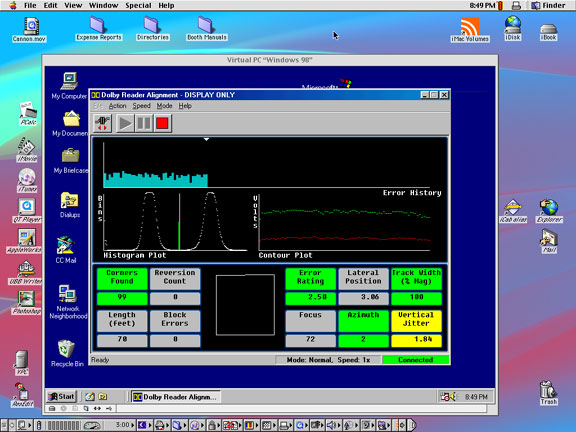
Here's the proof:
WinDRAS
DSP-60
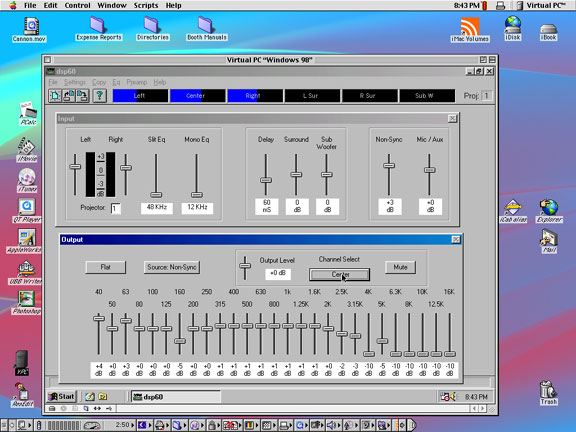
They both worked the first time right off the bat. No fooling around whatsoever. I'm pretty stoked! 
Here is how I did it:
I didn't notice any problems with speed. The displays all seemed to update normally just as they would if they were running on a Wintel machine. I didn't spend much time going through all the differrent modes and other things but I did trigger the pink noise generator on the DSP-60. It went through all the channels just like it did before.
I didn't get a chance to try out the SDDS program because the theatre that I'm at, right now, doesn't have any SDDS. There's only a one of them on my regular route and only about 1/2 dozen of them in my whole region. Judging from the results I got with DRAS and DSP-60 I'm willing to bet that there'll be few, if any, problems with the SDDS program.
I'm pretty glad this is all working out so far! It's nice to be able to carry around just one computer that can do anything instead of having two machines and switching back and forth depending on what I'm trying to do. It'd be REALLY nice if I could find an oscilloscope program (like WinScope) and a spectrum analyzer program. (like SmartPRO) That way I could put my computer on a cart and carry around just the select group of hand tools and test films I need to do system tune ups with. Heck! If I could work it out that way I bet I could do my quick system checks of an entire theatre in about 1/2 the time!
Okay, so now that I'm officially the first guy to do this and document it, do I get a cookie or something?

 I just slapped down a mighty big chunk of change to get the iBook I have! It'll be a couple-three paychecks before I have the extra cash on hand.
This iBook 600 isn't bad at all!
For those who don't keep up on things Apple, the new ones aren't the fruit colored, clam shell design they were putting out last year. It's a totally new design.
As well as the above mentioned software I got an Airport card installed. (That's the IEEE 803b wireless thingamabob.) Now I can travel around the country and hitch hike on other people's broadband connections whenever they are stupid enough to leave the network open all the time without passwording it.
... Which gives me ANOTHER idea!...
How about we hook wireless base stations up in the theatres and connect them to the processors? Then, all I'd have to do is walk into the auditorium and pop open the computer. I could make adjustments or diagnose problems right on the spot!
Yeah, it's only a G3/600 but it's got a 100 Mhz bus. It's pretty zippy, especially compared to the iMac DV/400 I have. I think the iMac is getting a bit jealous. I've been paying so much attention to the iBook lately with getting all the software running and then figuring out how to get DRAS to run on it. (Oh, we can't forget CCmail! I have to use that too!  )
)
That's OK because the iMac has a CD burner, a scanner and a 30 GB hard drive. The way I figure, I'll do all my real work with the iBook and let the iMac be the "hub". I have Airport installed in both machines. I can scan junk on the iMac and file share it back and forth. I can share the printer over the Airport and even use the iMac's modem for the internet. (Still don't have DSL.  )
)
Imagine... There I sit on the back porch with Guiness in hand, typing on the iBook. A theatre calls and tells me that they can't get the Dolby Digital to run. I just click a few keys and say, "There you go! All fixed!"
Hey! It could happen!
Did the iBook come with Mac OS X also?
I like just fooling around with automatic things. Being able to hook into the sound system remotely is one thing but starting projectors from the other side of the world is another. Essentially, it's fun to think about but you wouldn't want to do it in real life.
Matthew, I'm not selfish. Anybody who wants to do the same is quite welcome to try. As a matter of fact, as far as I'm concerned, I'd like to see as many people do it as possible. That way there'd be more reason for companies to make Mac-naitive software... the more people that want it, the faster it will happen.
Steve
------------------
"Old projectionists never die, they just changeover!"
I am running OS X and OS 9.2 on a dual boot 20 gig drive. I think I have about 128mb of RAM dedicated to VPC4. The thing works great, in fact so well that one of my colleagues switched over from a PC laptop to a Powerbook G3 because he liked it so well.
Unfortunately, for the iBooks they don't have the PC Card slot so you are stuck with USB and if you run into problems there is nothing else to fall back on. I would buy an iBook in a second if they had the PC Card slots. I like everything about them (size, weight, form factor, features, etc.) except that, but Apple has to keep their division between the Consumer and Professional lines. So after I get done recovering from the dent the G4/800DP made in my bank account I will be buying a TiBook for the field.
Hope you are still having good luck with the USB. And drop a line if you ever need help. Mac users have to stick together.
-David Miller
inov8tr@speakeasy.org
The Keyspan is doing well. I have had no problem with it. I just got another 256 MB of memory in the iBook. VPC is running perfectly now. (Before I had a problem with it running out of memory.)
I'm even using CCmail over the Airport connection.
I understand what you are saying about the PCI card. I have given it a little thought but honestly it doesn't bother me much. Except for connecting to the processors at work I don't think I'll ever need to hook up anything but a USB or a FireWire.
You're right about the Mac user thing. Keep spreading the word!

Steve
------------------
"Old projectionists never die, they just changeover!"