
Make sure to also tell us what kind of platters you are using as well as the make of failsafe.
Also, do you have Dolby Digital with a Cat 700 penthouse reader in that auditorium? If so, make sure it is threaded correctly. If it is threaded too loosely and the film is rubbing against iself before and after it passes the flywheel you will get scratching.
Steve
------------------
"Old projectionists never die, they just changeover!"
But, like I said, it stopped doing it quite a while ago...
Your projectionists are making their lower loops too big. Each machine is just a bit different and on some machines the lower loop will slap worse than others. The film is slapping up against the bottom side of the Ultramittent, thus causing your off center horizontal scratches that move up the image. It's operator error, not equipment error.Christie sells "slap guards" that can be mounted on the underside of the Ultramittent, but the real problem is the way they are threading. Things like the "2 finger loop" do not apply with Christies. Check the "tips" section on "Threading 101" for exact descriptions and pictures of the size of that loop.
I've worked a few different all Christie booths and in every instance there is always one or two projectors in the complex where the loop slaps around abnormally as compared to the rest of the machines in the complex. I am quite certain you have found your token machine in the building.
As to why "all of a sudden", it was most probably caused by your trainee. It only takes one run through the machine to make those marks.
You seriously might want to consider calling your dealer and ordering those Ultramittent slap guards and putting them on your projectors...or at least that particular one.
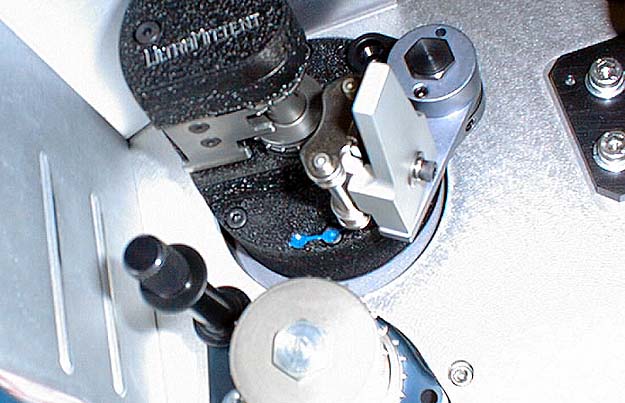
The slap guards just mount right to the bottom of the Ultramittent. This way if the film starts slapping around, only the edges where the sprockets are will make contact.
Pay attention to what Brad said about the screws...Christies recommended fix is Lock-Tight....the low strength grade.
Also, watch out for the ultramittent sprocket is you clean with a toothbrush! A cought bristle will result in horizontal scratches pulsating from top to bottom. I prefer to clean sprockets and rollers with a clean rag and q-tips!
Also, every os often inspect the gate/trap shoe for erosion...but these should last for years if the machine is operated correctly.
That lower rear cover on the Simplex really should never come into play, of course, but not too many people know that's what those ridges are for -- just in case that lower loop gets a little too big.
"Slapguards" is kind of an interesting term. The Ballantyne 35's use a "Slap Roller" just below the intermittent sprocket. If the film was threaded properly, though, film ran throguh nice and quiet.
Pat
The last two days, I found out why this happened in that specific booth. I ran that booth as a projectionist for the last two days, and probably will for quite some time. We kind of "inherited" that place.
First, there was a film cleaner bracket bolted to the mast of the AW-3 platters on all five houses. If extreme care is not taken during threading, the film can easily drag right over the end of the guidance roller shaft on the upswing to the upper roller. In addition, the film can also drag on the whole frontside of the film cleaner bracket and start cutting a slot in the guidance roller stand-off. I think this bracket was installed by the installing contractor, but I cannot be certain. I cannot blame Christie on this one, unless they made that provision on the mast at the factory.
However...
Secondly, while I was inspecting those extremely cheap green plastic rollers that crumble nicely, I noticed that edge that covers the roller can come in contact with the film while breaking down and building the print if the adjustable roller castor assy is twisted 180 degrees! To add insult to injury, detection of the problem could be overlooked very easily if the lighting in the work area is very poor like most booths are.
I wonder where the Christie Engineers had their heads inserted on that one......
Sure - the Christie equipment is easy to operate, and very easy to keep clean. But there are just too many "GOTCHAS" that the average operator or manager will fall into, especially if they are in a hurry to get things done when they are not totally familiar with what they are running. (Which also is quite common, as we all know.)
Most of the short-comings I see in this equipment are, in my opinion, attributed to poor designing with cheap components. I guess that is normal these days.
Luck has it my way - I have two 17-year old kids on my booth staff in the theater that are really interested in doing it right. One of the kids told me that he learned more in the last two days about the equipment than he did since he was hired to do booth work in that theater.
(Maybe I accomplished something after all.)
I must say I could easily make the same silly arguments against any other make/model of platter that you have made against the AW3. Take for example Strong's foolish "double roller/single roller" situation at the top of the tree on takeup. The kind of idiots who can not figure out which way to thread a roller are the same kind of idiots who will thread over both of those Strong rollers and scratch the living daylights out of the film during it's high tension takeup. Besides, if you will pay closer attention the next time you work that booth, those rollers can NOT spin 180 degrees if they are properly installed. Perhaps there was an idiot who screwed around with things before you got there, eh? Might I also ask why your rollers are "crumbling" apart in your hands? I have never even HEARD of this happening, let alone witnessed it. Also, if you don't like the film cleaner bracket mounted on the platter, just take the thing off. It's only held on by 2 bolts.
I don't mean to sound like an ass here, but I feel none of your complaints are very valid when you step back and look at the bigger picture. Your gripes seem to come from your lack of experience with the Christie line of equipment, which is of course not your fault, but please consider working with the equipment for a couple of months before you pass judgment. Just because it doesn't thread like a Strong or whatever it is that you are used to working with on a daily basis doesn't mean that it was poorly designed or is crap. In all fairness, try throwing that same kid who was running the Christie booth without proper training into a booth with a Norelco AAII without training and see how well he fares. I'll bet you'll not only have lots of scratched film but a damaged shutter assembly as well! See my point? 
Sure Christie had LOTS of flaws, and most have been documented here on the forums (many by me), but the company has made improvements to their design and upgrades to their existing machines that have taken care of most of those problems.
I'll send you a picture of those rollers on the MUT so you can see what I am talking about.
I already took pictures of the film cleaner bracket, but I will re-take them again in the SQ format. In addition, I will take pictures of the green rollers with the broken plastic hubs.
As far as the intermittant loop is concerned, I'll send pictures on how I check it to make sure it is not too big.
------------------
- dave
Look at this! His chin strap has been cut!
Yes it is very important that the lower loop size be established by the pad roller formed on the Christie. Seems funny that even though there is instructions taped to the console, the operators "just don't get it." 
The use the finger test as a final check to gage the size, and to make sure film is properly engaged on the sprockets. The included picture shows that it is impossible to touch the rear casting if the loop is formed properly.
As far as the cheap rollers are concerned, none actually crumbled in my hand. They do that on the shafts. There are some pictures that show the hub so badly worn out. These failures are happening over a very short peroid of time. Why?
Some pictures included show how the roller can be positioned 180 degrees and scratch the film. Both MUTS are the same way. We only had the the theater three days now, so they had one guy come in to build film. I watched him for about 30 seconds...and guess what? The roller was in the wrong position.
The film cleaner bracket mounted where it is will cause a problem. It is simply just not the place for it. There is room for it on the top of the DTS reader head bracket, so that is where they will go.
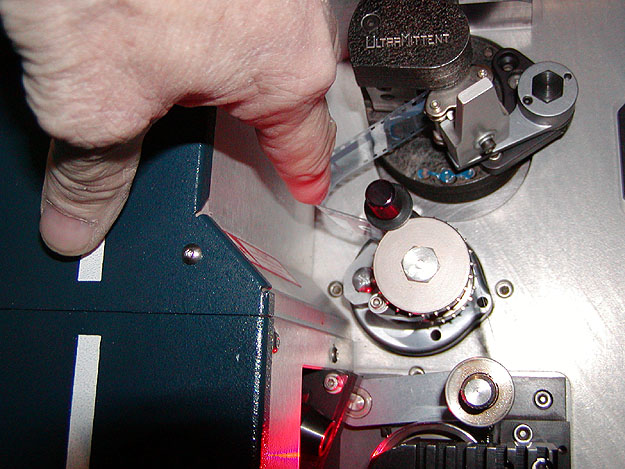
This is a picture of using the "finger" method for checking loop size. This is simply NOT the correct way to do it. The CORRECT method for a Christie projector is very clearly outlined on the second page of "Threading 101" in the "tips" section. Just because the loop cannot be stretched to hit the back wall of the projector doesn't mean that the loop won't bounce up and down and slap up against the underside of the intermittent. Fortunately though, as is noticed in this picture you sent, this model DOES have the "slap guards" installed underneath the intermittent. This means that if someone makes that loop a little bit too big, the picture will not get scratched, but still be aware that damage can be occuring to the SRD/SDDS soundtracks if threaded with "the finger" method. This is not a Christie error. This is an operator error.
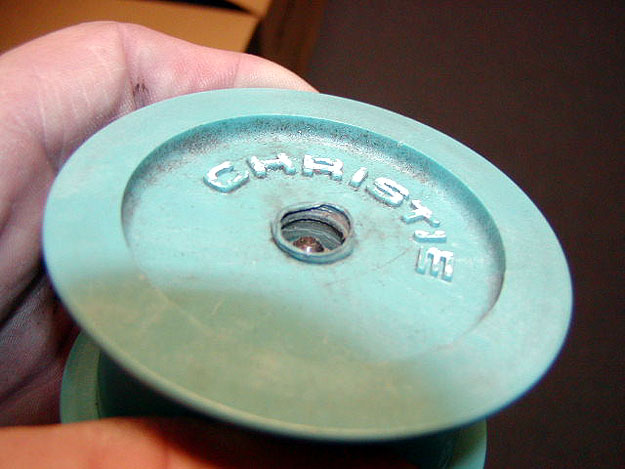
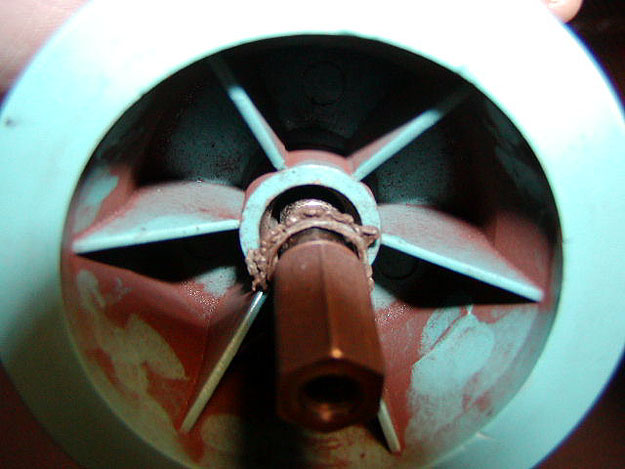
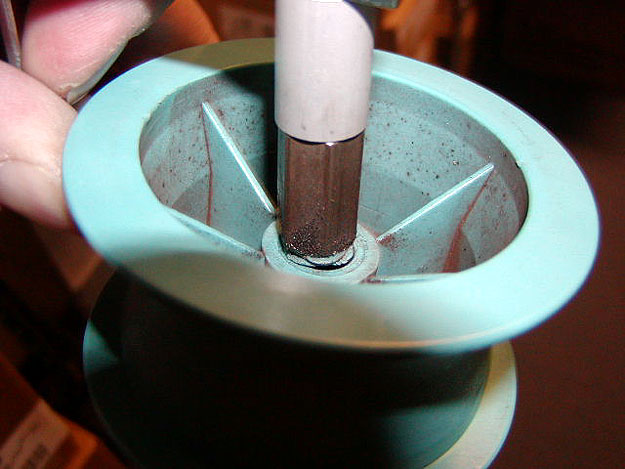
Ok, I have NEVER seen anything like this before. I am actually thinking that whatever bozos ran that booth before you got there used some kind of solvent that ended up eating away at the plastic in an attempt to clean the rollers. Has anyone else ever seen this?
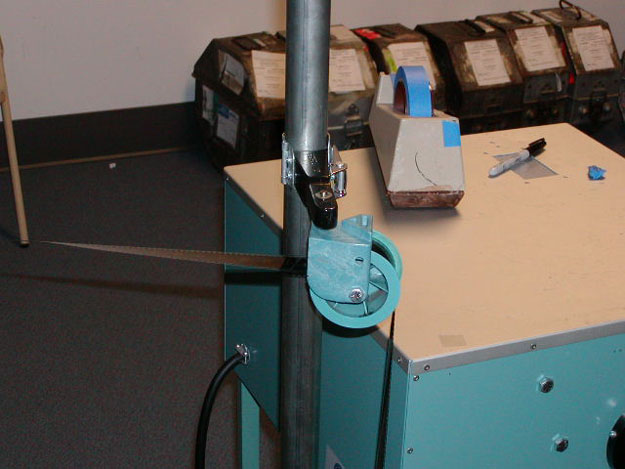
I assume this picture means that you have not watched the latest Advanced Training" video. In the video you will notice that Joe shows this is not the way to thread the make up table. This is clearly an operator error. (I mean come on, what kind of MORON would actually thread the roller like this, especially since the "open" side is away from the operator, thus making it HARDER to thread this way!) Now for the sake of argument, yes I can see where said "moron" WOULD thread the film like this, but NONE of my make up tables are like this. See the raised triangular shaped area on the top of the bracket? That is designed so that the roller can NOT be turned 180 degrees. Someone has modified this particular table and is not Christie's fault. Mine can not be turned in this manner.
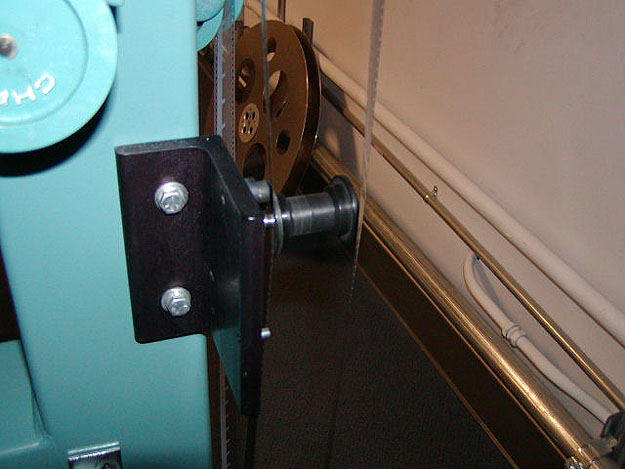
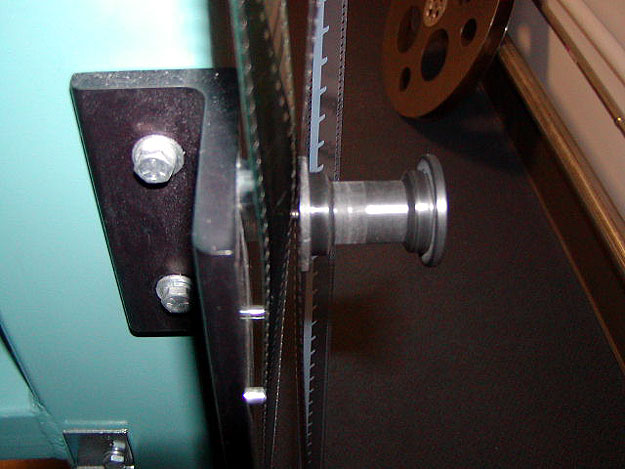
Ok, now I KNOW you did not look at the "Threading 101" page in the tips section, even though I specifically referred to it a couple of times previously in this thread. On the first page of it the threading of the film is VERY clearly shown. What is it that you are missing? Simple. You are to thread BEHIND the bracket going down and in FRONT of the bracket going up. The film does not thread on the front side of the bracket both ways. Again, an operator error and NOT Christie's fault.
Have a gearless day.
If things like this can happen, it will happen in other booths as well.
Since we have all ages running our poorly lit booths, we try to do things to minimize the errors. The "finger" job was just trying to illustrate that the rear casting cannot be touched with the film if threaded correctly according to the manual.
I still use the finger method as a check to detect any sprocket threading problems before I manually roll the machine forward. Then I usually use the finger again as a final check.
After you get to know your machines, you know what feels right and what feels wrong even in the dark. This also includes loop sizes.
One booth, for example, many problems such as scratched prints, mis-threads, loop bashing, pay-out head wraps, etc. simply went away when we improved the lighting situation. The film-cleaner picture was a re-inactment for picture purposes that I saw in that booth when I walked in.
What bozo would thread the roller that way? Well, the one that put the print together last night did just that! Luckly, I spotted the problem before he powered up the platter.
Look at the beading of the plastic near the shaft, I think that is the key to deciphering the problem. I have a very strong hunch the roller was run with the film cockeyed in the roller at high speed and under extreme tension. (Read: breaking down a film at warp 9.) IME, plastic won't bead like that unless very hot. The dust looks like iron oxide. Perhaps the shaft lost lubrication and overheated? I've seen humidity caused damage and acid fumes caused damage, but both those hit the entire booth, not just a roller. Perhaps a Coke got spilled in it and started the whole destruction sequence?
There was one roller housing that cracked through the bolt hole and fell off the cluster roller assembly. The projectionist claims it broke and fell off in the middle of the show.
Paul, I know what you are saying regarding operator error, but I really don't think a company should be bashed just because some numnuts running the booth don't know what they are doing. Seriously, those kids need to be given 3 shifts to "adapt" to proper practices or be removed from the booth. It's crap like this that is hurting the industry. In the meantime, you now know that you need to fix those make up table rollers so they cannot free spin 360 degrees.
Steve
------------------
"Old projectionists never die, they just changeover!"
Perhaps Christie should relabel that to say "makeup table mode".
I also think I will take an old CFS table and modify it to handle the Christie AW-3. I never liked the MUTS that has the side reel, whether it be Christie, Xetron, Eplotz.
Film cleaning brackets are going to be removed from the platter masts and placed on the projector. I see too many problems in the making if I do not re-locate them.
Steve
------------------
"Old projectionists never die, they just changeover!"
There are 20 frames between "Picture Start" frame and the 35mm "Sound Start" diamond in the SMPTE Theatre Projection Leader (standard SMPTE 301M). The analog optical sound offset on a release print is 21 frames (SMPTE 40). Having exactly 20 frames between the picture aperture and the sound reader scanning point will put the sound in sync at about 50 feet from the screen, as sound takes about 1/24 second (one frame) to travel 50 feet from the speakers to the prime audience. If that lower loop is too small, the sound sync will lag the picture; if it is too large, the sync will be ahead of the picture.
------------------
John P. Pytlak, Senior Technical Specialist
Worldwide Technical Services, Entertainment Imaging
Research Labs, Building 69, Room 7525A
Rochester, New York, 14650-1922 USA
Tel: 585-477-5325 Cell: 716-781-4036 Fax: 585-722-7243
E-Mail: john.pytlak@kodak.com
Web site: http://www.kodak.com/go/motion
When threading a Christie P35GPS, the best advice I can give is to visually inspect the intermittent film loop! You do not want the film loop to slap against the intermittent or the back of the projector, yet you do not want the loop to be too small and tight. The best advice I can give is a visual common sense inspection when threading...
As far as those rollers on the MUT being threaded backwards, I too have seen an adiot attemt this!
That advice is almost useless in the real world. No two people will view the size of the loop the same and that is similar to the "use 2 fingers" rule...no two people's fingers are the same size.
The only true way is to use the pad roller arm as a guide. Only that trick will ensure a perfect loop every time. (Check out that "Threading 101" page)
Once you get to know your machines, the finger method will be very helpful in an extremely poorly lit booth, especially on other machines.
Remember the dead zone that is discussed in 101.....that is when the loop will be the biggest. However, if your frame knob has been turned and the movement is at or near the bottom of the travel, a problem could exist if you have a 3 perf mis-frame. The loop will practically become non-existant, but there is enough there to keep the pad roller from popping open. I tested that, by the way. It'll run....
There was a picture I sent that Brad did not post, but if he does post it now, it can be seen that it is very important to insure threading is accomplished with the movement in the center position of its travel.
Paul
To clearify...
Yes I do use the pad roller as a guide. But in addition to this, I visually inspect the loop as a means of double checking.....