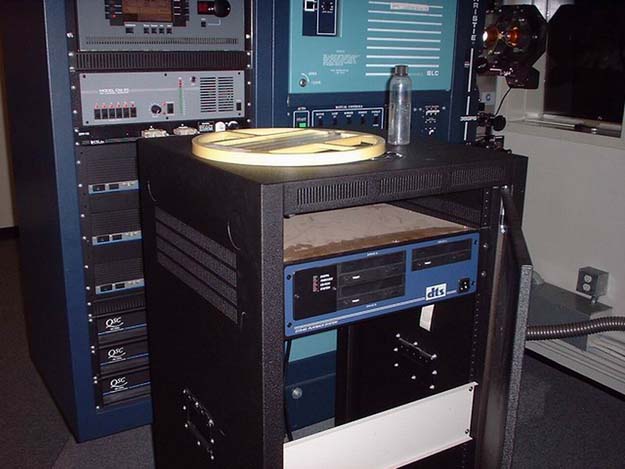
The unit itself (yes I've dusted it you can't even see that in the dark! hehe)
We have a house that has a Dolby basement reader for its digital sound. This basement reader has *always* given us problems, always 6,F,6,F,6,F, and always switching back and forth from SR, to SRD making the auditorium sound really bad in the process. Considering our technician is not very good (We've had some platters broken for a year, and I don't have the expertise to fix them), I have to find some sort of workaround for this Digital problem. This house also has an installed DTS system, and we have a cart that roams around and we could place on different projectors, so I decided to put it in the projector that has the digital problem. That took care of the problem, you can run the movie in DTS and it sounds great, BUT I'm trying to figure out a way to make the automation automatically switch to DTS when the feature start cue runs through. The only way DTS will run is if you manually press the external channel button to switch it to DTS. The projector is set to go to Dolby Digital instead of DTS. My projectionist are lazy and always forget to switch it to DTS, and I'm never there to babysit them all the time so I can't do a thing about it.
We have a CP500, with an all christie setup, and I've looked through the the DTS manual and there is nothing there, so I looked through the CP500 manual and finally found something that might do it. You can assign Sources and Targets to the CP500 as to what it will switch to when the cue goes through and you have it set on auto-digital. Right now the sources are Mono, A-Type, SR, and the Target is Dolby Digital, which it does switch to when the feature start cue runs through. I tried putting the external channel as a source, but that did not work because it switched to DTS for the trailers when a trailer was on, but did not switch out when another trailer came on that was not on the DTS trailer disc. So I tried putting external channel as the target to switch to when the cue went through and that did not work either as it stayed on external channel even when our policy went through which isn't DTS. So, my predicament is how do I put it so when the feature start cue goes through, it will switch to DTS and NOT Dolby Digital. The wierd thing is is that we have CP65's in our smaller houses that do this flawlessly (although they don't have basement readers) so I'm pretty sure it can be done.
When conencting the DTS to CP500, you must use the D715 logic interface board to steer the pulses from the DTS to the CP500. DTS sends one pulse when it's in digital and then another one when it drops out. If it drops out during the feature, it will drop to 04 or 05, if at the end of the feature, it will drop to nonsync.
I suggest you get a DTS setup disc and test the setup.
You don't have to add any sound cues to pulse the CP for DTS. But if you must use cues, remember to never put any cues on film that has timecode, it will over-ride the DTS pulse. Put all sound cues on black leader before timecode starts.
For DTS - CP500, we normally appear on Format 11 (external).
I hope this helps. If you have more questions. Please send me an email.
Karen at DTS
khultgren@dtsonline.com
Believe me, I've tried *everything* to try and get it to read digital, thing is we have 5 exact same houses, and two of them are like this, the other three run perfect every single time.
Brad as for the connection of the DTS, I know there is an automation cable connected to the DTS unit, and it is a 3-disc drive. I will try and take some pictures of it because I cannot remember all the technical names yet, but what I'm thinking is that when the cue goes through it signals the processor to go to auto-digital but the film is still a non-digital soundtrack (such as the 8 foot black leader on black hawk down) so it stays on SR until digital comes, by that time there is no pulse or anything from DTS, and Dolby Digital read is bad.
This explains the fact that I forgot to mention earlier that sometimes it kicks into DTS perfectly, but most of the time it doesn't.
And Karen our feature start cue goes on the middle of the film on our feature presentation policy so I don't think that is ever a problem.
Thanks !
The "automation cable" should be a 25 pin cable that goes from the dts into a small green breakout board, which plugs into the bottom left corner of your CP500 (as viewed from the rear).
Turn off your "auto digital" crap on the CP500. Make sure there are no "targets" or "sources". Since your SRD doesn't work properly, my initial guess (assuming things are wired correctly) is that the faulty SRD is trying to force it into SK4 (Dolby Digital), but it keeps defaulting to SK3 (SR) and prevents the dts from playing. If not that, your "feature cue" might be placed on your prints AFTER the dts unit has started up, which would be a mistake and would also prevent the dts unit from playing.
Some prints would switch to DTS for the attached trailer, then switch back to SR as the feature start cue ran through. It was confusing, considering that none of our other DTS houses did this. So, what I did was I moved the placement of the cue ahead, until it would pass through the failsafe about a half-second before the tiny break in the timecode between the feature and the trailer. This solved the problem. If there was no break in the timecode (Rollerball was like that), I put the cue on before the attached trailer. It does mean the house lights go down a bit early, but like Aldo, I too work with lazy projectionists. Try it out; see if it works.
Test the DTS system with a setup disc. If it the CP500 is automatically pulsed into external (for DTS) and then, when the disc is ejected the CP500 goes to optical, then the DTS is working correctly and something external is overriding our pluses.
CP500 factory units come setup for External to appear on SK5. That is where we normally send the DTS pulse.
I hope that helps.
Karen at DTS
khultgren@dtsonline.com
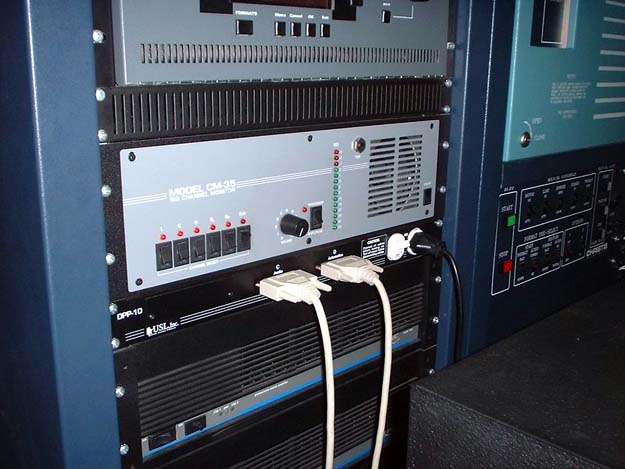
The unit itself (yes I've dusted it you can't even see that in the dark! hehe)
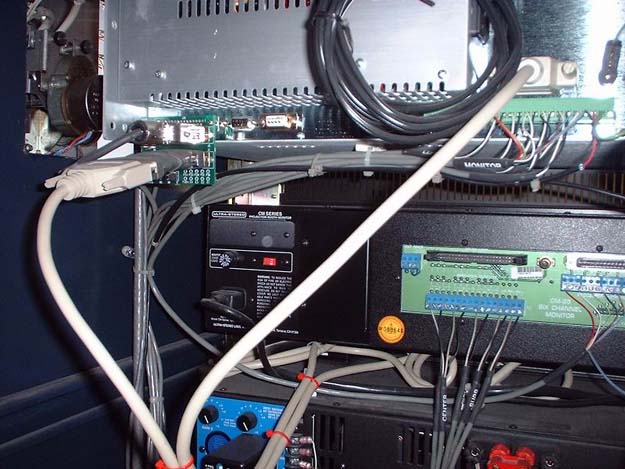
The back into the CP500, the thick white cord you see on the left is from the dts unit as well as the reader, it connects to that green board.
I've tried not putting a cue, I've tried putting a cue on the actually movie instead of our feature presentation, it doesn't work unless you actually manually put it in. Karen, I started working at this theatre 1 year after it opened and I haven't seen any setup disks. If possible could we be sent one? My email is abaez@mediaone.net for the address.
Thanks alot everyone I will keep trying.
Also, if none of that works, do bypass that roll around plug-in thing and wire the dts automation cable straight from the dts unit to the CP500.
Karen at DTS
P.S. Nice photos!