This is topic Finding the frameline in the end credits in forum Film Handlers' Forum at Film-Tech Forum ARCHIVE.
To visit this topic, use this URL:
https://ft-forum.com/ft/cgi-bin/ubb/ultimatebb.cgi?ubb=get_topic;f=1;t=003221
Posted by Michael Brown (Member # 890) on 03-20-2002, 10:06 AM:
I refer to standard end credits with white scrolling text on a black background.
I am not good at this at all  . I hope there is sume hidden nack to getting it right. There was an out of rack splice in the end credits of The Prince of Egypt, (there was about 4 or 5 spliced through out the credits, don't know what the last cinemas had done to it) Anyway one of them through the credits out of rack. I think it was the nearest splice to the end. I tried to repair it. But i'm not sure if i was sucessfull.
Posted by John Hawkinson (Member # 1135) on 03-20-2002, 10:33 AM:
I'll bet there are better techniques than these, but here are 4 alternatives:
- Use a frame counter or sync block and start counting from somewhere that the frameline is visible.
- Inspect the frames closely until you can find a frame where the text scrolling off the screen is very clearly cut off halfway through a line. This is either the top or the bottom of the frame, and hopefully you can figure it out as appropriate.
- If you're really desperate, thread it up in a projector with a piece of paper sticking out around the suspect spot, frame it properly early on, and then shut it down when the paper goes by. Advance the geneva until you reach a new frame, and then mark the edge of the film (sharpie, tape, whatever), then take the film over to the bench. Just count the small number of frames from your mark.
- If you're willing to tollerate a splice not frameline registered, you can just visually inspect the 4 perfs of stuff before the splice and make sure it matches up with the text after the splice. Unless there's a lot of film missing, you should be able to match it up. Also, you can take an educated guess by how much the film jumps visually as it goes out of frame.
I'm curious what other ways people have come up with. I suppose what we have on our bench may not be common -- a 17x23" piece of paper with 24+ frames marked on it in ink, which makes it really easy to count seconds and short numbers of frames.
--jhawk
Posted by Leo Enticknap (Member # 534) on 03-20-2002, 11:18 AM:
My way wasn't anything like as sophisticated as the above options, but if you don't have a footage and frame counter, then the following might help.Point 1, is the frame line right in the middle of the screen or just above/below? If it's in the middle, then you're two perfs out of rack. Separate the defective join, and remove two perfs of film from one side, or one from both. Make a new join, rack fixed.
If it's above or below, then you're either 1 or 3 perfs out of rack. I'm buggered if I can remember whether above=1/above=3, below=1/below=3, so here is the crude way. Separate the NFG join and remove one perforation from one side. Remake it and run the film through. This will either correct the problem, or make the frame line appear dead centre. If you've centred it, then take two perfs off on the next run and the problem is then fixed. 
Posted by John Hawkinson (Member # 1135) on 03-20-2002, 11:23 AM:
But Leo, that could lose more film than you have to .I editted my post to make it clear those were 4 alternatives, not 4 steps of one method.
--jhawk
Posted by Brad Miller (Member # 2) on 03-20-2002, 01:55 PM:
The best solution I've found is #2 on John's list above, except once you find a frameline that has half of it's text chopped, count back in 4 perforation increments until you reach the actual splice. That way you only lose 2 frames worth at maximum. The other methods could result in having a clear horizontal flash across the screen if you are into making "butt" splices and don't hit that frame line.
Posted by Leo Enticknap (Member # 534) on 03-20-2002, 02:56 PM:
John: I never claimed that way was elegant, only that it worked! I wouldn't dream of treating any film element that way in circumstances where you have the right equipment and lighting conditions to examine it properly.But I have been in one or two badly lit projection boxes with no footage/frame counter in my time faced with the problem of correcting a rack in the titles, and if you really can't see what you're dealing with, this method will work. But I agree, you risk losing two frames in a situation where theoretically, you only need to lose one and so obviously this is a last resort.
Posted by John Hawkinson (Member # 1135) on 03-20-2002, 03:10 PM:
Brad, I do wonder what you mean...the first 3 of those methods should result in being properly frameline registered.The frame-counter should have a mark to indicate the frameline.
And the whole point of using the projector and marking the frameline is to be certain to have it in-frame...
--jhawk
Posted by Brad Miller (Member # 2) on 03-20-2002, 03:29 PM:
What do I mean? You don't need a projector nor do you need a frame counter to do this. You can easily double-check splices on used prints before screening them using these instructions:So we have a stretch of end credits with an out of frame splice in it, but we don't know how many perfs it is out of frame. Simple. Just get that section of film in your hands and examine the splice. 50% of the time just looking a few perfs over from the splice will show a frameline, merely because half of the text is chopped off like you explained in #2 above. Now we have a positive identification on a frame line. Count over 4 perforations at a time until you reach the cut in the splice. Is that cut in frame? If yes, leave it. If not, remember how many perfs you have to cut out (hint, this will be either 1, 2, or 3). Now go to the other side of the splice and locate a frameline using the chopped text trick. Once you positively id a frameline, count back toward the splice again (of course you are on the other side of the splice this time) in 4 perforation increments until you hit the splice. Is that cut in frame? If yes, then leave it. If not, remember how many perfs you have to cut out. Now put it on your splicer, chop the necessary perforations to get it back in-frame and remake the splice.
Thus, nothing is needed but your eyes and a splicer.
The reason I don't like the trick of just remembering how many perforations off the splice jumps when viewing it on a projector is because the cut in the film COULD HAVE been made incorrectly on the lead side of the cut, which would result in the cut being visible on screen after repair, even though it would not go out-of-frame.
Posted by John Hawkinson (Member # 1135) on 03-20-2002, 03:35 PM:
Indeed, the point of supplying 3 alternatives is that if you choose one of the methods, you don't need to choose the others.Method #2 (chopped text) can be frustrating if the text block is not registered in the center of the frame, which is most likely in 1.85:1.
You don't need any of the other methods, but you said earlier:
quote:
The other methods could result in having a clear horizontal flash across the screen if you are into making "butt" splices and don't hit that frame line.
and that's not correct. Any of these methods should give you the same result, a perfect frameline registration (except #4, of course).--jhawk
Posted by Brad Miller (Member # 2) on 03-20-2002, 03:42 PM:
John, I disagree with your statement that my comment was not correct. While #1 and 3 can accomplish the same task, running the film through a projector and stopping it after the bad splice goes through, only to make a mark on the film to represent the "should be" frameline does NOT guarantee that the person will end up making the cut on the frameline. Let me say that again in case you missed it, it does NOT guarantee that the person will end up making the cut on the frameline. Likewise I've seen people using frame counters to fix an out of frame splice and they ended up having the cut line flash right across the screen because they did not carefully pay attention to the markings. While sure it can be done, both of these options are a ridiculous waste of time in most booths and there is no *guarantee* that they will have the cut on a frameline. The only time using a frame counter is a time saver is if someone is running reel to reel and is fixing the splice during a rewind *or* if the person is inspecting a print before exhibition and wants to make sure the splice is in frame beforehand. Most of the time however I think the need for finding an out of frame end credits splice these days is after a screening when the film is platter mounted. Still, as end credits generally have a chopped line of text at either the top or bottom of a frame, the frame counter is not necessary...much like making marks on the edge of the film with a marker is not necessary. If someone can't handle counting in increments of 4, they can always put a mark on their splicer to count frames with. (This is shown in the tips section under "cutting trailers properly".)As for 1.85 films, anyone who can assemble a print with the "wide" matted framelines doesn't even need to look for a chopped line of text! The framelines are very obvious. Even if they aren't, any projectionist worth a damn will clearly see that the text is being chopped alongside a perforation, instead of between perforations. I think most people here know the difference. Give 'em a little credit.
I blame it all on the codecs anyway.
Posted by John Hawkinson (Member # 1135) on 03-20-2002, 04:13 PM:
OK, Brad, you're entitled to your opinion. Note that as a changeover projectionist, I have some luxuries you don't, making some of those other methods easier than they are on platters.As for the codecs^H^H^H^H^H^Hcounting, I find it much easier to count
in increments of 24 frames (on the aforementioned 17x23" piece of paper) than to count in increments of 8 frames on a splicer.
--jhawk
Posted by Brad Miller (Member # 2) on 03-20-2002, 04:19 PM:
Luxuries? Some may agree, some may disagree. Personally I think it's fairly well split 50/50% in terms of repairing a bad splice. If I know there is a bad splice coming, I can fix it on a platter in less time by inserting a foam "boot" into the takeup roll at the bad splice (like you insert a piece of paper into a reel of film). If I don't know it is coming, I can fix it during a rewind in less time. It just depends and I wouldn't use the word "luxury" unless I was being more specific as to why.Opinion? Well technically yes it is, but it mine as well be considered a fact because no one I've shown this trick to in a platter booth does it any other way anymore, for it IS a waste of time and far more hassle, being equipped only with a splicer. It takes me all of 60 seconds maximum to find the frame lines on a platter and remake the splice. The same can be said of anyone else I've shown the trick to and it is ALWAYS in frame and ALWAYS frameline registered. You and Guttag can spin your reels, but the problem can be fixed quicker on a platter than running reel to reel if you know what you are doing.
BTW, laying film flat on a table could scratch it if you are not extra careful. 
Posted by Steve Kraus (Member # 476) on 03-20-2002, 04:25 PM:
Depending on the nature of the credits near where the bad join is you may have to go quite a distance to find the cutoff credits to show the frameline plus if the frames are masked you will of course be seeing the mask cutting them off, not the frameline. It's completely do-able manually of course but so much easier with a checker or synchronizer. Plus it makes it possible to easily double check one's work after the new splice is made. Every booth should have one.
Posted by Brad Miller (Member # 2) on 03-20-2002, 04:33 PM:
Steve, try leaving the screening room and go fix some out of frame splices at your neighborhood platterized 30 plex. You won't be using that frame counter for long. Frame counters and platters do not work well together. (Note my disclaimer above regarding changeover booths.) This is simply a matter of knowing how to work with a particular booth setup (changeover, platter, tower, etc) and the tips of the changeover projectionist do not transfer well to the platter booth, and vice versa. It would be different if John's argument (and yours) above included a "for reel to reel booths" disclaimer, but when nothing is present, in this day and age "platters" are automatically assumed...and John's argument is very foolish advice for use in a platter booth. Now I know you are running reel to reel, but think of the tons of lurkers that do not know this. Anytime advice is given that is varied from a platter booth, it really needs to have a disclaimer on it. (Picture a platter projectioninst trying to run a film that is on a platter through a frame counter. Can you imagine the tangled mess? If not, I can simulate a picture for you and post it here.)
BTW, in the case of the topic starter Michael, he runs towers. What are the odds Michael has a frame counter mount for that tower? Not good. Unless he does, he is better off treating it like a platter, stopping at the bad splice during a rewind, pulling a couple of feet of slack and working right on the splice like a platter. It would waste even more time to run the last reel off of the tower onto a shipping reel to take it to the bench to use the frame counter to fix the splice so it can be rewound and taken back to the tower and re-attached to the roll, not to mention unnecessary film handling in the entire process. 
Posted by John Walsh (Member # 168) on 03-20-2002, 05:48 PM:
I often have to fix an out-of-frame in the credits - and I run out of time; I must start the next show. I'm embarrassed to admit this, but when that happens, I just take a guess and splice.Basically, I do what Leo does: I watch it when it runs through again. Sometimes I've made a lucky guess, but if not, I can see how many perfs (and in which direction) it goes out, so I'm sure to get it in frame the next time.
Of course, it may be in frame, but the splice might not be on the frame line, so I watch it again. I can see the splice go by, and I can fix it for sure then. I don't lose frames, because the new splicing tape peels off easily. It's kinda a drag to run several shows the way, but with many projectors to thread and little time between, you can only do so much.
Frame counters are great tools, but it's too hard to use one with film on a platter. Trying to follow the film around and feed it into the counter while pulling it up out of the wind ... ugh!
Posted by Darryl Spicer (Member # 711) on 03-20-2002, 06:39 PM:
Brad is correct the best methode to find the nearest frame line where the credit is cut off and count. The methode that Leo talks about can work but only if one side of the frame is correct. If you have a situation where you are two out on one side and three out on the other any change you make will result in the flash of the splice across the screen.
Posted by Andy Muirhead (Member # 712) on 03-20-2002, 07:50 PM:
I agree that the method Brad uses is the best, and quickest.I see no need for a frame counter, i don't have one and even if i did, i wouldn't use it for this particular situation.
Brad, That's the first time i heard the 'foam in' trick on Film-Tech, i thought i was the only one
Posted by Paul G. Thompson (Member # 655) on 03-20-2002, 08:29 PM:
I usually use a big Simplex XL sprocket with markings with white-out marked every 4 teeth. I simply matched white-out line with the last known frame line, and rolled it through my fingers to see where the frame line would fall. It worked very well! Those pesky out of frame credit splices were very easy to fix.
Posted by Rick Long (Member # 213) on 03-20-2002, 11:36 PM:
Rolling white credits on black background in Scope can be a lot of fun to find a misframe in, especially considering the length of credits used today. To me, this makes using a frame counter a real pain in the ass, especially if the misframe is five minutes into the credits.I too, often use Leo's method. As John points out, with a relatively new splice, peeling off the tape is not a problem.
When observing the misframe, as Leo points out, if the frameline suddenly occurs in the centre of the screen, it is necessary to remove 2 sprocket holes.
If the frameline appears in the bottom third of the screen, it is necessary to remove only one sprocket hole.
If the frameline appears in the top third, it is necessary to remove 3 sprocket holes.
This is usually done during a short intermission. If "screen flash" is a problem, simple working out of the amount to be removed can be corrected when time permits.
Posted by Steve Kraus (Member # 476) on 03-21-2002, 11:04 AM:
I'm a bit unclear on why you would find a checker useless in a platter booth. Yes, a checker would be awkward if not impossible to use on a lifted out turn but one presumes the competent operator is inspecting the print before or during the build and would find a splice in the credits and check it at that time. Given the distances that sometimes must be spanned to find framing information on both sides of the splice the checker is the way to go.I would also suggest based on how many platter operators are cutting off fade-ins and fade-outs as part of their build (I see where their splices are) because they're too lazy to figure out where the frameline is in solid back, that a frame checker belongs in every booth. At the moment I am screening a previously plattered Sony Classics print which has a splice a short way into the SPC logo because someone couldn't deal with a fade-in which is only a few frames long.
When I was teaching platter operations to newcomers I always taught them to drop foam or something similar onto the takeup before or after a bad splice to enable it to be lifted out for repair. I assume that is so universal it doesn't even count as a "trick."
BTW, Why *are* end credit getting mangled in the first place?
Posted by Michael Brown (Member # 890) on 03-21-2002, 11:13 AM:
I don't have a frame counter. But there have been a few occasions where i wouldn't have minded having one.At the moment i can be seen in the proj box marking framelines with a china pencil.
Posted by Steve Kraus (Member # 476) on 03-21-2002, 11:42 AM:
I have a checker and syncronizers but I still keep marks on my bench for quickly placing the changeover cue on the ends of reels lacking them at either 20 or 24 frames from the end. But the checker still comes into use for putting the motor dot 10'12f up from that (the distance from the left side of one set of cues to the left side of the other, 10'8f in between). Also useful for finding faint ones when the 8 turns of a house reel method doesn't.
Posted by Paul G. Thompson (Member # 655) on 03-21-2002, 11:42 AM:
I agree with Rick. However, if you have a good eye or a good magnifying glass, you can see the credits as they come out of or going into the the frame line area. That could make it much easier and faster to repair the bad splice.
I use this method on film inspection proir to running the print, and it saves alot of hassle afterwords.
Posted by Brad Miller (Member # 2) on 03-21-2002, 01:47 PM:
Steve, note I said "frame counters and platters do not work well together", not "frame counters are useless in a platter booth". I have a frame counter by every bench where I do film work and I DO use them for timing footage to assist in placing cues on the film while the film is still on the rewind bench. I also do use them from time to time when repairing old film on the bench, but once the film is on the platter, you mine as well toss that counter out the window. If you re-read my posts, I think you will understand that I once the film has been loaded onto the platter, a frame counter only becomes a waste of time to repair a bad splice that was not caught in the buildup process.As to why the tails get so beaten to crap, this one is simple. It is from platter operators who:
#1 Fail to add extra tail leader, because the end of the film roll is going to drag all over the floor (at least 25 extra feet should be required - shame on you people who don't!)
#2 Did not properly secure the tail, the tail comes loose and causes an axle wrap, thus throwing the print.
#3 Have improperly timed platters and/or static, causing a thrown print.
The closer to the end of a film roll on a platter, the better the chances of these things happening. All are easily prevented.
NOTE: not adding extra head and tail leader on each reel in a changeover booth is equally unprofessional IMHO too, for it allows the ends of the reels to get dirty from the constant handling that is required when running reel to reel. Lab leaders are never long enough.
Posted by John Hawkinson (Member # 1135) on 03-21-2002, 04:03 PM:
Real subtle there, Brad. How long do you think is "long enough" for a changever head or tail?--jhawk
Posted by Brad Miller (Member # 2) on 03-21-2002, 04:10 PM:
Anything extra is helpful, even if it's only another 5 feet, but my preference is 25 feet at head and tail of each reel. For reference, I use 100 foot platter threading leaders and a start cue.And I see no need to be subtle. Film damage is film damage. If you are running reel to reel and are not adding extra leader over what the lab provides, you ARE causing film damage, even if you do not believe it to be true. If you have a problem, contact me offline via email.
Posted by John Hawkinson (Member # 1135) on 03-21-2002, 04:18 PM:
Saying "anything extra helps," without specifying a goal is pretty pointless. Personally, I have great difficulty seeing the merits of adding 25' to each tail. I haven't run extensive tests, but I'd be pretty surprised if more than the last 1' or so of film gets any appreciable damage in my booth, and lab tails cover that quite well.If your concern is damage outside the projector (i.e. dirt creeping in the reels during shipment, etc.) it seems like your comments would be better directed to the labs and the people paying them the bucks.
Perhaps I'm naive here, but I don't see how a longer head is going to be "more professional". A longer tail I can see, if there's a long threading path, but my assessment is that that is rarely necessary.
It sounds like you're just sore at us changeover guys for not having to breakdown our prints, and are trying to give us something to make us sit around the booth after we're done. But that couldn't possibly be what you mean . I suppose we could try a different codec.
--jhawk
Posted by Brad Miller (Member # 2) on 03-21-2002, 04:22 PM:
John, yes you are naive. If your last wrap of film gets dirty, then that wrap of film touches the wrap before it, thus getting that wrap dirty, then THAT wrap touches the wrap before it, thus getting ANOTHER wrap dirty. This is not rocket science here. Haven't you ever noticed why films "typically" start to show dirt before even the first changeover mark comes up, getting dirtier and dirtier as the reel closes? Haven't you ever noticed how the first several feet of a reel starts off dirty and gets cleaner and cleaner, usually within 10 seconds of the first frame? If you haven't, then open your eyes, for it's very easy to see. The same is true for platters. I am not picking on changeover guys and have no problem with running film that way, provided it is done properly.
Posted by John Hawkinson (Member # 1135) on 03-21-2002, 04:32 PM:
Sure, Brad, dirt moves in layer by layer, that's well-known. The question is, does adding an extra n' of film for a few changeover showings appreciably help keep that dirt out.It was my understanding that most of that dirt does not get in the film from the tail running through the projector absent tension from the supply side (end-of-reel effect), nor does it come from reels being carried around the booth when proper procedures are followed (film not on floor, etc.), but rather that it comes from dirt and crud in shipping cannisters, and failure to tape down or reel-band down the ends of reels during shipping. Not to mention platter booths where the heads and tails are poorly handled and not kept in a workmanlike fashion while the print is plattered.
If that understanding is correct, then adding an extra 25' of tail for a few shows is not going to help.
If my understanding is incorrect, then you'll need to tell me how much tail you think is really going to be necessary to fix how much of the problem. Will 25' of tail move the dirt 90% closer to the end? 95% closer? What's the cutoff? It's a judgement call.
Beyond that, because this is a slow buildup effect over time, is there really any point in one or two changeover booths doing this if everybody does not? This is not analagous to the platter situation where failure to attach a tail causes the entire tail of the print to be trashed, guaranteed.
Perhaps you see why you haven't yet convinced me.
--jhawk
Posted by Gordon McLeod (Member # 33) on 03-21-2002, 04:48 PM:
Brad the SMPTE recomendation is that there be 33' of protective film on the head and tail of every reel and most labs provide that unless instructed not to
Many depots remove it when mounting up
Posted by Brad Miller (Member # 2) on 03-21-2002, 04:55 PM:
Gordon, SMPTE can recommend anything they want, but Deluxe Hollywood, Deluxe Toronto and Technicolor does NOT follow it, or every single studio they print for is instructing for them not to. Also, no depot in the US still rewinds film onto reels, they all use "clip together" reels and the film is not even unwound at the depots before they are sent out to theaters. Sorry, but your last statement is wrong (at least in the US) and there are several hundred other people that post here that can easily back that up. I do agree to the 33' of extra leader, for that is where my 25' number of *additional* leader comes from.
John,
I really like your attitude of (paraphrasing) "if no one else cares, why should I?" Also, the idea is for you to add extra leader and LEAVE IT ON! (This doesn't have to be any kind of super expensive leader, even just cutting up a trailer will suffice.) Since you only work a changeover theater where you run a film once or twice, of course you are never going to see what is happening, but it is happening John. Every time you run a film without extra leader protection, you ARE adding a little bit more dirt to the ends, which end up causing scratches from cinching during rewind or improperly adjusted feed backtension.
Dirty reel cans? Wrap the reels in a plastic liner before you ship them back! Your laziness attitude is pathetic. Just because you don't care enough to take every possible bit of care to the films you run in your booth does not mean that the next guy doesn't care. Since you are not a first run theater, but a college theater, this just makes things worse, for you are handling repertory prints which are the only surviving copies for others to present for what could be years and years. I'm glad you have a changeover setup, for running a film once or twice on reels is generally considered less wear than to load up a film on a platter only to show it one or two times, but for you to not admit you are adding marks to the film is ludicrous.
Case in point, Joe worked as a projectionist at the Telluride film festival a couple of years back where they run on 2000' reels and never even cut the film. All of the prints were brand new and on the first day Joe reported the presentation looking perfect. Each film ran no more than a dozen times and no film had extra head or tail leader added to it. Joe reported that after only a few days (with each film being ran once or twice a day) that NOTICEABLE dirt, scratches and other wear had become apparent!
And you know what John, I am not going to waste any more of my time trying to explain this to you either, for you just don't get it and you obviously do not care to. Go back and re-read this thread slowly and without your comments. I think it is pretty well explained. The forum is for people who believe in "Film Done Right".
Posted by Gordon McLeod (Member # 33) on 03-21-2002, 06:12 PM:
If a lab does not provide the 33' it is at the cusomers insistance not the labs
The customer pays per foot including heads and tails.
I noticed that the dumpster at the local exchange has tons of scrap clear film in it and they use clip on reels. And I notice that the short end is always only one end so I assume they spool off what they feel is excess while it is on the core
Posted by Steve Kraus (Member # 476) on 03-21-2002, 06:21 PM:
Hmmm...I'm not sure I see much point to adding leader to the end for reel to reel operation. Unlike the head leader that gets handled during thread-up there is really no reason for the end to be picking up excess dirt. Sure, as a general principle adding extra leaders to both ends so that everyone and everything stays well away from the picture can only help but in a world where 98% of prints are going to be built on platters or towers which unfortunately requires direct handling of actual "live" film that is the primary place where the problem of dirty heads and tails originates. The projectionists who handle film very delicately with gloved hands during buildup and breakdown are the rare exception.
Let's face it, many of the most popular makeup tables ought to be outlawed for the way they force or encourage bad film handling. Horizontal reels that dump film on the floor? No proper work area for a splicer? Compared to this reality I am quite satisfied that my prints are remaining pristine winding directly onto a reel even without the benefit of excess leader. I'm not sure where it would pick up any dirt at all. The tail leaders do not normally slap the ground even after the reel runs out and there's not enough travel on the top (feed) side for the dangling end to touch anything either. There is of course the hypothetical opportunity for dirt pickup during the inspection process but extra leader isn't going to help there.
Posted by Gordon McLeod (Member # 33) on 03-21-2002, 06:24 PM:
Bravo Steve I would love to conign most makeup tables to the dumpster
And in a proper reel to reel house (that has magazine cans) film need never touch the floor
Posted by Steve Kraus (Member # 476) on 03-21-2002, 06:48 PM:
I was hoping someone would come out with an adapter for the Strong/Potts MUT that would turn the feed arm sideways and adapt the rollers appropriately. But that would only be a halfway solution. Also the whole arrangement for 70mm in terms of how little space there is for the film to make 90 degree turn is very troubling.(O.T.) Speaking of which I caught the first half of 2001 in 70mm this afternoon, run reel to reel on twin JJ's.
Posted by Brad Miller (Member # 2) on 03-21-2002, 07:14 PM:
Gordon, ok fine I'll agree then that this is not a fault of the labs, but the studios being cheap. However, why in the world would your local depot (note: not a US depot) go to the extra trouble to cut off leader when they use clip together reels? That would only waste their time, and I would presume they are busy enough as it is. I know the US depots don't have that kind of spare time on their hands. Regardless, I get prints in every week that don't even have 1 extra foot in front of the "PICTURE START" frame, and frequently I get tails that are less than 3 feet long from the final frame of the reel. I'd say about once every other month I get a reel that has less than one foot of tail leader and the head leader starts mid-way through the countdown! That is just ridiculous. (BTW the overseas Technicolor lab always has plenty of leader on their prints and they go through the normal US depots, so I know the US depots are not cutting the leader off for this is a consistent finding.)Steve, maybe because you have screening prints your leaders are a bit longer??? (Always a possibility.) Anyway, kudos to you for setting up your reel arms so that the film does not come into contact with anything when the reel runs out. I would assume you keep a super clean booth environment too. However I still stand by my statement that if you are running without adding extra leader, you are causing damage to the print. (I define "damage" as any kind of damage, including dust and dirt, no matter how minor.) Since you probably only run your prints one time, of course there is no way you will see the difference with your booth being set up as described. Regular commercial theaters that run their prints via changeover over and over will see the damage after a short while. Heck, even the changeover god Steve Guttag adds extra leader, threads on that leader and motors the film down to the starting point so human hands never touch the roll of film as it was received from the lab. (I know his procedure because the two of us have had discussions about this previously and I agree 100% with that method.) Now if you are running your prints one time and do not pre-inspect on the bench, under your booth conditions I would probably agree to just run it and be done with it, for it wouldn't be worth two rewind cycles to add the leader. However, if you are going through the trouble to inspect before projection, adding some extra leader wouldn't be any real extra hassle and would help to protect that print in the future. Out of curiosity, do you thread with gloves?
By the way before you ask, yes I ALWAYS add an extra 25 feet of head and tail leader to all reels of a print that is going to be ran via reel to reel. This seems to greatly aggravate some operators who run the prints that I prepare for them, but when I loan out a print that is about to play at a commercial engagement to a screening room (with studio permission, of course), if I don't add that extra leader, the last 10 feet of the reels tend to come back covered in dirt, oil and scratched. All this after only one show too! Granted this is an extreme example of old equipment and a not-so-ideal booth environment, but it happens guys.
Posted by Gordon McLeod (Member # 33) on 03-21-2002, 07:35 PM:
Two small points
One major circuit complained a while ago to our exhanges about the length of head and tail pieces feeling they didn't feel they should pay for there staffs handling time (petty and stupid I know)
The other is I seriously doubt steve G nor Steve K runs anything they don't revise on the bench
Posted by Steve Kraus (Member # 476) on 03-21-2002, 08:05 PM:
Correct. I'll sometimes let a final reel of a new print go up with only a head inspection but otherwise everything gets checked heads and tails, hence my joy at receiving prints tails out.
Posted by Frank Angel (Member # 248) on 03-21-2002, 08:37 PM:
First question about the original post: Why do you see so many credits without ANY visible framelines? Is it a lab problem? Whatever happened to those little dashes between every forth sprocket that you used to see on may prints -- even though they never seemed to match the actual frameline, they were a perfect reference and made finding FLs in even with the blackest background a snap. Seems that the lab could easily be sure there is SOME indication of framelines --many times I have seen prints that although you couldn't see FLs in the picture area, you could see the slightly rounded corners which were a perfect indication of where the FL was. Seems this is just a matter of a lab (and the industry) being conscious of the need to put at least SOME device on the print to indicate the 4 sprocket sequence.
I am not that familiar with lab technology, but it seems it wouldn't be all that difficult being that we have all seen they way some prints DO show FLs irrespective of the image area.As for good operating practice in the booth re: protection leader, I have to agree with the rule-of-thumb that at Brad's 25ft and the SMTPE's 33ft protection is the best way to avoid dirt migration into the body of the print. On the other hand, I don't ascribe to putting blank raw leader or that white leader (I hate that stuff) at the head of the reels, simply because it forces the projectionist to find framelines so he can properly threadup. The more frameline-less leader you have, the more he's got to pull off the supply reel. Will he know or care to be sure none of this 33 feet touches the floor? Will he have a felt-lined wastepaper basket beside the projector to dump this leader into while he threads? Will he be able to wrap 33ft of leader around his neck so as not to dirty it? Probably not. Will he look at you as if you are a crazed lunatic when you suggest that he do any of this? Probably.
Solution: the best to avoid this "where's the frameline" problem is to use frameline leader as the protection leader. But at whose expense? Why the studio's of course -- use that pile of trailers which eventually will be thrown out. Usually you can see FLs quite easily on any trailer. This puts framelines right out to the film end. Then any projectionist, no matter how unaware he is of the creeping crud syndrome, will be able to threadup without needing to pull any excessive lenght of film off the supply reel and certainly he won't have to wrestle the stuff from touching the floor.
But what if he is REALLY slow and thinks the trailer is actually part of the print? I say, let him run it so he will loose his job. Actually, what I do is, I take a razor and simply scratch a line down the center of the emulsion so it is quite clear that this is NOT the print.
Posted by John Pytlak (Member # 331) on 03-21-2002, 09:35 PM:
Frank Angel asked: "Whatever happened to those little dashes between every forth sprocket that you used to see on may prints -- even though they never seemed to match the actual frameline, they were a perfect reference and made finding FLs in even with the blackest background a snap."Kodak had to eliminate the inked or perforated "pinhole" framing marks many years ago, since the film edges and area between the perforations is now often occupied by digital sound data. They would match the actual frameline only if the printer operator took care to thread the unexposed raw stock so the marks lined up with the framelines. Likewise, the latent image frameline marking of the duplicate negative is usually not printed through onto the print with the available printer "edgelight", as it would interfer with the digital sound data.
------------------
John P. Pytlak, Senior Technical Specialist
Worldwide Technical Services, Entertainment Imaging
Research Labs, Building 69, Room 7525A
Rochester, New York, 14650-1922 USA
Tel: +1 585 477 5325 Cell: +1 585 781 4036 Fax: +1 585 722 7243
E-Mail: john.pytlak@kodak.com
Web site: http://www.kodak.com/go/motion
Posted by Steve Kraus (Member # 476) on 03-21-2002, 09:43 PM:
Let me clarify that the reason I don't find much point to adding tail leader is that the actual "live" end is going to get handled on the bench to some extent anyway, checking and in some cases making cues; in some cases repairing the leader splice or making one if the leader is masking taped on. As careful as one is handling is still handling
and the only perfect handling is no handling at all. That coupled with my prior statement about how, at least in my situation, there isn't going to be any dirt picked up on the end anyway, and even if there was, the direction of travel would move it away from picture would make this a wasted effort.
Extra leader on heads on the other hand, if it had framelines on it, isn't a bad idea. But once again the real world intrudes with the need often to handle the film at the leader splice which is a far more likely cause of dirt ingress and wear. That coupled with the volume of film handled make ordinary care a more practical solution.
Posted by Brad Miller (Member # 2) on 03-21-2002, 09:54 PM:
"...the direction of travel would move it away from picture would make this a wasted effort."Actually no, dirt doesn't know which way is the heads and which way is the tail. It will migrate in either direction. I commonly find that on changeover prints the tail end of reels more offensive than the head ends. Often the head ends are just fine after several runs. Those tails are just too short. Try this extreme test. Get a reel of film that has a bright final scene. Now chop off all but 1 foot of the tail leader and run that reel multiple times. Handle it as carefully as you want, but the last few seconds after not-too-many-screenings will start to show damage. As you continue to run the reel, the damage will migrate further and further into the print. This test will show how dirt migrates forward or backward. If the last wrap of film gets dirty, it will transfer the dirt to the next-to-last wrap of film and so forth. Like I said, it may be very minor and some people may argue they don't see it and as such it is not a problem, but it is there and it is damage. (Heck, for years people watched movies not knowing what the CAP code is and never saw it!  )
)
Posted by Steve Kraus (Member # 476) on 03-21-2002, 10:47 PM:
Point taken but where are you expecting dirt to be picked up?
Posted by Brad Miller (Member # 2) on 03-21-2002, 11:01 PM:
Dirt...it's everywhere! 
Specifically though, dirt comes from just about everything. I've seen dust come from AC systems, un-mopped/un-vacuumed floors, your clothes, the shedding of the film itself, the dusty reel cans, exhaust systems, editing gloves that "shed", just...everywhere. Take a look inside the amplifiers in the sound rack. See any dust? How did it get there? Who knows, who cares. All I know is I've never seen a projection room that was so clean that dust never formed anywhere, and just because you are running reel to reel doesn't mean you don't have to worry about it (granted not as much as when running platters though). Even just the takeup reel spinning stirs up the nearby dust.
Posted by James Robertson (Member # 888) on 03-22-2002, 03:20 AM:
When I were a lad working at 20th.Century Fox's top London cinema
(Carlton, Haymarket) it was standard practice to have FIFTY feet of spacing at start and end of each reel.The prints left as they arrived-UNMARKED.
Posted by Stan Gunn (Member # 554) on 03-22-2002, 04:33 AM:
More damage happens at the tail of spools due to bad rewinding habits,the film must be wound firm from the start of wind.
This prevents the film slipping, thus preventing cinch marks, most spools have a certain amount of dirt in the centre,a firm wind will assist in keeping the dirt from between the layers at the start of rewinding.Long leaders whether 25ft or 33ft will prevent cinching marks and assist in keeping unwanted gunk from between the early winding layers and keep heads and tails cleaner. Its been proven to me many times over the past 30 years.
------------------
KALEE FOREVER. CARBON ARC, THE ONLY LIGHT FOR THE STARS!
ALL PARTS FOR VICTOR AND KALART VICTOR 16MM PROJECTORS.SERVICE TO 35 AND 16MM PROJECTION EQUIPMENT.
35MM sprockets made to order.
Posted by Bernard Tonks (Member # 809) on 03-26-2002, 07:35 PM:
I've only skipped through, but has anyone remembered that there were frame lines throughout on the scope prints of Harry Potter and Lord Of The Rings. Why not always on every print ?
Posted by John Hawkinson (Member # 1135) on 04-01-2002, 11:19 PM:
It is with some reluctance that I return to this thread...Brad, I certainly misinterpretted you with respect to whether the 25' leaders you suggest should be left on the prints permanently, and my comments should be taken in that light.
Unfortunately, as a practical matter, I don't see how we could afford to permanently add 300' of leader (25' x 6 reels x 2 ends) to each print we show. I would not feel comfortable using trailers for a variety of reasons, not the least of which would be the resultant confusion from the trailer, even were it labelled clearly as "fill" (Frank's comments notwithstanding).
We do inspect every foot of film on the rewind bench before we run it, even for sneak previews that get only one showing.
I do have to wonder at your Telluride example; we run our trailer reel before every show, and the last two items on it ("Our Feature Presentation" and DTS#1045) should be a good example of how a tail wears; yes, those pick up dirt and scratches over time, as you would expect, but they don't look anywhere near as bad as many dirt-encrusted tails of release prints we see, nor is there an obvious case of the tail looking dirtier and dirtier as the end draws near. It's really hard to know where the dirt comes from, but I agree every little bit matters.
It might be interesting to followup with studios on this issue and see just who is speccing short tails.
--jhawk
Posted by Leo Enticknap (Member # 534) on 04-02-2002, 04:54 AM:
Bernard: I think frame lines are easier to spot on 'scope prints simply because the picture area extends right to its boundary. I remember that quite a lot of 1:1.85 prints had frames with an Academy aperture (presumably from the camera). The opaque area (to the naked eye in a dark scene) could easily cover 1-2 perfs, which can make life difficult finding the frame line in darker scenes.AFAIK, the only way to guarantee a clearly visible frame line is to use an optical step printer to strike the release prints. This is slower, more expensive and the prints aren't as sharp as ones which are contact printed.
Posted by Steve Guttag (Member # 268) on 04-02-2002, 06:36 AM:
I can say that at the Uptown, we ALWAYS add film to the heads and tails (typically old previews, call it recycling!) for handling. This significantly reduces or eliminates dirt in feature. We remove the scrap upon departure from the theatre. In this way the next theatre can apply fresh scrap film to keep things clean.Steve
------------------
"Old projectionists never die, they just changeover!"
Posted by Bernard Tonks (Member # 809) on 04-02-2002, 04:52 PM:
Leo, You are of course right in everything you have said 100%. However there must be an explanation out there somewhere as I can assure you that the print I had of Harry Potter had distinctive thin white framing lines throughout. Lords Of The Rings was the same except they were a darker grey but could be seen easily enough.
I did consider putting a posting out on Film-Tech at the time as I felt it was a breakthrough on an improvement with prints perhaps only from Super 35mm. I will now endeavour to visit two of my local friendly multiplexes to check this out again.
Posted by Leo Enticknap (Member # 534) on 04-03-2002, 01:19 AM:
The Super 35 theory fits - if there were a gate assembly which 'flashed' a clear frame line using the printer light in the optical step printer used to enlarge the flat frames on the S35 camera neg to the anamporphic ones on an intermediate (conventional) 35mm fine grain pos, that would then be reversed to an opaque line on the internegs and then back to a clear line on the release prints.This would certainly make it much easier for projectionists to find the frame lines. My only worry would be that because the horizontal border of a 'scope frame is so tight, then (i) there would be no leeway whatsoever for overcutting projector plates because you'd risk showing a white frame line, and (ii) the projector racking would have to be kept 100% accurate for exactly the same reason. For example, if you had a mix-and-match print of reels that had been printed head-to-tail and tail-to-head, there's a risk that the frame line position could shift during the show if you built the whole lot up onto a platter or tower roll.
Posted by Frank Angel (Member # 248) on 04-03-2002, 11:40 AM:
Leo, that's true, but that was the whole purpose of the SMPTE changing the anamorphic ar spec to 2.39. That extra bit of crop is supposed to compensate for that very eventuality -- image positioning being a tad off from reel to reel or print to print. In the old days if you cut your plates EXACTLY to the 2.35 spec, you could wind up seeing splice flashes up the wahzoo. We were running ANASTASIA (the live people verson) and I got so fed up with the flashes that I just brought in a few stage guys and we dropped the mask 4 inches, for the short fix, then cut new plates to match.
Posted by John Pytlak (Member # 331) on 04-03-2002, 12:00 PM:
Standard SMPTE 195 specifies the current anamorphic projectable image area as 0.825 x 0.690 inches, an aspect ratio of 2.39:1. ------------------
John P. Pytlak, Senior Technical Specialist
Worldwide Technical Services, Entertainment Imaging
Research Labs, Building 69, Room 7525A
Rochester, New York, 14650-1922 USA
Tel: +1 585 477 5325 Cell: +1 585 781 4036 Fax: +1 585 722 7243
E-Mail: john.pytlak@kodak.com
Web site: http://www.kodak.com/go/motion
Posted by John Hawkinson (Member # 1135) on 04-22-2002, 04:50 PM:
Well, this is interesting.Frank asked, "Whatever happened to those little dashes between every [fourth] sprocket that you used to see on...prints?" and John Pytlak said, "Kodak had to eliminate the inked or perforated "pinhole" framing marks many years ago, since the film edges and area between the perforations is now often occupied by digital sound data."
The print of Kate and Leopold we had this weekend was printed on Kodak 2383 (2001) stock, and has these, or something similar:
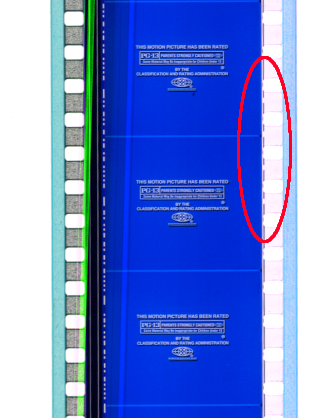
Note the region in the red circle. Those dashes last for 4 perfs and appear every 16 frames (1'), thoughout the entire print, in between the sprocket holes adjacent to the image on the side opposite the sound. In this case, they're not properly frameline-registered, so you'd have to find a frame where you can see the frameline and determine that there's an offset of 1 perforation, but it could still be useful.
So how is it that this print has them?
--jhawk
p.s.: sorry for the nasty green line. Hardware bug in the flatbed scanner I used, I'll see about getting it fixed.
Posted by Jan Hackett (Member # 1231) on 04-22-2002, 06:52 PM:
Brad wrote: "Thus, nothing is needed but your eyes and a splicer"I agree!
Posted by John Pytlak (Member # 331) on 04-22-2002, 10:07 PM:
JHawk asked: "Note the region in the red circle. Those dashes last for 4 perfs and appear every 16 frames (1'), thoughout the entire print, in between the sprocket holes adjacent to the image on the side opposite the sound. In this case, they're not properly frameline-registered, so you'd have to find a frame where you can see the frameline and determine that there's an offset of 1 perforation, but it could still be useful. So how is it that this print has them?"I suspect the dashed pattern you see is a print-through of some kind of pattern on the negative, due to the 16-frame repeat. But I don't think it is the KODAK KeyKode:
http://www.kodak.com/country/US/en/motion/products/keykode/index.shtml
http://www.kodak.com/US/plugins/acrobat/en/motion/postProduction/keykode/35mm.pdf
------------------
John P. Pytlak, Senior Technical Specialist
Worldwide Technical Services, Entertainment Imaging
Research Labs, Building 69, Room 7525A
Rochester, New York, 14650-1922 USA
Tel: +1 585 477 5325 Cell: +1 585 781 4036 Fax: +1 585 722 7243
E-Mail: john.pytlak@kodak.com
Web site: http://www.kodak.com/go/motion