This is topic Kinetronics and film scratchs in forum Film Handlers' Forum at Film-Tech Forum ARCHIVE.
To visit this topic, use this URL:
https://ft-forum.com/ft/cgi-bin/ubb/ultimatebb.cgi?ubb=get_topic;f=1;t=003353
Posted by Antonio Marcheselli (Member # 373) on 04-26-2002, 04:46 PM:
Hi everyone.In one of our theater we have a Kinoton Endless loop platter with a kinetronic vaacum film cleaner.
From few weeks vertical scratches on the prints appeared... in the middle of the images.
Since nothing is touching the print on the middle, I was thinking that the film cleaner (that uses soft brushes to remove the dust) is the cause of the scratches.
We are now playing the movie without the cleaner to see what happens.
In the meantime I completely disassembled the cleaner and I clean it deeply. I've noticed that the brushed are like "blowed" where the print passed. Could be the brushes became "harder" in that area so that they are scratching the print?
Is there anyone with a kinetronics cleaner? Should the brushes have to be changed periodically?
Thanks for your help
Antonio
Posted by Gordon McLeod (Member # 33) on 04-26-2002, 04:53 PM:
Brush cleaners can scratch when the ends of the hairs get split ends
Posted by Antonio Marcheselli (Member # 373) on 04-26-2002, 04:54 PM:
Gordon,What do you mean with "split ends"?
A
Posted by Gordon McLeod (Member # 33) on 04-26-2002, 06:16 PM:
The ends of the hairs get split open from subbing the film and become razor sharp
Posted by Paul Cassidy (Member # 951) on 04-26-2002, 06:18 PM:
Thats something women with long hair Hate 
Posted by Ken Lackner (Member # 1002) on 04-26-2002, 07:22 PM:
I used to use the Kinetronics cleaner. There are instructions for removing and cleaning the brushes, but I don't remember anything about replacing them. But if the brushes are damaged, they would be easy to replace.Stick with a Kelmar media cleaner and Film Guard! 
------------------
This one time, at Projection Camp, I stuck a xenon bulb....
Posted by Dave Macaulay (Member # 813) on 04-26-2002, 09:07 PM:
I'm hoping this Kinetronics cleaner is the brush type I'm familiar with - crossed counter-rotating black brushes that brush the film then a chrome tube with a slit that sucke the dust off via a vacuum?
I've seen these scratch film (Imax) when maladjusted. The chrome tube has to be fairly deep into the brush - maybe 3/16" - so the brush gets "flicked" pretty hard as it passes. If the vacuum tube just touches or doesn't touch the brush, dirt tends to get trapped. The brush won't scratch a seasoned print but a bit of grit on it will.
I mention this because one of the symptoms of insufficient tube contact was the matting or whatever on the brushes that shows where the film contacts them. With a good flicking action this doesn't happen much.
As well, a really large overlap of the brushes can make the bristle shafts scarpe along the film rather than just the tips brushing it. The brushes should be about 1/8" into each other.
And I would hesitate to use the brush on a green print, get a few passes on it first to get the emulsion totally dry.
Posted by Antonio Marcheselli (Member # 373) on 04-27-2002, 04:02 AM:
Dave,My brushes are not rotating...
So you suggest to don't have the cleaner installed when the print is new. I was thinking of that.
Thanks
Antonio
Posted by Ken Lackner (Member # 1002) on 04-27-2002, 09:15 AM:
Dave,I don't know what cleaner you're referring to, but that's not the Kintetronics.
This is the one Antonio is talking about.
------------------
This one time, at Projection Camp, I stuck a xenon bulb....
Posted by Antonio Marcheselli (Member # 373) on 04-27-2002, 12:12 PM:
Yes, that is my cleaner.I found out that the scratch is there also without the cleaner...
WHAT can scratch the print IN THE MIDDLE of the frame? It is not a continue scratch, it is intermittent...
I'm become crazy.
Antonio
Posted by Darryl Spicer (Member # 711) on 04-27-2002, 12:17 PM:
What type of projector and sound heads do you have. Remember the only thing that should touch the picture area is the sound drum and preasure rollers. Check these and make sure they are turning freely and make sure the sound drum is turning smoothly.
Posted by Antonio Marcheselli (Member # 373) on 04-27-2002, 02:13 PM:
Cinemeccanica V5 with penthouse sound drum.Our sound drum is not touching the print, there are two rail that keeps the print lifted...
Antonio
Posted by Brad Miller (Member # 2) on 04-27-2002, 02:27 PM:
Hmmm, a V5 would have an awful hard time scratching a print the way it is designed. Let's look at your platter or tower first. Do you run a platter/tower and what kind?
Posted by Scott Norwood (Member # 30) on 04-27-2002, 03:08 PM:
The easiest way to scratch film with a V5 is to make the upper loop too big. This would cause the type of intermittent scratches that (I think) Antonio is describing. I'm willing to be that this is the problem, unless there's something about the curved-gate machines that might do it...I've only worked with the straight-gate models.One of the best things about the Century design (35mm only, not the JJ) is that the pad rollers set the loop sizes when open. This not only speeds up threading, but also makes it very difficult to grossly misthread the machine. I don't believe that I have ever seen scratches caused by a Century projector--only by platters, rollers, rewinding, etc.
Posted by Richard Fowler (Member # 893) on 04-27-2002, 04:05 PM:
On some of the older versions of V-5 with the mechanical aperture link pin or film rupture safety switch, you could mark the film; but that would be a very large, noisy flapping loop....and to an Italian projectionist who could not handle a Cinemeccanica ( Prevost / Pio Pion / Microcine / Veronese ) projector, then he ( she ) must make bad pasta
Richard Fowler
TVP-Theatre & Video Products Inc. www.tvpmiami.com
Posted by Antonio Marcheselli (Member # 373) on 04-27-2002, 04:41 PM:
Brad,Cinemeccanica V5, ST200 endless loop Kinoton platter.
Scott,
No, there aren't loop scratch. I can recognize them. They are thiny vertical lines in the middle of the image, that appears and disappears but not a continue line.
There are thousand of rollers here, it is a mess to found out the cause... 
Thanks for your support
Antonio
Posted by Brad Miller (Member # 2) on 04-27-2002, 06:35 PM:
There's your problem. "Endless loop platter!" Get rid of that thing.
Posted by David Whitbeck (Member # 894) on 04-27-2002, 06:57 PM:
I had one of those Kinetronics Static Vac things. We used it and kept it clean, it didn't do a damn thing for us. Prints without stayed just as clean and from my experiences with The Mummy Returns, it didn't help on the static issue either. I trashed mine a week ago.
Posted by Antonio Marcheselli (Member # 373) on 04-28-2002, 05:05 AM:
Brad, David.I agree with you but thake a look at that booth...
We NEED an endlees loop platter and a print cleaner. I will talk to my manager about Film-Guard.
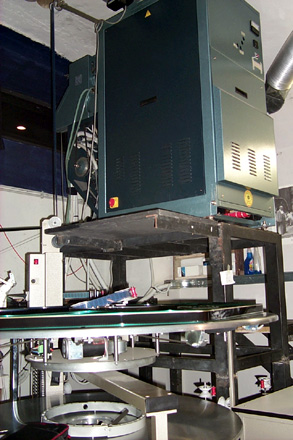
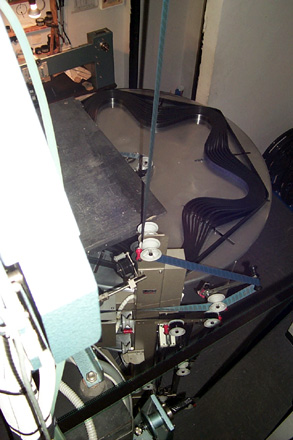
Despite the booth, it is a wonderful theater...
Bye
Antonio
Posted by Jan Hackett (Member # 1231) on 04-28-2002, 09:54 AM:
What is an endless loop platter?------------------
Jan Hackett
Theater Operations Manager
Extreme Screen Dynatheater
NM Museum of Natural History Foundation
Posted by Gordon McLeod (Member # 33) on 04-28-2002, 10:14 AM:
There are several attempts at an endless loop plater (they work mutch like a eight track cartridge (oops dateing myself)
The film runs like a regular platter paying out from the centre but on return to the plater the head is spliced to the tail of the print
One type we used to call "the scratch-a-matic"
Posted by Antonio Marcheselli (Member # 373) on 04-28-2002, 02:20 PM:
Gordon,I noted that when film is taked smoothly, without messing it, no scratches appear. I remember (one from all) "Pearl harbor" that went out from the platter regularly and absolutely no scratches after weeks of projection.
However I agree with the "scratch-o-matic" nickname...
Antonio
Posted by Brad Miller (Member # 2) on 04-28-2002, 02:35 PM:
Be careful using any liquid film cleaners with that endless loop platter. Because in your case you rely on the film slipping against itself constantly, you want to use things extremely sparingly. As I do not have access to an endless loop platter, I am unable to recommend specific procedures for using FG on one of these machines. However I did receive some tips awhile back from users of loop platters. This is basically the steps:Once a week, load up new pads and saturate with FG. Let the pads sit overnight on the cleaner and run the cleaner on the first show the next day. Then remove the cleaner for the rest of the week.
Hopefully you will find those directions to work well for you, but do remember to take it slowly and easy.
By the way, check out the pictures of the AMC Prestonwood. There you will find normal platters running with projectors on pedestals similar to yours. It is possible and didn't really take the operator more than a few extra seconds to rethread. I would push for a regular platter myself.
Posted by Antonio Marcheselli (Member # 373) on 04-29-2002, 04:43 AM:
Brad,Thanks for the tips using FG.
Behind the endless platter there are two "normal" platters. We can use them if we want.
The problem is that that is an "old style" theater, with just one screen and just two people inside: one stay at the tickets sell, and another (me) check the audience (take the tickets, have the people in and out...) and, really, I cannot left the hall of the theater to rethreat the projector in that moment...
I saw the AMC pictures. Their booth is more than twice ours!
When you thread the film in our projector you hit the head and the body everywhere...
The Kinetronics cleaner seems to be unable to clean the print in a good way. What do you suggest to have our film in better shape?
Bye
Antonio