Shipping Depot lackey: Hurry up, George says to add more dirt to the shipping cans.

------------------
John P. Pytlak, Senior Technical Specialist
Worldwide Technical Services, Entertainment Imaging
Research Labs, Building 69, Room 7525A
Rochester, New York, 14650-1922 USA
Tel: +1 585 477 5325 Cell: +1 585 781 4036 Fax: +1 585 722 7243
e-mail: john.pytlak@kodak.com
Web site: http://www.kodak.com/go/motion
------------------
John P. Pytlak, Senior Technical Specialist
Worldwide Technical Services, Entertainment Imaging
Research Labs, Building 69, Room 7525A
Rochester, New York, 14650-1922 USA
Tel: +1 585 477 5325 Cell: +1 585 781 4036 Fax: +1 585 722 7243
e-mail: john.pytlak@kodak.com
Web site: http://www.kodak.com/go/motion
------------------
John P. Pytlak, Senior Technical Specialist
Worldwide Technical Services, Entertainment Imaging
Research Labs, Building 69, Room 7525A
Rochester, New York, 14650-1922 USA
Tel: +1 585 477 5325 Cell: +1 585 781 4036 Fax: +1 585 722 7243
e-mail: john.pytlak@kodak.com
Web site: http://www.kodak.com/go/motion
Any chance it was near a "lab splice"? The extra handling of the raw stock ends near a splice can sometimes pick up some dirt particles.
------------------
John P. Pytlak, Senior Technical Specialist
Worldwide Technical Services, Entertainment Imaging
Research Labs, Building 69, Room 7525A
Rochester, New York, 14650-1922 USA
Tel: +1 585 477 5325 Cell: +1 585 781 4036 Fax: +1 585 722 7243
e-mail: john.pytlak@kodak.com
Web site: http://www.kodak.com/go/motion
We got the prints at 4pm for the midnight screening, normally that would not faze me, I knew the 'Daddy Longlegs' prints would arrive late, but I was doing a bio/mgr shift on a Wednesday, when every supplier you can think of rings up or drops
in wanting how many Ice cream tubs / Chips / Candy C-packs / coke BIBs we need. (Even secuitity showed up to change the combo's on the safes. Im amazed the damned auditors didn't turn up - that would complete it!)
Anyway...
At the same time I'm trying to manage the place, run the films, change the trailers, change the ads, send people on their their breaks and taking over for them, conferming programming (read: Fixing programming), and trying to makeup Starwars when they finally arrived, with a stuffed up right hand. We'll there was no way I could wind them onto 6000 ft spools (came tail out, which I LIKE) so I could not play each spool straight to plate so I got a Candy Bar girl come in and wind the rewinder. She was puffed after two reels, and got that normal look from floor staff that says 'you guys are nuts, no wonder I dont want to be a projectionist' So I finished getting reels 1-2-3 of one print ready and gave up.
So started on easier thing on the hand like doing the the ads and trailers until my trainee to arrived.
WASNT HE PISSED that he had to make up of all things STARWARS prints for the big Midnight opening.
So I go home to watch SURVIVER (after helping until 9pm) then show up at Midnight to see how Starwars goes.
All went fine. I was looking for mistakes in the makeup of the prints.
(HEY this funny he (my trainee) was running between platters to see when a join a join was coming up, and start sweating that it might sound track reversed - reel reversed - out of frame) I'm glad he got it all right.
This is COOL. The air-con went off because the damned shopping center turned it off at 12.30am.
It started getting very hot in packed cinema's I so went up to the plant room with the firealarm over-ride key, but it had no effect, so I opened the control panel, and set all the switches that were set at AUTO to MANUAL and the air came back on!!
Heh Heh. Hope they dont read this!
Anyway thats my little story.
However, back to you MATT noticed like you the white specks throughtout all the prints, some sections where very bad others where fine. I kind of forgot about it when there was actually some action, so I'll have too look again.
(the prints were new - clearly)
I was looking for 'filmed on digital' sucks, but could not find any (Though I had a FEW beers before I got there)
The only thing I could pick on was CGI but we know, we can pick on CGI in any movie.
By the way, I ended up seeing most of the movie, and I think it was quite good (Beside the lame attempts at jokes)
you can see links to the to Starwars 'NEW HOPE'
So I really look forward to the next one.
Bill. (Whew - I'll shut up now)
------------------
The early bird may get the worm, but the second mouse gets the cheese!

/p
I thought that exact same thing when I saw how much of the backgrounds and sets at the cloning factory were bright blinding white. I can imagine how quickly and obvious scratches and dirt would show on that at most theaters.
Lucas: Look at how bad film looks compared to digital
Shipping Depot lackey: Hurry up, George says to add more dirt to the shipping cans.
-Adam
As far as the "ID slate" you are referring to... Are they color bars? I am guessing it is that or something similar to compare the color on the print to the color from the originating video
As for apparent sharpness, at least the occasional subtitle was there to confirm that I really was in focus.
As for the specks .... I've noticed it mostly in reel 1 ..... for a while they all looked suspiciously horizontal ... almost generated  ... you don't think he ..... just to promote ..... nah.... surely he wouldn't!
Also, I guess if you just sit as a patron and immerse yourself in the sub-culture that is 'Star Wars' ... then it looks ok.... HOWEVER, as a projectionist, who else kept checking their focus again .. and again .. and again? The total lack of sufficient resolution for large screen projection is most apparent in the faces, wouldn't you agree? And could that 'fake' CGI world look great if it were rendered at a little higher res? .... Probably not! Call me old fashioned, but give me models and film any day..... For older SW fans, it just doesn't look or feel the same now, does it? 
*rant over*
I've never understood what the STAR WARS fuss is all about.
Not my cup of tea at all but as they say 'differant strokes for differant folks." For those of you who are fans I say..."enjoy".
But wait, theres more...who QCed the digital tracks? If you are running DTS, you will probably be ok but for the sound on film guys watch out. SDDS faired a bit better than Dolby with only one noticable dropout in R-7. The Dolby Digital printing was just plain horrible! The film is printed with the azimuth off to between -3 and -4. The focus on the Dolby digital track is also rather low (in the 50s and 60s best focus). To add insult to injury, the trailers played wonderfully with "1s". The reader was checked against reference (measured) test film to verify it was in proper calibration (and the trailers running fine also proved the reader is working well).
It would be one thing if just one reel had a problem but nope they all did. I'd recommend DTS for this film if you have it.
Steve
PS: I did notice the "EX" effects in this one more than in EP:1
PPS: SDDS is only in 5.1
------------------
"Old projectionists never die, they just changeover!"
I agree that the reports of "brown spots" are probably seeing the "new" supplemental antipiracy code. I easily found them in "Spiderman". The original Kodak-developed CAP Code is much less visible.
------------------
John P. Pytlak, Senior Technical Specialist
Worldwide Technical Services, Entertainment Imaging
Research Labs, Building 69, Room 7525A
Rochester, New York, 14650-1922 USA
Tel: +1 585 477 5325 Cell: +1 585 781 4036 Fax: +1 585 722 7243
e-mail: john.pytlak@kodak.com
Web site: http://www.kodak.com/go/motion
Right on! "Film Done Right"! 
Today, there is just no good excuse for prints getting dirty or scratched. The abrasion-resistant conductive anti-static coating on KODAK VISION Color Print Film greatly reduces the static charge that attracts and holds dirt to the film. Excellent film cleaning technology is affordable and readily available, and should be used to keep prints clean during each showing. And now some good words from Brad and others about FilmGuard...
------------------
John P. Pytlak, Senior Technical Specialist
Worldwide Technical Services, Entertainment Imaging
Research Labs, Building 69, Room 7525A
Rochester, New York, 14650-1922 USA
Tel: +1 585 477 5325 Cell: +1 585 781 4036 Fax: +1 585 722 7243
e-mail: john.pytlak@kodak.com
Web site: http://www.kodak.com/go/motion
Anyway getting to my reply, the 4 prints I looked at tonight were a mixed batch. I have one reel 2 that has those godawful oversized CAP code marks like John Hawkinson posted pictures of about a month ago. This simply MUST be replaced!
My prints from Deluxe Toronto generally looked better than the one from Deluxe Hollywood (no big surprise), but there was a noticeable amount of negative dirt and some very odd things here and there. One reel had knicks in it every few feet. This may have been at each turn of the reel, but as Fox only delivered my 4 prints just under four hours before showtime, I didn't have much time for inspection. Another reel had bizarre clear spots, there's the big screwup with the CAP code on another and I know I am forgetting some of the other problems, but it's late and I'm tired. Overally, generally sloppy lab work with this one. Sure every print may have been a "show print", but what I saw made me say "big deal".
Also, as Steve pointed out the SDDS track is indeed quite sloppy and there were tons of dropouts in it. (I have no idea how the SRD tracks are.) DTS played without a glitch.
Regarding the image quality, the only stuff that looked really good to me were the darker scenes with light sabers flailing around. Otherwise it just looked like very good video. I think the biggest complaint was the lack of contrast in the image. Outdoor scenes "burned" clear white and the very dark scenes looked like a cheap consumer video camera with "gain" turned on (lots of grain, lots of random color in that grain). The movie is soft, soft, soft focus. I spent a good 20 minutes tweeking that focus to make sure it was absolutely as sharp as it could be, but the resolution just isn't there. Sorry George, but shooting in digital is just not ready quite yet. Of course that's only my opinion. To be fair, I did not receive one single complaint about the focus.
Sound...Gary Rydstrom is once again my hero for sound mixing. This film sounded FANTASTIC! This by far beats out any other Star Wars mix and my only complaint with it was some of the dialogue did not sound natural (not Gary's fault) and sometimes one person's dialogue in a 2 person conversation sounded a bit too loud (Gary's fault). Overall this is damn, damn good sound mixing! A hearty "job VERY well done" goes out to Gary and everyone associated with that sound mix.
Come on Gary, it's time for directional dialogue to come back.
Steve
------------------
"Old projectionists never die, they just changeover!"
(I'd be curious if anyone has seen these on a non-Toronto print).
--jhawk
quote:
Come on Gary, it's time for directional dialogue to come back.
Lack of directional dialogue was the second thing I noticed. (The first was the edge jaggies on high-contrast edges.)
Are we now so concerned about those damned hard-of-hearing devices that we're not allowed to use the sound system the way it was designed to be used?
No, George cares about every presentation, film or D-Cinema, or he wouldn't have hired TAP to do all we were doing for the past 6 weeks... Alignmnets, Evaluations, Phone THX, Lab QA all over the world. Really, he cares, and wants the best for the audience. He feels that D-Cinema is the best way to see the film. That is how he feels. Maybe that is because of some of the complaints raised here. But nevertheless, he wants the best for every single audience member at every single presentation of his film (yes, I said film), and absolutely no defects were intentional, by Lucasfilm Ltd, or by the labs manufacturing the prints.
I hope the force is with every print out there!
Yours, Ted
Gary Rydstrom DID use directional dialogue in TOY STORY II and MONSTERS, INC. I have heard that this causes problems with the dubbing process for foreign releases.
Talked with some friends over in SE Asia. The digital presentation there was great, the film was a little less than that. However, "soft focus" was the only comment they had on film, the quality of the prints there were otherwise fine. I think the reason for that is they strike their own release prints in Thailand at a very good lab -- this was by Kantana, I believe. The Interneg would have to come from the States. No negative dirt or other deficiencies. I don't yet know how many prints were done for that market, but nowhere near the number required by the US theatres.
The prints there were also in the theatres 3-4 days ago. I compare that to several posts here where prints arrived hours before their first presentations. Sounds like delays in the process made the whole thing more hurried than it should have been. The the exchange for speed and late delivery is quality, right from the labs.
Be interesting to know how many film prints there are in the US and the time frame in which they were made and shipped to theatres... Seems like the digital material has been in place for several days, hasn't it?
Pat
Regarding directional dialogue:
I only care about what the film sounds like in my theater and could care less if a certain process causes the studio to spend more time or money to show the film in another market.
It doesn't make any sense to be looking at one place and experience the ventriloquist act of the sound coming from somewhere else in the room, particularly if another character is directly in front of the center speaker.
The ads, PSA, trailers, and the feature were all clean, nary a black speck in sight. Ep2 did have some white specks here and there but nothing drastically bad. I saw no CAP codes or lab splices. Image quality was OUTSTANDING, sharp as I've ever seen it at this theater. Bright and steady as well, and centered in the masking. Reel change splices were very clean, wouldn't have noticed them at all if not for cue marks.
I went in prepared to find lots of digital artifacts and other "defects". I'm happy to say that, for the most part, the movie looked great to me. The CGI work is BY FAR the best ever done as far as I'm concerned. There were only 1 or 2 times when it kind of fell apart, but overall it was a large cut above the norm in today's movies.
The live-action stuff, especially closeups of faces, was a little soft, no question about it. But had I not known this was basically shot in HDTV, I wouldn't have noticed. In fact that part looked better than I was expecting. The lower the lighting, the more video-like it looks though, but even at its worst, I thought the live-action images looked mostly at least good, and sometimes very good.
So basically, I thought the movie looked fantastically good, and anything non-filmlike about it seemed to be in line with how it was intended to look. I noticed no video-related defects calling attention to themselves.
Not that this proves anything, but I sneakily shot a photo of the screen image just for the heck of it, to see how it would turn out: 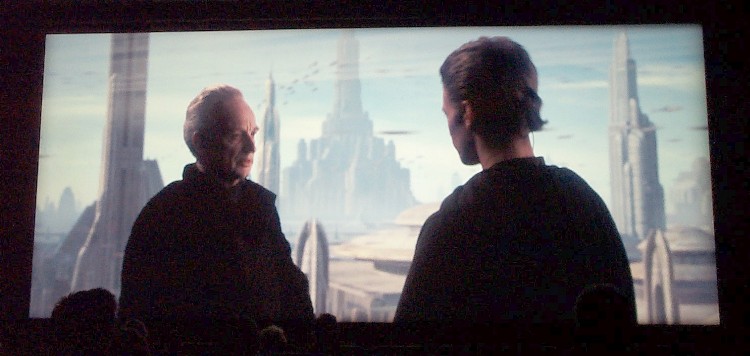
The sound was in SDDS, and except for a stretch of dropouts near the end of reel 1, it was FABULOUS. I can't say enough good things for the film's mix, and this theater's ability to reproduce it in something approaching its full glory. Give Gary Rydstrom, Ben Burtt, and the sound crew the Oscar now because no other film this year is likely to come close to this. Sub and surround action was brilliantly used and not over-used.
The SDDS sound did repeatedly drop out for the last few minutes of reel 1. Several people went out to complain to theater staff. After that though, it was fine for the rest of the show. After the movie, I spoke to the manager and he said they are probably going to switch it from SDDS to DTS.
I must see this in DLP now...
As for the question, "Is this a good movie?" I'll answer that in the reviews section.
Color quality was good and even looking, although some parts of the film got pretty grainy. Early on, I noticed some digital mosquito noise artifacing in the backgrounds when Padme, Anakin and Obi Wan first meet in the film. Subtle details like stands of hair were noticeably lost in many scenes. This image quality just is not nearly as sharp as imagery originated on film. I also noticed a lot of the heavy CGI scenes actually looked sharper than the live-action-only stuff. Usually the reverse is the case.
There was a particular technical gaffe on the digital image during a cliched scene where Obi Wan meets this big octopus looking dude in a 50's style diner. The two are seated in this booth talking across the table at each other. During a single shot on Obi Wan, the video image scrambled for just an instant on an area of Obi Wan's face, making it look kind of like one of his eyes and part of his face was floating off somewhere else. Really wierd.
I was not all that impressed with the DTS mix on this film. There was some decent surround activity and all, but there were times where the mix just seemed kind of front heavy. It even made me look up through the port glass to see if the DTS green light indicator was on. Anyway, I've heard better audio mixes than this one. I'm sure that different audio masters will be used when this video is ported over to DVD.
I forgot to mention that. Yep, some of the CGI stuff seemed WAY sharper than the live-action.
And not only that, but any any dialogue shot (thus drawing attention to their face) of a character that wasn't a close-up ... well, 'soft' doesn't really it justice. Are these problems (especially the grain) 'film' problems? ... or is it the 'digital filming' .. oh, I'm sorry, 'videoing'?
Video dropout? Can't think of anything in the printing process that could cause this. Due to the half second length, I found this more annoying than a lab splice (only 1 frame) or even the negative dust.
If everyone on Film-Tech looks out for artifacts, there'll probably be too many to count ...
Yes my oversized CAP code marks were from a Deluxe Toronto print.
the white specking was immediately apparent from the outset, most of the marks looking like small hairs rather than dust.
The focus was iffy but I think that this was largely down to the cinema set up rather than the print as there was a left to right difference even during ads and trailers.
The splices were lousy. Nice and jumpy with black marks across the screen. At one reel change just before the arena scene there was a nice black vertical scratch for a couple of seconds about third way across from left side of screen.
Oh and to top it all the feature presentation tag between ads and AOTC was out of rack ! Film done right, I don't think so. 
Of course, both are being FilmGuarded. FilmGuard should be mandatory in all theatres. But then again, so should properly trained projectionists who care and know what they're doing.
From the few parts that I saw yesterday, I feel that contrast, sharpness and colour saturation are lacking, and the picture overall lacks 'bite'. It seems pale.
Both our prints have negative dirt in exactly the same places, indicating that the same printing negative had been used. It will be interesting to see how frequent it is tonight.
CAP codes are definitely present in both prints - the blue kind. I think they are mainly in reel 3. They were also noticed by our floor manager who wasn't aware of the capcode system. The fact that they were noticed at all is a no-no. They aren't subtle.
CGI elements look excellent, whereas studio/live action plates look like...video. The fact that film wasn't used is screamingly obvious to me, and I would have picked it even if I didn't know it was video beforehand. It's higher-end video to be sure; very different to say, 'The Anniversary Party'. It is, however, unmistakably video complete with all its visual trappings.
Furthermore, it is more obvious in this production than most where the seams are with respect to studio plates and composited background action plates. Usually, it is fairly hard to tell where the blend is, but here it is almost cardboard cutout in nature, especially in scenes where the characters are riding in a vehicle with a visible background. It should not be this obvious that they are in a studio.
I don't really know if video cameras can ever achieve the look and feel of film, but I can't see how they could. One is electronic, and the other is photochemical, and these processes both have different properties with no way (that I can think of) of making one resemble the other. I feel that resolution may become comparable at one point, but the look will always be different. Even though popular TV shows such as 'The X-Files', 'Buffy the Vampire Slayer' and 'Angel' are destined for the small screen, there is a reason why film is chosen for these projects. It's not just about resolution. (Not that anyone here doesn't know that already!).
Is anyone playing their SWII print through a CP-650? We found a nice surprise yesterday - the display on it read, 'Auto Surround EX', with the format 10 selector lit up. This is our first print encoded for auto-EX decoding. We like this! Keep doing it.
I'm not a digital artist and I'm not tuned in to spotting digital artifacts. I didn't see anything that screamed "Digital Artifact!!" If I didn't see that stuff, I can't imagine that 99% of the viewers would see it either.
Maybe my impression of the sharp "look" is better than some others are reporting due to the relatively small size of the screen I saw it on: only 30 feet wide if the ceiling tiles are 2' x 4'. I'm guessing most of you are seeing it on larger screens. I need to pace off one of those tiles to confirm their size. If I see this at Cinemark, I expect it to look a lot softer due to their larger screens (40+ feet) and because their image quality is a notch below the Regal I saw it on.
The image was extremely bright. I have no way of knowing whether it's 16fl (or more or less) but it seemed brighter than usual, and I didn't notice anything like unsaturated colors or poor contrast. It really jumped off the screen. All those white-background scenes were impressive-looking (and clean). Maybe they installed a new xenon for the movie?
I will say though that sometimes the fleshtones in the actors' faces didn't look quite right. Whether that's a printing issue or related to the video source, I don't know. Faces are probably the dead giveaway to the video source.
When I said "live action looked a little soft", what I meant to say is "live action lacked the finest detail". Especially faces. The focus was extremely sharp overall, and uniform across the whole screen.
I agree that sometimes that blend of live-action (soft) and CGI backgrounds (sharp) seemed out of balance. Maybe the CGI stuff turned out so good that they couldn't bring themselves to soften it to exactly match the live action. Anyway I think the CGI in this movie is by far the best I've ever seen in any movie, by a wide margin. If they made a decision not to dumb it down, it was the right decision.
I missed a few minutes of the beginning of reel 2 when I was reporting the sound problem, so maybe that's where the CAP code was. For the time I was in my seat though, I saw no flaws like splices or dots, just the occasional random white speck.
I went in wanting to not like the look of the movie, but based on the 1st viewing I'm impressed.
I think the CGI stuff would have been much more seamless against the live action video plates had both been shot/rendered at the same resolution. Basically the thing making the live action plates appear being cut out of cardboard is a difference in depth of field between CGI plate and live action plate. That's essentially what makes the image look fake. Identical resolutions would have solved much of that. Most computer graphics animation work is rendered in the same RGB color model that video uses. Because of that the color was pretty consistent. Focus/depth of field, however, was not.
All of the 24p post processing where various amounts of dither, blur and grain were added to hide the pixels also added to the overhead for video compression. That's why I was able to see "mosquito noise" blocking in some backgrounds. Some borders, such as the hair on a person's head was pretty fuzzy instead of defined --even when the person was standing on a set and not in front a blue screen.
If video cameras are going to be used more often on movie production, the resolution specs have to be improved. 1440 X 800 certainly is not good enough. Even the 2160 X 1440 captured by my Kodak DC4800 still camera isn't good enough (not to mention the CCD is waaaay too slow). We need better-than-HD quality video cameras with native resolutions in the 3640 X 2048 area. I believe home video formats and monitor displays will eventually outpace HD quality standards. So something like 3640 X 2048 (a 16:9 ratio) should be a goal. Such a standard would be better than the 2K format used for most CGI renderings and nearly as good as a 4K rendering. Electronics companies are working like crazy to come up with smaller, faster and more higher res CCDs. There's already a number of CCDs being made with higher res than 3640 X 2048, but they are too slow to capture full motion video (much less video at high rates of speed --this is one area where film has a BIG advantage).
CGI still has a ways to go on perfecting character movement, posture and overall support of weight. Lots of 3D models are simply skinned over a few spheres and simple muscle/skeletal sets to simulate a lot of different effects. Basically the process is not detailed or focused enough. Some of Yoda's facial expressions and movements appeared a bit on the "sloshy" side. I'm not poo-pooing the work; what you see in this movie is at the limits of current CGI capability. But it still didn't look real. Frank Oz may have been relieved not to be cramped under a set with his hand up a puppet, but I do have to say Yoda in "The Empire Strikes Back" looked more real than the newer CGI Yoda. I wish a mix between models and CGI had been done on this film. That's part of what made "Jurassic Park" work so well.
i saw it today on a 3DLP ( older generation, nothing like Nec or Panasonic latest "true black" super high contrast ratio of 1000:1+ unfortunately ). many scenes lacked serious background details, sometimes it was terribly fuzzy. blacks were poor (cantina scene for instance ). too big a screen too, 18meters +/- . very bright however.
it will most probably look much better on dvd with high end home cinema systems
I miss a good fresh Panavision 2.39:1 print , shot In Panavision that is
once those super high res cameras AND super high res 3DLPs "dark chip" equipped will be used, with enhancing contrast ratio - microperforated screens (!), then we'll be in a much higher quality world...
maybe they will correct it for the dvd ?
poor contrast, burned white, poor blacks were reocurring problems indeed. it felt like video on many occasions.
As Lucas was proclaiming THE PHANTOM MENACE dvd will be a new reference ( failed miserably: tons of EE, grain, lowered sound mix ), AOTC shot in digital is still way below what can be done with the best Panavision cameras and argentic projectors. With a state of the art newest 3DLPs on a 20-25feet screen, at the 1920x1080 resolution, ok! The still way too low resolution of the digital Sony cam hampers to have for instance huge background details with that scence of enormous depth and great "lifelike" contrast ratio.
Also bear in mind that while the CGI effects are at "real" 2K resolution, the HDCAM footage is sampled horizontally at 1440 luminace and 480 chroma, which is why people are reporting that purely CG shots look sharper than ones containing live action.
I know that, I put my earlier comments in the film reviews section.
it was said JVC would release a 4000x2500 (or something in this range ) resolution panels for its ILA/DILA projectors this year. maybe still a prototype but it's coming. fill factor is above micro mirrors, up to 93% or so (85-90% with DLP).
_____________________________________________________________________
QUESTION: There has been a lot of discussion about what resolution is 'good enough' for theatrical digital projection. Do you have a standard for that?
KENNEL: We believe you need to project at least 2K resolution to create natural looking images that don't block up or have jagged edges. With film, you begin with a negative that can capture at least 4K resolution. This resolution is reduced somewhat by the analog film duplication and projection process. However, there are other crucial factors including retaining the contrast, color gamut, and tonality captured on the original negative. It is important to retain subtle details. Maybe it's a slight blush in someone's cheek when another character enters a scene that gives the audience a powerful visual clue that is a key story point. From our perspective, that's one of the big limitations imposed by the new generation of HD cameras. Resolution is about 1.5K and the dynamic range falls far short of film. We are determined to preserve those cinematic qualities of film with both film and digital projection.
QUESTION: How does the prototype Kodak Digital Cinema projector compare to other projectors that we have seen demonstrated?
KENNEL: We are capable of putting more pixels (resolution) on the screen, if that's what you are asking. The current digital cinema benchmark is the DLP chips that are 1280 by 1024 pixels. That's about 1.2 million pixels. The next generation JVC (2K) D-ILA chips we are using in our prototype projector have an on-screen resolution of 2048 by 1536, which is about three million pixels. When you combine that advantage in resolution with our color management technology, you begin to get a more cinematic look.
--- Glenn Kennel, Kodak Digital Cinema Program Manager
____________________________________________________________________
------------------
John P. Pytlak, Senior Technical Specialist
Worldwide Technical Services, Entertainment Imaging
Research Labs, Building 69, Room 7525A
Rochester, New York, 14650-1922 USA
Tel: +1 585 477 5325 Cell: +1 585 781 4036 Fax: +1 585 722 7243
e-mail: john.pytlak@kodak.com
Web site: http://www.kodak.com/go/motion
very interesting info!! seems Kodak is not willing to get bypassed by TI and they are right to do so. till now, JVC's proprietary technology indeed surpass TI. no wonder JVC is going to the high end home theater niche market with the D-THEATER digital tapes either.
regards
David
I've said it many times before so I will say it yet again...I don't think the 35mm quality is good enough and it should not be a benchmark, 70mm should be...that looks good on all but the largest of screens.
Steve
------------------
"Old projectionists never die, they just changeover!"
"I don't think the 35mm quality is good enough and it should not be a benchmark, 70mm should be...that looks good on all but the largest of screens."
Digital Cinema is an evolving technology. 2K resolution is not an endpoint, but a starting point. I agree that the BEST today is 65mm origination and 70mm prints, but almost everyone shows 35mm prints. Matching 35mm is the starting point, and you have to start somewhere.
------------------
John P. Pytlak, Senior Technical Specialist
Worldwide Technical Services, Entertainment Imaging
Research Labs, Building 69, Room 7525A
Rochester, New York, 14650-1922 USA
Tel: +1 585 477 5325 Cell: +1 585 781 4036 Fax: +1 585 722 7243
e-mail: john.pytlak@kodak.com
Web site: http://www.kodak.com/go/motion
hi. agree with you. super 35 does not look good compare to 70mm (or even Panavision shot 35mm movie). grainier, less depth, noisier.
it fits better tvs later (yuck !):
Super35 has become a very popular format for creating 2.39:1 "scope" prints for theatres. Super35 movies can usually be translated into a television version with less image loss than anamorphic scope movies. Other than this advantage, Super35 is not really "super" at all.
The "Super35" technique is simply the use of the silent aperture for filming while recording the sound external to the film. The soundtrack area is used for image, which increases the resolution available to that available back in silent film days.
Super35 is a combination of the flat and anamorphic formats. Super35 movies are shot flat using the silent aperture, with an aspect ratio of 1.33:1. Theatrical prints are made by extracting a 2.39:1 slice of the image and printing it "scope" style for theatrical release (requiring the 2:1 unsqueeze during projection). Although the entire image area is used on the theatrical prints, nearly half of the image area of the source is wasted, which often results in theatrical prints that have a much grainier look than movies shot in true anamorphic.
DAVID PLEASE EDIT THESE LINKS PER THE FAQ, MODERATOR
two of the best presentations I saw over the last 12months was PEARL HARBOR (PANAVISION 35mm, one copy in 70mm) and CAPTAIN CORELLI'S MANDOLIN (PANAVISION 35mm). superb !
From what I could tell, there is little to no EX-channel information in the surround track... Lots of LS and RS but I just couldn't hear any EX...
-Aaron
The emphasis has to get back onto giving theater customers the best possible presentation instead of just pulling some wool over their eyes using the "digital" buzzword.
I'm hopeful video camera and projection systems can hit much higher resolutions than the current 1280 X 1024 standards or ones that simply mimic the HDTV 1080i/1080p standard. However, the electronics companies have to have a bigger market than just commercial theaters to justify developing the CCDs and display chips that can address those resolutions. Commercial theaters alone are not enough to justify the cost of R&D on new chip sets.
The digital still camera craze, along with the need of making more and more digital cameras perform both still and motion functions might drive CCD development well past the 10 megapixel level. As chip fab processes make those chips smaller and faster, the theoretical sharpness of video camera imagery will get much better. But someone has to develop video carrying formats to hold all that res. Tape driven formats are pretty well fixed on the pixel layouts they commonly hold. Computers and formats like QuickTime right now seem to offer the only flexibility on resolution and image aspect ratio.
Digital projector imagers will be locked into what is available for flat panel TV screens and computer projection systems. This is why Texas Instruments DLP chip is still at a very puny 1280 X 1024 spec. The micromirror chip process is very expensive and they cannot seem to get chips with more appropriate resolutions made. While flat screen TVs are locked into native resolutions of only 1280 X 1024 (or even less) they are a horrible waste of money. But that's where things are stuck for now.
The only hope for digital projection (and home theater flat TVs) to improve their resolutions specs is from computer industry demands. That market could drive development of better display chips for flat panel screens and digital projectors. Apple just released a new flat screen monitor that displays 1920 X 1200 pixels. Graphic artists, gamers, photographers, architects and engineers all have a demand for lots of screen real estate and higher resolution. I won't touch a computer monitor that displays any less than 1600 X 1200. Any lower res is just plain counter-productive. Needless to say, I don't have a flat screen because of this. When flat panels can outdo the capability of a good 21 inch CRT, then maybe I'll switch.