This is topic My Big Bulge in forum Film Handlers' Forum at Film-Tech Forum ARCHIVE.
To visit this topic, use this URL:
https://ft-forum.com/ft/cgi-bin/ubb/ultimatebb.cgi?ubb=get_topic;f=1;t=003762
Posted by Joe Redifer (Member # 3) on 07-24-2002, 02:11 AM:
I have a few prints in my fabulous movie theater complex that automatically create gigantic inward bulges. Platter equipment is ORC (TES orange, the microswitch variety... microswitch platters are believed to be flawless by some Film-Techers, so these must be flawless as well). Projectors are Simplex 35. Take a look at this picture:
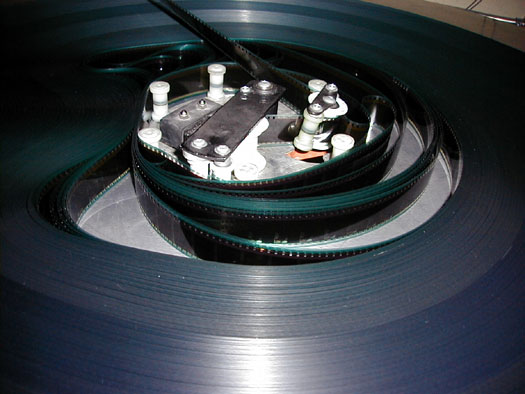
This print is "Yo Mama Tambien" and is on Kodak vision stock. Bulge appears as ring is carefully removed, and bulge prevents film from paying out anywhere near smoothly due to the pressure of the film pressing against the brain.Check out this picture as well:
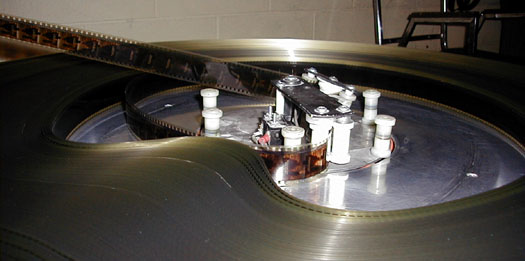
This is the movie "Lagaan Part 2" and is on unspecified film stock. There are no markings on it at all to indicate the stock.
So what could be causing this? Perhaps the platter is trying to wrap the film too tightly? But if that's the case why does it only happen on select prints? And no, this is not happening where the tail is tucked. In fact the tail is never tucked here. BevanPoo's keep the tails secure.
Posted by Daryl C. W. O'Shea (Member # 1303) on 07-24-2002, 03:26 AM:
You sure have a large bulge...I've seen a ring that is very slightly bent out of round cause inward bulges. Not as large, maybe an inch and a half inward. By the looks of the second picture it seems that the bulge is occuring on the 'side' 90deg from the posts on the ring. Therefore a bent ring would be possible.
This would also explain why it only happens on some prints and on different film stocks.
If this isn't the case, do you have any larger rings that you could use on the problem prints until you figure it out? At least with the larger ring the bulge might not come into contact with the brain.
Posted by Brad Miller (Member # 2) on 07-24-2002, 04:31 AM:
Is it happening on the same platter, or all of them?(And people wonder why I call them "The Stupid Platter" instead of "The Super Platter".)
Posted by Peter Kerchinsky (Member # 1098) on 07-24-2002, 04:39 AM:
Joe
I've had this exact same thing happen on those "stupid platters" and could not explain it either. I want to believe the print is taking up too tight or it is just certain film stock. I never could fiqure it out simply because it didn't really cause me any major problems. Sometimes I would take up the print sound track down and that would cure it....might be worth a try.
Super Platters and the like belong as boat anchors in Puget Sound......period.
Posted by Joe Redifer (Member # 3) on 07-24-2002, 05:16 AM:
But..... Super Platters use microswitches! They can't be bad! 
And no this does not happen on every platter system. Well not to this degree anyway. On some of the others it happens but the resulting bulge is not as large. Actually this is pretty recent as far as the severity goes.
Posted by John Pytlak (Member # 331) on 07-24-2002, 06:25 AM:
Both Kodak and Fuji include their names on the magenta-colored edgeprint. So the "Lagaan Part 2" without markings on it at all to indicate the stock is likely someone else.I agree that excessive/unever tension during windup could cause this kind of problem. Also, changes in relative humidity (e.g., very dry conditions) could cause excessive curl leading to winding problems.
------------------
John P. Pytlak, Senior Technical Specialist
Worldwide Technical Services, Entertainment Imaging
Research Labs, Building 69, Room 7525A
Rochester, New York, 14650-1922 USA
Tel: +1 585 477 5325 Cell: +1 585 781 4036 Fax: +1 585 722 7243
e-mail: john.pytlak@kodak.com
Web site: http://www.kodak.com/go/motion
Posted by Sam Hunter (Member # 1119) on 07-24-2002, 08:19 AM:
Joe,
could that be caused by to much tension on the platter when the print is loaded onto it? (Takeup tension). It looks like it was just wound too tight.
Is the film Mylar based or acetate based? Maybe the film is got like a loose wind problem?
Just an observation from someone who has never messed with a platter.
Posted by Ken Layton (Member # 133) on 07-24-2002, 09:04 AM:
Has the print been Film Guarded? It appears that your Super Platter has a Strong # 2546 control plate retrofit kit installed (it completely replaces the original orange ORC control plates.You may have an egg shaped center ring also.
Posted by Jerry Clark (Member # 1342) on 07-24-2002, 09:28 AM:
Hello all. I am a newbie to this forum, but I have been following this site for about 6 mos. I had this very same problem when I was in the booth some years ago. A couple of questions. Does this happen on all three tables? When was the last time the variac was checked?
Check the variac to see if the race on top has worn through. This will cause the film to wind tight and can cause the film to be thrown. I replaced the race on several of these type platters and the problem was gone. I have also found that a bent ring will cause this. I hope this helps.
Posted by Manny Knowles (Member # 1171) on 07-24-2002, 10:13 AM:
I have a very large bulge, too!And it's actually on one of my Christie platters...that one doesn't wrap too tight; it winds too soft.
I've seen super-tight winds cause this, too.
Posted by Randy Stankey (Member # 64) on 07-24-2002, 10:16 AM:
Joe,I have seen this occur on many types of platters (Christie, Strong, Speco) and, although it can be caused by too much take up tension, I find that a more likely cause is damaged film.
If it's too much tension it will go away once you fix the platter or move it to another. If it's damaged film it will be there forever, no matter what you do.
The most common cause is roped edges. (Back here, we call it "Spiked".) Somehow, the film has jumped off a sprocket and the teeth have made indentations in the film. Often this is because one of the pad rollers has become maladjusted but it can also occur because of a bad splice. Either, the holes weren't punched in the tape or there may be a misialigned lab splice that wasn't caught in time.
Check the film for "spike marks". Right before the place where they start, I bet you will find said splice. Fail that, it could be a poor threading job or a loose pad roller or intermittent shoe.
Since I know you are pretty conscientious, my bet is on a lab splice. Even though I checked for them religiously I have missed one or two of them in my day.
Once the film is damaged, there isn't a lot that can be done about it. If it's really bad, you MAY have luck rewinding the film back and forth on the bench under high tension. Mind you this is not a good thing to do in every day practice. I can cause scratching and other "not good" things to happen. However, if it's all you can do to save the show, you could try it. The best solution is to get a new print. If you can't do that, there is a chance that the damage will "play out" after several shows. On the other hand, if it's really bad it will cause progressive damage as the film plays.
The telltale is that the film may "buzz" as it plays throught the projector. On occasion, you may find that the film has jumped off the sprocket again even though you have found the cuase and effected a repair. The damaged sprocket holes tend to "lead" the film off-track.
Needless to say, no matter what the cause, I would babysit that film pretty closely from now on until you are satisfied that nothing else is going to happen.
Posted by John Pytlak (Member # 331) on 07-24-2002, 10:33 AM:
When a print gets "roped" by sprocket teeth, the little indentations have a slight ridge around them, making one side of the film effectively a bit thicker than the other. Even a tiny thickness difference adds up over hundreds of laps of film in the roll. The same thing can happen if very high tension stretches the film.Sometimes, changing the winding orientation (soundtrack up vs. soundtrack down on the platter) will help.
------------------
John P. Pytlak, Senior Technical Specialist
Worldwide Technical Services, Entertainment Imaging
Research Labs, Building 69, Room 7525A
Rochester, New York, 14650-1922 USA
Tel: +1 585 477 5325 Cell: +1 585 781 4036 Fax: +1 585 722 7243
e-mail: john.pytlak@kodak.com
Web site: http://www.kodak.com/go/motion
Posted by Ken McFall (Member # 845) on 07-24-2002, 10:52 AM:
This is a problem that I've had in the past, we use Kinoton ST200 platters. It was caused by too tight takeup and resolved by taking some of the tension off the return arm... Problem solved. However at times some prints don't take up as tight as I'd like, so its a trade off. Humidity plays its part too but tension seemed to be the biggets culpret in our case at least. We tend to move prints from screen to screen during the day, Often with three films in a screen each day as well.One way around the problem is to use a large take up ring, the Kinoton rings are great for this as they have a locking arm built in and lock solid. That way if the print does bulge the film is nowhere near the module to cause a problem. With the larger diamameter the plate is running slower so the irregular shape is handled better.
The knock on benefit is that its much easier to insert and remove ads and trailers with a larger ring.
Posted by Adam Martin (Member # 641) on 07-24-2002, 11:20 AM:
Joe, you're such a tease in your old age ...
Posted by Frank Angel (Member # 248) on 07-24-2002, 11:23 AM:
Hmmmm, bet no one ever saw that kind of a nightmare running reel-to-reel transport. Those pictures sure don't exactly instill any desire in me to throw out my second projector and put in a platter. But then again Joe, a Big Bulge will make you very popular.
Posted by John Pytlak (Member # 331) on 07-24-2002, 11:30 AM:
Adam Martin said: "Joe, you're such a tease in your old age ..."Joe never teases. (NOT!!!!) 
------------------
John P. Pytlak, Senior Technical Specialist
Worldwide Technical Services, Entertainment Imaging
Research Labs, Building 69, Room 7525A
Rochester, New York, 14650-1922 USA
Tel: +1 585 477 5325 Cell: +1 585 781 4036 Fax: +1 585 722 7243
e-mail: john.pytlak@kodak.com
Web site: http://www.kodak.com/go/motion
Posted by Michael Barry (Member # 237) on 07-24-2002, 11:48 AM:
Frank: don't let this scenario scare you out of getting a platter system if you are thinking of going that way. It is a true rarity. Just don't get a CFS/ORC platter. Instead, get a Christie (set up by Brad, of course!), a SPECO or a Kinoton and you won't have any trouble at all.If you are running the same few program(s) over and over then it's probably a better way of operating, and when using FilmGuard, unquestionably so.
If you are running repertory or some other situation where you show a different print every session or close to it, then stick with the second projector.
I hope this post doesn't seem too didactic. I'm probably stating the obvious. Apologies in advance if this is the case!
Posted by Don Sneed (Member # 955) on 07-24-2002, 12:01 PM:
Everytime I seen this the film has been damage, in fact I just service two theatres that had this problem & both theatres had slightly damage sprocket holes, cause by mis-theading, and/or bad sprocket and/or bad pad roller...which was in the case of theatre #1....if you see this bulge, check the print to see if the sprocket holes is slightly damage, usually in one corner of the sprocket hole...
Posted by Ian Price (Member # 14) on 07-24-2002, 12:58 PM:
Every time I have had this problem it has turned out to be scoring the film with a pad roller that is too tight. So after threading the machines, twiddle the pad rollers to check their clearence. Pad rollers shouldn't touch the film.I also have simplexes and this has been my problem.
Posted by Frank Angel (Member # 248) on 07-24-2002, 01:04 PM:
Michael, Actually all the places I work are art houses and museums and rarely play a feature more than a few times. They all play festivals, some run by very coordination-challenged curators; running such shows sometimes I wish I had THREE projectors....actually, counting the 16mm I do....ok, FOUR projectors. Platters just wouldn't lend themselves to this kind of pretty chaotic operation. Platters fulfull a particular need -- quick changing programs and multiple formats isn't what they are about. But believe me, when I have to buy TWO digital readers and TWO new ISCO lenes and TWO new red readers, I look longingly over at you platter guys!
Posted by Joe Redifer (Member # 3) on 07-24-2002, 01:04 PM:
I do believe that the sprockets are slightly damaged. It is not so bad that the film jumped off of a sprocket, but on the non-soundtrack side of the film, the sprockets feel a bit "rough" when passing through, and the Dolby Digital side sprockets do not. I think maybe the sprockets have been stretched due to the amazing tension the vacuum cleaner motor driven platters put on the film coming from the projector. Also when the film exits the holdback sprocket, it must pass through a steeply angled roller to clear the tons and tons of conduit going to and from the projector before it is able to proceed to the ORC platter. Do you think having an angled roller pulling one side harder than the other off of the holdback sprocket could be the culprit? I am thinking "possibly".Edit: Just remembered, it must pass through the sometimes-functional failsafe mechanism before the steeply angled roller, so I don't think that could stretch the sprockets.
Posted by Brad Miller (Member # 2) on 07-24-2002, 01:09 PM:
I know some people who have used a counterweight to increase tension on platters (such as hanging a heavy magnet on a takeup elevator or attaching a string to the end of a takeup arm, which was draped over something with a weight tied to the other end. However I wonder if it would be possible to use a counter weight to decrease tension on your junk-o-matic platters. Perhaps you could put a hook on the ceiling and attach a string to the elevator, loop it through the hook and experiment with various weights on the other end of the string. Not enough of course that it would affect normal operation, but enough so that it wouldn't come crashing down hard at the end of a show, and such that in general the elevator wouldn't have so much weight.
Posted by John Pytlak (Member # 331) on 07-24-2002, 01:19 PM:
To permanently stretch polyester print film, the film tension would have to GREATLY exceed the recommended maximum in SMPTE Recommended Practice RP 106-1999: Film Tension in 35-mm Motion-Picture Systems Operating Under 0.9 m/s (180 ft/min). This practice specifies the film tension needed to transport 35-mm motion-picture film through a film-handling system operating under 0.9 m/s (180 ft/min) while minimizing conditions that contribute to film damage. This practice also recommends methods for testing film tension.
------------------
John P. Pytlak, Senior Technical Specialist
Worldwide Technical Services, Entertainment Imaging
Research Labs, Building 69, Room 7525A
Rochester, New York, 14650-1922 USA
Tel: +1 585 477 5325 Cell: +1 585 781 4036 Fax: +1 585 722 7243
e-mail: john.pytlak@kodak.com
Web site: http://www.kodak.com/go/motion
Posted by Peter Dougherty (Member # 686) on 07-24-2002, 01:23 PM:
Joe Said: quote:
I think maybe the sprockets have been stretched due to
That's it! Some corn-shovelling operator-wannabee was practicing with the Film Stretcher while you weren't looking! Tell him to go out and get you another box of sprocket holes!!
Posted by Rachel Gilardi (Member # 4594) on 07-24-2002, 02:29 PM:
Joe, stop picking on my damn ORCs! In my 2 years of running the "super platters" I only had 1 brain wrap...and it was when I was learning. The Christie's I use now are much worse..
Posted by John Pytlak (Member # 331) on 07-24-2002, 02:32 PM:
Peter said: "Tell him to go out and get you another box of sprocket holes!!"Kodak recycles many billions of perforation punchouts ("chads") each year. The silver and base chemicals are recovered.
I suspect we got calls from both the Bush and Gore campaigns after the 2000 US Presidential election.
------------------
John P. Pytlak, Senior Technical Specialist
Worldwide Technical Services, Entertainment Imaging
Research Labs, Building 69, Room 7525A
Rochester, New York, 14650-1922 USA
Tel: +1 585 477 5325 Cell: +1 585 781 4036 Fax: +1 585 722 7243
e-mail: john.pytlak@kodak.com
Web site: http://www.kodak.com/go/motion
Posted by Peter Dougherty (Member # 686) on 07-24-2002, 03:31 PM:
quote:
Kodak recycles many billions of perforation punchouts ("chads") each year. The silver and base chemicals are recovered.
Ahh, but those are punchouts--not the actual holes themselves. The boxes of holes have a different part number (04-01, if I'm correct  ).
).
Around here, you get them in the same shoppe where you can get a bucket of Welders' Sparks.
------------------
Cheers,
Peter, W2IRT
No trees were harmed in creating this message, however several thousand electrons were terribly inconvenienced.
Posted by John Pytlak (Member # 331) on 07-24-2002, 03:34 PM:
Of course, there are different part numbers for KS, BH, DH and CS holes. ------------------
John P. Pytlak, Senior Technical Specialist
Worldwide Technical Services, Entertainment Imaging
Research Labs, Building 69, Room 7525A
Rochester, New York, 14650-1922 USA
Tel: +1 585 477 5325 Cell: +1 585 781 4036 Fax: +1 585 722 7243
e-mail: john.pytlak@kodak.com
Web site: http://www.kodak.com/go/motion
Posted by Scott Norwood (Member # 30) on 07-24-2002, 04:42 PM:
Rachel--something is wrong with your Christies.I've worked with AW3s made between 1979 and 1998 and have only managed to have one brainwrap, ever. That was in the last month, actually, and was the result of an attempt to change a trailer too fast (i.e. it wasn't the platter's fault). Actually, I like the older ones better, especially since they were recently converted to have removable brains--the motors don't squeak and they seem to pay out the film more smoothly than the newer ones.
My only complaint about the AW3 is that I've had several motor cards go bad in them, particuarly within the last few months.
Posted by John Hawkinson (Member # 1135) on 07-24-2002, 05:32 PM:
Out of curiosity, (don't try this at home, folks!) does "rewashing" a print help to fix this sort of thing?--jhawk
Posted by John Pytlak (Member # 331) on 07-24-2002, 05:53 PM:
Rewashing (Kodak Process RW-1) MAY help, in that it swells the damaged emulsion, and heals any minor abrasion or digs. Rewashing and drying the print may also help relax any curl issues, and return the print to the proper humidity equilibrium.
Kodak Rewash Process RW-1 ------------------
John P. Pytlak, Senior Technical Specialist
Worldwide Technical Services, Entertainment Imaging
Research Labs, Building 69, Room 7525A
Rochester, New York, 14650-1922 USA
Tel: +1 585 477 5325 Cell: +1 585 781 4036 Fax: +1 585 722 7243
e-mail: john.pytlak@kodak.com
Web site: http://www.kodak.com/go/motion
Posted by Joe Redifer (Member # 3) on 07-24-2002, 07:32 PM:
Jiggidy Jhawk-I took your advice and ran the print through my dishwasher. Now it is worse than ever. So I guess rewashing it does not help. 
Posted by John Pytlak (Member # 331) on 07-24-2002, 08:36 PM:
Joe said: "I took your advice and ran the print through my dishwasher. Now it is worse than ever. So I guess rewashing it does not help."Sounds like you didn't use the Kodak RW-1 recommendation that I supplied the link to. And you probably used the "power dry" setting.
------------------
John P. Pytlak, Senior Technical Specialist
Worldwide Technical Services, Entertainment Imaging
Research Labs, Building 69, Room 7525A
Rochester, New York, 14650-1922 USA
Tel: +1 585 477 5325 Cell: +1 585 781 4036 Fax: +1 585 722 7243
e-mail: john.pytlak@kodak.com
Web site: http://www.kodak.com/go/motion
Posted by Scott Norwood (Member # 30) on 07-24-2002, 09:06 PM:
I think Joe should do it again, but this time use the "two-stage countercurrent wash" cycle.
Posted by John Pytlak (Member # 331) on 07-24-2002, 09:09 PM:
A four-stage countercurrent wash would be better for archival keeping:
Counter-Current Washes ------------------
John P. Pytlak, Senior Technical Specialist
Worldwide Technical Services, Entertainment Imaging
Research Labs, Building 69, Room 7525A
Rochester, New York, 14650-1922 USA
Tel: +1 585 477 5325 Cell: +1 585 781 4036 Fax: +1 585 722 7243
e-mail: john.pytlak@kodak.com
Web site: http://www.kodak.com/go/motion
Posted by John Hawkinson (Member # 1135) on 07-24-2002, 11:41 PM:
I guess I should have said not to try it at work either.
"oops." Send me the bill, Joe.--jhawk
(who finds the j's jiggle better than the J's, y'know)
Posted by Joe Beres (Member # 678) on 07-24-2002, 11:46 PM:
Feature films are only top-rack safe. I'm guessing you forgot about that. Yet another film handler proving that digital is the only way to go. Thanks for ruining it for us all.
Posted by Joe Redifer (Member # 3) on 07-25-2002, 12:11 AM:
quote:
--jhawk
(who finds the j's jiggle better than the J's, y'know)
Ummmmm... I'm not sure but did you just admit to a smaller than average manhood or something?
Posted by Mathew Molloy (Member # 666) on 07-25-2002, 04:19 AM:
We were having this same bulge problem on our AW3 when we took the theatre over, especially with the print of ALI. That was before FilmGuard. Now that we are using FilmGuard we have not had this problem at all in 5 months.
Posted by Peter Kerchinsky (Member # 1098) on 07-25-2002, 05:16 AM:
Like I said before and I'll say it again..........
take those damn Supers and ORC platters and junk em.......they're crap.
I've been running AW3s with the removable brains, as you call em, and have never had any problems with them
IT'S THE ONLY WAY TO FLY.
Posted by Jason Burroughs (Member # 68) on 07-25-2002, 08:22 AM:
Just to state the obvious, it sounds like, from Joe's description, that the damage is occuring in the projector. A roller missalignment or excess tension would not cause sprocket damage. Sounds like either a pad roller is pinching the film or a hooked tooth somewhere. Try reversing the Intermittant sprocket, check the "shoes" for a burr as well.
Posted by David Whitbeck (Member # 894) on 07-25-2002, 06:50 PM:
With Strong platters, I never had any bulge problems. Sure maybe a head wrap every now and then, but proper maintenance took care of those. But no bulges. With the Christies, it's not too tough to get a good bulge during build up of a print. Made a good one last night with Goldmember, too much tension. Had to rewind it to a 6k foot reel and then put it back on the platter with less tension. Anytime I see bulges, I think about the tension or the ring. Even if the film is too thick where you tuck it in the ring a bulge can happen. We have a Super Platter sitting in the corner, I used it to tear down a movie once, I disassembled it shortly after...
Posted by John Pytlak (Member # 331) on 07-26-2002, 09:40 AM:
David: Glad to see your theatre is up and running again after the Arizona forest fires. How did you and your town of Show Low fare?------------------
John P. Pytlak, Senior Technical Specialist
Worldwide Technical Services, Entertainment Imaging
Research Labs, Building 69, Room 7525A
Rochester, New York, 14650-1922 USA
Tel: +1 585 477 5325 Cell: +1 585 781 4036 Fax: +1 585 722 7243
e-mail: john.pytlak@kodak.com
Web site: http://www.kodak.com/go/motion
Posted by Charles Everett (Member # 889) on 07-26-2002, 03:43 PM:
Are those prints new from the lab or circuited from another theater?If they're circuited they may have been damaged before Joe R got them. Y Tu Mama Tambien has been out in the US since March. Lagaan had its original release in June 2001 and was re-released in the US two months ago.
Posted by Joe Redifer (Member # 3) on 07-28-2002, 01:36 AM:
I was right. The platters pull so tight, that it pulls the film a few perfs worth of tension on the holdback sprocket of the crappily designed Simplex sound head. With the tension maxed out in the soundhead, it damages/stretches each sprocket hole on the non-soundtrack side of the film. Film that is damaged like that ends up buldging. This usually happens when the projector is motored through and stopped and the projectionist fails to break the take up platter by hand in time. Or when the projector stops on it's own for no reason (it happens) and the take up keeps on goin'. And before you even ask: Yes, the pad rollers are set up correctly with the proper tension on the sprockets. And yes, these platters are "timed" as good as they will get. Any slower and the elevator DROPS COMPLETELY when the film begins to motor.Whoever had the bright idea to use super-high torque VACUUM CLEANER MOTORS in a platter system should be shot in the nuts repeatedly with a rubber band. Vacuum cleaner motors are for vacuums, not platters. There is simply no need for THAT MUCH TORQUE in a platter system. Period. What's next... a platter system powered by an air compressor kept in another room? Oh wait. How are dumb people able to get their designs manufactured by companies?
I am so glad that we are throwing these ORC platters in the trash very soon and getting newer less-crappy platters!
Posted by Peter Kerchinsky (Member # 1098) on 07-28-2002, 04:32 AM:
Joe
I heard once that some platter tables were actually run on air pushing the flanges below the decks.
If Scott Hicks in Portland, OR. reads these threads he would know.
Scott, tell me this was true!
Posted by Darryl Spicer (Member # 711) on 07-28-2002, 12:12 PM:
yes it is true. There used to be platters that used air to move the decks.
Posted by Gordon McLeod (Member # 33) on 07-28-2002, 08:15 PM:
One of Potts early efforts for Simplex was the Air-O-Matic that used a vacume cleaner blower(I wonder where the link to vacume cleanrer motors came from) to propel the vains on the bottom of the platter
Posted by Joe Redifer (Member # 3) on 07-28-2002, 08:48 PM:
It seems like the manufacturers of platters are in love with vacuum cleaner parts. The platters should be able to transform into a working vacuum cleaner and vacuum the booth on their own.Revelation: The people who designed these types of platters used to be janitors, since all they know are vacuum cleaners.
Posted by David Favel (Member # 1125) on 07-28-2002, 09:12 PM:
Or perhaps a film cleaning device is about to be launched.Considering the debate between PTR's & Filmguard a combination platter/vacuum film cleaner would be cost effective as most of the equipment is pre-installed.
Posted by Richard Fowler (Member # 893) on 07-28-2002, 09:45 PM:
Bob Potts picked the vac motors due to their low cost and figuered they would give a long service life, bearing wise, since they where designed for high r.p.m. and to stall without a hassle.
Richard Fowler
TVP-Theatre & Video Products Inc. www.tvpmiami.com
Posted by Matthew Bailey (Member # 601) on 07-29-2002, 09:42 AM:
I think my solution would be adding a rheostat to each motor on an ORC & figuring out a way to use felt in place of the drive puck or O ring or better yet, design & install a friction clutch on the input or output shafts of the motors.
Posted by Ken Lackner (Member # 1002) on 07-30-2002, 11:55 AM:
quote:
I heard once that some platter tables were actually run on air pushing the flanges below the decks.
I would think that would cause the deck to run at an uneven speed: the air is blowing, and along comes a flange to catch the gust of air. The platter speeds up. But as the flange gets farther and farther from the source of air, the platter would gradually slow down, until the next flange comes along, at which time it would speed up again. How would they keep the speed constant?
Posted by Richard Fowler (Member # 893) on 07-30-2002, 01:04 PM:
The Simplex Aeromatic platter, also designed by Bob Potts, used air drive motors ( like oil hydralic motors but air ). A pipe blowing on the fins would be a little goofy
Richard Fowler
TVP-Theatre & Video Products Inc. www.tvpmiami.com
Posted by Don Sneed (Member # 955) on 07-31-2002, 09:46 AM:
I service a few of these in my time, it was a different idea that didn't work, or at least in my area, I was always there to service these, I hated these platters until I found out I could make alot of money trying to keep these running (same hold true for the Ballantyne Pro-35), needless to say these platters was not in the booth for more than a year when they were replace & was haul to the junk yard !!! or stored behind a screen...
Posted by Joe Redifer (Member # 3) on 07-31-2002, 06:24 PM:
ALL old junk should be stored behind the screen. That's the perfect place for it. NEVER throw ANYTHING away!
Posted by Steve Kraus (Member # 476) on 07-31-2002, 06:50 PM:
What was/is the arrangement between Bob Potts and Design & Manufacturing? He designs a platter, contracts a factory to build it, and they then start selling essentially the same design to a competitor (which years later acquires the factory)? I presume there is a royalty arrangement but I don't know. What is the story there?