This is topic Strange scratch in "Signs" prints in forum Film Handlers' Forum at Film-Tech Forum ARCHIVE.
To visit this topic, use this URL:
https://ft-forum.com/ft/cgi-bin/ubb/ultimatebb.cgi?ubb=get_topic;f=1;t=003792
Posted by Adam Martin (Member # 641) on 08-01-2002, 12:35 AM:
We have three prints of Signs here. One arrived on Monday for a screening of some sort. I watched the first print Monday night and called for the replacement of reels 3, 4 and 6. Reel 6 was because of a magenta scratching on just one shot, but it was an important shot in an important scene at the end of the movie. I chalked it up to possibly a bad or worn dupe negative and assumed the prints we got later in the week wouldn't have it.
I just finished screening another print, one which arrived today. It has this same exact magenta scratch.
This paragraph contains **SPOILERS** for the end of the movie and only describes exactly where the scratch is. When Joaquin Phoenix hits the alien for the last time, we get a POV shot from the alien as he falls backward, just before the water glass dumps on his face. As he is falling backward, the vertical magenta scratches are visible in the light area at the center of the screen. **END SPOILERS**
There are maybe a dozen or so short scratches bunched up together, like an intermittent scratch from a projector, and they are all magenta (the top gelatin layer, which only makes sense if it was on the dupe negative, right?).
Are these in everyone's prints, or should we just keep ordering reel 6's until we get a good one? Could they originate as far back as the camera negative?
Posted by John Scott (Member # 520) on 08-01-2002, 01:20 AM:
I was at a sneak screening last night and the print they showed did not have any of the magenta scratches you mentioned.
Posted by Steve Guttag (Member # 268) on 08-01-2002, 08:20 AM:
A ran a show off of an EK print...no scratches but a bunch of dirt! (PTRed the print twice too)Steve
------------------
"Old projectionists never die, they just changeover!"
Posted by Jim Leko (Member # 1287) on 08-02-2002, 04:48 AM:
Just screened Signs. Print looked good with the exception of reel 5. There was a series of translucent white blotches on the right of the screen. hardly noticable, but once you see it, it's all you can see. I am guessing this is a lab error. Managment will look at it tomorrow and make a decision (I didn't know exactly how to describe it to them).
Posted by Michael Gonzalez (Member # 593) on 08-02-2002, 10:36 AM:
Our print has the occcasional blotch and one bad factory splice near the end of the movie also if the framing isn't perfect, you get the boom mic showing up in several scenes.
Posted by John Anastasio (Member # 607) on 08-02-2002, 03:26 PM:
I just saw a print where the beginning of reel #2 was printed out of frame. It continues for about 20 seconds, then gradually creeps back in. It looks for all intents and purposes like a bad splice on the screen, but when I saw it I immediately looked back to the booth and there was nobody within miles of the projector, so it had to be the print.
Posted by Jason Black (Member # 684) on 08-02-2002, 03:40 PM:
Screened one of our prints last night and all looked well, with the exception of one lab splice in R-4. Didn't see the magenta scratches Adam mentioned. Everyone thought I was crazy when I mentioned Joaquin Phoniex getting into a battle with an alien... 
Posted by Aldo Baez (Member # 790) on 08-02-2002, 09:34 PM:
ok has this ever happened to anyone:
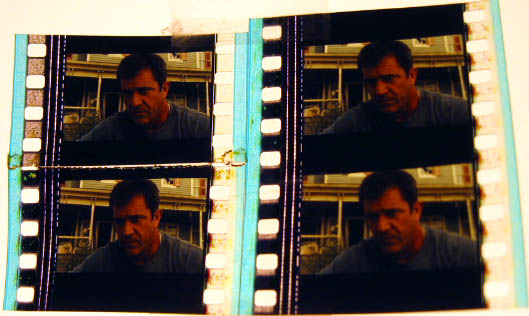
Upper left frame is the normal frame, then lab splice.
What a pain in the butt.
Posted by Gordon McLeod (Member # 33) on 08-02-2002, 09:43 PM:
looks like the soundtrack neg jumped the printer sprocket when the ultrasonic splice in the raw stock went by
Posted by Aldo Baez (Member # 790) on 08-02-2002, 10:00 PM:
The picture is off frame as well.
Posted by Alex Grasic (Member # 1371) on 08-03-2002, 03:01 AM:
I had the same problem with a Premiere print of K19 that I received a couple weeks back. I'm still amazed that I didn't catch it while I was making up the print, instead, my machine (a Simplex 35/70) had to "deal" with it!
Posted by Aldo Baez (Member # 790) on 08-03-2002, 09:36 AM:
I've never seen where the actual picture on the film was off frame. While I was tring to fix it I was so confused why I couldn't splice it in frame arrrrrrg I was a little fustrated. Granted its only like half a sprocket hole but still.
Posted by John Pytlak (Member # 331) on 08-04-2002, 08:59 PM:
I agree that it appears the splice caused the film to briefly jump off the printer sprocket. Should have been caught by the lab.------------------
John P. Pytlak, Senior Technical Specialist
Worldwide Technical Services, Entertainment Imaging
Research Labs, Building 69, Room 7525A
Rochester, New York, 14650-1922 USA
Tel: +1 585 477 5325 Cell: +1 585 781 4036 Fax: +1 585 722 7243
e-mail: john.pytlak@kodak.com
Web site: http://www.kodak.com/go/motion
Posted by Adam Wilbert (Member # 1184) on 08-04-2002, 10:59 PM:
Both of our prints had the magenta "scratches" at the end, but they were stationary on the screen, they didn't move like scratches from frame to frame. They looked more like drips of fluid. -adam