This is topic Start Cue for ORC Automation? in forum Film Handlers' Forum at Film-Tech Forum ARCHIVE.
To visit this topic, use this URL:
https://ft-forum.com/ft/cgi-bin/ubb/ultimatebb.cgi?ubb=get_topic;f=1;t=003930
Posted by Joe Redifer (Member # 3) on 08-28-2002, 03:05 PM:
Like Brad, I want a start cue for my automation that was originally built with the ancient outdated logic of "motor down the leader and then press start... seven seconds later your douser/sound will change". I will not go into the many many advantages of having a start cue, but I would really like one for this automation. I don't remember the exact model number since I am not at the theater, but it is the automation circled in this picture:
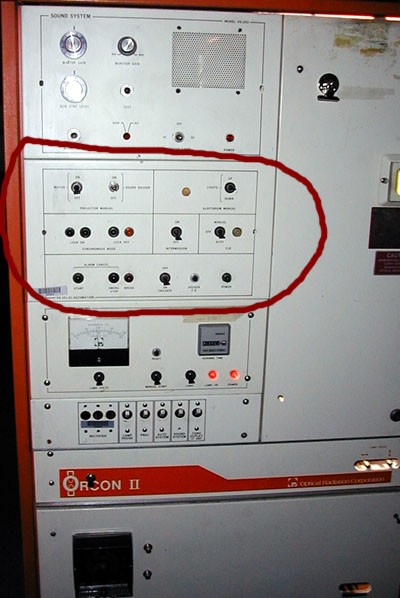
The automation can use a start cue when interlocked, and then it counts down anywhere from 0 to 15 seconds (adjustable) before it opens. I'd like to wire this so it thinks it is interlocked all the time and just use a cue on the leader and adjusting the timing to zero so it opens as it reads the cue. Is there anyway to wire this automation so that it thinks it is always interlocked with itself?
Posted by Paul G. Thompson (Member # 655) on 08-28-2002, 06:38 PM:
Joe, the last time I interlocked my two ORC's together, I used a 10-pass 8-foot accumulator. I didn't have Selsyns. What I did was start both machines at the same time (motor manual on the second machine) without significant delay. (I could run fast in those days) and then I waited at the second machine for my marker splice at a pre-determined location, and started the second machine on automation. After everything was running hunky-doory, I shut the manual motor switch off and let the automation do its thing. It worked quite well.Today I would not try it with those old ORC POS'S. They are too flakey, and I still have not found out why one of them drops out when it feels like it. If your automations are still rock solid, they should perform OK like the way I used them.
Only thing to be careful of....find out which machine runs a little faster...and thread your accumulator accordingly. 
Posted by Joe Redifer (Member # 3) on 08-28-2002, 07:31 PM:
You don't understand:I WOULD NEVER EVEN ATTEMPT TO INTERLOCK THESE THINGS! That frightens me. It even frightens Brad Miller.
What I want to do is wire the automation so that it thinks it's always interlocked, when in reality it is not. That way I can use a start cue on the front of the leader to tell the machine when to switch on instead of the lame-ass 7 second delay. I do have Selsyns but I have no use for them and would love to disconnect them, but the wiring schematics in the ORC manual are cryptic at best.
Posted by Jon Bartow (Member # 241) on 08-28-2002, 07:35 PM:
Joe, I believe the automation you circled is a VA-301 automation. It's been a few years but I once did exactly as you are wanting to do. Now I could be remembering incorrectly but ... here goes.
What I was using was Big Sky optical cue readers and I set cue "1" as the start cue.
When the "start" button is pushed it starts a series of capacitor "timers" on the timer board. If I remember correctly there is another little plug-in board with some diodes on them to set which timer circuit is connected to which relays (LU, LD, PO, PU, etc) WHat I did was to unsolder one end of the diode that controlled the PO (Picture On) relay. Then the "Start" button will start the motor and Xenon but the C/O will not open. I used the N/O contacts of the Big sky automation cue "1" to trigger the PO relay. This meant that the "Picture On Cue" was not delayed at all so the cue would go about 24" IN FRONT of the first frame you wanted on screen.
I may not be remembering exactly right, but it did work for me. It requires some free time and a bit of fun with a soldering iron. I suppose you could wire in a SPDT toggle switch to go back and forth between modified and factory operation.
Jonathan Bartow
Posted by Paul G. Thompson (Member # 655) on 08-28-2002, 07:39 PM:
Sorry, Joe. I mis-interperted what you were trying to ask.
Posted by Gordon McLeod (Member # 33) on 08-28-2002, 09:20 PM:
You probably have a knowckoff or one of the OEM versions of the Rven Pac1 and it will not allow a foil to start unless in interlock and then only on the second machine
It was not designed for any other form of operation
Posted by Joe Redifer (Member # 3) on 08-28-2002, 11:33 PM:
Yes Gordon, but I want to TRICK it to thinking it is always interlocked. There MUST be a way to do so.
Posted by Gracia L. Babbidge (Member # 582) on 08-28-2002, 11:43 PM:
...that looks eerily familiar... 
Um, yeah, that does look an awful lot like the VA-301 automation
What Mr. Bartow suggested does in fact work ... even after a couple of years!
...but as for tricking the machine into thinking that it's interlocked? *shrugs*
Posted by Brad Miller (Member # 2) on 08-29-2002, 12:00 AM:
Jon, do you know how Joe's automation handles interlock? What is the wiring between units? I wonder if it is not possible to fake the other automation (the starting one) on the line such that the second one thinks it is running in sync with another unit (which of course is nonexistant). Even if Joe had to cycle a switch each time he threaded to simulate a "tailing out/reset" of the first machine, I'm sure that he wouldn't mind to be able to achieve a start cue. Even that might be able to be automated though. (I'm just babbling here as I have never worked with the fabulous automations that Joe is blessed with. )
Posted by Joe Redifer (Member # 3) on 08-29-2002, 12:18 AM:
I would have to flip up the interlock sync "lock on" switch, but it could just stay up 100% of the time. Beyond that it should operate normally with a properly cued film, just as long as no one "unswitched" the interlock.
Posted by Jon Bartow (Member # 241) on 08-29-2002, 07:56 AM:
Ok, going on the premise that it is in fact a VA301 the interlock system required an "interlock box." the schematics called for Nine 16awg wires from each proj to the interlock box. Then there were three switches on the box (?). As I recall after pressing start on either interlocked projector both motors and xenons would go then an end of show cue was placed on the film to start the timer. Interlock operation required both projector sync switches to be on and switches on the interlock box to engage the projector and to select sync/normal mode.
Now without studying the schematics I can't tell you how to hotwire the interlock so it thinks that there is another "phantom" projector, but it could be rather complicated, I'm pretty sure it would involve a couple of relays and a couple of switches. There is a manual in the archives for a VA-101 that includes the SY-101 syncronous box (interlock box) that was the same for the VA-101 and -301. If you have a spare interlock box that would probably make things easier.
However, I think my previously discussed mod would be cheaper. But if you have foil cues only... get some countdown leader.Gracia, glad to hear that those beasts are still running fine.
AFAIK she has OrconII consoles with the VA-301 automation and she does have interlock set up between two of them (no selsyn) but the two projectors are a Century JJ-2 and a Christie P35C which required a signifigant accumulator loop to accomidate the different start up/run down speeds. However the interlock did work rather faithfully. (and still does?)
Jonathan Bartow
Posted by Darryl Spicer (Member # 711) on 08-29-2002, 11:42 AM:
Here is a curious question to throw on the pile. Of course depending on the type of automation and what it can do. If you place a foil start cue on the leader like Joe wants to do and trick the automation into thinkiong that it is interlocking. What effect does the other cues have on the system. Things like rolling stock cues, full dim cues and end cues. Would you encounter a situation like I have where the cue that is the start cue is the same as the full dim cue and when that one is read shuts the picture off and then back on. This happens at our older theater here when running interlock. You have to remove the other cue.
Posted by Joe Redifer (Member # 3) on 08-29-2002, 12:36 PM:
I think Jon is correct in that it would be difficult to hotwire. I do have 3 of the wall-mounted interlock boxes (for 6 projectors). I have standard foil cues. Inboard and outboard. The inboard raises the lights and does nothing else. The outboard does the shutdown logic. Could Jon's method be done with a cue detector like that?Darryl, when in interlock mode, the first outboard cue would start the picture on logic. After that the picture is on and the next outboard cue is assumed to be the shutdown cue, so it performs accordingly.
Posted by Wes Hughes (Member # 981) on 08-29-2002, 01:02 PM:
I fail to see what is so hard or technically non-advantageous about lacing countdown leader to "7" and starting the show ???? 
Even if you don't have countdown...lace up with the "start splice" a predetermined distance from the projector (that you have found via trial and error).
Posted by Brad Miller (Member # 2) on 08-29-2002, 02:15 PM:
Wes, it is because it is unprofessional. I say unprofessional meaning that if you are threading up a mere 7 seconds of film away from the first frame of your presentation, you are basically getting on your hands and knees and begging to the gods of dirt to come live on your film...especially that first trailer. The dirt that gets on the leader (moreso at theaters where they let the leader touch the floor as they thread) then transfers itself to the next wrap on the center ring as it is taken up. Then the next show that second layer of dirty film transfers it's dirt to the third layer, then the fourth, then the fifth and so on. This is why at probably over 90% of all theaters, the first trailer looks awful, and then slowly clears up the further into the roll of film the show gets. A professional operation's "first trailer on the platter" after weeks of running will look just as good as the middle of a 2000 foot reel of the feature on it's first run.
Then there's the issue of threading on a reasonable length of leader (never ever less than 50 feet, 75 or 100 is preferred) and "motoring down" to the start point. Turning that motor switch on and off is just adding more wear and tear to the motor and gears.
A start cue is the professional way to go for both your equipment and your presentation.
Posted by Scott Norwood (Member # 30) on 08-29-2002, 02:32 PM:
How much damage to the motor and gears is really caused by motoring the leader down to "7" (or whatever)? This is common practice in reel-to-reel booths and I've seen plenty of _old_ equipment that runs fine even though it has been used to motor the leader down several times per feature (once each reel) every night for many years.I agree, though, that the concept of having a start cue is pretty obvious and I'm surprised that it isn't more widely used. The only automations that I've worked with are the Maxi-10 (and a couple of newer Kelmar models which are basically the same thing) and TA-10, neither of which (as far as I know) supports start cues. With the Maxi-10, the operator needs to manually press "start" as the 7-second mark runs through the gate; the Kelmar automations work similarly, except there's a button for "interlock cue" or something like that that one uses instead of "start." The TA-10 uses a start cue for interlock, but I'm not exactly sure how it works, having never run an interlock show with the TA-10.
On the automations which use start cues, is there a way to bypass this function and use the regular 7-second delay? When running once-only shows on platters, I usually just add a light cue at the start of the credits and an end-of-show cue at the tail and then start the show manually. Obviously this precludes the use of timers for show start, but it saves time during print inspection/makeup.
Posted by Ken McFall (Member # 845) on 08-29-2002, 02:56 PM:
Must admit I have no problems with running down to a START point clearly marked on a leader. I lace up without film touching the floor and I'd expect my staff to do the same.
As for wear on the mech, many newer projectors use inverters so smooth slow starts are built in by design.
The TA10 can easily be set to use a 'start' cue. I use it often. We have a 1 min break between our adverts & trailers as we have manual lens changes. This also allows easy removal of adverts & trilers on a thursday evening. We break the show at a clearly marked break point on the 1 min leader. Then we run the feature onto a large take up ring. When we restart the show all we do is press the interlock button on the TA10, blue led lights up and press start. The projector motor starts and the TA10 'Find's' the start cue and puts the show back on. This saves the stop start running down of the leader.
Posted by Jon Bartow (Member # 241) on 08-29-2002, 08:28 PM:
Joe, another thought... Assuming that you just have an inboard and outboard cue and no cross cue...
It should be possible to create a circuit so that the outboard cue serves dual purpose.
press the start button - motor/xenon on
outboard cue - starts PO timer (with seven second delay)
PO timer (timer #2 I think) will trigger PO relay, connect one side of a DP latching relay parallel with the PO relay so when it switches it reconnects the outboard cue to the normal circuit path
inboard cue -lights down/up or however you have it
outboard cue - starts PF timer (timer #4 I think) also a seven second delay (although it is adjustable for longer). When the timer ends it triggers the PF relay. Connect the other side of the DP latching relay in parallel with the PF relay. this would switch the outboard cue for show start function again.
*one note you probably would want to make sure that the "Stop" button would reset the latching relay for show start operation and you might also want a SPDT momentary toggle switch to manually control the latching relay.
I may not be making any sense but you should be able to do it...
Jonathan bartow
Posted by Joe Redifer (Member # 3) on 08-30-2002, 11:32 PM:
Just for the record I checked today and the automation is the 101, not the much-coveted 301.
Posted by Oscar Neundorfer (Member # 458) on 08-31-2002, 11:59 AM:
When I designed the SMART automation, I used a start cue configuration. I could never really understand why that was not a standard way to do things anyway. Of course, I have basically zero booth experience to go on, but it sure made logical sense to me. (Don't you guys just LOVE someone with no booth experience designing equipment for the booth? Many thanks to ALL who have kept me from making many more mistakes than I have.)
Posted by Jon Bartow (Member # 241) on 08-31-2002, 03:07 PM:
Joe, even though I have never worked on a VA-101 I believe that the 101 and 301 are very similar. The manual in the archives has a schematic but it is almost impossible to read. If you have a copy of the manual it should have the print in it. Have fun! I'm sure it can be done at a minimal (or no) cost.
Jonathan Bartow
Posted by Richard Fowler (Member # 893) on 08-31-2002, 05:06 PM:
Joe,
you just don't have the proper tool for the start function....a 5 pound ( 2.27Kg ) sledge hammer applied liberally..... 
Richard Fowler
TVP-Theatre & Video Products Inc. www.tvpmiami.com
Posted by Joe Redifer (Member # 3) on 08-31-2002, 05:20 PM:
Well if these automations keep acting the way that they do, I think that'll be the only tool that can fix them!
Posted by Richard Fowler (Member # 893) on 08-31-2002, 05:37 PM:
I have 8 used Kelmar automation systems in our warehouse...at least you can get parts and factory support.
Richard Fowler
TVP-Theatre & Video Products Inc. www.tvpmiami.com