This is topic Print Problems in forum Film Handlers' Forum at Film-Tech Forum ARCHIVE.
To visit this topic, use this URL:
https://ft-forum.com/ft/cgi-bin/ubb/ultimatebb.cgi?ubb=get_topic;f=1;t=004061
Posted by Michael Elam (Member # 788) on 10-03-2002, 06:39 PM:
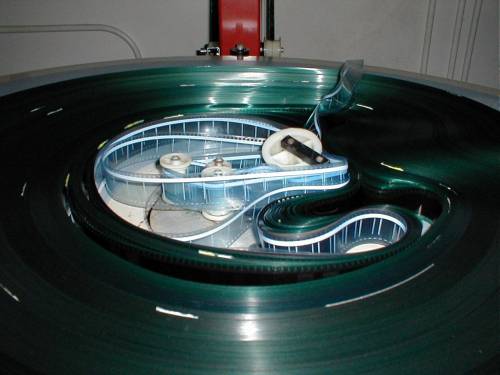
I have some prints doing this on Speco platters, this is a 10 screen
complex and it happens on all screens, doesn't matter who or what the
film stock is, happens at random. Any ideas???? What is the "idea"
humdity of a booth?
Thanks
Posted by Ken McFall (Member # 845) on 10-03-2002, 07:00 PM:
Does it only happen when you have just run a print on or after it has run thru the projector and taken up onto the platter.I would initially suspect too much tension along with humidity! But it's one of those things that can have many many causes.
Just a thought but who marks your prints for breakdown....
Posted by Michael Elam (Member # 788) on 10-03-2002, 07:40 PM:
Appears AFTER the print is built and one showing. The tape is a new tape being purchased, I don't like it, the splicer is also out of
adjustment.There are always those 'booth experts' that are tweaking,
adjusting to the way they think it should be.
Posted by John Pytlak (Member # 331) on 10-03-2002, 08:14 PM:
I suspect incorrect tension as the film is winding onto the platter. The film seems to have little curl, so humidity is probably in the desired range of 50 to 60 percent RH.Those splices are UGLY, and the overhang is likely to eventually "hang up" and jam in the projector gate. Fix your splicer and get some high quality transparent splicing tape. Keep going the way you are, and you're likely to damage a print worth over $1000 to save a few bucks on a roll of tape and a few minutes adjusting your splicer.  (If anything, carefully trim the overhanging tape with scissors).
------------------
John P. Pytlak, Senior Technical Specialist
Worldwide Technical Services, Entertainment Imaging
Research Labs, Building 69, Room 7525A
Rochester, New York, 14650-1922 USA
Tel: +1 585 477 5325 Cell: +1 585 781 4036 Fax: +1 585 722 7243
e-mail: john.pytlak@kodak.com
Web site: http://www.kodak.com/go/motion
Posted by Glen Rich (Member # 1150) on 10-04-2002, 12:29 AM:
I also run the same platters,(going by the picture).In the past we've had the same problem ; using air-conditioning we remove most of the humidity in the boxes,which solves the problem .It's just a bit chilly in winter.
The tension does'nt seem to make much difference.
Posted by Joe Redifer (Member # 3) on 10-04-2002, 12:39 AM:
Michael, are you using Simplex projectors by chance?One way to solve one of the problems I see is to get rid of the guy who purchases your splicing tape and only buy Neumade clear tape. 
Posted by Daryl C. W. O'Shea (Member # 1303) on 10-04-2002, 12:45 AM:
I agree with Joe's implication... is the edge of the film getting damaged on the way out of the projector? Like what happened when Joe had a big buldge.
Posted by Darryl Spicer (Member # 711) on 10-04-2002, 02:35 AM:
If you are using the gray LP271 platter make-up tables with the retrofit fly wheel and slip resistant belt. There is your problem. These tables with the fly wheel change like to over tension the film as it winds on. That is what is causing the bulge. If you are not using those tables with the retrofit or are using the older wooden tables. Then you are applying to much back tension to the reel flangs with your hands. Solution is simple ease up on the back tension and for the retrofit models remove the belt and just apply light back tension to keep the film from bouncing.I like the new tape if you use it right. Don't cover the picture area with the solid white/yellow area It should only touch the edges. I will say I do not recomend it for theaters using dolby digital and sdds because it may cause dropouts. It is not a problem with dts only theaters.
Definetly do something about that splicer or get one of those razor blade knives to trim off the excess.