This is topic Pro35 motor wiring help needed in forum Film Handlers' Forum at Film-Tech Forum ARCHIVE.


To visit this topic, use this URL:
https://ft-forum.com/ft/cgi-bin/ubb/ultimatebb.cgi?ubb=get_topic;f=1;t=004128

Posted by Dan Lyons (Member # 1454) on 10-22-2002, 12:12 PM:
 
I've gotten the projector and soundhead cleaned up, time for the motor.
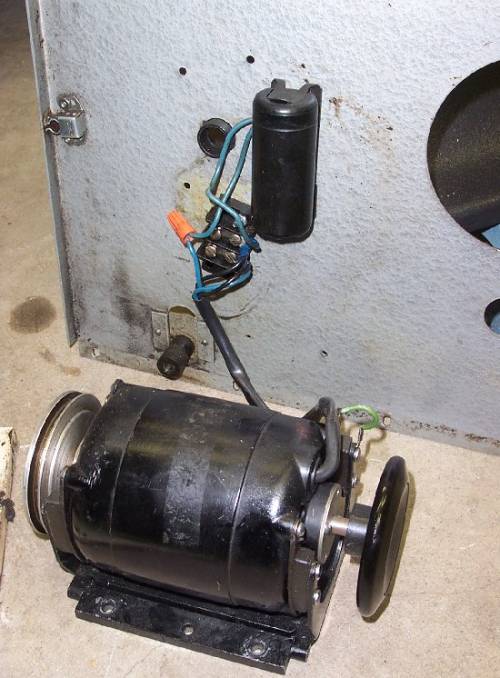
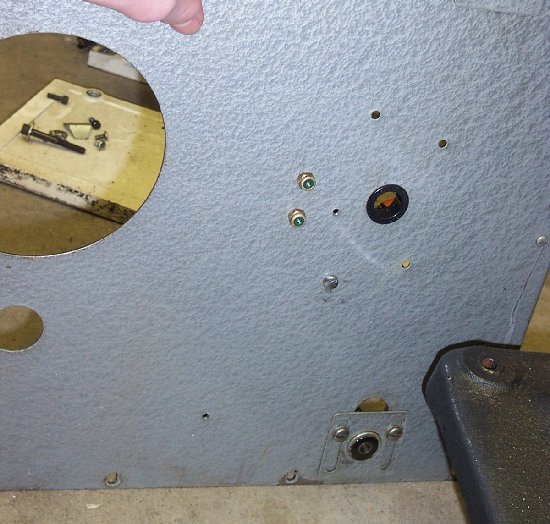
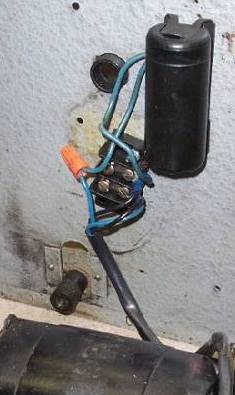
It's the standard 115v, 60hz Bodine motor. Right now is has 4 wires coming out of the motor, attatched to something that looks like the relay box in the manual. From there, 2 wires go to a cylinder like capacitor, which on the other side(outside of proj front) are 2 round plugs which look like audio RCA plugs, only the holes are smaller.
My question is, how do I hook this up so i can plug it into a standard house wall socket?

One more ?. When i turn the motor over by hand, i hear a scraping or rubbing like sound. Neither the pulley nor inching knob are rubbing against anything. Does it need oil? How is a motor oiled?

Below are pics of the motor wiring, and then the outside front with the 2 plugs of some sort.


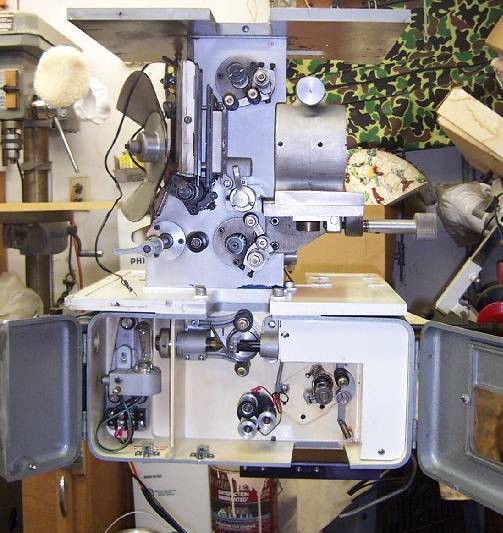
Finally, this is what i have so far. Soundhead is cleaned and put back together, projector is "naked" and waiting for the motor.
Thanks
Danny


Posted by Shaun Flichel (Member # 1435) on 10-22-2002, 01:00 PM:
 
Dan, what you should have is a hot,neutral, ground and cap wire. run the hot and cap to one terminal, neutral to neutral and ground to ground, are you hooking up a switch with this?
 
Posted by Paul G. Thompson (Member # 655) on 10-22-2002, 03:12 PM:
 
That sound you here is the starter switch assy. For the most part, it is somewhat normal. DO NOT take the motor apart if you never had one apart. It is very easy to ruin the starter switch if the motor is not being properly dismantled. Take it to a motor repair shop if the noise bothers you.

Which motor do you have? Is it a black Bodine? I don't have the wire color code handy, but in the next copule of days, I should have it available. Maybe someone can provide you with that color code sooner than that.


Posted by Shaun Flichel (Member # 1435) on 10-24-2002, 06:19 PM:
 
Also those plugs on the front are nuts, just the self locking/tapping type, they hold the cap on
 
Posted by Gordon McLeod (Member # 33) on 10-24-2002, 08:05 PM:
 
It looks from the photo that the wiring is terminated on 2 terminals of that barrier strip there fore one might just hazzard a guess that one terminal is hot and the other is neutral of 120vac supply

Also it is appropriate that there is a partially exposed phillips item behind the machine since Ed Nelson ripped off the DP75 design for the pro35


Posted by Paul G. Thompson (Member # 655) on 10-24-2002, 10:36 PM:
 
The wiring on your added picture looks right as far as I can tell. Hit it with 120VAC on the two terminals on the terminal block and I think your motor will run.

That thing is coming along nicely in your picture......

But that cue detector will work, but it is obsolete. But you might not have much of an option if you run reel-to-reel. Most standard cue detector/fail-safes won't mechanically fit if you are using 2000 foot take-up magazines without major spacer modifications. And then, you would still have to remove the "can" to have enough clearence because the fire trap rollers are usually part of the lower can. Make sense?

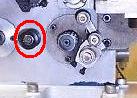
I know many will disagree with me, but remove the roller and shaft which is circled in the below picture. This roller is of the old style, and it will cause horizontal emulsion side scratches on the film. I removed all of mine with very little or no adverse effects on the PRO-35 performance. You will hear a little more loop noise, but that's no big deal. I ran my PRO-35's for years without this roller, and never regreted it. It sure beats the hell out of scratching prints.


Posted by Dan Lyons (Member # 1454) on 10-25-2002, 01:15 AM:
 
Thanks Paul!

I'll try the motor pretty soon. What if i conect the 2 wires in the wrong order? The motor won't explode or catch fire i hope....
I always wondered why that roller was there near the loop. In the treading diagram for the machine, it shows the loop above the roller, why would you even have it there?? Is it so the film has something to slap against?

Danny


Posted by Shaun Flichel (Member # 1435) on 10-25-2002, 01:30 AM:
 
You won't hurt the motor by hooking it up backwards, it will work either way, its AC power which is alternating current, which means say the hot is +120v while the neutral is -120v, then they switch rolls 60 times a second depending where you are. You gotta pay attention to correct polarity when wiring DC power. That black roller there is strickly for film support, to help eliminate the noise paul was mentioning, it wont hurt to remove it at all.

Shaun


Posted by Paul G. Thompson (Member # 655) on 10-25-2002, 02:03 AM:
 
Dan, Shaun answered the question. If the motor is good, it'll run.

As far as the fail-safe/cue detector is concerned, if you remove that unit you will find that the red circled roller and shaft assy in the picture will fit in the cue detector/fail-safe's place very nicely, and it will be in perfect alignment.

For loop size out of the intermittant sprocket, adjust the loop so it will be slightly above the shaft's hole just before pulldown, and slightly below the hole immediately after pulldown. That seemed to work very well for sound sync in a 60-foot (or smaller) projection throw house.

Another thing about the roller - the newer ones Ballentyne made are much more grooved in the center to keep the film slap from coming in contact with the center of the roller which caused the horizontal scratches.


Posted by Gordon McLeod (Member # 33) on 10-25-2002, 03:19 PM:
 
The roller is to absorb loop slap and I have found with it missng I tend to have a bit more jump to the picture.
If the loop was the right size I never had scratching but if it was too big it sure marked them up
Any machine shope could deepen the recessed centre
 
Posted by Paul G. Thompson (Member # 655) on 10-25-2002, 04:08 PM:
 
I have seen many projectors have worse picture jump than the PRO-35 without the roller. Tri-Acetate film was worse about being scratched.

Gordon said:

quote:
If the loop was the right size I never had scratching but if it was too big it sure marked them up.

I cannot dispute Gordon's comment. Unfortunately, the PRO-35 is not very forgiving about loop size if the roller is in place. It is much more forgiving with the roller removed. If the intermittant sprocket, sprocket shoe, and other gate parts are adjusted properly, there should be no problem with picture jump as long as the intermittant, coupler, and outboard bearing arm is in good shape.

I transplanted 5 Pro-35's to another theatre, all of which I removed the rollers in 1983. Those machines I transplanted have negligable picture jump.


Posted by Dan Lyons (Member # 1454) on 10-26-2002, 10:23 PM:
 
Motor works! Thanks for all the advice.

All I did was take a power cord from an old lamp, and connect the 2 wires to the two screws on the left side of that relay box . Motor sounds good, about the same level of noise as any from a portable 16mm projector! I let it run for about 20 mins, no change in sound or burning smell. I'll get the belt from the local CinEquip dealer sometime next week so I can finally run the projector.
(of course i'll hook up some sort of switching device eventually)

Danny


Posted by Paul G. Thompson (Member # 655) on 10-27-2002, 12:05 AM:
 
As you view the handwheel, what direction is it turning? It should be counter-clockwise. If it is running in the wrong direction, reverse the two blue wires going into the motor.


Powered by Infopop Corporation
UBB.classicTM 6.3.1.2