This is topic 2-Proj. automation in forum Film Handlers' Forum at Film-Tech Forum ARCHIVE.
To visit this topic, use this URL:
https://ft-forum.com/ft/cgi-bin/ubb/ultimatebb.cgi?ubb=get_topic;f=1;t=004184
Posted by Don Sneed (Member # 955) on 11-09-2002, 10:00 AM:
I have a theatre that need a automation that will run a two projectior C/O system when needed... but will mostly run a single projector w/platter...is there anything on the market that will do this, or do I need to have two automations, or make one ?? Any ideas??
Posted by Markku Eriksson (Member # 1256) on 11-09-2002, 10:33 AM:
You may be intrested in Kinotons matrix-type programmer, it is time proven design and has no useless gimmicks. Follow this path: here ->cinema ->automation ->matrix programmer
Posted by Mark Gulbrandsen (Member # 72) on 11-09-2002, 10:45 AM:
Don,
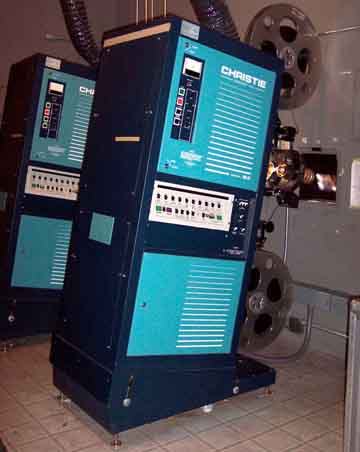
Kelmar can make you a variation of their DeLuxe automation that can do this. Our company set up Bruce Willis's Theatre in Hailey ID this way. I just took over the theatres in thata area on my normal service route through Idaho and after rejuvinating the pair of Christie P35's tried the automation out to see how well it worked. Basically flawlessly....I do reccommend that if you go this route you also use the Kelmar cue tape applicator as positioning the triple cue dots would be rather difficult withuot it.
Mark @ CLACO
Posted by Steve Guttag (Member # 268) on 11-09-2002, 12:16 PM:
Kelmar makes their "Integrator" that will link two of their current automations together. It blocks the outgoing automation from raising the lights and killing the sound..etc. It is pretty simple and can be modified for use with electromechanical automations.
Panalogic's automation can do 2-projector
Pennywise automations also do 2-projector (either with the Christie CA-21 badge or the Kinoton EMK-1 badge)
The Pennywise and Panalogic only makes you buy one automation though Pennywise has a mode where you use two automations linked together.
Steve
------------------
"Old projectionists never die, they just changeover!"
Posted by Brad Miller (Member # 2) on 11-09-2002, 01:00 PM:
CA21 all the way. You won't regret it!
Posted by Jonathan M. Crist (Member # 413) on 11-09-2002, 02:30 PM:
The old reliable EPRAD co-operator will work just fine,
Posted by Gordon McLeod (Member # 33) on 11-09-2002, 03:44 PM:
That is discontinued and earned its name the Un-Copoerator aptly
Posted by Steve Kraus (Member # 476) on 11-09-2002, 07:18 PM:
I used to help service a place that had an old Co-Operator. I made a number of modifications--generally in the form of additional little boxes to drop inside the projector base. One was a device to allow the lights to be brought up with the credits instead of only at end-of-show (they had one of those wonderful old RF-free motorized transformer dimmers). We had a proximity sensor picking up the lights-up cue from the non-track side of the film since the primitive contact-type cue detector simply wasn't picking on that side although the track side did do the EOS cue ok, at least for awhile. When it finally gave up entirely I came up with a clever little circuit that allowed the same prox. sensor to do both: First cue through pulsed the lights-up-early box then it reset so that the second cue was a contact closure for the Co-Operator's show end.
Posted by Jack Ondracek (Member # 1466) on 11-09-2002, 09:41 PM:
Re: Co-Operators.
I wouldn't go looking for them now, or even buy one used... considering (as has been mentioned here) that they are no longer supported.That being said; I have 4 of them in my drive-in (installed in 1978), and service 2 more in a neighboring town.... none with proximity detectors.
Not one of these units has failed..... EVER.
I've replaced the requisite pilot lamps as needed... however, considering the mechanical nature of this unit, I would put it up with the best of its time.
Posted by Peter Hall (Member # 695) on 11-10-2002, 05:48 AM:
Component engineering TA10 will do this in it's virgin state, with a very few mods
Posted by Pete Naples (Member # 761) on 11-10-2002, 06:38 AM:
Cinemation.Don't know if the current unit that goes by the name is capable of two projector though.
Posted by Steve Guttag (Member # 268) on 11-10-2002, 08:23 AM:
I didn't think the TA-10 would do changeovers. I have heard it can be set up to run either-or projector but not the changeover part itself.Steve
------------------
"Old projectionists never die, they just changeover!"
Posted by Ken McFall (Member # 845) on 11-10-2002, 09:10 AM:
Tut tut Peter you know better than that 
The TA10 will NOT run a two projector automated show....
There is a two projector version that allows you to select which projector to run on automation but it will only run one projector and cannot do change overs.
Posted by Peter Hall (Member # 695) on 11-10-2002, 09:20 AM:
Tut tut you too - read the post and use a little imagination! The TA10 can happily do a changeover, to another projector equipped with another TA10. We played with the 10.5 for while and decided for the sensible cost it was worth going for another TA10 - is simple to get a TA10 output cue to "press" the start button on another TA10 - then depending on the diodes etc it can happily start projector 2. Only trick is not to wire anything to the film rfun out cue or use thte "stop" contacts on the first projector. Has been done, works brill.. Or if you want spend a fortune on more elaborate automation..
Posted by Gordon McLeod (Member # 33) on 11-10-2002, 09:35 AM:
How do you prevent it from bringing the house lights back up to mid point when the second one starts as it is see a begin of show cue?
Posted by Ken McFall (Member # 845) on 11-10-2002, 10:36 AM:
Fine that may work with a lot of mods to the projector shutter wiring... but you are also disabling event 5, film runout event.But it's not what you said in your orignal post.
========================================================
Component engineering TA10 will do this in it's virgin state, with a very few mods
========================================================
You made no mention of buying another TA10!! So effectivly everyone else on here is correct the TA10 will not run two projectors on automation. If they want to buy two automations then fine....
By not using event 5 you are removing some of the functionality of the unit.
The mods required would involve quite a bit of work on the C/O shutter wiring in the projector(s) to prevent the TA10 from closing the outgoing machines shutter as the incoming machine started. (For info the TA10 pulses the C/O shutter closed as the projector starts
Also what do you do with your lighting etc. You are effectivly taking a lot away from the automation due to the way the TA10 works.
If you want to run the show manually then do so and save a lot of money....
So it's not a plug in and go solution. Take into account an engineers time and the second TA10 and the costs mount considerably.
I am a great fan of the TA10 as you know but don't think disabling a large part of it is a solution.....
Posted by Mark Gulbrandsen (Member # 72) on 11-10-2002, 10:41 AM:
Ok I'll try again to post this pix. Bruce Willis's Liberty Theatre, Hailey, ID. Running hour reels and Kelmar Deluxe 2 projector c/o automation.
Mark @ CLACO
Posted by John Hawkinson (Member # 1135) on 11-10-2002, 04:30 PM:
"Component engineering TA10 will do this in it's virgin state, with a very few mods."Err, Peter, do you mean something other than "unmodified" when you say "virgin state?"
--jhawk
Posted by Frank Angel (Member # 248) on 11-11-2002, 08:30 AM:
How about a projectionist? Install a projectionist. 
Posted by Daryl C. W. O'Shea (Member # 1303) on 11-11-2002, 08:37 AM:
I don't know... I've known a few 'projectionists' that couldn't do a changeover if their life depended on it.
Posted by Brad Miller (Member # 2) on 11-11-2002, 08:49 AM:
Yeah, projectionists can be bitchy and have attitudes. Oh wait, some equipment does too. 
Given enough time and effort, two of just about any automation could probably be set to run together. As far as something right out of the box that is frame accurate and loaded with options, you still can't beat the CA21. I may preach about these a lot, but they deserve the praise. Once you have worked with one, you will have a hard time using anything else, for everything else is a joke in comparison.
Posted by Scott Norwood (Member # 30) on 11-11-2002, 09:09 AM:
As for using two single-machine automations: this would require a precise timer that would always open the changeover the incoming machine on the same frame every time. The TA-10 seems to be pretty accurate. The Xetron Maxi-10 is definitely not frame-accurate.
Posted by Ken McFall (Member # 845) on 11-11-2002, 11:33 AM:
Hi Scott...I've no problem with using the TA10 in any way it is as you say very accurate on start to shutter open..... 'BUT' you need to remember when the 'stop' button is pressed, either using your finger or a pulse from the second automation, a number of events are triggered. ie event 3, 4 & 5. So once the outgoing projector has been 'stopped' these events will happen. So what do you do with the things on those events. If you put nothing on them then fine the change over will happen and the outgoing machine will stop and nothing else will happen. So whats the automation doing for you in the end. It's not doing your non-sync (event 4), lights (event 3 & 4), masking & tabs (event 3 & 4) etc etc. You are left with the option of controlling everything by cue's only and ignoring the event functions of the TA10.
The TA10 is an excellent automation and does what it was desgined to do VERY well. I cannot see the logic in having a system and crippling it so severly that it's no longer an automation. If you need full two projector automation with change over facility then go for a purpose designed automation. Its horses for courses.
Brad says ==============================================
As far as something right out of the box that is frame accurate and loaded with options, you still can't beat the CA21.
======================================================
I have no doubt he knows what he's on about so use the right tools for the job. Now if Component Engineering ever make a true two projector automation then I would have no hesitation recommending it based on my experience of the TA10. Until then.... I'd look else where.
Posted by Steve Kraus (Member # 476) on 11-11-2002, 11:35 AM:
I think you should be able to wire them so that one (presumably on the outgoing machine) performs the actual changeover. Each automation opens its own C/O and closes the other. I don't recall the details but it's something like that. I agree about the TA-10. It's pretty much frame accurate in my tests. I have one here on one machine (put in years ago as a training aid) and I sometimes use it if I want a nice long preroll and open exactly on the right frame. Maybe I should get a second one and have C/O's that precisely show first and last frames--great for badly edited movies.
A side benefit would be forgetting to remove cues would mean for once a C/O house would muck it up for a platter house! 
Posted by Brad Miller (Member # 2) on 11-11-2002, 03:32 PM:
You don't have to put cues on the film to use the CA-21. It can be ran manually as well with less effort than a typical manual booth.
Posted by Pat Moore (Member # 380) on 11-12-2002, 08:32 AM:
We looked into an add-on module for the CineNet Automations to allow two-projector changeover operation, but just never found the market for it. The concept was easy, just could never find the need for it. Is the need really out there?Pat
Posted by Ken McFall (Member # 845) on 11-12-2002, 01:33 PM:
I've given some thought as to how you would get a two projector TA10 to perform as a Change over automation WITHOUT crippling it in any way.Setup your two projectors using the CE second relay box, so you have selection of any one projector. All this relay box does is duplicate the relays at the bottom of the TA10. The selection switch just determins which set of relays is currently controlled. Wire the projector selection switch thru a relay that can be latched as required. N/C would be projector 1 or your main projector, N/O the other prjector.
You then set up a cam timer to react to a cue from the TA10. As the cam rotates it would do the following.
1 Cam motor is latched on by one set of contacts on the cam.
2 Short the projector selector switch so that both projectors are selected. This will put the incoming machine into the same running state as the outgoing machine.
3 At the required time the incoming projectors C/O shutter should be pulsed to Open and the outgoing to Closed. Sound should follow the projector anyway, assuming its been wired within the projector. If not projector sound should also be pulsed/selected.
4 Immediatly after the actual change over the projector selector relay should be latched so it is pointing to the second projector.
5 The timer should now break the short on the projector selection relay so that the initial projector, which is no longer 'Selected', stops. The second projector is now the 'Selected' projector as far as the TA10 is concerned and has full automation available to it and remains running.
6 The timer should then return to its inital start position and unlatch the motor, ready for the next changeover.
=====================================================
There would need to be a couple more relays to determin which projector is running so that the proper shutters are opened or closed and to latch or unlatch the projector selection relay. But this is a simple matter.
The alarm system presents no problem as the TA10 requires a Closed contact when film is running for motion and presence. So the fact that one pair will be 'Open' when a projector is idle does not matter. This is exactly how things are with a normal two projector setup anyway.
This method is considerably cheaper than buying two TA10's and requires very little work to make. Its big advantage is that NONE of the TA10 is crippled. All events can be fully utilised.
Hope someone finds this interesting.
Posted by Steve Guttag (Member # 268) on 11-12-2002, 03:46 PM:
Pat:The market is there...I just don't know how big it is. The bulk of our installations are 2-projector but the bulk also have operators and are single screens...screening room types that don't lend to automating. Really, the 2-projector automation would be for a multiplex.
Steve
------------------
"Old projectionists never die, they just changeover!"
Posted by Pat Moore (Member # 380) on 11-12-2002, 06:48 PM:
Hi Steve; I agree the market is there, it's a question of size of course. There's so much going on it's hard to commit resources to something that may not have a whole lot of market. It's stuff you and I have talked over before and the interest remains lukewarm.There are locations overseas that look for combination single and dual projector capacity. However, they tend to do single projection from the platter automated, and run reel-to-reel manually.
Pat
Posted by Steve Guttag (Member # 268) on 11-12-2002, 08:01 PM:
A market I'm seeing emerge a bit is the art house that will have 2-projectors and a platter (on at least one screen)...those types are interested in a 2-projector automation.There are a couple of players now in the capable field...Pennywise, Kelmar and Panalogic. Note, two of them originate overseas!
Steve
------------------
"Old projectionists never die, they just changeover!"
Posted by Brad Miller (Member # 2) on 11-12-2002, 09:23 PM:
With there already being several choices for automated 2 projector changeover, I can't see it being worth the R&D for Strong to devise an upgrade. That money would be MUCH better spent adding other features to the automations, such as start cue, remote fader and so forth. The money invested I doubt would pay off in the end with the amount of actual sales. Almost everything these days are platter driven.
Posted by Bernard Tonks (Member # 809) on 11-13-2002, 06:07 AM:
Pete wrote,
quote:
Cinemation.
Don't know if the current unit that goes by the name is capable of two projector though.
I found out from Bernard Bentley, that the last Cinemation series that had changeover facility between two projectors was the Cinemation 2000. Two were installed in Empire 1 & 2 Leicester Square, London, and hundreds were installed in the USA by RCA.
All the later Cinemation series have been for single projector operation in conjunction with platter systems, as is the current 2005.
Posted by Ken McFall (Member # 845) on 11-13-2002, 07:57 AM:
To be honest, is it really worth the effort and money?If you're doing change overs then you have a projectionist to hand.
It's not the most difficult thing to learn so why automate it.
Up until a few years ago the Cinecenta, now Odeon Panton street, was changeover in four screens with FP20's dual manning. The change overs were automated using Philips own change over module.
The boxes were very small, one on each level and there was just enough room for four projectors, 4 westinghouse rectifiers and a rewind bench in each box. The lamphouses were the early AEI/BTH Xenon using 2k three electrode lamps. Talk about sweat shop.
Change overs should be done on a one to one basis. One man per show... encourage automation and I can see one man, or is it person now-a-days, running a mixture of long run and change overs.
If you want to run change overs then man the box properly. Having manned the box properly, if you want to make their life easier then by all means automate the change overs.
Posted by Scott Norwood (Member # 30) on 11-13-2002, 08:19 AM:
Does anyone make a really _simple_ automation system that can handle changoevers? The CA21 seems like total overkill for most venues, especially since most changeover houses are older single-screens where many functions (e.g. lights, curtain, etc.) may be set up in ways which cannot easily be interfaced with an automation system, anyway, so many of the CA21's functions wouldn't be useful anyway.The application that I could see for this would be in home theatres (where the projectionist is also the audience) and in (ugh) manager-operated theatres. "Showplace" single-screen houses and screening rooms have real, live operators, of course, and most of the other changeover houses are older singles where there will be a projectionist in the booth anyway and management doesn't see any need to spend money on automation.
For what it's worth, the vast majority of places where I have worked are changeover houses, but none have automation. I'd like to see how that type of setup works, but I can't see it being a huge market, either.
Posted by Steve Guttag (Member # 268) on 11-13-2002, 08:36 AM:
The application I see is for either mixed platter/changeover or a multiplex changeover.
Lets say you are running a 12-plex with two screens running screenings. You would want them running automated changeover so the operator can tend to the rest of the booth.
I don't see much of an application of a single screen automated changeover unless you are a mom-n-pop single where the projectionist is the manager and the ticket seller and popcorn seller......but those are few and far between.
As to simple, Scott, Kelmar has that one...the integrator can, with very little effort, be used on the Series IV automation and (we will find out soon) the older AM-3 automations. It basically keeps the outgoing automation from mucking around with the sound and lights at the end of the show. The changeover cue goes to it and it gets the incoming automation to inititiate the changeover and blocks the outgoing automation.
Steve
Posted by Daryl C. W. O'Shea (Member # 1303) on 11-13-2002, 01:45 PM:
quote:
I don't see much of an application of a single screen automated changeover unless you are a mom-n-pop single where the projectionist is the manager and the ticket seller and popcorn seller......but those are few and far between.
I worked at a twin (with c/o's) where I ran Monday & Wednesday nights by myself for a few years, you learn to run fast.
Posted by Steve Kraus (Member # 476) on 11-13-2002, 08:57 PM:
Wouldn't the application primarily be for big (e.g. 6000') reels?
Posted by Brad Miller (Member # 2) on 11-13-2002, 09:34 PM:
Primarily yes, but as I was discussing with the infamous Mr. Guttag just last week, there are a few places around town that do a lot of screenings and it would be a big help to have 2 projectors in one or two of the auditoriums. Granted most of the time only one would be used off of a platter, but for screenings it would come in very handy. It would also serve as an excellent "backup" for the large auditorium, should there be a projector or lamp issue.As an example, let's say there are 2 trade screenings to be ran at 10am. Both reels 1 and 2 could be threaded up and the shows started. All it takes for an automated changeover is a tiny cue at the end of each reel. So big deal, that's no problem. I would never run a print if I did not check to make sure that things were in order anyway, so that would require winding the print. Then as each reel finishes, the cue could be removed before packing it back into the cans. Meanwhile, each screen can run for a good half hour without operator intervention, without buildup and without even having to worry if the projectionist misses a changeover.
For a scenario like this, 6000' reels would not be of any use. 2000' reel changeovers and a platter would suffice for everything.
Posted by Ray Derrick (Member # 1001) on 11-15-2002, 04:55 AM:
If any of you good folk in the US would like to try an automation that does two-projector control out-of-the-box AND you have the where-with-all to install it, just send me an e-mail. We would be happy to send you a unit to try. The Panalogic CA2000 can be as simple or as complex as the operator wants it to be. Both Pennywise and Panalogic come from Australia where relay-logic based automation systems fell out of favour a quarter of a century ago. I still can't believe that most US cinemas still use them in this, the century of technology. I guess this is one area in the US where the fallout from the space program has been innocuous.------------------
Ray Derrick
President/Chief Engineer
Panalogic Corporation Sydney, Australia
Phone: 61 (0)2 9894 6655 Fax: 61 (0)2 9894 6935
Posted by Steve Kraus (Member # 476) on 11-15-2002, 07:54 PM:
Perhaps because so much of that fallout actually came down on you down under! 
Posted by Ray Derrick (Member # 1001) on 11-17-2002, 04:40 AM:
Judging by the standard of cinema automations that come out of Australia vs those produced by rest of the world, I would say you are absolutely right Steve.------------------
Ray Derrick
President/Chief Engineer
Panalogic Corporation Sydney, Australia
Phone: 61 (0)2 9894 6655 Fax: 61 (0)2 9894 6935
Posted by Ken McFall (Member # 845) on 12-14-2002, 03:22 PM:
Had my thinking head on today... hurts a bit should use it more.I've come up with a very simple solution to getting a TA10 to do change overs 'WITHOUT' crippling it in 'ANY' way and using only four relays! It's much simpler than my original suggestion....
You need a pulsed relay that will change state when pulsed and stay in the changed state. This will select which projector is being run on automation.
You also need three other timer relays, one to pulse the projector selection relay, one to perform the timed run in of the incoming projector and the third to pulse the change over shutter.
You would use a spare 'cue' to activate the three timer relays.
Relay One bridges the projector selector switch so that the idle projector starts running. This relay would be set for a suitable time to allow the out going projector to continue running for a few seconds after the actual change over. Maybe 12 seconds.
Relay Two would pulse the change over shutters at the correct moment, about seven seconds. Exact time to be determined when installed.
Relay Three would 'Pulse' the projector selection relay after about two seconds. This way when Relay One drops out the newly selected projector would continue running and the original projector would stop. A manual push button could be included to allow selection of which projector to start the show on, an indicator led would indicate the selected projector.
The actual times would be determined when installed... you could let the outgoing projector run for longer if needed by setting Relay One to a longer delay.. 7 seconds for the run down and 5 for over run so set for a delay of 12 seconds.
As there would be no 'effective' pressing of the start or stop button the automation is unaware of the change of projector but retains 'FULL' automation functions on all of its events.
All of this could easily be made to fit a small circuit board with ic's rather than timer relays.
Hope this is of interest to anyone, maybe even Component Engineering ![[Smile]](smile.gif)
A simple add on like this would expand their market for the TA10.
Regards.