This is topic DTS drive won't eject in forum Film Handlers' Forum at Film-Tech Forum ARCHIVE.
To visit this topic, use this URL:
https://ft-forum.com/ft/cgi-bin/ubb/ultimatebb.cgi?ubb=get_topic;f=1;t=006981
Posted by Greg Mueller (Member # 17) on 02-27-2005, 01:56 PM:
DTS 6D unit. The "C" drive will not eject when I push the button. I can open the little door and watch and it looks like it starts to come out, moves about 1/8" and stops, sits there for a second and moves back to the "in" position.
Suggestions?
Posted by Darryl Spicer (Member # 711) on 02-27-2005, 02:10 PM:
Does it have a disc in it or is it an empty tray?
If it has a disc in it can you tell if the disc has moved out of it's holding tray.
If no disc have you tried turning the power off when it slightly opens and tried to pull the tray out with your hand.
Posted by Greg Mueller (Member # 17) on 02-27-2005, 02:45 PM:
I just got this unit a while back and never had the ocassion to mess with the "C" drive so I don't know if there's one in there or not. Could be.
I'll try the power off trick
Thanks
Edit....a while later.....
Power off trick did not work. Can't see a disk in there but it's rather hard to see
[ 02-27-2005, 03:49 PM: Message edited by: Greg Mueller ]
Posted by Chase Hanson (Member # 2779) on 02-27-2005, 03:55 PM:
It should have a manual eject mechanism. This is most likely expressed by the presence of a small pin hole near the tray door. Insert an unfolded paperclip, push and it should eject the tray.
Posted by Darryl Spicer (Member # 711) on 02-27-2005, 04:04 PM:
for some reason not all drive had this release button. If yours does give it a try. There may be a problem with the mechanism jamming or something.
Posted by Greg Mueller (Member # 17) on 02-27-2005, 04:19 PM:
There is a little dinky hole on the front and I did slide an unfolded paper clip into it, but I could not feel any kind of (anything) to push against on any of the 3 drives. I can get ahold of the tray part with miniature needle nose pliers. I tried the power off trick and got ahold of the tray, but could not slide it out. It's like it's hitting against something. I guess I'll have to open it up
Posted by Monte L Fullmer (Member # 2797) on 02-27-2005, 04:37 PM:
quote: Greg Mueller
I guess I'll have to open it up
....while you have the top off, grab the compressor and blow out the innards of the case, the power supply, and the boards.
Then do a visual on the long card that is the closest to the drives, look at the chip, which is about in the lower center, that has the version number (v.1.22 for example) and if the number is lower than the current version of V.1.46, it's time for the upgrade kit from DTS. The kit involves the drives, the AQRM card and the SCSI controller card. There are included instuctions to do this upgrade.
good luck - Monte
Posted by Greg Mueller (Member # 17) on 02-27-2005, 07:33 PM:
Well this drive is FUBAR.
It's a TEAC CD-516S. Anyone know if they are still available new? If not, is there a substitute that will work?
I checked the rom version and it was way back at V1.37. Luckily I had a V1.46 chip from a previous encounter, so I stuck that in.
Posted by Monte L Fullmer (Member # 2797) on 02-27-2005, 07:43 PM:
quote: Greg Mueller
It's a TEAC CD-516S. Anyone know if they are still available new? If not, is there a substitute that will work?
Well, since SCSI CDRom drives are a hundred bucks a pop new, one can find used SCSI drives on eBone for about next to nothing.
I bought 16 of these SCSI drives on eBone for 2 bucks a piece (these are APPLE 6x to 8x SCSI drives) and they work great with the newer 6D units with the V.1.47 upgrade.
Set the jumper settings that the should be on the back of the each of the newer drives, and you'll be back in business.
Posted by Mike Babb (Member # 1379) on 02-27-2005, 08:07 PM:
I was able to find one on Ebay as well although it was a CD532S. The unit has been for almost a year since with no problems.
Posted by Wayne Keyser (Member # 2420) on 02-27-2005, 09:56 PM:
For what its worth, my computer has done the same a few times, and this trick worked: power off completely, and then turn it on again - while the system is busy rebooting (but before reboot is complete), the drive will agree to open. What you do thereafter is up to you - check the disk for defects, for one thing. Or simply try again - if you got it out once successfully, trying again won't hurt.
Posted by Gordon McLeod (Member # 33) on 02-27-2005, 10:45 PM:
If it has a door it is a toshiba 2x drive the teacs have a tray that sildes out with no openable door
the 6d was never sold with a caddy based drive
Posted by Greg Mueller (Member # 17) on 02-27-2005, 11:21 PM:
I've got the drive out, it's the Teac CD-516S. It does have a little door that flips down and the tray slides out. No caddy. Black face
Posted by Michael Schaffer (Member # 1204) on 02-28-2005, 02:00 AM:
Theoretically, any SCSI-2 could and should work. But DTS now also offer single drive replacement kits which include a IDE-to-SCSI-adapter board, so you can use standard IDE drives as well. Check with your favorite dealer for details and pricing.
Posted by Brad Miller (Member # 2) on 02-28-2005, 05:12 AM:
DTS replaced that with the Teac CD-532S drives. I have a couple of spares here, new.
Posted by Paul Vollmers (Member # 927) on 02-28-2005, 06:37 AM:
Is the V.1.47 chip the latest rom..............wonder what was changed from the V.1.46......thats what I preasently have in my DTS6D?
Posted by James Falloon (Member # 1933) on 03-01-2005, 01:41 AM:
90% of the time a jammed cdrom drive is caused by rough handling, I've seen many beat up drives servicing PCs.
usually in most cdromd drives, once you get right into the guts, on the underside of the tray there is a slot or grove, in the grove is supposed to be a little lever, if the drive is abused, sometimes the lever will jump out of the grove, and leave you with a jammed drive.
some pics from some random drive I found in the trash
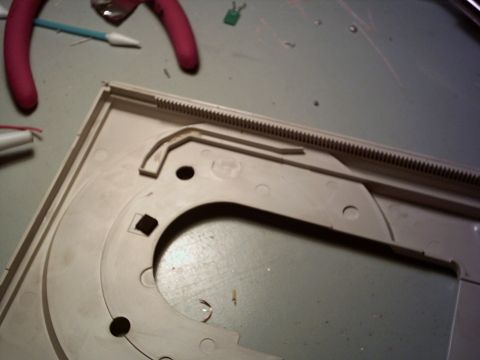
the slot on the underside of the tray
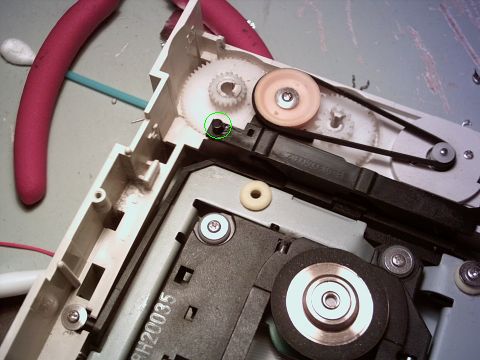
the lever
it is possible to fix if your carefull, have patience, and an hour or so to kill.
Posted by Michael Schaffer (Member # 1204) on 03-01-2005, 02:43 AM:
quote: Paul Vollmers
Is the V.1.47 chip the latest rom
Last time I checked about 2 months ago, v1.46 was the latest version. I haven't heard anyhting about a newer version yet.
Posted by Antonio Marcheselli (Member # 373) on 03-02-2005, 07:05 AM:
I made few tests, not all SCSI-2 drives work. Plextor seems to work perfectly for example, Waitec dont.
It's not a OS issue, the SCSI management files have no problems detecting the drives. It depends of the DTS.EXE and/or the TC firmware.
Bye
A
Powered by Infopop Corporation
UBB.classicTM
6.3.1.2