This is topic Threading Up a Simplex 35 in forum Film Handlers' Forum at Film-Tech Forum ARCHIVE.
To visit this topic, use this URL:
https://ft-forum.com/ft/cgi-bin/ubb/ultimatebb.cgi?ubb=get_topic;f=1;t=007046
Posted by Matt Hollis (Member # 2954) on 03-21-2005, 12:15 PM:
Alright gentlemen, here is the setup:
Simplex 35 Projector (No Turret)
SPECO LP-270 Platter
Cat. 701 DD Reader
No Automation Used
I am back in the theatre business again and have to admit that when I left I only knew one way to thread a projector. I was taught to thread from the platter across the upper magazine roller into the FLOOR, then thread the projector, and then come back to the platter. Now I know this is wrong, and even though our theatre is not a "presentation" theatre, I would still like to learn how to thread one of these machines the right way. ![[Smile]](smile.gif)
Could someone please explain the best way to do this?
My concerns:
Getting the film in frame at the start of the movie.
How to work with the wonderful take-up mechanism on the SPECO platter.
Thanks,
Matt
Posted by Jeremy Fuentes (Member # 2135) on 03-21-2005, 12:19 PM:
The Right Way
Posted by Dean Kollet (Member # 1789) on 03-21-2005, 12:26 PM:
quote: Matt Hollis
and even though our theatre is not a "presentation" theatre
all theatres are 'presentation' theatres, there is no reason to think otherwise.
Posted by Matt Hollis (Member # 2954) on 03-22-2005, 07:37 AM:
Alright, I have to agree with you there. I care about the presentation and that is why I'm trying to do this right.
On the 35 though, should I start at the bottom or at the gate and then work my way up? Also, I'm assuming I shouldn't select my take-up platter on the 270 until after I thread. (?)
Thanks,
Matt
Posted by Darryl Spicer (Member # 711) on 03-22-2005, 09:29 AM:
you can select your take-up platter before you thread. You just want to be sure to pull enough leader down to avoid pulling up on the variac. Best way is to pull the film down past the projector heads and hook it into the bottom return roller below sound head then clamping the film into the bottom hold back sprocket of the sound head and through the failsafe system then pull the film tight. THen you can either try to thread the film reverse throught the sound head and on up or thread the top feed sprocket the thread through the cat 701 then set your frame and top loop in the gate and continue on down. be sure to pull just a little bit of extra leader before starting to thread. you can remove the excess by adjusting the film at the hold back sprocket in the sound head.
Posted by Brad Miller (Member # 2) on 03-22-2005, 05:47 PM:
Yeah, what Darryl said, but I do want to add one thing. On the LP270, don't "baby" the film when you go to pull tension. If you have an older model LP270 with only 1 roller on the elevator, you will find that if you gently tug on the film that the elevator will go shooting up to the top and hit it's limit, potentially breaking the two rollers on shafts that are screwed directly into the tree. What you want to do is quickly pull about 2 feet of film (in 1 second or less) and then hold it there for about 2 seconds, then let the excess slack you just pulled rest back on the film path. That will prevent the platter from taking off on you. (This applies to most platters out there.)
If you have a later model LP270 with 2 rollers on the elevator, you can tug it any way you like and it won't matter.
Posted by Chase Hanson (Member # 2779) on 03-22-2005, 05:51 PM:
quote: Matt Hollis
Getting the film in frame at the start of the movie.
I have found the single most helpful element in getting people to thread a movie in fram, is to understand the movement of the intermitent. This simply being that one motion of the intermitent pulls 4 sprokets (or one frame). So ideally before you thread your film trap...youll want to hand crank the motor until the intermittent has completed one full motion. Than thread in frame, and baring no bad splices on the leader, you should be in business.
Posted by Randy Stankey (Member # 64) on 03-22-2005, 09:55 PM:
quote: Matt Hollis
Getting the film in frame at the start of the movie.
This is something that causes a lot of angst among new operators but is actually quite simple.
1) The very first thing you do when you walk up to the projector to thread it is TIME THE MECHANISM. Drill it into your employees' skulls. TIME THE MECHANISM!... TIME THE MECHANISM!... TIME THE MECHANISM!... If you don't do this you will never be able to reliably thread the projector in frame. In fact, it's so ingrained in my brain that every time I walk up to a projector, whether I'm going to thread it or if I'm simply going to look inside, I automatically reach for the flywheel.
My left hand reaches for the door. My right hand reaches for the flywheel. Then my left hand reaches for the framing knob.
2) Practice getting the film aligned with your framing landmark. On most Simplexes there is a framing window. You simply line up one frame of film with the window. On some projectors that don't have a framing window you line up a frame line with a landmark on the gate somewhere. On the Century projectors I used to use there was a little nut that held the lateral guide wheels in place. Centering one frame of film on that screw was the "In-Frame" landmark we used.
3) If you work at, say, a Ten-Screen theater you will thread an average of 40-50 shows a day. That's 150-200 per month and over 2,000 in a year! After you've done it so many times you should have no trouble doing it right every time. It'll be like riding a bike.
In fact, I once won a $20 bet by threading three projectors in a row and getting ALL THREE of them in frame... BLINDFOLDED! What they didn't know is that I had secretly put tiny little notches in the edge of the film that I could feel with my fingers to tell where the frame lines were! ![[evil]](graemlins/evil.gif)
After a while, you might even laugh at yourself for being so paranoid about it. It's just one of those things that comes with practice.
Posted by Carl Martin (Member # 1146) on 03-23-2005, 03:32 AM:
quote:
3) If you work at, say, a Ten-Screen theater you will thread an average of 40-50 shows a day. That's 150-200 per month and over 2,000 in a year!
but randy, not all of us are independently wealthy and can afford to work only one day a week!
Posted by Matt Hollis (Member # 2954) on 03-23-2005, 08:47 AM:
Alright, thanks men.
I just checked out the manual for the 270 on this website (Thanks!) because it appeared our theatre did not have one. It has a procedure in there for dealing with the take-up mechanism.
Thanks,
Matt
Posted by Randy Stankey (Member # 64) on 03-23-2005, 10:03 AM:
I stand corrected on the math:
4-5 shows per day * 10 screens = 40-50 thread-ups per day.
3-5 days per week = 120-250 thread-ups per week.
4 weeks per month = 480-1000 thread-ups per month.
52 weeks per year = 25-50 THOUSAND thread-ups per year.
After working at a 17-screener for over 5 years I estimate I have threaded nearly a 250,000 projectors!
The moral of the story is that, once you have threaded enough projectors, it will become virtually automatic. You won't even think about it anymore. You'll just do it. As long as you keep a good work ethic, it will come out right every time.
You'll look back at yourself a year from now and think about how "green" you were when you were just starting out. ![[Wink]](wink.gif)
Posted by Jeremy Fuentes (Member # 2135) on 03-23-2005, 12:16 PM:
quote: Randy Stankey
The moral of the story is that, once you have threaded enough projectors, it will become virtually automatic.
Then you can walk into any booth and thread any projector and be perfect everytime!! Wait, wrong discussion. Carry on.
Posted by Randy Stankey (Member # 64) on 03-23-2005, 02:34 PM:
If you have enough repititions of threading enough different types of projectors in enough different configurations you should be able to walk into ALMOST any booth and, with enough forethought, thread ALMOST any kind of projector! With enough practice... Yes! You SHOULD be able to do it perfectly every time!
As to the exact amount of knowledge, experience, practice and forethought that is needed I will leave that up to the individual to decide.
Posted by Dan Lyons (Member # 1454) on 03-23-2005, 04:20 PM:
quote: Randy Stankey
My left hand reaches for the door. My right hand reaches for the flywheel. Then my left hand reaches for the framing knob.
Why are you messing with the framing knob? Once you set your framing with RP-40, there is no need to ever touch the knob again, unless your machine has problems with the framing drifting out of position over time.
On my Simplex 1050, I set the framing when I cut my plates, then never touched the knob again. ![[Big Grin]](biggrin.gif)
Posted by Randy Stankey (Member # 64) on 03-23-2005, 05:11 PM:
quote: Dan Lyons
...there is no need to ever touch the knob again, unless your machine has problems with the framing drifting out of position over time.
OR... Unless you work in a theater that's filled with morons who can't thread a projector in frame to save their mother's life and you have to un-fuck the framing knob every time you thread.
Yes, I know that once the projector is framed it will stay framed even if the framing isn't set at the center position but I want my framing knob CENTERED, goddammitt!! I just can't STAND looking at a projector when the word "FRAME" on the framing knob isn't upright and level! It makes the hair on the back of my neck stand up! If it was up to me I'd cut the framing knob off the friggin' projector but, alas, I am surrounded by imbecils!
Even if I know I am the last one to have threaded the projector I will still, at least, verify that the fame is in the centered position. I have developed the habit of centering the framing knob out of necessity.
Furthermore, in my current job, I spend the greatest amount of my time in the booth TEACHING students how to run the projector. I repeat the concepts of "TIME THE MECHANISM" and "VERIFY FRAME at CENTER" so many times, over and over I think I say it in my sleep!
Posted by Wolff King Morrow (Member # 2226) on 03-23-2005, 05:32 PM:
quote: Randy Stankey
The moral of the story is that, once you have threaded enough projectors, it will become virtually automatic. You won't even think about it anymore. You'll just do it. As long as you keep a good work ethic, it will come out right every time.
So true in fact I've found myself thinking about non-related stuff while threading, get lost in thought, and then find myself wondering how I managed to thread half the theater without remembering ever doing it. It can be scary sometimes when that happens.
I'm also very assertive about "zeroing the intermittent" whenever training noobs. If I find a frame knob twisted, I know they didn't follow directions and I hound them until it becomes 2nd nature.
Posted by Jared Foley (Member # 3004) on 03-23-2005, 05:46 PM:
I run Simplex 1050's, and I'm positive something is wrong with the framing knobs. Each one has to be twisted a certain way to ever get a proper image. I've tested this for days, and they HAVE to be messed up somehow. Is there any way they could be "miscalibrated" or something? My instinct says no...
Posted by Carl Martin (Member # 1146) on 03-25-2005, 06:03 PM:
quote: Dan Lyons
Once you set your framing with RP-40, there is no need to ever touch the knob again, unless your machine has problems with the framing drifting out of position over time.
...or you run film that has shrunk, or film that was printed slightly out of frame (bi-directional printer?). when i saw steamboy the other day one reel had the hard matte showing at the top of the screen, but all the other reels were ok.
carl
Posted by Mark Gulbrandsen (Member # 72) on 03-25-2005, 07:02 PM:
quote: Jared Foley
run Simplex 1050's, and I'm positive something is wrong with the framing knobs. Each one has to be twisted a certain way to ever get a proper image. I've tested this for days, and they HAVE to be messed up somehow. Is there any way they could be "miscalibrated" or something? My instinct says no...
Boy howdy yes! On certain models of Simplex's you can push in on the framing shaft on the operators side and then rotate the shaft and knob to set the "Framing" logo so its level,after of course you are sure that its actually in proper frame on screen. Once you know that all the "Framing" logos should be level you can tell at a glance if some dork has messed it up. But keep in mind that not all Simplex framing shafts were created equal and can do this.... Hope this helps...
Mark
Posted by Jared Foley (Member # 3004) on 03-26-2005, 04:45 AM:
I've given up on trusting my instinct. Thanks for the tip - I'll be checking it out asap.
Posted by Robert E. Allen (Member # 1351) on 03-26-2005, 01:08 PM:
I'm assuming you set your shutter before you frame - right?
I frequently move the framing knob in our theatre because we are cropping the picture and if I didn't frame down the masking would cut the actors across the forehead.
Posted by Brad Miller (Member # 2) on 03-26-2005, 06:39 PM:
quote: Robert E. Allen
I frequently move the framing knob in our theatre because we are cropping the picture and if I didn't frame down the masking would cut the actors across the forehead.
Depending on the shot, that is very often intentional. As a general rule of composition, the horizontal "eyeline" will appear 1/4 to 1/3 of the way down the screen from the top of almost every shot.
Posted by Robert E. Allen (Member # 1351) on 03-28-2005, 12:24 AM:
I'm talking about medium and long shots, Brad. I understand the technique in a close-up. I will usually run it with the top frame line just into the top masking, except when there are sub-titles or datelines ("One year later") at the bottom.
Posted by Scott Norwood (Member # 30) on 03-28-2005, 07:51 AM:
Huh? Once you set the framing knob with RP-40, you should never need to touch it again, unless you have top masking for scope or need to hide extra-wide negative splices on scope prints. Occasionally a print (usually a 16mm blowup) will come in that needs framing tweaks, but it shouldn't be an everyday occurrence and certainly not for a mainstream wide-release title.
If you don't have RP-40, the SMPTE clock-sweep leader will work acceptably if you can get one that's printed properly. The smaller circle around the number should just touch the upper and lower edges of the 1.85 frame. The larger circle should do the same for 1.33 and should be vertically centered for scope. You need a well-printed leader for this, though, not just something pulled off a random trailer.
Posted by Brad Miller (Member # 2) on 03-28-2005, 08:06 AM:
quote: Robert E. Allen
I will usually run it with the top frame line just into the top masking, except when there are sub-titles or datelines ("One year later") at the bottom.
I hate to be the one to break this news to you Robert, but what you are doing is ABSOLUTELY WRONG! While you can get by with that practice when running scope movies, you are giving your customers a horrible presentation using that practice on every flat movie you run. Remember there are 4 perforations to every frame of film, and flat uses up approximately 2 1/2 perforations! So in your comment that you only rack the framing downward when there is a title being cropped off, that tells me that you DO follow that practice on flat films. You must frame EQUALLY between the framelines. You are showing WAY too much headroom, and probably boom microphones and the edges of matte shots and who knows what all else that was never intended to be seen.
Does anyone have a diagram they could post to help Robert understand this concept?
How many years have you been presenting movies in this manner? ![[Eek!]](eek.gif)
Posted by John Pytlak (Member # 331) on 03-28-2005, 04:01 PM:
Yes, for any 35mm format, standard SMPTE 195 specifies that the image centerline is between the perforations at the center of each frame (Dimension J=K).
You do NOT frame with respect to the framelines, but rather with respect to the center of the image as composed by the cinematographer.
Posted by Manny Knowles (Member # 1171) on 03-29-2005, 02:10 AM:
I have never had success in using RP40 film to set framing. It's great for cutting aperture plates or setting masking but I think it's a mistake to use it for setting framing -- even if it *is* technically perfectly-centered -- because actual prints always seem to ride a little high or low.
I prefer to use tail credit screens on trailers (I always try to keep a loop handy) or studio logos with which I'm very familiar. That said, I agree that a competent projectionist should find it unnecessary to adjust the framing knob for each show.
Posted by Wolff King Morrow (Member # 2226) on 03-29-2005, 03:35 AM:
I find you simply have to frame according to the movie at hand. For example, Passion Recut has some awful white lines on the top and bottom of the frame everytime there is a shot-change (just like the original did). I made sure my masking and plate were set correctly using 35PA, but ended up have to balance the framing to just barely cut off the white lines from showing up.
Posted by John Pytlak (Member # 331) on 03-29-2005, 08:59 AM:
quote: Wolff King Morrow
I find you simply have to frame according to the movie at hand. For example, Passion Recut has some awful white lines on the top and bottom of the frame everytime there is a shot-change (just like the original did). I made sure my masking and plate were set correctly using 35PA, but ended up have to balance the framing to just barely cut off the white lines from showing up
If the original cut negative of a film had an issue of the negative splices intruding into the projectable image area defined by standard SMPTE 195, changing a few scenes is not going to get rid of those non-standard splices. The best option is to cut a custom aperture plate and/or screen masking to show less than the 0.690 inch image height specified by SMPTE 195 so the splice lines don't show up on the screen for that poorly cut movie.
Posted by Manny Knowles (Member # 1171) on 03-29-2005, 12:34 PM:
Wolff, are your scope aperture plates cut for 2.39:1 or were they cut for the older 2.35:1 aspect ratio?
Posted by Wolff King Morrow (Member # 2226) on 03-29-2005, 04:34 PM:
I'll let you know tonight after work. I do know the masking lines up with the "anamorphic" border defined by the 35PA loop I used.
Posted by John Pytlak (Member # 331) on 03-29-2005, 07:02 PM:
The old standard anamorphic image height was originally 0.715 inches, and later was 0.700 inches. The current 0.690 x 0.825 inch projectable area was adopted to minimize the visibility of negative splices.
Posted by Robert E. Allen (Member # 1351) on 03-29-2005, 09:35 PM:
When you are running a house that is cropping the picture (whether scope or flat) you are cheating the public out of all the director wanted them to see. So you are forced to make a decision as to where you will place the image. Ideally theatres should install the correct lenses to allow the entire frame the director wanted shown to be shown. But many houses blow it up and crop it at the same time just so they can brag about their "big screen". The public does not see the image with the same eye as a technician so it is unlikely they ever notice a boom mike in the picture. And since when has that become a problem? I spent a year working as a lighting tech in the studios and if the cinematographer saw a boom mike in the frame they re-shot it. Are they just getting sloppy these days?
Posted by Mike Blakesley (Member # 26) on 03-29-2005, 09:47 PM:
Even if you're "cropping the picture," why would you want to frame it down so that the top frameline is just inside the masking? Wouldn't it be better to CENTER the image vertically within your available screen? What are your screen's dimensions?
Posted by Brad Miller (Member # 2) on 03-29-2005, 09:55 PM:
Sorry Robert, even on the assumption that your theater is truly cropping the 1.85 image, with you framing outside of the intended area to be projected like you are, you are just making the problem even worse than it has to be given the limitations of the "cropping" that you claim is there.
The fact of the matter is that never EVER should a flat film be framed so the frameline is just outside of the masking. That is film done horribly, terribly, godawful wrong. Can someone else explain this better than I am so Robert can understand?
Posted by Darryl Spicer (Member # 711) on 03-29-2005, 10:19 PM:
the image on a full frame flat contains dead space. that being area at the top and bottom. you only have the area between the first and fourth sprocket to work with. If the film has been hard matted the picture area in the first and fourth sprocket is black. You only have the middle area of the frame to work with in either case. Deviating from this area will result in either black or unwanted dead picture (boom mics if framed to low, the actor or actress with swim trunks on in the shower if framed to high.)
The only problem with scope is negative flash if the film is an anamorphic camera negative. Super 35 doesn't have that issue but sometimes has just a bit of black because of a slightly larger frameline.
I cinematographer is not going to reshoot a scene unless the boom mike passes the safe zone or dead area of the 1.85 or 1.66 image. With anamorphic photography there is no room for error with the boom mikes. Not sure about supper 35.
That's the best way I could think of to describe it.
Posted by David Stambaugh (Member # 1102) on 03-29-2005, 10:38 PM:
Maybe every flat feature should have the studio logo printed in letterbox format. Trainer to trainee: "See that? Make sure it's centered!!" I cringe when one of those trailers comes up and it's not framed correctly (which happens way too often).
Posted by Darryl Spicer (Member # 711) on 03-29-2005, 10:40 PM:
Even those are not entirly reliable. I have had those Letterbox trailers shift all over the place.
Posted by Brad Miller (Member # 2) on 03-29-2005, 10:48 PM:
Thank you Joe for making this...
Ok Robert, here is an example of a "flat" film. The green lines represent where you are SUPPOSED to be framing.
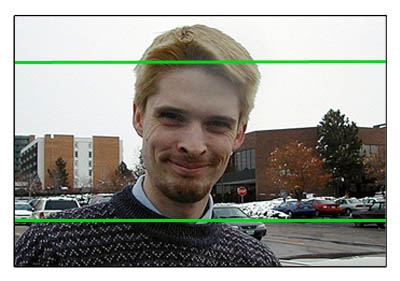
Now here is where YOU are framing, per the red lines. Notice that you are showing part of the image that is NOT supposed to be seen AND you are at the same time cropping off part of the bottom of the picture that IS supposed to be seen. To make matters worse, if indeed your theater is cropping the image too much to begin with, that lower red line will be even HIGHER, thus cropping MORE!!!
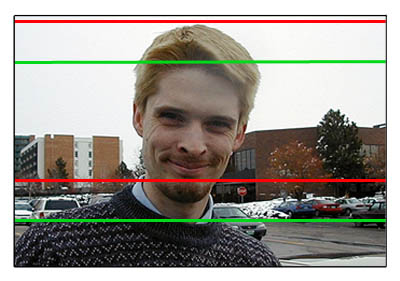
So now do you see why what you are doing is horribly wrong?
Posted by Robert E. Allen (Member # 1351) on 03-29-2005, 11:28 PM:
So when did this process of "We'll shoot a full frame but you project only part of it" begin? Do directors really think "Oh hell, it doesn't matter if we clutter up the top and bottom of the frame because we expect the projectionist to project only the middle of the fame anyway?" For 25 years I projected (with the proper lens) all that was in the frame. I never heard of projecting only part of a frame because that's what the director expects us to do. Both cameras and projectors can be equipped with lenses and appatures to shoot and project all that's on a frame. If the frame had broad frame lines that looked like what is called "letterbox" today then the lens and appature projected all the picture sans the frame lines. As far as "film done wrong" that's apparently the opinion of some techs who have been trained in the "Lets Project Only The Center Of The Frame" school of projection as I have never heard a complaint from ONE customer.
Posted by Phil Hill (Member # 371) on 03-29-2005, 11:38 PM:
quote: Robert E. Allen
So when did this process of "We'll shoot a full frame but you project only part of it" begin? ...
About 24+ years ago... The 35mm film camera captures a full-frame image and it's a very common practice of cinematographers and editors and labs to NOT hard-matt a full 35mm frame to 1.85, 1.66, etc. It's up to the projectionist to know how to present a good show. The image intended format is "usually" vertically centered in the frame.
Rather than being on the defensive and attacking those that speak the truth and are trying to help you Robert, you should do some research on "modern" technology and procedures of film production and presentation.
Posted by Scott Norwood (Member # 30) on 03-29-2005, 11:43 PM:
quote: Robert E. Allen
So when did this process of "We'll shoot a full frame but you project only part of it" begin?
This was the cheap way of creating a widescreen image (1.66, 1.75, or 1.85:1) that was established in the 1950s. Instead of using wider film (e.g. 70mm) or special lenses (e.g. cinemascope), a "wide screen" image could be created by shooting normally, using a camera with 1.66, 1.75, or 1.85:1 markings in the viewfinder, then projecting the image witha shorter focal length lens and an aperture plate cut to crop the top and bottom off the image to match the markings in the camera viewfinder.
It's important to note here that _all_ film formats have "extra" image area on the camera negative (and, in most cases, the print) which is not intended to be shown on the screen. As long as your plates and lenses are set up to show the correct image area as shown on an RP40 loop, you will be showing everything that was shown to the cinematographer in the camera viewfinder (i.e. everything that he intended to be seen by the audience).
Posted by Manny Knowles (Member # 1171) on 03-29-2005, 11:47 PM:
I'll probably come across as an insensitive prick, but...
Please don't argue, Robert. You are just plain wrong on this one.
The fact is that directors and cinematographers of "flat" films (1.85:1) DO IN FACT expect you to project only a portion of the frame -- the centre portion -- as illustrated in Brad's most recent post. If you've never done it that way then you've never done it correctly. It's really as simple as that.
The SMPTE standards cited by John Pytlak predate your 25 years of experience. You owe it to your craft, your customers and the filmmakers to familiarize yourself with the standards cited by John Pytlak. Arguing won't accomplish anything. There is only one right way in this case.
I'd also like to point out that just because customers don't complain to you doesn't mean they haven't noticed the mistake. Similarly, an absence of complaints doesn't mean you did a good job.
Can anyone recall a contemporary release in the last 25 years that was shot for 1.33:1 presentation (in U.S. theatres)?
Posted by Scott Norwood (Member # 30) on 03-29-2005, 11:56 PM:
Academy ratio isn't all that uncommon for video transfers or 16mm blowups (East Side Story and the Hank Greenberg film would be examples) and every theatre should be able to properly show the format on at least one screen. Much animation (shorts, mostly) is still done for 1.33, for example.
Even Academy has extra image area on the negative/print that isn't intended to ever be shown on the screen, however....
Posted by Phil Hill (Member # 371) on 03-29-2005, 11:57 PM:
quote: Manny Knowles
I'll probably come across as an insensitive prick, but...
Now, who can argue with that?
Posted by Manny Knowles (Member # 1171) on 03-29-2005, 11:59 PM:
Come on, Scott... We're talking about 35mm commercial releases and you know it!
Note to Phil... I'm shocked you didn't comment on the fact that the word "but" follows the word "prick."
Posted by Matthew Peters (Member # 1495) on 03-30-2005, 12:03 AM:
Reminds me of the time our aperture plate change over mechanism broke and we had to do it by hand, I forgot to move the plate from the scope position back to the 1:1.85 setting. I was stunned for a few secconds trying to work out why the image in our biggest house was on the roof, screen and floor with-out looking distorted.
Posted by Steve Guttag (Member # 268) on 03-30-2005, 12:07 AM:
Ohhh....I got that one Manny! One From the Heart was indeed composed for 1.33, if not 1.37.
If you ever see some of the "making of" documentaries on films, you can also see on the director's camera monitor (video monitor that sees what the camera sees) that they have either taped off or otherwise line off the action area versus the extraneous area. If you are projecting beyond .446 inches high on a domestic "FLAT" film then you are showing image that was not intended to be show, period.
Posted by Manny Knowles (Member # 1171) on 03-30-2005, 12:09 AM:
Was One From The Heart released as full-frame or was it "pillar-boxed" within a 1.85:1 frame?
Posted by Mike Blakesley (Member # 26) on 03-30-2005, 12:49 AM:
I remember a movie with Sally Field, can't remember the title but it was in the late 70s. In one scene she was shown in the shower, but you only saw her head and shoulders on screen. The printed image was full-frame, and one night my male urges took over and I wanted to see what she was "wearing" in the shower, so I rewound the reel on the bench by hand, found the scene, and turns out, she was topless! In a PG movie! (She looked good, too!)
So there are definitely things in there that are not supposed to be on screen, and it's been that way for years and is not likely to change.
Bob -- why not center the Studio Logo vertically? Then your whole movie will be OK.
Posted by Joe Redifer (Member # 3) on 03-30-2005, 01:06 AM:
Same goes for "Doc Hollywood", the runaway blockbuster smash hit that made billions for Michael J. Fox. Not only was the movie the best evar, but there was a scene where the chicky-poo came out of a lake or something. You could see her boobs on the frame and they were meant to be seen. The movie was not "R" but PG-13. Anyway on that scene if you "frame down" you can see her bush in all it's glory!
Posted by Brad Miller (Member # 2) on 03-30-2005, 03:02 AM:
This is why I doubted that the Regal techs set up Robert's auditoriums "wrong" when selecting lenses, setting masking and cutting aperture plates. While they may not be spot on perfect 1.85, odds are they're really close and the problem at hand is an operator issue.
Robert, since (fortunately) Regal doesn't have that weird policy of cutting off the green bands on trailers, simply frame up on those so that the lettering is centered vertically and then keep your paws off of the framer for the rest of the movie. While not all green bands are perfectly centered, they are ten times over more accurate than just guessing at where the proper composition is (which has just been proved that even someone with 25 years of experience doesn't).
This is also an excellent example FOR locking the framing knobs down in a mainstream multiplex. While art house fare has it's own interesting set of problems, I have ran for years in mainstream multiplexes with dead centered and locked down framing knobs without a hint of a problem. Best of all, it prevents projectionists who don't understand the concept of 1.85 matting from screwing up a presentation.
By the way what was that weird film about the bald guy who had magical powers from lightening or something released in the late 90s? Anyway it was a PG flat film and I had filled in on an evening shift at a theater I had only worked once before and as I was walking around checking focus I saw a scene where the bald guy was getting picked on by bullies in a field. I walked up to the port window right as they ripped off his clothes and low and behold guess what was swinging in the wind? You guessed it! Yet another example of why framing is so crucial. Another one that comes to mind is the Jurassic Park films. If you frame Robert-style, ALL of the effect shots will have the top half of the projected screen matted off with black!
Posted by Steve Guttag (Member # 268) on 03-30-2005, 07:26 AM:
To the best of my knowledge, One from the Heart was printed to the academy aperture. It was the film the really broke Zoetrope (Coppola's company) but launched the whole concept of using video to compose a film on the fly. I remember not only having to lens up for it but also having to mask the screen for it (hang additional masking theatres that could not close down to 1.37).
The name of Brad's film is on the tip of my tongue but I can't quite remember it...it is something like Ash, Ghost, Smoked...or something.
Posted by Darryl Spicer (Member # 711) on 03-30-2005, 09:09 AM:
quote: Mike Blakesley
I remember a movie with Sally Field, can't remember the title but it was in the late 70s
Would it have been "Norma Rae" by chance....
quote: Brad Miller
By the way what was that weird film about the bald guy who had magical powers from lightening or something released in the late 90s?
That one was called "Powder"
Posted by Martin McCaffery (Member # 37) on 03-30-2005, 12:22 PM:
Yes, Brad, arthouse fare as all sorts of problems. I set the projectors to RP-40 with each new film, but inevitably have to go up and tweek the framing for the composition and/or subtitles. I've had plenty of films, mostly foreign, but not always, that had to be adjusted with each reel. Always entertaining are the ones with changing masking
The opposite of the Sally Fields adventure is the pre-legal age Christina Ricci movie The Opposite of Sex. There is a scene where she is sitting next to the pool, supposedly topless. If you frame up too far you see she's wearing a strapless fleshtone nipple protecting top.
Posted by John Pytlak (Member # 331) on 03-30-2005, 02:51 PM:
Here is what standard SMPTE 195-2000 says:
quote:
A.4
Typical aspect ratios for nonanamorphic theatrical projection
For aesthetic and practical reasons, theatrical projection
may present 35-mm images in such a manner that the full
width of the projectable area is shown but the projected
height is less than maximum. Photography designed primarily
for theatrical exhibition recognizes this and is composed
for the more elongated rectangles. Several aspect ratios for
the final projected picture are recognized through usage
(see table A.1).
In every case, it is in tended that the projected area be
located symmetrically about the horizontal centerline of
the maximum projectable area.
To help ensure correct vertical centering (framing) of the
projected image, hard-matte printing may be used in producing the duplicate negative used for release printing of theatrical
prints. A hard matte with an image height of at least 0.505
in (12.83 mm) may be used for all style A aspect ratios
(1.66:1 or greater). Note that prints intended for a style C
aspect ratio (1.37:1) will normally have an image height of
at least 0.630 in (16.00 mm) as specified in SMPTE 59. In
all cases, the framelines on the print shall essentially be
opaque.
It is recommended that pictures designed to be shown at
aspect ratios other than those specified in this standard be
so marked in a conspicuous manner. The television leader
(described in SMPTE 55) provides for aspect ratio identification
on frames 6-10.
A.5 Image area on original negative
Use of camera aperture dimensions other than those stated
in SMPTE 59 is discouraged. Film users are reminded that
many features composed for wide-screen aspect ratio will
be shown later on television. Use of a hard matte in the
camera will require substantial cropping of the film horizontally
when the film is transferred to television, and severely
limits the use of a print made from the negative.
Good practice dictates using the 1.37:1 style A camera
aperture of SMPTE 59, while composing for the desired
theatrical projection aspect ratio. Care should be taken to
exclude extraneous items or action from the photographed
image area which may show in the television scanned
area.
You can purchase SMPTE standards here:
http://www.smpte.org/smpte_store/standards/
Note that films whose master positives and duplicate negatives are printed using continuous contact printers will have the framelines that were on the original negative, and NOT a "hard matte". Making a duplicate negative with a hard matte would require use of a step printer or digital intermediate.
Posted by Monte L Fullmer (Member # 2797) on 04-01-2005, 03:49 AM:
quote:
Maybe every flat feature should have the studio logo printed in letterbox format. Trainer to trainee: "See that? Make sure it's centered!!"
...this brings up an intesting side topic here on 1.85/1 "letterboxed" trailers/features:
For the OF'ers:
Let's go back to 1956. "The Ten Commandments" (actually anything filmed and released in VistaVision) - do we remember, on each reel change at the beginning of each reel-including the famous "Red Paramount C.B. DeMille" logo, those little "cross" markings that were shown on the screen at the upper right hand corner, being that the frames were "hard matted" to the 1.75/1 ratio of VistaVision?
Lot of theatres were still shooting full frame 1.37/1 at the time in as well as full adjustable masked 2.35/1 Anamorphic ratios (and some using the rare 2.00/1 SuperScope ratios as well). Then the 1.85/1 apertures were cut for the presentations of VistaVision, and these "t" markings were to make sure of the proper framing of this presentation format.
The one theatre that I worked at, had full adjustable maskings from 1.37/1 flat, to 2.66/1, anamorphic full-mag presentations, with apertures of each size.
Thus, a question on this topic as well:
I just got done with the presentation of "Lemeny Snickets" and noticed, during buildups, that some of the scenes are in full frame 1.33/1, then when some scenes changes, the frame gets "hard matted" to 1.75/1. And these two different ratios goes back and forth throughout the feature. Would this be different cameras, or some sort of lab work techniques?
thx-Monte
Posted by Darryl Spicer (Member # 711) on 04-01-2005, 03:53 AM:
quote: Monte L Fullmer
I just got done with the presentation of "Lemeny Snickets" and noticed, during buildups, that some of the scenes are in full frame 1.33/1, then when some scenes changes, the frame gets "hard matted" to 1.75/1. And these two different ratios goes back and forth throughout the feature. Would this be different cameras, or some sort of lab work techniques?
It could have been scenes that involved visual effects or CGI work.
Posted by Brad Miller (Member # 2) on 04-01-2005, 04:42 AM:
Just like my Jurassic Park example from earlier in this thread. Putting aside the blatant composition errors, just imagine how bad it would look for the matte bars to randomly turn up across the picture if presented out of frame.
Posted by Brian Michael Weidemann (Member # 2243) on 04-01-2005, 06:05 AM:
quote: Brad Miller
and low and behold guess what was swinging in the wind?
I forgot all about that! Yes, indeed, I have the same sort of story you have for that movie, Brad. I remember our framing was nowhere near OBVIOUSLY off, but I was in the auditorium when that scene played. And JUST visible at the bottom of the screen ...
If I recall, the dialog went something like they were making fun of him for being "bald down there", and clear as day we can see that that was not the case.
Some people at the theatre didn't believe it when I mentioned it. And since it was PG, we wouldn't dare misframe (accidentally or otherwise) that movie again, even as a joke. I had to point it out when I tore it down. The whole situation was amusing for us, but I have no idea who was in the audience.
Posted by John Pytlak (Member # 331) on 04-01-2005, 07:37 AM:
quote: Monte L Fullmer
I just got done with the presentation of "Lemeny Snickets" and noticed, during buildups, that some of the scenes are in full frame 1.33/1, then when some scenes changes, the frame gets "hard matted" to 1.75/1. And these two different ratios goes back and forth throughout the feature. Would this be different cameras, or some sort of lab work techniques?
Movies composed for 1.85:1 are usually shot with a "full frame" camera aperture. If continuous contact printing is used for all the intermediates and the release printing, the framelines on the prints are the ones defined by the full frame camera aperture. If a step printer (e.g., optical effects) or Digital Intermediate is used for any scenes, those scenes will usually have a "hard matte" defined by the printer aperture or recorded area. Likewise, any CGI is usually rendered to just slightly more height than the normal 1.85:1 aspect ratio.
Posted by John Hawkinson (Member # 1135) on 04-01-2005, 05:41 PM:
Martin McCaffery said: "I set the projectors to RP-40 with each new film,"
Really? Wow. That seems like an awful lot of effort. Why not just
mark the position of the framing knob?
--jhawk
Posted by Brad Miller (Member # 2) on 04-01-2005, 09:32 PM:
Because that's just dumb. No framing knob is anywhere near accurate enough that you could "mark it" and have any degree of precision in the projected framing.
Posted by Wolff King Morrow (Member # 2226) on 04-02-2005, 04:49 AM:
Which is why framing knob technology could use a serious boost. I'd like to see a large dial-arrow with degree marks around it on a face-plate. That way you'd know when your setting has been messed with if the arrow isn't pointing at the degree mark you set it to the day before.
Posted by Monte L Fullmer (Member # 2797) on 04-02-2005, 05:30 AM:
quote: Brad Miller
No framing knob is anywhere near accurate enough that you could "mark it" and have any degree of precision in the projected framing.
Exactly true. Now, all we need to do is tell the labs, when they do their contact printing, is to get the frames exactly right inbetween the sprocket holes.
For sometimes, and I'm sure that some/all of us have noticed, that the framelines ISN'T printed exactly right in between the sprockets on some prints.
If one has to "mark" their projector where the exact and proper framing should be, then that operator needs more booth training, because he's doesn't want to have that "perfect presentation" since he doesn't want to do his required "15 minute" booth checks while the film is running.
Nothing more tacky is to have a FLAT Disney feature, which is "hard matted" most of the time, with the top of the "matt" is showing on top of the screen, or opposite with the "matt" on the bottom of the screen.
For we know that some framing devices WILL eventually slip slightly downward from time to time during operation. (TIP-Snug up those two 3/16" allen screws a bit that holds down the framing/intermittent assembly to the mainframe on the Christie P35GPS machines if this problem exists..)
If there is "frame drift" and knob tension seems normal, then your gate and trap assembly settings could be too tight and actually "pulling" the intermittent assembly anti-clockwise, or upwards to cause this frame drift.
-Monte
Posted by Wolff King Morrow (Member # 2226) on 04-02-2005, 05:43 AM:
quote: Monte L Fullmer
If one has to "mark" their projector where the exact and proper framing should be, then that operator needs more booth training, because he's doesn't want to have that "perfect presentation" since he doesn't want to do his required "15 minute" booth checks while the film is running.
While that's true, there's also the flipside of the coin in that if you are showing the same print in the same screen for an entire week, you'd want to have some way of knowing your knob is still set where you centered it for the show in additon to regular screen checks. Marking the knob I agree is not the answer, but a better designed knob like I mentioned would be helpful. Granted, there's the point of not worrying about the knob and just using the screen to check the image centering, but I'd prefer having the extra option, if only to know at a glance where the 35PA centering line is (assuming your knobs don't drift).
Posted by Brad Miller (Member # 2) on 04-02-2005, 05:16 PM:
I have found a useful purpose for the CAP code. Every 24th frame or something, have it make two dotted lines horizontally across the image just a tad outside where the framing is SUPPOSED to be. If you see it flash every second, you're a crappy projectionist and you need to adjust your framing. Voila! Yay CAP code!
Posted by Phil Hill (Member # 371) on 04-02-2005, 11:20 PM:
That's a great idea, Brad! The dots could be not only used as Crap Code, but spell out in Morse code: "Dumbass Projectionist At Work"
Posted by Brent Allen Sadler (Member # 2987) on 04-05-2005, 12:45 AM:
I understand what you mean when you say that your theatre is not a presentation theatre. I work for Carmike, and believe me, they DON'T care about the quality of the movie. Just concession sales. But since you are interested in learning the correct way of doing things this tells me that you care. So YOU can turn your theatre into a presentation theatre. Thats what you customers are there for right? I'm not familliar with SPECO platter systems, but the platter should be threaded first. Pull the film down over the upper magazine roller giving yourself some slack to lace the projector. Don't forget to turn the intermittent drive shaft a quarter way until the intermittent sprocket comes into its locked position. After the projector is threaded, I normally just tug lightly on the film leader to engage the takeup platter. But I am also using Christie AW3's and am not shure of the takeup mechanism on the SPECOs. Hope this helps.
Posted by Monte L Fullmer (Member # 2797) on 04-05-2005, 01:17 AM:
quote: Brent Allen Sadler
I normally just tug lightly on the film leader to engage the takeup platter. But I am also using Christie AW3's and am not shure of the takeup mechanism on the SPECOs.
Shoot..I used to do that all the time with LP-270's and the AW3r platters-give a tug to engage the takeup platter.
-Monte
Powered by Infopop Corporation
UBB.classicTM
6.3.1.2