This is topic "Idiotproof" Trailers in forum Film Handlers' Forum at Film-Tech Forum ARCHIVE.
To visit this topic, use this URL:
https://ft-forum.com/ft/cgi-bin/ubb/ultimatebb.cgi?ubb=get_topic;f=1;t=007093
Posted by Monte L Fullmer (Member # 2797) on 04-10-2005, 08:23 PM:
..to members of the FT forum.
The time has FINALLY arrived. "Idiotproof" trailers. I found this on the "War of the Worlds" teaser trailer.
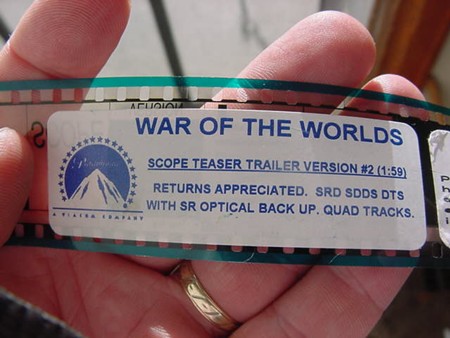
It's about freaking time that studios put something for the idiots to see where to cut the leads off the tail end so there is that proper fadeout at the end of the trailer. It's so annoying to see a fadeout just being at the end of a trailer, then "BLOP!!", green band of the next trailer is on the screen. No fadeout of any kind whatsoever. Just horrible trailer presentation. And I'm sure that the studios are getting peeved about this as well-let alone the filmmakers.
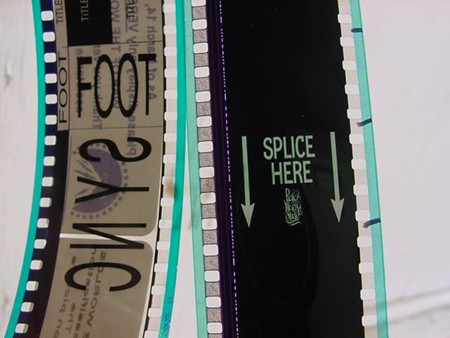
Now, wonder to see if the bozo idiots can see this, use this tip,even miss it,ignore it, or even care.
I added the edgelines with marker to represent the frameline. (now, wonder how many have done this trick to mark framelines for in-frame splicing, since this is an old practice to mark framelines on black film...)
thx-Monte
Posted by Randy Stankey (Member # 64) on 04-10-2005, 09:59 PM:
Murphy's Law #42:
If you make something so simple that even an idiot could use it, only an idiot would WANT to use it.
![[Big Grin]](biggrin.gif)
Posted by Mike Olpin (Member # 1115) on 04-10-2005, 11:17 PM:
Great. Now we just need a Splice Here mark for the head as well so that the green band doesnt jump in the gate when some bozo cuts right on the green band.
Posted by Tracy Bellar (Member # 3049) on 04-10-2005, 11:40 PM:
something I have always done, once I find where the splice goes I put the point of an ink pen in the next sprocket hole after the fram line. This way you can hold the film and pen in one hand and there is not a quess as to where to cut. You simply put the film on your splicer with the pen hanging over the blade of the splicer. You know the cut goes right next to the sprocket with the pen so your cut will be right every time.
Posted by Monte L Fullmer (Member # 2797) on 04-11-2005, 03:31 AM:
Oh, dear young "bretheren" of film handler's land:
Don't you remember the very first lesson that was learned when you were in your "training wheel" stage in the world of the "film handlers?" Remember that there is four sprockets per frame for 35mm - no matter what?
See what I have done below to emphasize this simple booth rule?
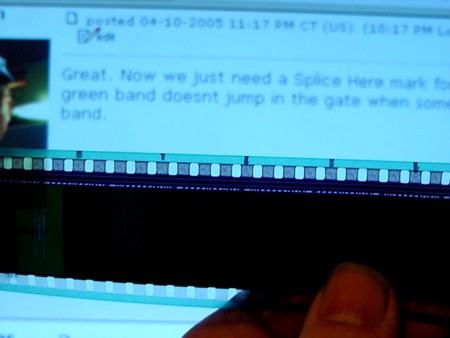
(this is the header from "EP-III" showing the fade-in hard matte rating tag with the corresponding four-sprocket/frame dots on the edge of the film, in which I counted and marked backwards from the beginning fade-in frame - LONG before the cut).
Head on over to the "Tip" section of FT, find "Cutting Trailers Properly" and you'll see excellent layouts of proper and professional trailer lead cuts for excellent presentation purposes.
thx-Monte
Posted by Mike Olpin (Member # 1115) on 04-11-2005, 04:01 AM:
5 frames of black is too short! ![[Razz]](tongue.gif)
I like to use a frame counter to take it as far into the black as possable on both the head on the tail.
Posted by Joop de Gruiter (Member # 84) on 04-11-2005, 05:27 AM:
It's safer to always do this on the non-soundtrack side. Otherwise you could accidently paint the srd track between the sprocket holes.
Posted by Monte L Fullmer (Member # 2797) on 04-11-2005, 05:29 AM:
quote:
5 frames of black is too short!
True and agreed. I used this pict as an example to show how to do framelines with marker. The best way visually, is to head to that "TIP" section that I mentioned, for this is how I do "trailer paks" for my feature buildups (and have actually been doing this method for 20 plus years...).
-thx Monte
Posted by Brad Miller (Member # 2) on 04-11-2005, 05:52 AM:
It's much faster to just cut at the last frame of the head leader before the black begins. Also the Neumade splicer block is 8 frames + 1/2 perforation long, so that makes as a fast way to lay a KNOWN frameline (from the head leader) on the left side then whack the cutting blade 8 frames over (into the black, of course). This way there is no need to even bother putting marks on the film. Just use the splicer block as a frame counter.
Click here and scroll down to the picture "SPLICER MARKER".
Posted by Mark Gulbrandsen (Member # 72) on 04-11-2005, 06:58 AM:
Dont'y worry the leader may be marked correctly but the lab will screw it up somehow.
Brad,
You left out the "whip the trailer to the other end of the booth" method of making them up !!
MArk
Posted by Frank Angel (Member # 248) on 04-11-2005, 09:18 AM:
Wait a minute. They go through the trouble of putting a SPLICE HERE frame, but no frame line. How idiotic is that?! There is absolutley no reason why that frame couldn't have white edges so as to eliminate any guess work at all....no need for frameling counting/marking at all. Evidently this is an "idiot-proof" leader made by idiots.
Posted by Monte L Fullmer (Member # 2797) on 04-11-2005, 01:06 PM:
quote:
Don't worry. The leader may be marked correctly but the lab will screw it up somehow.
..and they do. Thus, I use the "old school" method in what I was taught with - my eyes (and a "Sharpie", if necessary, and I only tik the area above the soundtrack area if I use that side...I know better).
I've "tuned" myself to where I don't look for pictures, but for framelines. And I've taught a few booth candidates that method and can understand where I come from.
quote: Frank Angel
Evidently this is an "idiot-proof" leader made by idiots.
...just like that "LFOA" with the set of arrows pointing to the last frame on the head of the tail leads of a print reel?
"the Dumbnifcataion syndrome" lives again!
Posted by Christian Appelt (Member # 1067) on 04-11-2005, 05:57 PM:
This trailer (first image) is NOT idiot proof!
Imagine what a real booth idiot might do if he decides to show it in the correct aspect ratio of 1.59!
Posted by Dominic Espinosa (Member # 2122) on 04-11-2005, 06:09 PM:
I personally ignore "cut marks".
I noticed the idiot proof splice here mark but I just don't think that it'll make that big of a difference to the dumbass that cuts on the first and last visible frame.
I take my splicing seriously these days. I've modified our splicer to the FilmTech "spec" (creating an overlapped splice, see tips section) and when I splice I keep as much black between the trailers as I can. It makes the transition much smoother, such as when running different kinds of trailers on one print.
My assistant on the other hand will lob off the first green frame on attached trailers and splice from there if he gets the chance. ![[Mad]](mad.gif)
Posted by Adam Wilbert (Member # 1184) on 04-11-2005, 08:57 PM:
quote: Monte L Fullmer
and I only tik the area above the soundtrack area if I use that side...I know better
except then you're writing all over the SDDS soundtrack. if anything, you should only be using the space between sprocket holes on the non-soundtrack side.
quote: Frank Angel
There is absolutley no reason why that frame couldn't have white edges so as to eliminate any guess work at all
but theatres with poorly cut apperature plates or ones that are a bit out of frame would show that white line on the screen. I prefer no frame line to white ones.
Posted by Monte L Fullmer (Member # 2797) on 04-11-2005, 09:30 PM:
quote: Adam Wilbert
except then you're writing all over the SDDS soundtrack
..doesn't matter when any of us doesn't have "Sony Baloney" at our theatres... - Monte
Posted by Brad Miller (Member # 2) on 04-11-2005, 10:38 PM:
The next guy might.
Posted by Darryl Spicer (Member # 711) on 04-11-2005, 10:52 PM:
quote: Adam Wilbert
but theatres with poorly cut apperature plates or ones that are a bit out of frame would show that white line on the screen. I prefer no frame line to white ones.
Maybe that would make them get their act together and recut plates and make them frame correctly......and thats a big MAYBE
Posted by Monte L Fullmer (Member # 2797) on 04-12-2005, 12:25 AM:
quote: Brad Miller
The next guy might.
...good ol' "Isoprop" Alcohol removes "Sharpie" pen marks.
'sides, I only do this on trailers (if needed) when I'm attaching trailers to the first reel on the Kelmar worktable, not on the features.
Then, when I'm done with the print, the trailers get broken down via the Kelmar method (which I've done that trick for almost 10yrs years now..), and send them to our other theatres who could use them. I have a good bucket full of those inch cores.
None of our theatres have "Sony Baloney", nor practically any other theatre around this state.
thx-Monte
Posted by Dominic Espinosa (Member # 2122) on 04-13-2005, 01:26 PM:
I mark between sprocket holes on the non-soundtrack side, feature if necessary, trailer if necessary. Most of the time I can just grab it where I see the frameline, either by holding it up to the light or by matching it to the tail leader or a visible frame on the end of the trailer.
Most splicers I've worked with are 8 frames long as Brad described. I always tell people to use it like a ruler and get as far away from the picture as possible.
As for marking on the SDDS, correct me if I'm wrong but isn't each side of the sdds a copy of the other side? Sort of a primitive error protection thing?
Posted by Monte L Fullmer (Member # 2797) on 04-13-2005, 01:53 PM:
quote: Dominic Espinosa
As for marking on the SDDS, correct me if I'm wrong but isn't each side of the sdds a copy of the other side? Sort of a primitive error protection thing?
Yes, the soundtrack side of the data information is the main track for Sony. The other side is, if I remember, 26 frames down the stream for the backup in case the main one begins to fail.
Then, when this second track fail, the system dumps completely and the optical track takes over reproducing the sound in MONO, being that the Sony processor is by itself and is wired to bypass the other processor and the analog signal from the Sony heads directly down to the amplifiers. This is why booth checks are necessary on SDDS operations. One must look at the SDDS display and to see if the data stream have failed and if it's necessary to switch the processor off and let the other processor take over due to this over-riding of the Sony processor.
The Sony track where it's placed on the film and where the most wear on the film is located, is the WORST place to place any form of information. When one runs Sony, the track lasts on the average of one to two weeks before failure begins-and that's both of the tracks on the film.
Granted, Sony sounds great when running-moreso than even the other two, but SRD has it hands down with the data digital format-being where it's located in between the sprocket holes where there is very little wear.
...this is why we call it "Sony Baloney."
Fox and Paramount, on some of their releases, have voided printing the SDDS track on these releases.
Course, EP-III will probably have all of the digital information.
thx-Monte
Posted by Brad Miller (Member # 2) on 04-13-2005, 02:33 PM:
quote: Monte L Fullmer
Then, when this second track fail, the system dumps completely and the optical track takes over reproducing the sound in MONO, being that the Sony processor is by itself and is wired to bypass the other processor and the analog signal from the Sony heads directly down to the amplifiers.
Hate to have to correct you on this, but that is absolutely wrong. On the 2000 series SDDS players whatever signal that is punched up on your main Dolby processor (which should be SR) will simply "pass through" the Sony unit. On the 3000 series SDDS players, the analog sound is built into them and if the SDDS track fails, it will auto-switch to whatever you have it programmed to (the default is SR). There is never a resort to mono unless the projectionist or tech set it up that way.
Posted by Monte L Fullmer (Member # 2797) on 04-13-2005, 03:25 PM:
quote: Brad Miller
There is never a resort to mono unless the projectionist or tech set it up that way
True and fully agreeable statement. And what I mentioned above was that very thing - this one complex that I know of had their SDDS set up this way.
Thus, even though SDDS was installed, the primary digital usage was either SRD, or DTS on some of these machines that had all three digital options installed.
So, thus my knowledge of SDDS is/was limited to what was installed at this complex and please forgive me of my shortcoming on this.
Later on, the SDDS was removed from this complex due to the operators that wouldn't use the system and my knowledge of SDDS stopped with this.
thx-Monte
Posted by Frank Angel (Member # 248) on 04-14-2005, 07:41 PM:
quote: Adam Wilbert
but theatres with poorly cut apperature plates or ones that are a bit out of frame would show that white line on the screen. I prefer no frame line to white ones.
The frame line can be miniscule - nothing but a white septum line at the frameline.
For the scope format, if the theatre is set up for proper 2.39 on scope as it should be, then there is plenty of leeway for a white septum line at the frameline -- it will be invisible to the audience; if the guy's scope plates are cut large enought to see that, then they simply are too large to begin with and they will be showing the negative flashes, which is why the apeture height of scope was reduced in the first place.
As for 1.85, the only way a white septum line could be visible in this format is if this guy is completely out of frame.
Posted by Mark J. Marshall (Member # 1409) on 04-14-2005, 10:41 PM:
I agree 110%. Print the damn line! I'm not saying this because I can't figure out where to cut on my own... I can do that just fine thanks. But why the hell should I have to waste time holding the film up to the light, straining my eyes, and counting sprocket holes?? Just print the line and be done with it. No need for SPLICE HERE, YOU MORON! ... just a line.
Powered by Infopop Corporation
UBB.classicTM
6.3.1.2