This is topic Changeover wont manually close in forum Film Handlers' Forum at Film-Tech Forum ARCHIVE.
To visit this topic, use this URL:
https://ft-forum.com/ft/cgi-bin/ubb/ultimatebb.cgi?ubb=get_topic;f=1;t=007133
Posted by Frank Dubrois (Member # 3042) on 04-22-2005, 04:29 AM:
This is a problem thats been bugging me for a while. Our change over won't close if we flip the switch to close it. It will open via the switch. I have swapped switches 3 times, same issue (opens but wont close). The changeover opens and closes just fine when the cuq strips are read. I have followed the wiring..all is good. The switch is good. The changeover seems good. The failsafe is good. This projector is about 4 months old (Simplex 35 Milineum). I wish I could tell you the changeover model, but it slips my mind. Any ideas where to look now? This is driving me nuts! Could there be a bad board somewhere? I didnt notice anything burned or cracked and all plugs and wires are firmly seated. Thanks for any ideas.
Posted by Darryl Spicer (Member # 711) on 04-22-2005, 10:09 AM:
The changeover may be the kelmar brand. With it working with the cues you can rule out a bad selenoid. Has this always been a problem or something that has just started to happen?
Posted by Scott Manley (Member # 867) on 04-22-2005, 03:34 PM:
What is the automation that is being used?
Posted by Frank Dubrois (Member # 3042) on 04-22-2005, 07:41 PM:
It is a newer problem withing the last week. I thought I ruled out just about everything. I am truely stumped.
Posted by Brad Miller (Member # 2) on 04-22-2005, 07:54 PM:
Ya gotta answer all of the questions if you want us to help you as best as possible......
quote: Scott Manley
What is the automation that is being used?
Also, is the manual switch on the automation itself, or is it an external switch?
Posted by Frank Dubrois (Member # 3042) on 04-23-2005, 01:35 AM:
Well I know, but in my first post on this topic I said the brand of changeover slipped my mind. I havent been back to work in a few days. As soon as I do, I'll write it down and post it. Sorry.
The switch is on the projector.
Posted by Monte L Fullmer (Member # 2797) on 04-23-2005, 02:52 AM:
..if you have an Strong X-90 console attached to that Mil2000, open up the back to where you see the motherboard where the automation (CNA-100...if this is your automation???) cables are running down to. The left connection plug, being a six or eight pin connection plug, one of the wires into that plug isn't making contact with the connector socket on the motherboard. What happens is that pin will unseat itself from the connector and has to be pushed back in connector and be reseated.
I had one of these same Kelmar dowsers do the same at one theatre-bugged me to death on wondering if one of the selinoids(push-pull type under the square cover) was bad. Replace the pull selinoid and nothing. I began to trace things out and found this problem mentioned. Pushed that pin back into that connector until I heard the pin "click" in the connector for proper seating, and the dowser now works fine.
Another trick on those Kelmar dowsers, is to take that cover off, and take a bit of vaseline on a "Q"-tip and "slick" up the square shaft on each side that rides over the selenoids where the two sets of screws slide through the spring catches, which will help the opening and closing sequence of the dowser to operate much more smoothly.
--hope this might help your problem.
-Monte
Posted by Phil Hill (Member # 371) on 04-23-2005, 03:24 AM:
The problem is that it works fine with automation...so that rules out ANY problem with the solenoids or the changeover device in general.
Since you've changed the manual switches and checked ALL the wiring and that did not solve the problem, and since it works fine with the automation, (to me) it sounds like it may be a burned NC relay/switch contact in the automation... if it is wired thru that way...hopefully it is as in good practice. (Brad has a good point about the manual douser switch on the automation)
Posted by Brad Miller (Member # 2) on 04-23-2005, 03:30 AM:
quote: Frank Dubrois
The switch is on the projector.
That doesn't actually answer the question, since many people refer to the lamphouse/console as the projector, much in the same way many people will say the switch is on the projector, but in reality the switch is on the automation which just happens to be mounted in the console, which people sometimes refer to as the projector. See what I mean?
So the question is, precisely where is the switch located? Is this something the installation tech added on, or does it look like it was something that came straight from the factory?
Still need to know what automation model you are using too. It wouldn't hurt to list the model lamphouse console as well.
Posted by Frank Dubrois (Member # 3042) on 04-23-2005, 03:38 AM:
My bad...The switch is on the console part of the auctomation panel. It wasnt an add on, it is factory. I think I better get the manufacter models before I start to sound any less intelligent. I know it is the black box with the push/pull deal inside. I was pretty sure I checked all the plugs and made sure they were seated properly.
Posted by Monte L Fullmer (Member # 2797) on 04-23-2005, 05:23 AM:
I bet you have an Strong X-90 console with a CNA-100 automation being that the switch is located to the left of the touchscreen panel in row with the lamp and motor switches.
Since you've "condemned" the switch thing by replacing the switch, follow the wires from behind the switch to the connection on the motherboard. Wonder if you have an open in the plug, or wire itself that attaches to the motherboard, or you have a burned copper inlay on the mother board itself. Somewhere down the string, the A/B action isn't doing its thing when using the rocker switch, yet automation part of this action works fine.
Now, the simple question: Why the usage of the manual dowser, since the automation part of the dowser usage IS working normally?
thx-Monte
Posted by Frank Dubrois (Member # 3042) on 04-23-2005, 04:12 PM:
The manual dowser isnt being used.
Posted by Monte L Fullmer (Member # 2797) on 04-23-2005, 05:07 PM:
Oh. So you're using a different source for dowser operation -outside of the automation then?
Posted by Frank Dubrois (Member # 3042) on 04-23-2005, 05:57 PM:
No...the automation successully opens and closes the change over, so there is no "problem" so to speak. However, when I said manually, I ment physically flipping the switch.
Posted by Brad Miller (Member # 2) on 04-23-2005, 08:02 PM:
Oh my...flipping which switch? Please be very precise and detailed in explaining where this switch is mounted and so forth. You're just running us all on a wild goose chase here.
Can you take a picture and upload it?
Posted by Mike Blakesley (Member # 26) on 04-23-2005, 08:58 PM:
Defective switch maybe? I've had to replace our motor switch a couple of times over the years. (no problems with the c/o switch but then it hardly ever gets used.)
Posted by Wolff King Morrow (Member # 2226) on 04-24-2005, 04:27 AM:
Sounds to me like he's talking about the rocker-switch that lets you flip the changeover up or down from the automation panel on the console. Like the CNA 150 for example.
Posted by Gordon McLeod (Member # 33) on 04-24-2005, 11:17 AM:
If memory serves that switch connects to the pcb by a molex styled connector they can have issues also I have had the trace on the PCB burn off leaving good wires and switch but no connection
Turn off the power
disconnect the changeover
measure contimuity between the changeover terminal and the contact on the switch
Posted by Richard Hamilton (Member # 321) on 04-24-2005, 11:54 AM:
Frank,
If this problem has been bugging you for a while now and you want it resolved, I think you need to provide all the info.
quote: Frank Dubrois
I think I better get the manufacter models before I start to sound any less intelligent.
Everyone is guessing at this point, and giving you advice on equipment they think you may have. You only stated in the original post that it is a Simplex Millinium.
Since the changeover works with the automation, the changeover and projector model becomes a non-issue. We only need to know what brand/model automation.
Rick
Posted by Frank Dubrois (Member # 3042) on 04-25-2005, 12:51 PM:
Hi, sorry all...I haven't worked for a few days, and I apologize. The changeover is a Strong I beleive its a 9720 or number such as that (I cant read my writing). I also found out that an employee smelled a burning smell similar to a wire melting. This is news to me. So, I went through the wiring and STILL found nothing out of place. And yes Wollf, I meant the rocker switch..thanks for mentioning that.
Posted by Richard Hamilton (Member # 321) on 04-25-2005, 01:19 PM:
When you went through the wiring, did you happen to look at any model numbers??? I believe they are on the front panel just above or beside the switches ![[Smile]](smile.gif) Could be to the right or left, but I think they are there somewhere!
Could be to the right or left, but I think they are there somewhere!
Posted by Monte L Fullmer (Member # 2797) on 04-25-2005, 05:13 PM:
Frank - is this your automation below?
This is the Strong CNA-100 automation panel-being that you have Mil2000 projectors. Why I brought this up is that both are from the same manufacturer-just a wild guess on this one since we don't know of your booth layout.
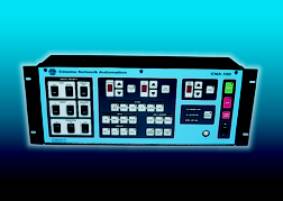
If so, the rocker switch we're trying to get out of you, and to help you out is in that lower left set of switches
thx-Monte
Posted by Frank Dubrois (Member # 3042) on 04-25-2005, 06:03 PM:
No thats not our panel...ours is very simplistic. I'm sorry I dont know what the automation is, we havent had the equpitment that long. I'll look at it and get a model for that. Sorry about this.
Posted by Brad Miller (Member # 2) on 04-25-2005, 07:36 PM:
This is why EVERYONE should send in full theater tours of their theater. Just imagine how easy it would be for someone to say "I am having this problem and you can see pics of my equipment setup on the pictures page." ![[Wink]](wink.gif)
Posted by Wolff King Morrow (Member # 2226) on 04-26-2005, 01:48 AM:
Except most employees would get fired if they posted booth tours on the internet.
Posted by Brad Miller (Member # 2) on 04-26-2005, 09:50 AM:
Those companies shouldn't be buying crap equipment and doing shitty theater designs then if they are so embarassed about someone seeing their booth. Think about it.
(and no this thread will not deviate into that discussion - keep it on topic)
Posted by Bob Koch (Member # 1062) on 04-26-2005, 12:37 PM:
Burned wiring smell sounds like the close coil on the douser is no more.
Posted by Gordon McLeod (Member # 33) on 04-26-2005, 12:50 PM:
"Burned wiring smell sounds like the close coil on the douser is no more."
Except he states the cgangeover closes on automation
I suspect a burned trace on the PCB
Posted by Frank Dubrois (Member # 3042) on 04-26-2005, 01:38 PM:
Thats what I was thinking too...its really the only thing I havent gone over extensively because I really dont know how to best find a broken trace..it sounds like a very time consuming project. I do have the schematics and can follow them to a certain point, but I'm no engineer.
Posted by Monte L Fullmer (Member # 2797) on 04-26-2005, 01:45 PM:
quote: Gordon McLeod
I suspect a burned trace on the PCB
...and that is an easy fix by soldering a 22g jumper wire between the two burnt trace ends on the PCB.
-Monte
Posted by Frank Dubrois (Member # 3042) on 04-26-2005, 01:50 PM:
Repairing it...sure...FINDING it...well that another problem. Should I look for obvious burn marks?
Posted by Frank Dubrois (Member # 3042) on 04-28-2005, 03:22 PM:
The lamphouse is a Strong Highlight IIA...in case anyone is still following this topic. I still havent found the problem.
Posted by Rick Raskin (Member # 1561) on 04-28-2005, 05:18 PM:
If you have detailed schematics, and not those damned detached drawings that only show lines connecting boxes, it shouldn't be to difficult to locate the fault. First, determine what signal the c/o switch applies to the closing coil when you push it. Is it voltage or ground (earth)? For purposes of illustration, let's assume it switches a ground pulse to the coil. Take a clip lead, ground one end and then walk the ground from point to point until the coil operates. The open circuit is between the point that operated the coil and the previous one. Not knowing your specific setup I'd caution that if there are electronics along the path, you seek help from a qualified engineer. Good Luck.
Posted by Bob Koch (Member # 1062) on 04-28-2005, 08:04 PM:
Gordon;
You`re again guilty of believing of what they report unto you ; is true.
Posted by Kevin Orman (Member # 3076) on 04-28-2005, 08:23 PM:
quote: Wolff King Morrow
Except most employees would get fired if they posted booth tours on the internet.
Err.. Would they? Why?
Posted by Dan Bouvier (Member # 2655) on 04-28-2005, 08:43 PM:
quote: Kevin Orman
Err.. Would they? Why?
If you have any bad habits, you're broadcasting them for all to see. Including competitors, friends of the owner/managers, or tech people. Basically your post implies that whatever you're doing is the sworn policy of your company, which it may not be.
Take it from me!
Posted by Phil Hill (Member # 371) on 04-28-2005, 08:56 PM:
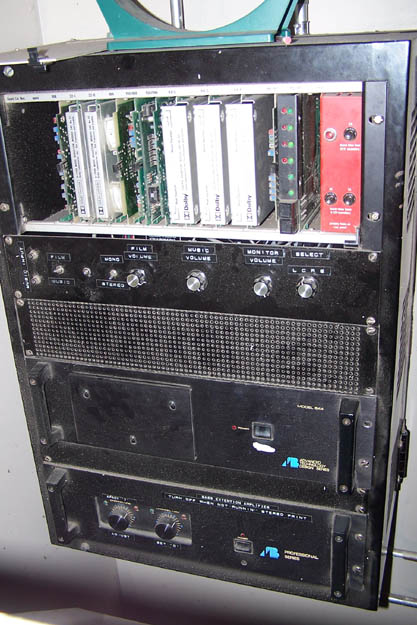
I agree Dan. The pic below is an example of a theatre that has poor management and/or a lazy staff to allow the equipment to be so dusty/dirty. IF I was the owner, I sure wouldn't like for those pics to be publically displayed. It makes one wonder how many other things they let go?
Posted by Monte L Fullmer (Member # 2797) on 04-29-2005, 03:45 AM:
..true, I was wondering about this on the one pic with that box fan blowing in this processor/amp rack. That's massive insane!
-Monte
Posted by Frank Dubrois (Member # 3042) on 05-02-2005, 01:12 PM:
Still driving me nuts!
Posted by Frank Dubrois (Member # 3042) on 05-04-2005, 10:02 AM:
Cant find anything wrong here...what would the next step be in locating the problem? It sounds like possibly a board may have a break or crack or something...but how do I locate it?? If employees smelled something burning, and its related to this, what would most likely have burnt? A relay? PC board?
Posted by Ken Layton (Member # 133) on 05-04-2005, 10:04 AM:
Did you ever tell us the make & model of the automation unit in question?
Posted by Gordon McLeod (Member # 33) on 05-04-2005, 12:02 PM:
since this now appears to be beyond your depth call in your service engineer the advice has been provided several times by several people to trouble shoot the problem if you had the skills
at this point do the safe thing call in someone who does
Posted by John Pytlak (Member # 331) on 05-04-2005, 12:46 PM:
When others "smelled something burning" when equipment failed, the source of the problem is usually obvious. But without the skills to fix it, the solution may not be. Call your service engineer. Turn off the power if the burning smell persists or you see smoke.
Posted by Frank Dubrois (Member # 3042) on 05-04-2005, 01:12 PM:
Perhaps I should stress that I am confident in my skills to repair or replace anything...troubleshooting has usually come pretty easy to me...but this problem eludes me. I'll try not to take these posts as a personal assualt on my skills. And for the record, the firm who installed our equiptment has been unable to find it as well, so I'm in good company. They suggested replacing parts with other units until I find the problematic board or relay. With some items, its ok to do that, but with electrical parts that apparently burned, I'm not quite as eager to swap them around. Thanks for the suggestions anyway.
Posted by John Pytlak (Member # 331) on 05-04-2005, 01:21 PM:
Sorry. It sounded like there was a risk of further damage, and you needed outside help. Obviously, if you find the burned component, you need to troubleshoot and fix whatever caused it to burn. If you have the skills to do that, go for it!
Posted by Richard Hamilton (Member # 321) on 05-04-2005, 09:42 PM:
Frank,
Don't take it personal, but when you dont give the info that we need to troubleshoot the problem for you online it gets a little frustrating.
The 2nd response to your post asked what automation you have. You have not answered that yet! Maybe you can ask the "firm" that installed the equipment and let us know. ![[Roll Eyes]](rolleyes.gif)
Posted by Gordon McLeod (Member # 33) on 05-04-2005, 11:37 PM:
I guess I will be a little more blunt
If a theatre I service posted a request on a public forum for help and the awnsers to there questions that appeared here were posted and the person then couldn't get it working but still claim they could trouble shoot what is appearing to be a probably simple issue of I don't know what brand of automation is involved let alone what brand of changeover in on my machine would find there head office would be told either get rid of that booth person or find another service company
We are not dealing with rocket science but with some issues that could be fatal to a user playing around
There has been enough advice offered call in someone who actually knows what they are doing before the liability increases (a burning smell has been publicaly posted so an insurance company if a fire occurs would have proof of bad judgement occurring)
Posted by Richard Hamilton (Member # 321) on 05-05-2005, 12:08 AM:
quote: Frank Dubrois
The lamphouse is a Strong Highlight IIA...in case anyone is still following this topic. I still havent found the problem.
Frank, i think we are following this topic. What does the lamphouse have in common with the problem? Is it a console or separate lamphouse/ pedastal? ;)Also since it is a new installation, maybe the dimmers are interfering with the automation. If you have SDDS ............
Posted by Frank Dubrois (Member # 3042) on 05-05-2005, 02:36 PM:
OK, then I wont expect anymore help form you Gordon, thanks for sounding like a smartass anyway. Sorry I'm not as brilliant as you are...maybe someday.
Posted by Richard Hamilton (Member # 321) on 05-05-2005, 03:21 PM:
quote: Frank Dubrois
OK, then I wont expect anymore help form you Gordon, thanks for sounding like a smartass anyway. Sorry I'm not as brilliant as you are...maybe someday.
Ok Frank, you ask for help, then call us smartasses?????WTF Maybe someday you will figure out your problem. Best of luck to you!
Rick
Posted by Frank Dubrois (Member # 3042) on 05-05-2005, 03:57 PM:
No, only Gordon. I took offense to his post....nobody else.
Posted by Jeremy Fuentes (Member # 2135) on 05-05-2005, 04:27 PM:
Maybe if you post a picture of the equipment in question someone here will recognize the unnamed automation in question, and they can go from there.
Edit: Brad suggested this back on the first page I think, but he was probably just being a smartass.
Posted by Frank Dubrois (Member # 3042) on 05-05-2005, 05:10 PM:
Well, unfortunately I havent been back to work for more than 1 day since this post. I understand the frustration others have in trying to help with limited information, but honestely, I'd prefer no response to the kind of comment I got from Gordon. He apparently enjoys his superiority complex...so I'll just consider this matter closed. Thanks you everyone else for their assistance, next time I'll have all the information ready before asking.
Posted by Richard Hamilton (Member # 321) on 05-05-2005, 06:53 PM:
Frank,
Gord was just being more "blunt" than i was. I tend to be more of a smartass in a subtle kind of way I dont think Gordon was coming off "Superior" to anyone. If you read this entire post, you will see 4 pages of people guessing about equipment they think you may have.
I havent re-read all of the pages, but if I remember correctly, I think every one of my posts, I asked you what automation you have. I think other people have also asked. I'm not saying that if you tell us, I can magically fix your problem. (That would take someone with Gordons years of experience and expertise) ![[beer]](graemlins/beer.gif)
If you dont know what brand of equipment you are having the problem with, then of course people will question your abilities and knowledge. Unless, you are servicing hundreds of screens and just cant remember because you have such a variety of different equipment!
Just a little friendly advice: This is a very small, close industry to be involved with. You should really think twice before making "smartass" comments on a public forum. If you stay in this field, you will be amazed at the number of "familiar" names that you run into.
quote: Frank Dubrois
Sorry I'm not as brilliant as you are...maybe someday.
I hope so Frank, we could use some more out here!
Posted by Frank Dubrois (Member # 3042) on 05-05-2005, 09:00 PM:
Well, as I explained, I havent been back to work for a while. I dont memorize our equiptment and the item I was trying to discuss is NEW to our theater. We have different set-ups and this particular set-up (automation, part #'s etc) eludes me. As far as his post goes (for the last time) I personally took offense to it. Maybe he is smart..maybe he does know what he's doing, and maybe is the smartest person here, however, he needs work in the personality department. I'm not saying he's a bad guy, but if he DIDN'T mean to offend, he couldn't clearly get his opinion out in writing without offending. I'm past it.. I am hoping this thread just gets closed because I'm done with it.
Posted by Gordon McLeod (Member # 33) on 05-05-2005, 09:39 PM:
Sorry if you were offended but you ask for help, tell us you can troubleshoot it yet, you can't tell us the make or model so how can we hel, something everyone has repeatedly asked
A changeover is a simple device, its control is simple, so trace it back there will be a manual switch, a relay a wire harness and probably a PCB with a terminal strip and connectors
The fact that there has been a notable smell indicates that something has gotten hot
Powered by Infopop Corporation
UBB.classicTM
6.3.1.2