This is topic Reminder: Don't throw CP650's away in forum Film Handlers' Forum at Film-Tech Forum ARCHIVE.
To visit this topic, use this URL:
https://ft-forum.com/ft/cgi-bin/ubb/ultimatebb.cgi?ubb=get_topic;f=1;t=007149
Posted by John Walsh (Member # 168) on 04-28-2005, 09:27 AM:
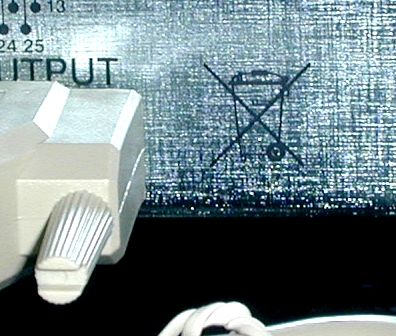
Anyone know why there's a picture of a garbage can with an X through it on the back of some CP650's?
Posted by Ken Layton (Member # 133) on 04-28-2005, 10:04 AM:
Maybe garbage in - garbage out?
Posted by John Pytlak (Member # 331) on 04-28-2005, 10:17 AM:
Usually, that's a sign that the components should not simply be put into regular garbage and sent to a landfill. In other words, electronic gear often has materials in it that can harm the environment, and should be properly recycled. Typically these include things like lead solder, batteries that contain cadmium, mercury, lead, or lithium, mercury-wetted contacts, lead in CRTs, chromium magnetic media, thorium-doped cathodes and electrodes, etc., not to mention valuable materials like gold plated contacts, etc.
Most professional gear would have an aftermarket for used circuit boards to use as replacements on old equipment, even if the unit is not repairable.
Posted by Tim Reed (Member # 137) on 04-28-2005, 02:15 PM:
quote:
Reminder: Don't throw CP650's away
![[Big Grin]](biggrin.gif) Hahahahaaa! ROFL!
Hahahahaaa! ROFL!
Posted by Joshua Waaland (Member # 287) on 04-28-2005, 02:56 PM:
That sign is usually printed on lead-acid batteries. Do these contain any for back-up maybe?
P.S. Anyone considering throwing their CP-650's out can donate to me. I will even pay the shipping. ![[thumbsup]](graemlins/thumbsup.gif)
Posted by Randy Stankey (Member # 64) on 04-28-2005, 03:34 PM:
I'll do you one better!
If you send me your used but still operational cinema equipment, not only will I pay the (reasonable) shipping cost, but I'll even send you a letter you can use to get tax credit for making a donation to a non-profit institution!
Really! ![[Smile]](smile.gif)
Posted by Bruce Hansen (Member # 281) on 04-28-2005, 05:56 PM:
I'll do that even better:
Send me your unwanted stuff, I'll send you BEER. ![[beer]](graemlins/beer.gif)
Posted by John Pytlak (Member # 331) on 04-29-2005, 08:58 AM:
Just received this note from Barry Ferrell of QSC:
quote:
Hi John,
There is a thread on "don't throw away CP-650's" on Film Tech. My membership is not up to date. Can you update the other folks next time you are on line?
This is part of the RoHs WEEE initiative in Europe. The EU wants all electronic gear to be recycled. The symbol will soon appear on QSC amps as well. The RoHs part restricts hazardous substances used in the manufacturing process. This is actually driving a conversion to "no lead" solder by August, 2006.
Here is a link to a website of a recycling company that explains the WEEE program.
http://www.weee-recycle.com/home.html
Best regards,
Barry Ferrell
Director of Product Strategy, QSC Audio Products, Inc.
Vice-President, International Theater Equipment Association
http://www.weee-recycle.com/home.html
quote:
This website is your one-stop-shop for information about the proposed WEEE legislation and how it is likely to affect your business.
During 1998 915,000 tonnes of electrical and electronic equipment
waste was created and this volume is rising between 3-5% per annum.
After 10 years of debate the EU directives EEE, WEEE and RoHS are becoming a reality. The impact on the way manufacturers design, produce and dispose of their products will be huge.
Weee-recycle.com will update you on all you need to know about the new legislation and suggests practical solutions your organisation can benefit from.
Posted by Chase Hanson (Member # 2779) on 05-01-2005, 12:36 AM:
quote: Bruce Hansen
Send me your unwanted stuff, I'll send you BEER.
WINNAR!!
Posted by Alan Dallas (Member # 2537) on 05-01-2005, 01:05 PM:
Throw them away!? Hell no I love my CP650's. All 10 of them. Now only if I could get Harkins to trash the other 4 Sony DP-3000's and penthouse readers that we have. *shudder*
BTW, another item I didn't see mentioned here that all electronic devices contain that are hazardous to the enviroment are Capacitors.
Posted by Michael Schaffer (Member # 1204) on 05-01-2005, 01:18 PM:
I don't know what a DP-3000 is, but if you have any DFP-D3000 to give away, I will take them immediately, look through them, get any parts needed from Roberta Hidalgo and then enjoy this great processor.
BTW, I thought Harkins had Kinoton projector heads. Unlike many other projectors with their metal gates and bands, these do not trash the edges of the print, so you shouldn't have too many problems with SDDS, unless there are some serious flaws in your film handling. Did you let the reader let do its readjustment routine lately?
[ 05-02-2005, 12:38 PM: Message edited by: Michael Schaffer ]
Posted by Alan Dallas (Member # 2537) on 05-01-2005, 01:38 PM:
Yes DFP-3000, Typo, my bad. And yes I do the A-chain on them often. And yes we run the Kinoton PK60-D's. However... 1 of them will not co-operate and we get audible pops on splices. And don't be dogging on my splices yo. I make damn clean splices. The popping is from the Processor not scrubbing out the splice noise. Even does it when I force SRD rather than let it run SDDS. Our Engineer is aware of the problem but has yet to find a problem with the processor. He believes the SDDS reader is losing the track and the processor is attempting to switch back and forth between SRD and SDDS. When it does that switch over it fails to filter the sound format change, hence the popping in the house.
Oh and before I forget. Films that are processed with Cyan tracks sound like utter crap in SDDS after a few runs. I know it shouldn't have anything to do with it but it does. Plastic Gates or not there is enough friction there to scrub the edges to the point that the SDDS reader has a bitch of time reading the tracks after a weeks worth of runs. So I end up forcing those into SRD on every run also. On the one that actually pops in the house it's worse. So we don't do prints with Cyan in there anymore.
[ 05-01-2005, 03:24 PM: Message edited by: Alan Dallas ]
Posted by Michael Schaffer (Member # 1204) on 05-01-2005, 01:54 PM:
That splice dropout is (strangely enough) caused by the changeover settings, it may or may not be firmware version dependend, I can't seem to remember any details right now. But I am sure Robbie can give you that info.
A lot of such problems with DFPs are also caused because the reversion (or "analog concealment mode" as they prefer to call it) is not properly set up. It might be worth investigating if your automation between the Dolby Digital processor (DA20?) annd the DFP is set up for pulse logic (as it most often is) or level logic (as it should be).
I ran SDDS on many FP30Ds and Es and never had any significant problems once the system was configured right - provided the track had originally been printed well. But that is another completely different subject. If you have wear problems on your projector heads, it might be worth investigating the gate (or "pressure skate") height. Sometimes these are set a tiny bit too high and there is a little too much friction between the curve at the bottom and the intermittent sprocket. And then of course the skate pressure.
Other problem areas might be the O-rings on the springed roller at the sound drum, and the setting of the spring tension which should be checked with the adjustment tool.
BTW we just finished installing 14 CP650s and I was also puzzled for a moment by the trash can symbol before I remembered what it stands for. It is just not very elegant that they placed it right next to the output!
Posted by Brad Miller (Member # 2) on 05-01-2005, 04:07 PM:
The quick dropout on a DFP-3000 when switching formats is not firmware related, it's hardware related. I forget the board number, but one of them if you have the newer board does a cross-fade so as to completely conceal that. Older boards have that quick blip of silence like the CP500 does.
Quick question, are you saying that you have one particular auditorium with SDDS and SRD and you get a dropout of digital sound regardless of which format you are using? If so I would say the easiest thing you could do is swap the SDDS reader with another one in the complex and see if the problem follows. It is entirely possible that particular penthouse isn't quite aligned properly enough to track through a physical interruption (splice) and the Kinoton basement reader just happens to also be slightly misaligned (or as Michael said, probably a little bit insufficient spring tension or worn O'rings). If swapping the SDDS reader with a known good one doesn't fix the problem with that format, then maybe it's time to start looking at a physical issue with the projector/console (shaking).
Cyan prints have no bearing on the SDDS digital tracks.
Is there any wear at all on your white runners in the Kinoton gates? If so that will tear the hell out of your digital tracks, and is caused by too much heat in the machine (likely from a water circulator that died). Place your hand on the aperture and around the assembly between the aperture and intermittent (sides and front). If it is any more than just a tad bit warm, you do not have sufficient cooling.
Michael - I switched out my delrin runners for steel. Whoever said that delrin is more gentle on the film is full of shit. I ran a fair test by making two loops out of a brand new trailer. One was run with a pair of new delrin runners for 10 minutes and the SRD error rate started to increase a point or two. (I was careful to ensure that the loop did not come into contact with anything other than a film roller.) I then took the other loop also from that never used trailer and ran it for hours with a 1/2 point increase in the error rating. Both times the xenon was lit and this effect was noticed in every auditorium. There was no "cheating" (FilmGuard) going on either. Buy the steel runners. They will last the life of the projector, never need to be changed and are more gentle on the film. Delrin is stupid.
Posted by Michael Schaffer (Member # 1204) on 05-01-2005, 11:09 PM:
There is a board-related isuue with crossfading between format changes (can't remember the version of the board either), but I was referring to the dropout at the splices. Either a firmware up to a certain version or the settings in the changeover configuration (even for platter systems) caused this. Hmmm. I think I remember what it was now, but I think it is better if somebody who is certain he remembers all the details correctly comments on that.
Posted by Robbie Hidalgo (Member # 2090) on 05-02-2005, 01:36 AM:
Alan,
Well, Brad and Frau Schaffer have definitely nailed all the key points already.
Who's tech-ing Prescott these days, is it Andy? Either way, the pop will only take a few minutes to diagnose with a couple of hints thrown their way. BTW, if you manually switch presets on the front panel during a run, say from SDDS to SRD to Optical, etc., do you also hear a pop in the monitor? And if so, when? (Coming or going to/from which format? I'm going to guess that if the answer is yes, it is coming and/or going to/from the Optical preset, but make sure the print is playing all three formats you're configured for if you check this).
Firmware version for all D3000's should be v2.92, changeover delay should be set for 7 seconds. I'm reasonably sure that all the units at Prescott are at v2.92.
The issue of crossfade is actually both firmware & hardware related. Newest generation DSP's use a newer generation processor. Since the new processors had some extra horsepower, a new firmware version was compiled strictly for the new boards which took advantage of the extra HP to perform the crossfade.
With or without crossfade though, there should be no inherent pop in the transitions of a properly funtioning D3000. A quick swap of the APR-34 (bottom) board or the DSP-82 (top board) in the processor (with a non-popping unit) will localize the pop source to either something failing inside the processor, or some offset present at the optical input. (This is definitely a to-do for your tech only).
FYI, the D3000 has it's own flavor of hold-time algorithm to prevent switching in and out of digital repeatedly, so rapid switching in and out is probably not the cause of the pop.
And you're right, Cyan optical tracks have nothing to do with SDDS decoding or sound quality. Although, if you're doing your own A-Chains as you mentioned, it would be interesting to know what the Slit Loss EQ is set for on those houses right now (that will show on the same screens as your Lt/Rt level cal).
As a last bit of info, SDDS can play through splices without any analog reversion since the two SDDS tracks are physically offset from each other by 17.84 frames. So there is no "splice noise masking" function in the unit at all. However, if you're reverting at a splice it means that TWO ACMs (or two double-track errors) have occurred within the 17.84 frame window in order to force the reversion. This is one of the reasons why splice quality is so critical, since a (for example) 39mm wide splice passing through a 35mm roller might cause enough of a physical impulse to create a second error near the splice point. Similarly, excessive handling around the splice (which causes any damage) can cause an error within the 17.84 frame window. And Brad has already touched on the influence of any physical alignment issues, and how to isolate those. Ideally, the unit should be playing through splices without analog reversions at all.
Tell the guys to give me a ring next time they come up there though. It won't be too hard to find the source of the pop.
-- Robbie
Posted by Alan Dallas (Member # 2537) on 05-02-2005, 03:11 AM:
Thank you Robbie, I'll print all that out and run through it this upcoming Wednesday after my "weekend". Get you the A-Chain info as well.
And yes Andy F. is our assigned engineer/tech. He's taught me all I need to know to effectivly trouble shoot all the equipement we have as well as train me in the proper way to do common preventitive maint. tasks. Including "officially" training me on Diode change outs. "Ooh look a giant 3-phase rectifier." Yay to US Air Force training.
Anywhooo... A couple things I can tell you off the bat is I never thought to ask someone to stand in the Auditorium while I physically changed format to listen for pops. I set the format right after hitting Start. They're[the 3000's] are currently set to a 2sec fade delay for Non-Sync. Tonight however I made it point to visit the Aud in question (house #1 btw) near a reel change on 2 seperate occations. Once standing near the screen to check L, C, & R for the popping and again at the back. If my hearing is as well as I believe it to be the popping was most notable in the surrounds but it was there in the front channels as well. It's enough to give the subs a good thump. But liked mentioned its really noticable in the surrounds. All 4 of our SDDS setups have the Dolby SA10's with the DA20 EX Expansion modules. Problem there maybe?
Lets see... oh and yes I believe the firmware is v2.92 in our 3000's. I remember seeing it when we last did the A-Chain Tests on those. Andy and I scoped the BAPCO Dolby penthouse readers about 2 weeks ago. He adjusted vertical alignment on #1 but couldn't adjust the horizontal as it seems to be fixed. As in non-adjustable. The other 3 scoped fine (3.5 volts +/- .2)
Physical interuption may be a possiblity but since I do all the film work now and this problem has been ongoing before I was given that fulltime task I'll assume it's not just my splices. I'll be rechecking the razor blade alignments again on my splicers this Wed just to make sure I'm not getting alot of overhang. Pretty sure I'm not however. I do take pride in my film work and presentations. ![[Wink]](wink.gif) All rollers on the readers roll freely. All 3 sound drums are nice and clean as usuall. If all else fails I'll have Andy try the "swap it and see if problem follows technique" on the Cards in the 3000's.
All rollers on the readers roll freely. All 3 sound drums are nice and clean as usuall. If all else fails I'll have Andy try the "swap it and see if problem follows technique" on the Cards in the 3000's.
Oh and the Cyan thing, I looked over one of the prints I have in Cyan while it was running this evening with my Maglite. The one that gives bad SDDS perfomance(Fading/popping) looked to be a bad print job(Ice Princess). Duma was also giving wierd popping and fading in house #1 when it first opened but its not Cyan. There is however whole sections where the SDDS tracks on one side or the other seem to fade in color from the normal bluish/green to clear on the last reel of that Print. Since we have these prints in non-SDDS houses now I'm not to worried about them as they're running in SRD off the CP650's.
Posted by John Pytlak (Member # 331) on 05-02-2005, 08:45 AM:
quote: Alan Dallas
There is however whole sections where the SDDS tracks on one side or the other seem to fade in color from the normal bluish/green to clear on the last reel of that Print.
Sounds like there was an issue with the lightsource on the printer that prints the SDDS soundtrack area.
Posted by Paul Mayer (Member # 355) on 05-02-2005, 10:54 AM:
quote: Robbie Hidalgo
Frau Schaffer
When did Michael get married?
Posted by Robbie Hidalgo (Member # 2090) on 05-02-2005, 11:33 AM:
I've always considered Michael to be "married to his art".
Hey Alan, one more thing to watch for: when the pop occurs, can you see any corresponding motion on the D3000's front panel meters? If so, it's a good bet that something in the processor is the source. (The headphone jack can be useful in determining this also, if you have a set of them around. You'll want to monitor switch position 1...).
Weekend?? What's a weekend??
Posted by Michael Schaffer (Member # 1204) on 05-02-2005, 01:22 PM:
A "weekend" is when people don't have to worry about work and have a good time. Kind of like ShoWest, only that normal people have it every week.
Alan: Since the pop problem obviously comes from the sound processor(s), an even better way to listen for it is using the DFP's headphone output. The selector switch can be configured in the software, the positions can be assigned various channel configurations. I do not know if you are allowed to use the software or to access the settings via the front panel menu. If not, ask him to configure the headphone settings for you.
The changeover settings mentioned by Robbie should absolutely be checked. We had a few DFPs which dropped out at every splice until I set these to 7 seconds for both - even though it was a platter setup - projectors. Then it worked very well...
Even if you are not allowed to use the software, you can check the firmware version any time by pressing the down arrow, then right, select menu when it is flashing, select status, the version number is right there.
I am a little confused about when exactly the pop occurs. When the system drops out and switches between formats, when it has already dropped out and is in Dolby Digital? Dolby Digital sometimes makes a very short "eee" buzzing sound at splices, I don't think there is anything you can do about that. Or does it revert to analog and the pop occurs in analog at the splice? Again, no offense intended about your splices. I just want to clarify where exactly the problem is.
I am little more confused by you mentioning that you have BACP penthouse readers. These are excellent units (Sam got the recognition he deserves for the design by every city in California naming a street after him), but if you have a Kinoton projector, you don't need it. The basement reader is just as good, and upgrading it to D costs $1000 less than buying the BACP penthouse, in addition to the fact that it is doesn't add any rollers to thread and clean in the film path. So a lot of money was wasted in the planning of your location...
That leads me to one more thing to check that wasn't mentioned before: Are the SDDS and Dolby reader offsets programmed correctly? It may be that they are just a little bit off and what you hear when the DFP switches is the audio "stumbling" for a moment. This is best tested by listening to a high quality piece of film (not a trailer) with dialog over the headphone. After threading that (the film, not the headphone) carefully with your standard loop sizes, select the C channel and switch between analog and the digital formats. The audio must be exactly in sync. If not, the reader offsets have to finetuned.
What I meant earlier by the "A" adjustment was not the traditional A-chain, but hooking up a notebook to the reader and sending it a textfile with the message "A" (for "adjust") via HyperTerminal. This will make the reader go through a self-adjustment routine.
Finally, if you are interested in troubleshooting print problems with SDDS, download the Lab process manual from the SDDS website. It explains exactly what channel information is in which track, how they are offset etc. It also contains high-res pictures of the actual track. Looking at the tracks with a magnifying glass can be very revealing: Sometimes the edge markings are washed out. Sometimes you find that the tracks are offset horizontally, so that the track on one side doesn't even have the edge marking anymore (typically on the picture side).
Posted by Alan Dallas (Member # 2537) on 05-04-2005, 07:14 AM:
I'll have Andy do all that work with the Laptop he has for the DFP's. I have access to the front panel login and know my around the menu's for A-chaining but beyond that... thats what Andy gets paid for.
Thanks for all the tips however. I'll be showing most of this to Andy on his next trip up to us from Phoenix and see if he can make heads or tails(no pun intended) of it all.
Edit: Oh and no Robbie, theres no corresponding movement on the Levels display on the DFP-3000 when a splice runs through. Thats that baffling part. I mean it doesn't bump up like you would expect it to. I noticed the while running a test loop through during an a-chain that the levels actually drop down on the loops splice.
Posted by Frank Angel (Member # 248) on 05-04-2005, 08:19 AM:
That concern about the environmental impact of the staggering amount of electronic equipment that is being trashed every day is not only being voiced in Europe. We just had an EPA compliance inspection and one of the things we now have to do is to mark all electronic equipment as "UNIVERSAL WASTE -- Electronic Components." All those computers and monitors and old mixers with all the toxic chemicals they contain, now have to be disposed of in a prescribed manner. They can no longer simply be tossed in the trash. Not a bad move, IMHO.
Powered by Infopop Corporation
UBB.classicTM
6.3.1.2