This is topic Kingdom won't lay down flat on platter in forum Film Handlers' Forum at Film-Tech Forum ARCHIVE.
To visit this topic, use this URL:
https://ft-forum.com/ft/cgi-bin/ubb/ultimatebb.cgi?ubb=get_topic;f=1;t=007173
Posted by Keith Peticolas (Member # 971) on 05-08-2005, 02:51 PM:
Hi there, I am using a a christe awr3 and my print of Kingdom of Heaven won't take up properly. Is laying down very uneven. Have switched out brains, threading ring and used different platter with no success. The preview/policy package lays down perfectly, once the movie hits reel 1, it starts acting up. By reel 6 it crowns unless we sit next to it and gently slap it down. Did not happen with previous print. Did happen with preview on weds. Same theater. Thurs ran fine with other print on deck. Problem returns on friday when Kingdom opened. I'm guessing a bad print. Any other suggestions would be of great help. thanks
Posted by Peter Mork (Member # 1336) on 05-08-2005, 04:02 PM:
There could be either a crimp along one edge, or one row of perfs is deformed. The difference may be very slight, so subtle you can't see it, but with one edge slightly thicker than the other, this happens. Try taking up with the edge you normally have up facing down.
On the other hand, if the "crowning" isn't so severe as to cause a problem, I say just let it go - looks weird, but so what?
Posted by Keith Peticolas (Member # 971) on 05-08-2005, 04:14 PM:
Thanks Peter, will try laying it down otherway next run. Is causing major problems towards end of flick, if not watched closely it creeps up and out of stack. And then film jumps and we have to shut it down. Has happened twice.
Posted by Monte L Fullmer (Member # 2797) on 05-08-2005, 05:03 PM:
..I used to work at a 14 screen complex that had all Christies. about 6 of those AW3 would allow "crowning" on prints. But not all prints would "crown".
I figured that it was a film stock thingey itself that would cause "crowning".
Then you get some of those prints that gets a bad case of "spoking", or even uneven winds as well.
-Monte
Posted by John Walsh (Member # 168) on 05-08-2005, 08:11 PM:
Humidity also can make film do this. This was common with polyester for several years, but the film manufacturers have done a good job reducing the effects of humidity. If it turns out the film is not physically damaged, it might be interesting to know what make film stock it is. All film manufacturers have done a good job reducing the effects of humidity, (and static)but Kodak has done the best.
This can also happen if there is too much tension either to or from the platter. The rollers that direct the film may be adjusted so the film does not 'wrap' evenly around the roller. With too much tension, the film may get stretched more on one side than the other. This might cause the film to not lay flat on the platter deck.
Posted by Brad Miller (Member # 2) on 05-08-2005, 11:21 PM:
Many possibilities here...
*One of your projectionists accidentallly damaged the film due to a misthread (no chance the lab could've done it to every reel...it's just not possile). This misthread could've been slight enough so that you can't see or really feel the damage on one edge of sprockets, but it shows up when the film is wound.
*There is a roller pretty severely misaligned (should be fairly easy to find), but of course not misaligned enough to actually lay any scratches on the print.
*Someone threaded a Century-type soundhead a perforation too tight.
You might want to also try raising the last cluster of rollers just before the film feeds back onto the takeup deck as far up as it can possibly go, while still creating a smooth wind. (This should be done anyway, but few people really bother to do it.) Having that last roller lower than about 15mm from the deck can cause this if your takeup tension is pretty high.
Just how high up is it coning? What happens if you flip and takeup "upside down" from your normal routine?
Posted by Dave Callaghan (Member # 1544) on 05-09-2005, 02:25 AM:
Years ago, sometime before 1996, I had a similar situation with coning on a SPECO platter.
I changed from soundtrack up to soundtrack down - meaning the base side is out - and the print took up absolutely flat.
I believe it was print related because emulsion out hadn't been a problem from day one. I recall a projectionist from Calgary advanced a theory to account for the strange print behaviour with a number of prints around that time. His explanation was that the labs were trying to become more efficient / cut costs by reducing the time the print spent in the hot box, so they weren't given sufficient time to properly cure in the processing.
As an operator it is more important to find something that works than to understand why. If the lab does something different and the prints behave differently, it can be argued there is a cause and effect relationship, but how the one change actually works to cause the effect is hardly obvious.
If prints up until this print have rewound flat, I would rule out the takeup guide roller height. If changing the soundtrack orientation appears to cure the problem, I would be inclined to rule out print damage.
Still, you could check for deformation of the perfs or creases along the perfs while the print is running by letting the film run between your thumb and index finger on the return path from the projector to the platter and comparing the perf area on each side. If you find damage, what causes the film to rise say with the damage up, might force the film down if the orientation is reversed.
Posted by John Pytlak (Member # 331) on 05-09-2005, 12:57 PM:
As mentioned before, winding issues are most often caused by improper humidity levels, or because the film was stretched or damaged by excessive tension.
Ideally, keep relative humidity in the range of 50 to 60 percent RH --- a strip of film should lie nearly flat, with only a bit of "positive" curl (cups widthwise with the emulsion at the bottom of the "cup"). Severely curled film will not wind evenly, and will tend to "spoke".
Excessive tension can stretch the film unevenly. Also look for any perforation indentations or any sprocket tooth "roping", which can make one edge of the film lie unevenly.
I agree with Brad that a lab problem would only affect a reel or two, not the entire print, since each reel is likely printed and processed on different equipment and on different days.
Posted by Steve Scott (Member # 630) on 05-10-2005, 08:39 AM:
I've had to work with these winding problems on AW3's and SPECO's, and I mostly found it was the roller alignment. Those wingnuts on the SPECO generally stay in place without too much need for regular monitoring, but get an operator who can't hold onto an adjustable takeup roller and lets it crash to the bottom of the rail, and you'll see this problem recreate itself.
Posted by Dick Twentyman (Member # 2746) on 05-10-2005, 08:35 PM:
We run Kinoton ST200E platters, and currently have 2 prints of "Kingdom of Heaven". One print winds perfectly flat, but the other cones up at around Spool 5 for about 10 minutes, then reverts to flat wind again. Both are running sound track down onto the platter.
Posted by Keith Peticolas (Member # 971) on 05-10-2005, 10:01 PM:
Thanks all for info. We checked all the projector and platter settings right after this first happened. They are fine, ran different print overnight and it loaded fine. Problem does get really bad after reel 5, same as stated above. Gonna try for a replacement and see what happens
Posted by Randy Stankey (Member # 64) on 05-12-2005, 02:01 AM:
Does your film look anything like this?
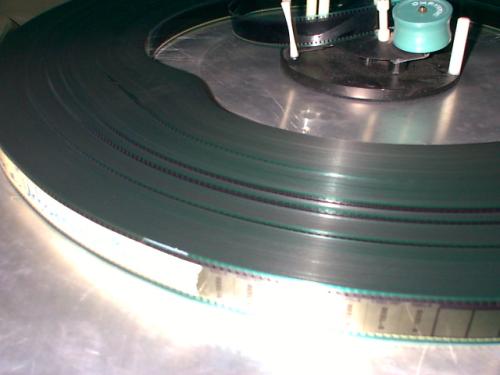
If so, it's a 90% chance that you have damaged film.
It could be because somebody misthreaded the projector. It could be because of a bad splice. It might be because the film accidentally jumped a roller and got crimped against a keeper.
Basically, the film is stretched or crimped in some way that it's no longer flat. Usually, the film is crimped against the sprocket teeth, making little dents that push the layers apart and preventing it from winding up evenly. (Often called "roping".)
If your film is damaged there is probably nothing you can do about it. As you have said, you're probably going to have to bite the bullet and order a new print.
If you're in a pinch and you NEED to get this print back on-screen as soon as possible there is a POSSIBLE solution. It might work and it might not. It depends on how badly the film is damaged and how lucky you are.
Break the film down onto 6,000 foot reels. Put it on your rewind bench and set the tension extra tight. Wind it back and forth two or three times then build it back onto the platter. Hopefully, the extra tension pressing the film agains the roll will flatten it out a little bit... At least enough to get you back on-screen until the new print arrives.
It's one of those solutions I hesitate to tell because it doesnt' always work and, if done haphazardly, you could end up worse than you started. However, if you are in a no-show situation you've got nothing to lose. Right?
This solution worked on the print in the picture above. They couldn't get the print to run without wrapping. Rewinding it flattened/stretched the film enough to get them back on-screen on a busy Friday night!
P.S.: Always carry a camera! ![[Big Grin]](biggrin.gif)
Posted by Peter Mork (Member # 1336) on 05-12-2005, 11:12 AM:
Well, I wouldn't go replacing any prints unless either the picture or sound is affected by the damage, or the print can't be made to take up somehow without causing a shutdown. Uneven or loose winding are not problems per se; it's what's on screen that counts.
A bad edge crimp can wreck your side to side focus if it causes the film to lift off the rear runners. I once had this happen - traced the problem to a pad roller in a Century sound head that was out of adjustment - the edge somehow got folded over and stayed that way producing a nasty crimp through a whole print of Happy Texas.
I found a way to fix it, by running the whole print backwards (that is, tail first) through the projector and purposely letting the misadjusted pad roller re-crimp the bad edge in the opposite direction. It worked (good old polyester film can take all kinds of abuse) but was very time consuming as you can imagine - I did get it to hold focus, though.
Posted by System Notices (Member # 2357) on 04-27-2007, 11:53 AM:
It has been 715 days since the last post.
Posted by Dominic Espinosa (Member # 2122) on 04-27-2007, 11:53 AM:
Has this issue ever found a culprit?
Here's my first "crowned" print.
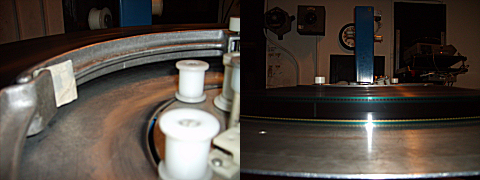
Note the ring being forced up about 1/3" from the deck surface.
The ring is difficult to remove as the wind is uber tight as well.
I'm thinking excessive tension on a very slightly out of alignment roller?
This week old film shows virtually no signs of wear, including a working SDDS track, has been run on a film cleaner with FilmGuard since day 1 and has continually taken up like this since the first show.
It's a brand new print and thus far is the only one to have this issue.
Posted by Darryl Spicer (Member # 711) on 04-27-2007, 12:08 PM:
look closely at the sprocket hole area on the soundtrack side. Do you see a slight crease in the film going across or near the sprocket hole area. Do you encounter the same problem if you run the soundtrack down.
Posted by Monte L Fullmer (Member # 2797) on 04-27-2007, 03:43 PM:
Don't worry about it - as long as it pays out and rewinds okey (woo..ORC platters...), film will want to do what it wants to do and there is nothing can be done about it... I get those "crowning prints" from time to time (prob due to the excessive curl during development stages..blame the labs here !!), and I figured on such above on not trying to make it lay flat.
Posted by Dominic Espinosa (Member # 2122) on 04-28-2007, 02:54 AM:
It's got to be the print. It's undamaged and shows virtually no signs of wear save for some minimal scuffing that all prints seem to have.
Any how, it's doing it on all houses. It runs through fine, it's just strange to me. That's all.
Posted by Stephen Furley (Member # 1277) on 04-28-2007, 03:47 AM:
Not just a problem with platters; I've had the odd print that just won't take up straight on spools, had one just last week. The print was so determined to take up that way, on both projectors and rewind bench that it was actually forcing the flanges of the spools apart. Looked fine, but just couldn't get it to take up properly.