This is topic EPISODE 3 IN THE AIR ! in forum Film Handlers' Forum at Film-Tech Forum ARCHIVE.
To visit this topic, use this URL:
https://ft-forum.com/ft/cgi-bin/ubb/ultimatebb.cgi?ubb=get_topic;f=1;t=007201
Posted by Per Hauberg (Member # 529) on 05-18-2005, 05:30 PM:
-In the still growing desperate fight for holding out pirates, print arrived so late, that test run was not possible. Full House midnight showing started with DTS dropping out after app. 2-3 minutes - Change to SRD gives fail rate 6. and Error !
Hippetyhop ! ![[Frown]](frown.gif)
Addition 0300, local time:
SDR rate reels 2,3,4,5 and 7: rate 6. - 7 and Error !
Reel 6: Error and drop out all the way.
Can anyone tell me: Is the dts-timecode copied in a way, allowing the code-string to be misplaced ? -In the beginning of reel 6 there are, what I would normally call scratches - but, my God - it looks like was it the dts-code coming down the screen one third into the picture.... And no ! - It HAS been a long day, but I'm not that tired - not drunk - and not smoking anything strong !
Per
[ 05-18-2005, 08:09 PM: Message edited by: Per Hauberg ]
Posted by Kris Dirix (Member # 3012) on 05-19-2005, 06:37 AM:
Hi Per,
It is almost impossible to split a DTS track from the other sound systems. The 4 soundtracks are recorded simultaneous on 1 sound negative and the soundneg. is printed in 1 sound-print head on the positive film.
If the other3 soundtracks are on the place they should be, it's no DTS. ("Never say never" ![[bs]](graemlins/bs.gif) happens sometimes).
happens sometimes).
Sounds to me like carvings from a sprocket wheel in wet conditions f.e: developing processor. If the "data-dots" are really white.
Can you tell me the name of the print lab?
The stock will be EK2383 that's for sure.
Greetz. ![[beer]](graemlins/beer.gif)
Posted by Per Hauberg (Member # 529) on 05-19-2005, 07:15 AM:
Hi again
No - the dots are yellow - and not dts track in any way by closer exam.
Will check stock and lab when back in cinema.
New print not possible until friday - it'll be a long thursday.
Per
Posted by Kris Dirix (Member # 3012) on 05-19-2005, 02:44 PM:
Yellow scratches is severe emulsion damaging, it means that the emulsion layers are scraped away till the blind (yellow) layer.
![[Eek!]](eek.gif)
Posted by Per Hauberg (Member # 529) on 05-19-2005, 06:11 PM:
This is not scratches in the print - it's in the printing !!
Posted by Rachel Gilardi (Member # 1016) on 05-19-2005, 06:17 PM:
Heh, we got our prints nice and early on Tuesday with no problems at all.
Unfortunaly we're not doing too much business with our three prints as of now, everyone is going to the multiplex down the street. Want one of my prints? ![[Roll Eyes]](rolleyes.gif)
Posted by Kris Dirix (Member # 3012) on 05-20-2005, 12:36 AM:
OK Rachel, send a copy over here by Star Destroyer, I haven't one in my collection yet . ![[Big Grin]](biggrin.gif)
Is it also a bad copy from damaged dupneg?
Hi Per,
How is the sound in there? Is it subtitled in Denmark or is it dubbed? Did you receive a good copy now?
Posted by Michael Schaffer (Member # 1204) on 05-20-2005, 03:02 AM:
quote:
This is not scratches in the print - it's in the printing !!
How do you know?
Posted by Per Hauberg (Member # 529) on 05-20-2005, 03:46 AM:
quote:
quote:
--------------------------------------------------------------------------------
This is not scratches in the print - it's in the printing !!
--------------------------------------------------------------------------------
How do you know?
By placing my little, sensitive, urine-stinking fingers on it, searching for uneven surfaces ! -How else ? Hi, Scaffer - Doing well ?
---------------------
Latest: So far 3 of 81 danish prints taken out, due to high failrates.
Rachel: Same here - Neighbour's adds shouts about 70 feet screen, and of course the kids runs that way....
Posted by Thomas Jonsson (Member # 1902) on 05-20-2005, 06:08 PM:
My print has SDDS on all reels except no 1. So I play that one
SRD and the rest in SDDS. I´ve listened to all three digital
soundtracks (they play just fine, all of them) and SDDS sounds
best. The other two sounds a little "thin".
To me the picture looks like it has been softened. Do you have
the same impression?
As for yellow scratches I had a HUGE one, made by the lab, on
the last 7 minutes of Kingdom of Heaven. Looked awful.
Thomas
Posted by Per Hauberg (Member # 529) on 05-20-2005, 07:17 PM:
quote: Kris Dirix
How is the sound in there? Is it subtitled in Denmark or is it dubbed? Did you receive a good copy now?
Fox logo not only a bit thin - but thinner than cold tea.
New print arrived friday - with exactly the same faults as the first one: DTS runs only as long as the opening titles are on, and fail rate 7 and "E" rules the SRD. As the first print, also on this one, reel 6 runs in SR only ! A Lucas digital promotion stunt !
Posted by Alan Dallas (Member # 2537) on 05-23-2005, 05:38 AM:
How many different SRD readers have you ran these "Bad prints" through? If only 1 you may want to look into your reader or possibly decoder. Then again it is quite possible you keep getting bad prints.
We have 4 houses with SDDS. Opening day we ran a 2x Interlock between 2 of the units with SDDS. Durning the ENTIRE presentation the SDDS kept dropping out to SR on BOTH readers. Viewer complaints were many at the end of that showing. Lace up next 2x interlock. This time I force the both SDDS decoders to run SRD-Ex only. Guess what? Not a damn problem one. Even ran the Main volume in Both houses up -8.0db from its normal -10.0db(0db Fade). Couldn't sound sweeter. Rich full round Bass. Hey if I can feel the Bass in the both... you know its bumpin.
Outta 3 Prints run between 6 screens (3 2x Interlocks) and 3 SDDS units everything gets ran on SRD-EX. CP-650's on the other 3 houses default to EX if present. All houses Equiped with Klipche surround speakers, Lt-Cnt-Rt Drivers and 6x20 inch Subs.
But I digress. For some reason the Printed SDDS tracks on all 3 of our Prints are chock full of errors. Thank Dolby we have SRD-EX to go to and that those tracks are perfect.
Posted by Michael Schaffer (Member # 1204) on 05-23-2005, 06:24 AM:
quote: Alan Dallas
Even ran the Main volume in Both houses up -8.0db from its normal -10.0db(0db Fade).
That sounds still pretty low. -8dB still is only about 4.5 on a Dolby fader. Unless I misunderstood you and you meant you turned the fader up 8dB from -10dB to -2. But -10 as the normal playback level also sounds really low. That is about 4 on the Dolby fader.
Posted by Alan Dallas (Member # 2537) on 05-23-2005, 08:24 AM:
You misunderstood. I did infact turn it up to -8.0 from -10.0.
Trust me that is friggen loud in Houses 1, 2, and 7 were we have 3 of the 4 SDDS setups. In House 13 -10.0 is way too loud it's near deafening. So it's normally is ran at -13.5
Don't ask me what Engineering did when they first set them up 4 years ago, but if I had to guess they set the gain on the Amps too high. I just havn't had time to crawl behind the Screens to have a look see yet. All I know is that they're QSC amps.
4.5 to 4.8 on CP-650's is whats normally ran. The note they sent in the cans with prints of SW3 said to run the Fader at 7.0. I was like Ya right and get called by radio every 5 mins to turn it down. 6.0 is plenty loud enough. Actually too loud during the Trailer pack.
-----------------
Speaking of Notes in the film cans from the Studio's.
It annoys me to no friggen end to get those.
Listen ASSHATS!! I don't tell you how to make the F'IN FILM!! You don't tell me how to present it!! GOT IT!!? GOOD!
Thats right, I'm talking to you Fox and you too Disney! ![[fu]](graemlins/fu.gif)
Like we don't know how much light should be on Screen. Like we don't know how to set sound levels to a comfortable listening level for your oh so "Special Mix". Next thing you know they'll be telling me how to clean my f'n Port Glass. grrrr.
Sorry for the mini rant. Had to get it off my chest. ![[Razz]](tongue.gif)
Posted by Paer Hoegberg (Member # 3133) on 05-23-2005, 05:46 PM:
Normally we run our CP-650s and CP-500 at 3.8-4.0 (3.6 on trailers).
On Star Wars 3 today I tried to raise the fader, 4.8 seems to bee the limit, 5 is way too loud.
Together with some prints there are notes to run at 7.0, and sometimes 7.5 or 8. Here in Sweden we have laws how loud the sound can be, and the I probably break the law.....
Posted by Dylan Marchetti (Member # 2764) on 05-23-2005, 05:48 PM:
We're properly calibrated, but our audience usually complains when films are run at 7.0, so we generally keep it at 5.0. For Ep III, we found the film was far quieter than many mixes, so we run the trailers at 5.0 then turn it up to 7.0. A pain, but it ensures that audiences don't get blasted out by the previews.
That Fox logo DOES sound terrible- of our six techings, four projectionists commented they went to the booth to make sure it was playing digital. As discussed elsewhere, the movie's OK, just mixed quietly.
Before someone says it, we did attempt to get a program in our automation to automatically adjust the volume, but were not allowed.
Posted by Kris Dirix (Member # 3012) on 05-24-2005, 03:21 AM:
Seems to me that everybody is little frustrated ![[Mad]](mad.gif)
Remember one thing:
"The sun will shine again after Star Wars" ![[Wink]](wink.gif)
And not everybody will have so much bad luck than Per with his replacement.
Small question: since I never saw a SW3 copy, is it printed at Deluxe or Technicol. ?
Posted by Michael Schaffer (Member # 1204) on 05-24-2005, 03:47 AM:
Alan - about your "mini rant": do a search about the subject in these forums. You will find that it has already been discussed in all its many aspects (ad nauseam). There are indeed a lot of aspects to it...
Still, these playback settings do "sound" very low. Apparently I did understand you correctly the first time, and you ended up at -8dB, not -2dB. That makes me wonder a little if the SPL levels were set with the SDDS units at reference level or at 7 (or near it, if I remember correctly, the DFP-D3000 had no "7" step, only 6.9 and 7.1.
Whatever gain settings you find on your amps is in itself not conclusive. It is a very common practive here to turn the amp gains all the way up to prevent tampering with the levels, then set the level in the processor. Or maybe your amps were not set up in this way since they were thought "safe" behind the screen and somebody did turn the gain all the way up later.
When your 3000 is playing very busy scenes, do the red LEDs on top of the level display come on often?
BTW, I remember we discussed some popping noise problems at reel changes recently. What has become of that?
Posted by John Pytlak (Member # 331) on 05-24-2005, 05:32 AM:
quote: Kris Dirix
Small question: since I never saw a SW3 copy, is it printed at Deluxe or Technicol. ?
20th Century Fox usually has their prints made by Deluxe Labs or one of their affiliates.
Posted by Mike Blakesley (Member # 26) on 05-24-2005, 12:50 PM:
I agree the Fox logo sounds different, but isn't it the same recording used across all of the SW films? An old recording, IOW?
The Fox logo also doesn't rotate into position like the current logo does either. I assume this is to make it match the other films too.
Posted by Jeremy Jorgenson (Member # 2989) on 05-25-2005, 01:29 AM:
Yes, Mike, you're correct.
Posted by Robert John Jeromson (Member # 2559) on 05-25-2005, 02:24 PM:
The Fox logo is deliberately crappy in terms of its mix isn't it, so that the first orchestral crash into the Star Wars titles is quite dramatic and heralds from Star Wars (1977) original release in Dolby-A ushering in a new era in film sound. From memory that particular Fox logo was recorded in the 1950's.
[ 05-25-2005, 03:56 PM: Message edited by: Robert John Jeromson ]
Posted by Mark Gulbrandsen (Member # 72) on 05-26-2005, 09:38 AM:
NOw here's something interesting.... Enhanced 35mm showings! Now what the heck is "Enhanced 35mm"? I'd bet that it being shown on an 80 foot wide screen that is underlit and with a fuzzy image....... Anyone seen it at one of these locations?
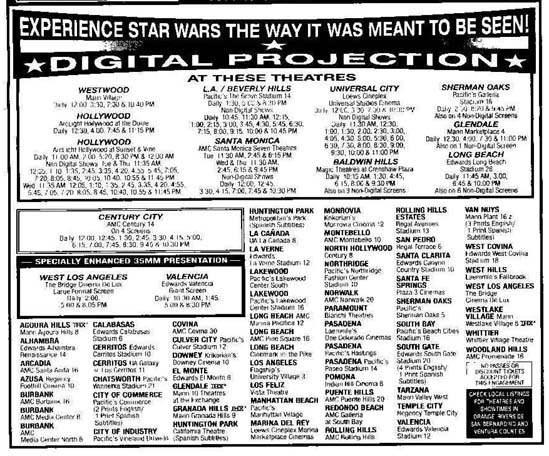
Mark
Posted by Dylan Marchetti (Member # 2764) on 05-26-2005, 02:25 PM:
My experience with "enhanced 35mm" has usually meant a 35mm print poorly projected onto an IMAX screen with blank screen on top, bottom, and occasionally on the sides.
Sound is great, though...
Posted by John Pytlak (Member # 331) on 05-26-2005, 02:43 PM:
Sometimes the distributors supply prints deliberately printed a few printer lights lighter in an attempt to compensate for the sub-standard screen luminance. These "Enhanced 35mm Prints" used to be called "drive-in prints". But you can only put so much energy though a piece of 35mm print film that is 0.825 x 0.690 inches or even smaller 0.825 x 0.446 inches in size. Current Digital Cinema projectors likewise have a limit similar to a 35mm film print. For huge screens, 70mm print technology that has been around for 50 years is the correct solution:
Splendor of 70mm Part 1
Splendor of 70mm Part 2
Posted by Per Hauberg (Member # 529) on 05-26-2005, 06:33 PM:
quote: Robert John Jeromson
From memory that particular Fox logo was recorded in the 1950's.
Let's say an even 1953, as it is the long CinemaScope-version, -but Fox logo with better sound has been around.
I do not remember the occasion, but danish cinema owners were gathered for demonstration af some new hardware together with the presentaion of one of the "Die Hard"-films.
Wether it was our first meeting with SR or SRD - or it was the Bose bass tubes, I don't remember, but I do remember most of us clapping our hands after hearing the Fox overture - because it sounded so dam'd good !
p
Posted by Mike Blakesley (Member # 26) on 05-27-2005, 01:50 AM:
Come on, guys. That 'enhanced 35mm' thing is simply marketing, designed to get the folks who are pissed because they couldn't get a ticket to a digital show, to attend a film show which they think will be better because it's "enhanced."
Posted by Manny Knowles (Member # 1171) on 05-27-2005, 02:11 AM:
The Fox Fanfare is rather low on these Star Wars films. I remember having that reaction with Episode I and II.
Not only is the Fanfare level too low (in my opinion) but my ears had barely recovered from the loud trailers (FANTASTIC 4, MR/MRS SMITH, THE ISLAND, STEALTH, BATMAN BEGINS) so it seemed even quieter than it actually was -- not only by comparison to those loud trailers but because the aural reflex was still kicking in to protect me from all those loud noises.
Having said that, I liked the mix of the movie itself.
Posted by Alan Haigh (Member # 1781) on 05-27-2005, 05:55 AM:
Per, what kind of DTS player do you have? It may need upgrading...
Posted by Jeremy Jorgenson (Member # 2989) on 05-27-2005, 05:36 PM:
re: enhanced prints
Back in 2001 a few distributors were really playing this aspect up... In fact, I remember even getting a few "enhanced" trailers (usually from BV... I remember both Pearl Harbor & Atlantis specifically).
Posted by Per Hauberg (Member # 529) on 05-28-2005, 03:38 AM:
quote: Alan Haigh
Per, what kind of DTS player do you have? It may need upgrading...
Screen # 1 is a 1993-vintage dts6 - running without disturbance ever and still with the original drives.
Also tried same prints and same three sets of discs in Screen #2 on dts-6d with same result.
BTW: Last night, I watched the whole, endless credits for the first time: No crediting of DTS at all - No other sound credits than SRD-ex. Is this political or what ?
Per
Posted by Kris Dirix (Member # 3012) on 05-28-2005, 06:15 AM:
Yeah Per,
Kill the soundtracks and put a live piano in front.
Posted by Per Hauberg (Member # 529) on 06-22-2005, 03:10 AM:
Back to the upgrading question:
Since the SW3 difficulties - Three sets of discs all dropping out after Logos, I have had trouble again with "Mr & Mrs Smith" and "Kingdom of Heaven" - dts starting allright, but dropping out after 2-3 minutes. At the same time, "Shall We Dance" and "Sharks Tale" run without trouble in same DTS 6 - unit.
Does this say anything to You ?
Per
Posted by Demetris Thoupis (Member # 833) on 06-22-2005, 05:41 AM:
You might need some firmware updates.
I remember seeing in a report that this update would be done though the actual Film Discs with no tech or projectionist intervention but I suppose this did not happen with yours. Check the firmware or call one of the DTS guys to tell you how to check it. That might probably be the fault. But then again your DTS drives are like 12 years old so I wouldn't be supprised if they need changing.
D
Powered by Infopop Corporation
UBB.classicTM
6.3.1.2