This is topic Weird Scratched Prints in forum Film Handlers' Forum at Film-Tech Forum ARCHIVE.
To visit this topic, use this URL:
https://ft-forum.com/ft/cgi-bin/ubb/ultimatebb.cgi?ubb=get_topic;f=1;t=007262
Posted by Jason M Miller (Member # 2597) on 06-14-2005, 10:10 PM:
We have some weird scratches on a couple of prints, they are in approx position as below (looking at the screen)

They kind of go and comeback and they are kind of wavy. I tried doing a scratch test and I can not figure out whats doing it, we have century projectors with strong platters. We run DTS
Posted by Jason Miller (Member # 2341) on 06-14-2005, 11:30 PM:
base or emulsion side?
do you use the cleaner bracket roller? I have seen film hit a splice and jump off this roller and ride on the flanges.
the spacing also looks similar to threading over a keeper instead of between it and the roller.
Posted by Jason M Miller (Member # 2597) on 06-15-2005, 05:10 PM:
Is there a way to tell if the scratch is base or emulsion by looking at the screen?
This is happening on two diffrent projectors, with diffrent cleaner roller configurations.
Posted by Jason Miller (Member # 2341) on 06-15-2005, 07:56 PM:
base side scratches are black. emulsion side scrtaches are colored: green-yellow-white (depending on how deep the scratch goes).
other colored scratches are usually a result of something the lab did.
you dont happen to have someone new upstairs threading do you?
Posted by Jason M Miller (Member # 2597) on 06-15-2005, 08:13 PM:
they are black, and no we do not have anyone too new
Posted by Randy Stankey (Member # 64) on 06-15-2005, 11:44 PM:
If they are very light and don't penetrate all the way down to the color layers, black scratches can occur on the emulsion side.
Hold the film up and look at the image. Keep the soundtrack on the right. If the picture is right side up and any words in the picture read correctly, the emulsion side is likely to be the side closest to you. In the projector, correctly threaded film has the emulsion side facing the lamp and the base side facing the screen.
If you are still not sure, you can try the "Lick Test". Lick your thumb and forefinger. Pinch the film between your wet fintertips. (Only on the edge, please!) The side that feels stickier is probably the emulsion.
Vertical scratches usually come from the film dragging across something stationary but they can also come from the film jumping 1/2 way off a roller and riding up on the flange instead of down in the "groove" where it ought to.
In any case, the likely cause is probably operator error. That's why I DEMAND that my projectionists check film at LEAST once per reel. If somebody screws up or if something goes wrong, it will be caught and, hopefully, fixed before it damages the whole print.
The best way to find a place where film is getting scratched is to follow the film path (with your finger) as it runs, checking every roller, bracket and/or keeper that the film passes over or even comes within an inch of. If the film touches ANYTHING it's not supposed to you are probably getting scratched film every time you thread.
If you are getting sever scratching you might even see some colored powdery junk near the place where the film is being damaged.
Finding the place where film is damaged can be tricky because, if it happens on the "home stretch" between the projector and the rewind platter, you won't know the film is scratched until the next show. I got suspended one day because some bastard scratched an entire print on the last run of his shift but it didn't get noticed until I was on duty. I got blamed for HIS fuck up! (Don't worry. The bastard got fired later on! ![[Smile]](smile.gif) )
)
The best way to find where the damage is coming from is to just "BE the film"! ![[Wink]](wink.gif)
Posted by Jason Whitlock (Member # 3077) on 06-16-2005, 12:29 AM:
Randy, don't you mean keep the soundtrack on the left (not right), with the image facing upright, the emulsion side is closest to you.
A common cause of those kinds of scratches is threading on the wrong side of the cleaning bracket.. not enough or no tension on the sound drum (sound drum then rubbing against the base side of the film)
I've seen film ride in the groove on a dts reader before.. (the edge gets caught down where the LED is, causing the film to bulge and rub against the edge of the roller and against the DTS lens.
Posted by Jason M Miller (Member # 2597) on 06-16-2005, 02:19 AM:
Ok thanks for the info, I will run some scratch tests and get back to you.
Posted by Jason M Miller (Member # 2597) on 06-16-2005, 02:25 AM:
could a film missguided in the film gate cause this? I would think when you started the movie and it (the movie) was not in there correctly you would know about it.
Posted by Mark J. Marshall (Member # 1409) on 06-16-2005, 08:50 AM:
I have two questions about this for Mr. Pytlak (or anyone else who may know)...
1) Is it "easier" to scratch the emulsion or the base? Assuming the film has been playing for a month, and has been regularly film guarded and all that.
2) During pure white scenes - is there any emulsion to scratch? In other words, is an emulsion side scratch during a white scene actually scratching the other side of the base?
Posted by Randy Stankey (Member # 64) on 06-16-2005, 10:41 AM:
quote: Jason Whitlock
Randy, don't you mean keep the soundtrack on the left (not right), with the image facing upright, the emulsion side is closest to you.
That's right. Umm... I mean, correct!
Soundtrack on the left.
That dyslexia thing keeps creeping up on me.
**********
Yes, there is emulsion even when the film is clear. It's just clear emulsion.
A misthread in the gate can cause scratches in the film but, if it was simply misthreaded, I can't imagine how the picture would appear normal on the screen. However, a burr on the aperture plate that hits the film WILL make nice scratches on the film for you.
That scratch that I got busted for happened in a similar way. On the Century projectors I used to work with, the door to the sound head had a glass window in it. People used to simply "slap" the sound head door to shut it. After a while, the wear and tear would start to crack the glass. A little chip of that glass came off the corner of the pane and lodged in one of the failsafe rollers. That piece of glass practically cut the film in half! BUT, if you walked up to the projector and looked at the picture you would see nothing out of the ordinary! Even if you followed the film path with your eyes, you wouldn't see the problem. Only if you got down on your knees with a flashlight and looked at the film going through the failsafe up close would you notice the problem. If you turned the overhead light on during the show (which was a "No-No" because of light pollution) you might be able to see the shavings piling up under the projector. In the dark it would be a long-shot if you noticed it.
Moral of the story... Keep a close eye on your film during the show(s)! Finding the cause of a scratch after the fact can be tricky! Prevention is the best cure.
Posted by John Pytlak (Member # 331) on 06-16-2005, 02:26 PM:
quote: Mark J. Marshall
I have two questions about this for Mr. Pytlak (or anyone else who may know)...
1) Is it "easier" to scratch the emulsion or the base? Assuming the film has been playing for a month, and has been regularly film guarded and all that.
2) During pure white scenes - is there any emulsion to scratch? In other words, is an emulsion side scratch during a white scene actually scratching the other side of the base?
1. Either side of the film can be scratched. Measurement of scratching depends on the sharpness and micro-roughness of the point (stylus) doing the scratching and the "loading" (pressure) applied to the film. The back (base) side of Kodak VISION Color Print Film has a scratch resistant polymeric coating that is harder to scratch than plain polyester base. The emulsion side has a clear protective gelatin layer coated on top of the imaging layers, which are in the order magenta-cyan-yellow. Kodak incorporates lubricants on both sides of the film, some of which stays after processing to help protect the film against abrasion. But post-process lubrication will significantly help reduce abrasion, per SMPTE Recommended Practice RP151. As noted, a scratch on either side of the print film will be black, unless it penetrates into the imaging dye layers. An emulsion scratch progresses from black to green to yellow to white as the scratch becomes more severe.
2. Essentially, the density of the image does not affect the amount of emulsion that is on the film. A dark scene has lots of dye formed in each layer. A light scene just has less dye formed in the layers, but all the layers are still there.
Here's a discussion of scratches:
http://www.kodak.com/US/en/motion/support/h1/printingP.shtml#wetgate
quote:
A scratch on the support of a negative film acts as a diffuser that scatters light. Light from the printer passes essentially in straight lines through the undamaged portion of the support and emulsion of the original. When light strikes the scratch, it is scattered and displaced from the straight-line path, reducing the light on the receiving emulsion.
Scratches on the support of a negative film printed onto positive film usually produce more objectionable effects on the screen than scratches on reversal originals printed onto reversal print films. This is because scratches on the support of negative films appear white on the positive film and are generally of lower density than any other white in the picture. In reversal printing, scratches on the support of the original appear black on the screen print and generally tend to blend in better with the picture.
Scratches on the emulsion side of negative films present another situation. Shallow emulsion scratches on a black-and-white negative will appear white on the positive film. Emulsion scratches that penetrate to the support on a black-and-white negative will print black. Scratches on the emulsion side of color negative films may appear colored on the print, depending upon how deep the scratch is and whether image-bearing layers have been disturbed.
Posted by Jason Miller (Member # 2341) on 06-16-2005, 02:35 PM:
I still think someone threaded over a keeper roller.
Posted by Randy Stankey (Member # 64) on 06-16-2005, 04:29 PM:
On a Strong/Potts platter that's entirely likely.
Two popular places to make that misthread are the top swivel roller as the film goes from the platter to the projector and the one on the bottom that receives the film from the projector and routes it to the takeup accumulator. (Yo-yo.)
Also look at the last swivel roller as the film winds onto the rewind platter.
Posted by Louis Bornwasser (Member # 3063) on 06-16-2005, 09:03 PM:
If you have a Srong or Potts platter, you should look carefully at threading (or mis-threading) around the spring-loaded yo-yo button. That has been a consistent problem over a long period of time. Good luck.
Louis
Posted by Mark J. Marshall (Member # 1409) on 06-16-2005, 10:07 PM:
Thanks, John.
That helps to explain why we recently had an emulsion side scratch that was solid black during really bright scenes, and very very slightly green during dark scenes.
Posted by Kevin Raisler (Member # 1761) on 06-17-2005, 03:14 PM:
If you use basement sound readers? check the rubber or felt pad on the lateral guide for dirt and contamination these can cause the problems you are describing. After each show the tail of the film ends up on the floor thus picking up dirt then next show you get the dirt deposited on the lateral. hope this helps
Posted by Jason M Miller (Member # 2597) on 06-18-2005, 05:47 PM:
quote: Jason Miller
I still think someone threaded over a keeper roller.
I really dont see this, can you please draw me a diagram and show me how this can happen
Posted by Jason Miller (Member # 2341) on 06-18-2005, 05:59 PM:
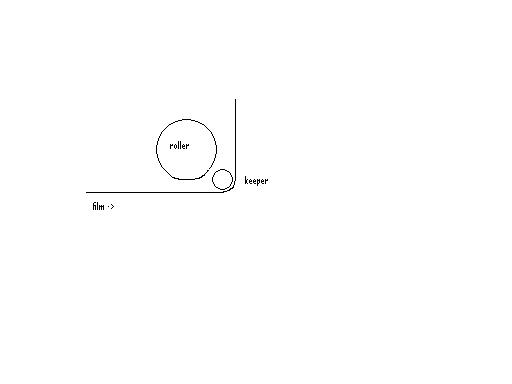
does that make sense? I'm no artist. usually the roller at the very bottom of the tree or rollers on the takeup assembly (yo-yo) are the culprits.
Posted by Jason Greek (Member # 3159) on 06-19-2005, 08:02 PM:
We use Strong/Potts Platters, the positioning of your scratches, and that they SEEM to be base, I would look at the final swivel roller the film passes through when rewinding to the platter. we had a few that were adjusted just a touch too low and they were on rarely used platters (we have a habit of not using our bottom ones). the result was base scratches toward that side of the screen and sometimes that close to the centre. the problem happened so intermittently that it took us awhile to figure out what was happening. Try rewinding film on each platter of the two machines and watch the film as it rewinds...
Posted by Dominic Espinosa (Member # 2122) on 06-20-2005, 12:18 PM:
The diagram posted above shows one possible misthread.
There's also the possibility that it's on the roller but not all the way in riding on the flange being pinched down by the keeper roller.
Though I would think that would cause scratches on both sides...One from the roller flange and done from the keeper.
I've seeb scratches very similar to that on AW3's when someone screwed up the brain and had a big bubble of film dragging it down between the trailing and center rollers.
Posted by Jason M Miller (Member # 2597) on 06-21-2005, 07:27 PM:
Jason Greek: If the film was hitting the platter wouldn't the scratches be horizontal not vertical?
Posted by Randy Stankey (Member # 64) on 06-21-2005, 11:32 PM:
If the film was dragging against the edge of the platter as it rewound you would get diagonal scratches. It would look like a meteor shower on the screen. (Some people, I have heard, use the analogy of trying to watch the movie through a chain link fence.)
Assuming that you wind your platter soundtrack UP and toward the tree:
If the scratches are on the base side the scraping is probably happening on the rewind deck.
If the scratches are on the emulsion side the scraping is probably happening on the underside of the deck above the payout. These scratches may or may not be diagonal. If the deck above is idle they could be straight lines. If the deck above is also the rewind deck then they could be diagonal.
You're telling us that the scratches are mostly straight and vertical. That tells me that the scratching is happening somewhere else.
I'm going to vote with the consensus. The scratches are probably from a mishtread at one of the rollers on the platter.
Here is one of the most famous ways to scratch film on a Strong/Potts platter:
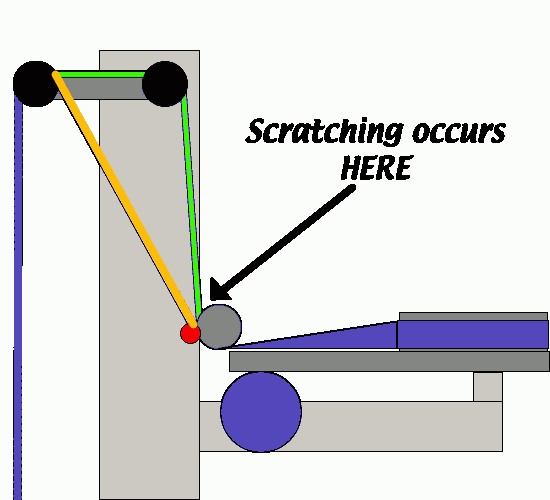
When threading the TOP takeup deck, if you follow the green film path everything will be OK. But if you follow the orange path you are likely to get scratching against the red keeper roller.
If you always thread the soundtrack toward the tree so as to get the soundtrack UP then the scratches are likely to be on the base side of the film.
If the middle or bottom deck is your takeup and you thread the green path you will also get scratching in a similar location but it's probably not going to be on the base side of the film, but on the emulsion instead.
A misthread like this could very well produce the scratches you describe.
Try taking an old, useless scrap of film about 6 feet long and painting a section of it, all over, with a dry erase marker. Thread it up along that section of the platter with your "telltale" film. Run it back and forth by hand a few times then look at it to see if the rollers have rubbed some of the dry erase off the film. Thread the film the right way and the wrong way.
If you can reproduce the pattern of scratches on the film you have likely found the cause of the problem.
Posted by Jason Greek (Member # 3159) on 06-23-2005, 12:56 PM:
I thought the same thing, that the scratches should be diagonal, but We've been getting scratches that are vertical, on the left hand side of the screen, base side, and after we adjusted the final rewind roller, the problem disappeared...
Posted by Edward Cox (Member # 3303) on 08-12-2005, 08:47 PM:
Reading this topic is what made me decide to register at this forum... this is something that I noticed happen with a Century/Strong combo... if the sounddrum in the projector head itself is not spinning properly, it can cause scratches much like the ones you described. The drum will not spin constantly, so the scratches can come and go. More over, the film path can be perfectly threaded... not missing a single thing.
A quick way to check this is to try to spin the sounddrum with your hand... just a light amount of force from your hand should make it spin for quite a while... If it doesn't spin easily, a quick solution that can buy you some time... get a can of WD-40, and just behind the sounddrum, there should be two holes, almost on top of each other. Spray a little amount in the top hole, then check it by spinning it. Now, spray a TINY bit in the bottom hold, and check it again.
PS... hopefully, the problem is no longer even a problem for you, but, this is still something to keep an eye out for in the future.
Posted by Richard Hamilton (Member # 321) on 08-13-2005, 02:35 AM:
Randy, I understand your drawing and explanation, but I have a hard time seeing how that mis thread could scratch the middle of the image. I agree, the source of the scratch can be tricky to find, but a little troubleshooting skills with time and patience should find it! It is also helpful to know and be able to identify the base or emulsion side of the film.
Edward, why is a Century projector/Strong platter combo bad? Does the platter effect the rotation of the sound drum?
Posted by Adam Martin (Member # 641) on 08-13-2005, 12:42 PM:
quote: Edward Cox
a quick solution that can buy you some time... get a can of WD-40
NO NO NO NO NO NO NO NO NO! WD-40 is a solvent, not a lubricant! ![[Mad]](mad.gif)
Posted by Dan Lyons (Member # 1454) on 08-13-2005, 01:57 PM:
quote:
Century/Strong combo... if the sounddrum in the projector head itself is not spinning properly, it can cause scratches much like the ones you described. The drum will not spin constantly, so the scratches can come and go........get a can of WD-40
Sounds like you've got bad bearings. Replace them right away.
Posted by Brad Miller (Member # 2) on 08-13-2005, 02:42 PM:
Guys, he did say...
quote: Edward Cox
If it doesn't spin easily, a quick solution that can buy you some time
I have had to do exactly this in the past on a frozen sounddrum, and indeed it did buy me the two days it took to get new bearings delivered and installed. I am not advocating this as a "permanent fix" (because it won't be), but yes it will work as a "temporary fix" to buy you a couple of days until you can get the replacement bearings. Would you rather the sounddrum sit stationary and scratch the film?
That's the way I interpreted his post. If in reality he was suggesting that WD40 can buy you some time in terms of weeks or months, then by all means no.
Posted by Mark J. Marshall (Member # 1409) on 08-14-2005, 12:38 PM:
What happens to the film if the WD40 gets on it?
Posted by John Pytlak (Member # 331) on 08-14-2005, 07:22 PM:
WD40 contains mineral oil, and mineral oil can leach the dyes from abraded areas of the emulsion. If you wipe the oil with a white tissue and it is magenta colored, that's the dye from the film! ![[Eek!]](eek.gif)
If the dyes are leached from the film, you will typically see green or yellow spots in the image.
Posted by Mark J. Marshall (Member # 1409) on 08-14-2005, 09:19 PM:
That's what I thought, but I wanted to be sure before posting a word of caution about using WD40 in the projector.
Posted by Barry Floyd (Member # 385) on 08-15-2005, 10:58 AM:
Looks exactly like what happened to me a couple of weeks ago. Weird black scratches on the print. Turned out to be dirt and crud imbedded in the rubber pad on the lateral guide roller that closes over the sound drum. Too much tension on the film between the intermittant sprocket and the sound drum had the film constantly rubbing the lateral guide roller. Had to get my tech to come out and replace the part.
Cost me money in print damage.. but we fessed up to it.
Powered by Infopop Corporation
UBB.classicTM
6.3.1.2