This is topic Dolby Digital WOW at reel change? in forum Film Handlers' Forum at Film-Tech Forum ARCHIVE.


To visit this topic, use this URL:
https://ft-forum.com/ft/cgi-bin/ubb/ultimatebb.cgi?ubb=get_topic;f=1;t=007719

Posted by Robert Schultz (Member # 2301) on 12-28-2005, 07:54 PM:
 
I have a customer that is complaining of a WOW problem on 4 Dolby CP650 units. All of these units only show the problem at a reel change, and it's mostly audible during a scene with music. The systems are about 3 years old, using CAT 701 readers on top of Simplex Millennium Projectors. Anyone have this problem or know how to fix it?
 
Posted by Brad Miller (Member # 2) on 12-28-2005, 08:44 PM:
 
This just screams of a poor splice to me. (I've never seen this problem before though.)
 
Posted by Mark J. Marshall (Member # 1409) on 12-28-2005, 09:44 PM:
 
I'm convinced (although I seem to be the only one) that this is an incredibly stupid software design decision in the CP650. There is NO reason at all not to have the software identify an average speed of the film, and smooth out the incoming data so that it doesn't warble. To me, ours sounds like a warped audio cassette tape. You can only hear it during music scenes. We've switched back to SDDS in that house for now.

Is it something mechanical that can be fixed? Maybe. But the CP650 should be able to deal with that problem and make it unnoticeable. Dolby needs to fix that.
 
Posted by Monte L Fullmer (Member # 2797) on 12-28-2005, 10:37 PM:
 
..yet, question: How could digital data information warble since the information on the film is just "ones" and "zeros" with nothing inbetween?

(or, could be a final editing problem with the analog mastering that hit a warble when the digital tracks were recorded..and missed QA when prints were struck)

If that complex has more than one print of this movie, how is the other print and did the prints get switched to see if the other print does the warbling..

Odd, yet interesting..

-Monte
 
Posted by Paul Linfesty (Member # 214) on 12-28-2005, 10:44 PM:
 
Can't warbling happen if the splices create a momentary unsteadiness of the film, causing some bits to be read out of order?
 
Posted by Mark J. Marshall (Member # 1409) on 12-29-2005, 12:18 AM:
 
If you move the little rollers that sit between the sound drum and the sprockets on the Dolby reader up and down while the film is running, you can hear the pitch change. Assuming the sound playing is one where you'll be able to detect a change in pitch. Do it during a music scene or a snipe that you've heard a hundred times for maximum effect.

I'd be interested to hear if anyone else can reproduce this.
 
Posted by Richard Hamilton (Member # 321) on 12-29-2005, 01:27 AM:
 
quote: Mark J. Marshall
If you move the little rollers that sit between the sound drum and the sprockets on the Dolby reader up and down while the film is running, you can hear the pitch change.
Really? And this is in digital? Or when you manipulate the film and move the little rollers, does it switch to analog?
 
Posted by Robert Schultz (Member # 2301) on 12-29-2005, 02:11 AM:
 
This guy has four theatres all doing the same thing. I arrived to the theatre today and listened to the problem on two of the screens. I heard this problem in "King Kong" and "Cheaper By the Dozen". I was in the auditorium for both of these, but I never heard a drop out of digital. The owner of the theatre says that this problem is audible in all the auditoriums that have CP650 units as long as there is music crossing the splice area. After hearing this I went up to the booth and watched the splices pass through the CAT 701 penthouse readers. I didn't notice anything out of the ordinary and I never saw a film drop out of digital during a splice.
 
Posted by Monte L Fullmer (Member # 2797) on 12-29-2005, 02:23 AM:
 
quote: Richard Hamilton
Or when you manipulate the film and move the little rollers, does it switch to analog
I was wondering about that since the digital information can't be read too well by the camera with such a variance of speed, causing the system to goto default SR (05). I've done this on purpose by bouncing the rollers to watch the error rate take a leap and watch it drop from (10) down to (05), then right back to (10) when the film feed is constant again.

But, if this all checked out as mentioned, wonder if he has a brain problem with bad splices that causes the film to jump some in the reader and maybe dropping out of digital to optical..but that just a guess now since that's been already observed..
 
Posted by Mark Gulbrandsen (Member # 72) on 12-29-2005, 08:32 AM:
 
quote: Paul Linfesty
Can't warbling happen if the splices create a momentary unsteadiness of the film, causing some bits to be read out of order?

You've got to have 4 blocks of data in a row read improperly before it would default to analog..... Also the data being sent from the CCD camera is normally unsteady to some extent.... this can be seen on a scope. If your scope has a calibrated adjustable delay setting this unsteadiness can actually be measured, this is also true of SDDS or any other mechanical form of data being read, it is completely normal. However there are circuits inside the processor that re-clock that incomming data into an extremely stable data stream and I suspect this is where your problem may be. I've never seen this happen on any 650's that we installed,,, none have failed yet, but I do agree on the software issue. Going with Linux was a stupid mistake... its slow and the boot up time on the 650 is way, way, way too long. Manufactuirers are using it because its basically free. To be fair the XD-10 software system is even worse than the 650... and just as slow at boot up. If you shut the XD-10 down during boot up there's a 50/50 chance of corrupting the data on the HD... then you have a dead XD-10 that will read out "initialization" till kingdom come. Its best to have a UPS supply on an XD-10. I've run out of fingers counting the number of times we've had this happen. Shipping one back and forth so they can repair it is a hundred bucks worh of UPS and insurance. With the recent death of the 6D I will be pushing 650's again. I just don't like selling equipment that can't be repaired on site in the booth..... In warranty or out....

Mark
 
Posted by John Walsh (Member # 168) on 12-29-2005, 08:45 AM:
 
This might not relate to your problem, but I had an issue where some DA20's were acting strange at the same time Dolby had just done a 'with the soundtrack' software upgrade. So, if you really can't find why it's not working right, you might ask them if one was done recently.
 
Posted by Mark J. Marshall (Member # 1409) on 12-29-2005, 09:38 AM:
 
Yes, Richard, it's still in digital. If it dropped to analog, it wouldn't be warbling because that part of the projector runs steady. When the cue goes through for the lights to come up at the start of the credits, it causes a bad warble that always makes the audience laugh out loud. Since it's the end of the film, it's always on a big orchestral "Taaa-Daaaaaaaaaa" which instead sounds like "Taaaa-Daaaaaaowawawawaaa". I posted about that here and was told to check this and that, change my cue tape thickness, etc., but I don't think that's it. We need some people with CP650s to try my experiment and post here if they can create a warble by doing it. It may not be a widespread problem, but it will be interesting to see if others have this problem so we can narrow it down. Maybe as some have suggested, there is a bad card, or there's some incompatible software/hardware versions or something.

BTW, my reader is a CAT 702.
 
Posted by Jason Miller (Member # 2341) on 12-29-2005, 05:58 PM:
 
It is possible that it did drop to analog but just didnt register on the display.

since the displays are the last thing to update during remission, the decoder could have picked back up digital before the display had a chance to change.

that could explain the warble at cues/splices.
 
Posted by Louis Bornwasser (Member # 3063) on 12-29-2005, 06:00 PM:
 
Disable analog in order to test digital. Easiest way is to unplug the analog input or turn off the analog LED. Reversions will then be heard as silence. Louis
 
Posted by John Hawkinson (Member # 1135) on 12-29-2005, 07:12 PM:
 
Would the "vertical jitter" setting from DRAS be the right thing to be looking at here? [I don't have any DRAS experience.]

I'm not sure what a reasonable jitter tolerance for the 650 to have is, or if its any different from the 500 or DA20...but it sounds like you're exceeding whatever tolerance it has.

--jhawk
 
Posted by Mark J. Marshall (Member # 1409) on 12-29-2005, 07:33 PM:
 
quote: Jason Miller
It is possible that it did drop to analog but just didnt register on the display....
quote: Louis Bornwasser
Disable analog in order to test digital...
Well, I'm not sure how I would be changing the speed of the film going through the basement analog optical sound head by moving the rollers on the Dolby penthouse reader. But to eliminate the possibility, I removed the analog exciter lamp, put the SDDS in bypass (bringing the CP650 online in format 10) and moved the rollers on the Dolby reader up and down. And the result.... Uninterrupted warbling sound.

[Frown]

quote: John Hawkinson
I'm not sure what a reasonable jitter tolerance for the 650 to have is, or if its any different from the 500 or DA20...but it sounds like you're exceeding whatever tolerance it has.
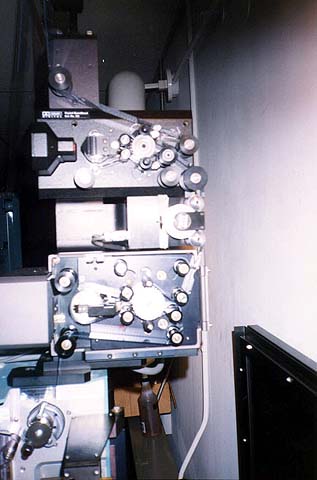
Hmm. Our Cat 702 is mounted on top of our SDDS DFP-D2000's reader. Could the problem be that it's be too far away from the aperture?
 
Posted by Brad Miller (Member # 2) on 12-29-2005, 09:45 PM:
 
quote: Mark J. Marshall
Hmm. Our Cat 702 is mounted on top of our SDDS DFP-D2000's reader. Could the problem be that it's be too far away from the aperture?
Aha!!! NEVER EVER DO THAT. There is a spring loaded roller on the 2000 series reader that will wreak havoc on any digital penthouse also mounted on the projector if the "entire path" is threaded. Instead, change your offset on the cat702 reader such that you thread "straight down" the front instead of zig zagging back and forth to eliminate running over that roller.

 -
 
Posted by Monte L Fullmer (Member # 2797) on 12-30-2005, 02:40 AM:
 
..wouldn't just one digital format be good to call since all three of them would sound close to the same anywho to the average human ear?
 
Posted by Alexander Smith (Member # 1769) on 12-30-2005, 03:43 AM:
 
One digital format would only be good if each and every print always had that format, and it was always printed correctly on every print as well.

Not all prints have every digital format, and a very small number of those have it printed out of spec so it can't be (reliably) read off the film.

Alex.
 
Posted by Mark J. Marshall (Member # 1409) on 12-30-2005, 09:41 AM:
 
Hmm that's interesting. This is the only projector that has the SDDS mounted below another digital reader, so that may be contributing to the constant slight warble that makes it sound like a warped audio cassette. But it doesn't explain why the Dolby doesn't smooth out the incoming data to prevent the warbling in the first place.

Brad, I'm assuming you have a 650 there somewhere. Can you reproduce the digital warble by moving the Dolby reader's rollers up and down while the film is running? If you can, then I guess it's supposed to act that way. If you can't then I likely have another problem.
 
Posted by Brad Miller (Member # 2) on 12-30-2005, 01:43 PM:
 
Mark, I've got 650s and none of them have exhibited what you claim to have. In fairness though they are all either Kinoton basement readers, a Dolby penthouse on top of the machine without anything else up there, or the triple stack in my screening room...of which I have the threading set up to ignore any spring loaded rollers.

Back before I started avoiding the spring loaded rollers, I DID have that problem with CP500s and DA20s though, hence my recommendation to you. It wasn't just at splices though. There was a general speeding up/slowing down problem throughout the movie.
 
Posted by Mark J. Marshall (Member # 1409) on 12-30-2005, 02:28 PM:
 
Thanks, Brad. I appreciate all of the info, and I'll look into re-timing the Dolby so we don't thread the SDDS or moving the SDDS on top of the Dolby or something.

But I just want to be clear... are you able to reproduce a warble in your screening room by pushing the rollers up and down while the film is running? What I do is push the two rollers all the way to the bottom, then all the way to the top, then back to the center over the course of about a second and it causes the sound to make very noticeable pitch changes. If yours doesn't do that, then we definitely have something else wrong with our 650. If it does, then I guess it's supposed to act that way, which is stupid. I'm particularly interested in your screening room because the reader is set up so high.

Thanks again.
 
Posted by Brad Miller (Member # 2) on 12-30-2005, 03:13 PM:
 
First, just moving the SDDS to the top will NOT help the problem. You have to get rid of the threading path that involves that spring loaded roller.

As far as intentionally forcing the tension rollers up and down, I've never done this as it would scratch the film.
 
Posted by Mark J. Marshall (Member # 1409) on 12-30-2005, 09:40 PM:
 
I just figured that by having the SDDS above the Dolby reader, at least the film wouldn't be pulled in a jumpy manner.

What scratches the film? Nothing touches the film when the rollers move up and down. Maybe I'm not clear. Move both rollers at the same time up and down, not independantly. If you're worried about scratches, can someone try it on an old trailer or a Dolby tone loop or something?
 
Posted by Brad Miller (Member # 2) on 12-30-2005, 11:04 PM:
 
The film will come into contact with the bar in front of the sound drum if you force the tension rollers to the extremes like that, meaning scratches.
 
Posted by Monte L Fullmer (Member # 2797) on 12-31-2005, 02:10 AM:
 
Thatsa lotsa rollers that the print has to go through - so much uneeded tension by the time the film hits the upper sprocket, which is pulling film pretty hard by itself there (and causing some extra stress on those two bearings in that upper constant sprocket assembly..) per each revolution.

-Monte
 
Posted by Brad Miller (Member # 2) on 12-31-2005, 11:37 AM:
 
The only real drag there is from the SDDS reader. DTS and SRD doesn't really put enough tension on the film to matter.
 
Posted by Mark J. Marshall (Member # 1409) on 01-04-2006, 09:57 AM:
 
I've worked on a projector with an SDDS DFP-D2000 on top of a DTS reader on top of a Cat 699 reader, with all threaded all the time and we've never had a warble from any of them, nor have we gotten any scratches (unless you let a manager do the threading). The Dolby always sounded perfect in that theater. We never had a warble when the cues or splices went through. This was a CP65 / DA20 setup.

So, this is the last time I will ask for help on this. I need someone (preferably multiple someones) who know(s) what they're doing to try my experiment and tell me if they can reproduce a warble on a 650. If you're worried about scratching the film, then make a loop out of an old trailer and try it. You'll need something with music in it where you will be able to easily hear a warble if it happens. I'm not asking anyone to scratch King Kong. It sounds like Robert and I are having the same problem. If no other 650s do this, then we have an internal problem in our units. If they all do it, then ... that's pretty stupid on Dolby's part.
 
Posted by Max Biela (Member # 1919) on 01-04-2006, 10:21 AM:
 
Hi,

I will try it with our CP 650/Cat 702 tomorrow!

Max
 
Posted by Mark J. Marshall (Member # 1409) on 01-04-2006, 10:41 AM:
 
Thank you! [Smile]
 
Posted by Max Biela (Member # 1919) on 01-04-2006, 11:27 AM:
 
Hi,

I just put in a loop with music and it also happens on our CP 650. However, we don't have any problems with splices and cues. I will check the firmware version later.

Max
 
Posted by Mark J. Marshall (Member # 1409) on 01-04-2006, 12:51 PM:
 
Thanks, Max.

Do you use foil cues along the edges of the film, or something else?
 
Posted by Max Biela (Member # 1919) on 01-04-2006, 01:05 PM:
 
Yes, but those cues are very very thin (from CPI) and are on the back side on the film so they doesn't cover up any blocks. The two arms on the Cat 702 don't bounce from cues made with the CPI stuff. I will check the sound with a few different splices on the same loop tomorrow.

Max
 
Posted by Robert Schultz (Member # 2301) on 01-04-2006, 09:49 PM:
 
OK...I suspected outside forces and oscillation of some kind to be the culperate of the WOW so this is where I started looking first. I found the problem very quickly actually, and really it's quite simple. Brad put in his 2 cents and suspected the splices, but he had never seen the problem himself (neither had I). I can now say that I've seen a bad splice cause WOW when using a Cat. 701 reader.

The culprit...a splicer that leaves hanging edges beyond the 35mm width of the film? Simple. All sound readers are subject to errors or reading problems at or around a splice, but in this case, my customer was using solid yellow splicing tape and had a splicer that was so gummed up that each splice was a bit different from the last. The inconsistency in splices (and the fact that they have 4 different splicers) made some splices go through just fine, while others would bounce the rollers on the Cat. 701 all over the place. Another factor to contend with is that the problem is not normally heard unless there is some steady tones to make the wow audible (like music). In a 'dialog only' scene it is much harder to hear the WOW problem.

One problem I am still having is that once a large amount of bouncing starts it seems to take about 20 seconds for the reader to get back to a completely steady state. There should be some better dampening in this system, but the platter tension is so soft (almost non-existent) that it's letting the reader oscillate like a spring with no dampening to quickly stop the problem.

The fix to this problem right now is to just simply make better splices. I was able to find a film at this theatre that had a great example of the type of splices that cause the problem. The picture below is a great example of what NOT TO DO! I have seen people adjust their splicers to leave just a small edge hanging so that it's easy to see the splices when breaking down prints (I am not a fan of this), but at this theatre, this was not the intention. No matter what, splicers should be adjusted to make as clean and smooth a splice as possible.

 -
 
Posted by Brad Miller (Member # 2) on 01-04-2006, 10:03 PM:
 
There is an airpot adjustment inside the cat701 you can adjust to minimize that bouncing.
 
Posted by Richard Hamilton (Member # 321) on 01-04-2006, 10:44 PM:
 
quote: Robert Schultz
The fix to this problem right now is to just simply make better splices.
Really????? The real fix is to get rid of the person who made these splices in the first place!
 
Posted by Max Biela (Member # 1919) on 01-05-2006, 03:38 AM:
 
quote:
Really????? The real fix is to get rid of the person who made these splices in the first place!

Really? [Confused] I know some places where simply isn't enough money for a new CIR U-blade or other parts.

EDIT: Firmware version is 2.2.5.0

[ 01-05-2006, 07:27 AM: Message edited by: Max Biela ]
 
Posted by Mark J. Marshall (Member # 1409) on 01-06-2006, 08:08 AM:
 
Yeah, we have three crappy splicers (but not so bad that they make splices like THAT), but we won't replace them or get them refurbished for fear of managers losing their quarterly bonuses. [Frown]

Our firmware is also 2.2.5.0. I'm curious if the folks who have 650s that don't warble have the same version.

Also, does anyone know what the latest firmware version is?
 
Posted by Christos Mitsakis (Member # 143) on 01-06-2006, 10:35 AM:
 
Current CP650 firmware is version 2.5.5.3. It aderesses only a problem of the volume indicator. Otherwise it is exactly the same as 2.5.5.0.

Christos.
 
Posted by Demetris Thoupis (Member # 833) on 01-07-2006, 01:11 AM:
 
Always have a scissor at hand and trim the edjes of the splice as to have the same width as the film.
D
 
Posted by Carl Martin (Member # 1146) on 01-07-2006, 02:25 AM:
 
i'm a little late getting around to posting this, but i just wanted to point out that on both our bacp reader and our cat. 700, there are blocks preventing the tension rollers from moving so far as to let film come into contact with that bar, so there's no chance of scratching. is the cat 702 different?
 
Posted by Steve Guttag (Member # 268) on 01-07-2006, 07:39 AM:
 
Correction to the above post...the current CP650 firmware is 2.2.5.3. Dolby is still working on 2.3.x.x and is no where near a 2.5.x.x.

Steve
 
Posted by Christos Mitsakis (Member # 143) on 01-07-2006, 11:08 AM:
 
Thank you Steve [beer]
I did mean 2.2.5.3 but typing in a hurry gives these results. There is also another orthographical "in a hurry" error in my post.
Christos.
 
Posted by Dominic Espinosa (Member # 2122) on 01-07-2006, 01:35 PM:
 
As you move the rollers the film is changing speed, wouldn't this cause some data to be read faster or slower?
With the data moving faster the sound would be reproduced faster thus shortening the wavelengths and raising the pitch right?
 
Posted by Rick Raskin (Member # 1561) on 01-07-2006, 01:49 PM:
 
FWIW: As I read this thread I was somewhat confused as to how you could have WOW, which I understand to be an analog type defect, appear in a digital system. But then I read Mark's post about data block errors and realized that the incoming data is block oriented, allowing for some recovery mechanism in the upper layer protocols. I believe that what was identified as WOW is actually the digital system attempting to re-synchronize to the incoming data stream following a data loss (of less than 4 blocks) caused by a defective splice.

Question: Is there a method to track CRC or similar errors on this system? If so, that would be a dead give away.
 
Posted by John Hawkinson (Member # 1135) on 01-07-2006, 02:48 PM:
 
We seem to have come full circle.

Dominic, yes, of course the problem is because the film is speed is changing. The question Mark is asking is why the CP650 does not smooth out rapid changes (a speed decrease followed by a frequency increase) to reduce the apparent visbility of the problem. It is not a direct "shortening the wavelengths" phenomenon, though -- that would apply in analog. Instead, the Dolby Digital decoder is deliberately changing the frequency in order to speed up the material to catch up (or slowing down, as appropriate).

Rick: no, this is not about data loss. The "wow" is not about a resynchronization failure. The Dolby Digital decoder is continually watching the speed of incoming data blocks (to monitor the speed of the film) and adjusting the output frequency/speed such that they match. Because if your projector is running at 24.1 or 23.5, Dolby Digital still wants to work, and lip sync still needs to match.

More than just a CRC, there is actually a Reed-Solomon error correcting code. See the "Theory of Operation" section of the Dolby DA20 manual, pages 102-104 of the PDF (aka pages 5-1 through 5-3).

But it's not of relevance here. If splices are involved, they are pushing the film around and changing the speed physically, not necessarily causing a reversion to analog sound. Mark did tests to confirm there were no analog reversions.

--jhawk
 
Posted by Lonny Jennings (Member # 365) on 01-07-2006, 11:15 PM:
 
We need to look at the source of the problem, not the symptoms. The problem is NOT what happens when a splice goes through the reader. That is irrelevant; the system design of Dolby Digital allows for these speed variations and SHOULD be inaudible. The real problem is why the CP650 can’t deal with it. I believe that Mark Marshall was absolutely correct in the beginning: it’s a CP650/Cat. No. 773 software problem and it does need to be looked at by Dolby. Here’s why:

The front end of the Dolby Digital system tracks the speed of the projector by looking at the perfs going by. That’s right, the perfs, not the blocks of data. It doesn’t use the blocks to correctly lock onto the speed of the projector. The front end circuitry simply looks for the brighter light coming through the perf and a PLL (Phase Locked Loop) locks onto this as a reference clock for the entire front end processing. Whatever speed the projector is running at (from +7% to -11% of 24 fps) determines the clock for all of the digital processing in the front end DSP. You can see this by watching the right hand “goalpost” on the oscilloscope (you are using an oscilloscope, right?) and see how it tracks the projector speed even if there are no data blocks printed on the film. However, it does really track the speed of the projector quite closely and responds to speed changes instantly. That’s why you can see the right hand goalpost jerk back and forth following rapid speed variations (flutter) on a soundhead like a Christie. As bad as the speed variations may be, the front end can still lock on to the perf rate even if the rest of the system can’t cope with the speed irregularity enough to read the blocks.

O.K., so the system is really good at following the speed (and its variations) of the projector but, that would make a pretty bad sounding system because any speed fluctuations (and we know there are lots during a splice) would be tracked by the front end and show up in the audio playback as audible wow & flutter (see where this is headed?).

So….. after the system reads each block the data is sent into a FIFO. It’s not a cute little dog; it stands for First In, First Out. It’s a clocked memory buffer and it works to smooth out the data flow so that there is no wow and/or flutter in the data before it is converted to analog audio. How’s it work?

Imagine a large barrel. Picture it having a faucet on the bottom like one on the side of your house for your garden hose. Imagine pouring buckets of water into the barrel one at a time. The flow of water into the barrel is anything but constant or smooth and, of course, if you don’t do anything else you will fill up the barrel and then overflow it. So now imagine slowly opening the faucet to let the water out (you have three really long arms). As you keep pouring buckets of water (data) into the barrel (memory buffer) you s l o w l y, gradually, adjust the faucet to maintain the level of water in the barrel (buffer) so that the level is somewhere in the middle. If you happen to speed up a little pouring in the water and the level starts rising in the barrel you slowly open the faucet more to let the water out a little more quickly and get the level back down to the middle. Conversely, if you slow down pouring in buckets you slowly close the faucet to slow down the flow to maintain a smooth, relatively constant flow of water coming out of the barrel.

This is how the system is designed to work. Any changes to the speed of the data coming in are smoothed out by the FIFO so that it is inaudible to our ears once it is converted to audio. Things like splices in the reader should have no audible effect on the sound.

That’s what is should do anyway. It sounds to me like it isn’t working right in the CP650. I don’t ever remember hearing of this with a CP650 before and it seems (correct me if I’m wrong) that it hasn’t been a problem for anyone with a DA20/CP500.

Also, remember that the software for the Dolby Digital subsystem in both a CP500 and a CP650 is separate from the main operation system software like on the Cat. No. 684 or the Cat. No. 774. It is separate code and can be changed apart from the operating system, sometimes without your knowledge. Most of you are somewhat familiar with what is called the Dynamic Loader feature of Dolby Digital. With it, Dolby can put new software for the Dolby Digital subsystem on the film within the digital data on the film. When you play the film, it gets automatically loaded into the subsystem and then starts running that code from now on. In fact, you can’t stop it from happening. If it’s on the film it will get into your system. It’s possible that Dolby has done a software upgrade for Dolby Digital using Dynamic Loader and the new software has this bug causing the FIFO not to work. If that’s the case, they need to fix the bug and put it on all subsequent films to reprogram all units.

A couple of other thoughts:

When the Dolby Digital system is playing a feature film and it gets to the splice between reels you usually aren’t really hearing the sound coming from the area of the splice. That’s because of another feature of the system called splice caching. Using some of the extra bits in the data blocks of the digital track they record “spare” audio from the area around the reel change when the recording is made on the dubbing stage. If my memory is half here I believe it is about 3 feet on either side of the splice. For example, the digital track on reel 3 would have all of the audio for the last 3 feet of reel 3 and the first 3 feet of reel 4 recorded throughout reel 3. When it is played back through the processor, this spare audio is retrieved from the track and temporarily stored in RAM. Each data block is numbered in every film so the processor “knows” where these spare blocks are supposed to go. When the reel change splice goes through the reader and inevitably some blocks are missed because of the disturbance the processor looks to see which blocks were lost and looks up the spare one in RAM and plays that one out instead; the result? No missing blocks and no reversions. Of course, due to the way the spare blocks are recorded and then obtained this only works with missing data around the reel changes. Any splices between trailers or elsewhere in any reel are not covered and there may be a reversion.

BTW. Splice caching was something that was developed years after the system was designed and after many processors where already installed and working. All Dolby Digital processors; CP650, DA20/CP500 etc. old and new are able to utilize this feature because all processors were upgraded with this new software using the Dynamic Loader feature!

Adjusting the dashpot in a Dolby Digital reader: DON”T. The purpose of the dashpot is to work with the flywheel and damper arms to create a mechanical filter in a Davis loop system like the Dolby Cat. Nos. 699-702. It is adjusted for a certain value at time of manufacture to produce the lowest wow & flutter in the reader and should not be touched. It doesn’t “drift” out of adjustment and you can’t make it work better by changing the setting of the valve. You can make it different and you may think you’re helping but, you can’t make it better. Leave it alone and find out how Dolby is going to fix the CP650!

I hope this all helps. I hope I didn’t take up a lot of your time with this long explanation.

Lonny J.
 
Posted by David Stambaugh (Member # 1102) on 01-07-2006, 11:24 PM:
 
quote:
BTW. Splice caching was something that was developed years after the system was designed and after many processors where already installed and working. All Dolby Digital processors; CP650, DA20/CP500 etc. old and new are able to utilize this feature because all processors were upgraded with this new software using the Dynamic Loader feature!

I posted something about that a long time ago, about how early Dolby Digital always dropped out at reel change splices, then at some point that problem went away. Nice to know now why it went away.

Thanks for all the good info. [thumbsup]
 
Posted by Rick Raskin (Member # 1561) on 01-08-2006, 08:47 AM:
 
quote: Lonny Jennings
Imagine a large barrel.
Agreed! This is analogous to the Generic Cell Rate Algorithm (GCRA) used in Asynchronous Transfer Mode (ATM) data systems. I have seen similar problems with MPEG video transmission over ATM where the video would freeze with one manufacturer's equipment but not another's. The problem was the FIFO buffer in the faulty equipment was undersized and unable to keep up with the incoming data rate; think overflowing the barrel.

There were also other factors such prioritization of traffic classes but in a nutshell, the buffer was to small.
 
Posted by Scott Norwood (Member # 30) on 01-08-2006, 09:47 AM:
 
Wow.

(sorry..had to)
 
Posted by Louis Bornwasser (Member # 3063) on 01-08-2006, 09:56 AM:
 
Always good to hear from Lonny. (Info from the master!) Louis
 
Posted by Mark J. Marshall (Member # 1409) on 01-08-2006, 11:36 AM:
 
Well well well. Thank you very much, Lonny for that excellent explaination. I'm sure lots of folks who read it learned a thing or two. [thumbsup]

For what it's worth, we've been plagued with this problem for over a year. I originally mentioned it way back here, and then again more recently here.

Does anyone have any engineering contacts inside Dolby?
 
Posted by Sam D. Chavez (Member # 1841) on 01-08-2006, 12:53 PM:
 
Thank you indeed Lonny. It's about time you showed up.

Lonny is probably right, he usually is. There is another possibility. What we think we are hearing and/or seeing is not always as it seems.

There is an engineer at Dolby who is fond of saying, "if it can't be happening, it's not". When I first heard him say this, I thought it was denial, but what he was really saying was to stop and re-examine your premise entirely.

As to contacts at Dolby, start with Norman Cerda, it's his job to deal with this and follow through to a satisfactory conclusion.
 
Posted by Fred Schoenfeld (Member # 2632) on 01-08-2006, 11:10 PM:
 
For those who are not aware, Lonnie and Sam were with Dolby for many years. I have recently 'picked' Norman's brain at Dolby due to the problems I had with the CP 650 remote control lock up problem. He is very good at getting to bottom of problems and will return phone calls and E mails. Dolby is probably one of the best companies that suppports its end users.
 
Posted by Frank Angel (Member # 248) on 01-09-2006, 02:22 AM:
 
Hey Lonny....shout out from Brooklyn to ya! Yes indeed, good to hear from you, and as always, it's like sitting in class with a Master. Thanks for uncovering that really elegant piece of engineering solution to what happens at reel changes when the splice jocky clowns are let loose to have their way with the prints. I was totally unaware of that 3 feet of data protection was built in on either side of the splice. I guess Dolby took one look at some of the returned test slugs and figured they needed to protect six feet of film at the reel changes.

When Dolby demo-ed the digital system at the New York SMPTE section meeting, one of the things they explained was how they determined what film geography would be suitable to record the digital stream. They sent out 25ft lengths of black film to a few dozen theatres which was spliced into the trailer packs. After a few months, the samples were retreived and inspected for what areas sustained the least damage by the entire film transport system. They saw that one of the areas they originally were looking at had the worst damage -- the space outside the sprockets, (sorry Sony, you should have done your homework). I guess they also saw what kind of damage could be caused by lousy splices putting those slugs on and off the trailer packs and figured they'd better nip that potential problem right in the bud. Sweet. I am guessing 25 foot lengths of slugs when out and 20 ft lengths came back (bet some thought they needed to lop off two "ID frames" of the black slug every time they moved it), hence Dolby wisely added SIX feet of protection. [Big Grin]
 
Posted by Sam D. Chavez (Member # 1841) on 01-09-2006, 12:11 PM:
 
So what do you call the guy that hired the master?

I never could see the point of hiring someone dumber than myself to be an assistant just for job security. Hiring Lonny allowed me to concentrate on other engineering and marketing issues.
 
Posted by Bruce Hansen (Member # 281) on 01-09-2006, 06:53 PM:
 
Here is a question that comes to my mind: is there a test mode that allowes you to "hear" how stable or unstable the film is running? Could this 650 have been some how put into this mode?

BTW, a CD player does the same sort of FIFO thing, but the FIFO has control of the speed of the CD, and will vary the speed of the CD to keep (that part of) the memory an average of half full.
 
Posted by Norman Cerda (Member # 1107) on 01-09-2006, 07:38 PM:
 
Aside from what Robert initially pointed out at the beginning of this thread, there has been one other case that reported this "Wow" effect during a reel(S)) splice 3 weeks ago or so.

A few days ago we received and tested the Cat. No. 773 board and confirmed the issue at hand here (remember things move slowly during the holiday season).

The Cat. No. 773 was replaced and all is working well.

We are awaiting on another board so that we can do some diagnostics, but it is believed the problem might be a bad batch of SMT film caps on the 773, but is only speculation having only checked out one board thus far.

We'll let you know more soon hopefully.
 
Posted by Mark J. Marshall (Member # 1409) on 01-09-2006, 07:58 PM:
 
Thanks for that, Norman.

We have our regional tech coming out tomorrow to look at a few things including our 650 warble. I'll let him know that you guys are investigating something that might have something to do with our problem. If you like, I can email you his contact info so you can speak to him directly. Let me know.

Thanks!
 
Posted by Sam D. Chavez (Member # 1841) on 01-10-2006, 05:04 PM:
 
I received a call from Doug of Cinematronix in Calgary reporting a "wow" problem with the DSTR-20 reader and the 4 650's in the same theatre. I left a message regarding this with Norm at Dolby earlier today.

This is getting really interesting.
 
Posted by Mark J. Marshall (Member # 1409) on 01-10-2006, 06:57 PM:
 
I wonder if he read about it here, or just noticed it recently.

I spoke to our tech earlier today and he said that in addition to us, our sister theater down the street also has a warble problem with their 650. I gave him Norm's name and email and all of the details in this thread, so we'll see what becomes of it.
 
Posted by Robert Schultz (Member # 2301) on 01-11-2006, 01:43 AM:
 
Before making my initial post, I heard Dolby systems that had a slight warble in some parts of different movies, but I don't recall whether this was always at a splice. Until a few weeks ago, I never tried to duplicate the problem and it seemed to be extremely rare (so I left it alone). I now believe that this problem is not as small and isolated as I originally thought it to be. I hope that this can by fixed through dynamic updates. Please keep us in the loop Norman.

Lonny...it was great to hear from you on this.
 
Posted by Monte L Fullmer (Member # 2797) on 01-11-2006, 02:11 AM:
 
I do believe that SONY and DTS also have this cache memory as well - to absorb this reel changeover concept.
 
Posted by Steve Guttag (Member # 268) on 01-11-2006, 05:35 AM:
 
Not really...

Sony staggered the sound tracks so at a splice, one is always using the back up tracks for the duration of the splice (about one frame). Then again, this works for all splices, regardless of reel change or just a repair splice.

DTS allows the discs to "freewheel" for 4 or so seconds without time code so there is no need for caching, per say.

Dolby has all their information in one place so when a splice goes through, they are going to loose data and have to repeat blocks....they made a special case of reel-change splices in that they loaded redundent information about the splice area earlier in the reel so it could be substituted later during a reel change. Note, this does not help them for a repair splice.
 
Posted by Ken Jacquart (Member # 369) on 02-08-2006, 09:10 PM:
 
I want to follow up on this thread regarding the evidenced problems that started this discussion. I wish I could’ve posted sooner. I waited until we received the specific print in question along with the specific cards involved in the scenario. We tasked a few key engineers here at Dolby to look into this. First, I believe it best to post their explanation of what is going on inside a Dolby Digital film decoder (DA20 / CP500 digital section / CP650 Cat. No. 773 board). During a previous post, Lonny also nicely described its functionality. Maybe this one will also shed some light on to what is going on inside the workings of the decoder. I’ll follow up at the bottom with my own comments.

From Engineering:

The DA10, DA20, CP500, and CP650 all handle the data from the readers in the same way.

In order for the sound to stay in sync with the picture, the audio sample clock, which determines the speed of audio playback, must be synchronized to the projector speed. Since penthouse readers do not have the same inherently low wow and flutter as the analog sound head, the measured short-term projector speed will vary due to splices and platter tension variations. The playback systems therefore incorporate a low-pass filter that prevents short-term rapid speed changes from having an audible effect on the clock speed but allows the long-term average projector speed to control it.

For this filtering to work, the input data with speed variations must be stored so that it can be read out at a steady rate even though it came in at an unsteady rate, containing wow and flutter. The digital storage device used for this is called a FIFO buffer, which stands for First In, First Out. A FIFO buffer is like a bucket of water that is filled from the top and has a pipe coming out of the bottom. So long as you keep the bucket from running dry, water will always be available at the bottom and can be metered out at a steady rate. Of course, you don’t want the bucket to overflow, either, and as long as the average fill rate equals the emptying rate, the bucket will neither run dry nor overflow.

The buffer stores about a tenth of a second of audio. As long as data is taken from the output end at a speed whose average is the same as the average input speed, the buffer will neither fill up nor empty out, just like the bucket of water.

Since the output speed is low-pass filtered so that it is steady, wow and flutter are removed but the long-term speed is matched, preserving sound-to-picture synchronization.

Ultimately, however, the projector speed does govern the playback speed. Gross disturbances in input data speed, such as those caused by splices, are greatly reduced but cannot be totally eliminated by the filtering process. If a steady musical note is held across a reel splice boundary, it is possible for a small wow effect to become noticeable. Most films are mixed so as to avoid critical picture or sound material crossing reel boundaries, but sometimes the length of particular scenes or events in the film will require sensitive program material segments to cross a reel boundary. In these rare cases, small wow effects may become audible.

Back to me:

Okay, according to the above mentioned explanation, “gross disturbances in input speed are greatly reduced, but ultimately may not be completely eliminated by the filtering process”. Key word: “gross”.

Under the hopefully unlikely circumstance when a film is mixed with steady toned type audio across a reel boundary, for optimum performance we need to assume a few things.

One, there are no “gross disturbances in input speed”.

Two, the film splice is a good one. If the perforations are not cut out cleanly, and there are “hanging chads” into the perf holes, the front end PLL may lose its sync. This is because the video front end PLL obtains its projector speed sync from the rising edge of the square wave produced by the light coming through the holes of the perforations. The audio output sync (the spigot flow of the buffer bucket of bits) bases its flow synchronization by identifying the Dolby Digital block corner targets of each digital block (Each and every block contains within it four sync targets in the corners). If the splice tape being used is zebra tape and is blocking the data blocks, this also creates problems. The audio sync is momentarily lost because it cannot find those sync targets. If 4 successive blocks are not found at a reel splice, then splice cache data begins dumping into the bucket rather than the “bad” data. (If this happens outside of the reel boundary area, then the processor simply reverts to Analog Dolby SR).

Three, the dashpot is not broken. If the dashpot assembly is broken, then the entire dampening mechanism around the sound drum is not doing its job properly. Film splices and platter payout tension problems will magnify themselves into front end problems. If you have a damaged dashpot assembly, you have two choices. One, you can RXO the entire reader unit. Somewhat costly, yes. But it will be repaired perfectly. Two, if budgets constrain you, then you may choose to replace the assembly yourself. We’ve conferred with our reader design engineer here and have written instructions which should help get you close to a proper tension adjustment. It won’t be perfect, but it’s better than nothing if you don’t have a choice…

I hope this information helps the understanding of what is going on here.
I know that I have a headache now <g>

-ken
 
Posted by Steve Guttag (Member # 268) on 02-09-2006, 09:31 AM:
 
To add to what Ken has just stated...I've also seen where the anti-gravity spring has become unhooked (don't ask me how it happened). This spring is horizontal and at the bottom of the reader (inside with the flywheel, not the film side). It hooks to an adjustable bracket.

The purpose of this spring is to offset the effects of gravity on the tension rollers. Without it, the rollers will tend to drift towards the bottom of their travel and no longer provide proper damping to the system. If the spring is properly connected and calibrated, one should be able, without film to move the rollers to the middle of their travel (where they touch will be at the middle of the drum) and they should stay there...if they alway shoot up, there is too much spring tension...if they they drop down, there is too little or no spring tension.

Steve
 
Posted by John Hawkinson (Member # 1135) on 02-09-2006, 04:48 PM:
 
So, this means that the bad cap theory has been disproven, and the problem is definitely not in the decoder, it is in the reader? Hmm.

--jhawk
 
Posted by Ken Jacquart (Member # 369) on 02-09-2006, 06:51 PM:
 
John,

I don't recall if I had brought this up in this particular thread or another thread somewhere, but early on in the life cycle of the CP650 (and Cat 773 Dolby Digital decoder board)there had been a quantity of Cat 773 cards which had some problem capacitors affecting the front end PLL performance. As it turns out, the Cat 773 cards that we received back from the RXO (repair /exchange) were not of that era. In fact, nearly all of them have likely been weeded out by now but I thought it worth mentioning for the sake of history.

-ken
 
Posted by Mark J. Marshall (Member # 1409) on 02-10-2006, 10:15 AM:
 
Thanks for the explaination, Ken. And thanks to Dolby for looking into the issue. What was the result of the testing of the unit returned to you? Did the engineers certify that it was working as designed? Or did they determine that there was a problem somewhere?

I'm wondering... when the system notices a change in the speed of the perforations going by, how long does it wait to see if the speed stablizes back to the average before adjusting the "spigot" on the bottom of the FIFO "bucket"?

Remember that while the sound going across reel changes may be mixed to not include noticeable jumps in the audio, the end of the film almost always ends with some sort of "TAA-DAAAAAAAAAA" musical note, and that is where just about every theater puts some piece of cue tape. The ones that use edge sensing cue tape along the outboard edge of the film, like us, are introducing what would probably constitute a "gross disturbance" since that cue tape is about five frames in length.

Also, during musical scenes, especially near the end of the movie in the credits for example, there is a clear constant, although very slight, warbling sound for us. Most people can't detect it unless it's pointed out to them. It would be interesting to put about 200 feet of SRD Dolby tone on the end of a fully built up print and go down and listen to it.

Thanks again.
 
Posted by Ken Jacquart (Member # 369) on 02-10-2006, 12:29 PM:
 
Mark,

The Cat. No. 773 (CP650 Dolby Digital film decoder) boards that we received and tested were from a customer up in Canada. They evidently were aware of this discussion thread and got in touch with us regarding the same type of symptom that Robert had reported on his first post here that started this discussion. We also went to the studio and received the same film print “Rent” that the customer had used. We tested the Cat 773 cards that were returned to us. We used the film "Rent", Dolby Tone loops, CP650's, DA20’s, o-scope leads soldered into test points on the 773 cards to watch signals, etc… At the end of testing, the results of what we saw, supports the statement made by engineering (which I posted a few posts up this thread). Again, in order for this digital system to work well and be robust with various projector motor speed differences, we are able to filter out all of wow and flutter except under certain extreme circumstances. For example, if you yank on the film, you will cause enough disruption to possibly hear a subtle wow affect. While maintaining normal best practices in the projection booth, this scenario should not occur.

You asked about the FIFO bucket spigot response time. Basically, the system is designed to never have a FIFO underflow or overflow. It tracks the speed closely depending upon the FIFO.

As you mentioned, edge sensing cue tape will likely cause some disturbance through the reader and may or may not cause an audible effect depending upon the state of condition of the reader itself. Certainly if enough data blocks are covered there will be trouble. If the cue tape is truly along the outside edges, it will only cause bounce in the reader.

-ken
 
Posted by Mark J. Marshall (Member # 1409) on 02-10-2006, 02:58 PM:
 
Which reader(s) did you use in your test?
 
Posted by Ken Jacquart (Member # 369) on 02-10-2006, 03:55 PM:
 
quote: Mark J. Marshall
Which reader(s) did you use in your test?
Oh, If I remember correctly we happened to use a 699 and 701 reader in the lab and a 702 reader up in the screening room. Oh yes, and a Cat 706 "Chicken Heart" on John's bench.

-ken
 
Posted by Mark J. Marshall (Member # 1409) on 02-25-2006, 05:20 PM:
 
I filmed a little video of our CP650 problem and hopefully I can get some feedback from the Dolby folks and other experts here. I apologize for the crudeness, but I was operating the camera and the projector at the same time. I wish I could have done this sooner, but I'm officially on a leave of absence from the theater while I work on other things.

In this video, we run a loop of Cat 69T SRD formatted Dolby Tone film through our projector setup. This includes a Simplex 1050, a Cat 702 reader, and a CP650. The first thing we do is run the loop through the projector and analog sound head to show that the projector itself is running at a constant speed.

Then we move the loop up to the digital setup. The loop goes through the Cat 702, around the outer rollers of the SDDS reader (not through the gears of the reader), down around the upper feed sprocket of the projector, back up out of the projector and up to the upper speco roller that is mounted on the upper arm of the projector. During this run, you'll hear a very slight warble. To me, it doesn't even sound like it's the right frequency. Should it be different? After a few seconds, I'll move the rollers on the Cat702 up and down to exagerate the warble.

Next we add a piece of edge sensing cue tape to the loop. This is accutape pre-cut foil tape. I trimmed the width of the strip so it doesn't even come close to the digital data on the SRD track. What you'll hear over and over during this demo is basically what happens at the end of every movie when the "house lights up" cue goes through the projector. I also show the CP650 display so you can see that the error correction is around a 4, which in theory should mean that everything is still fine.

Finally, note what happens when I turn off the motor. The warbling tone relaxes back to a constant tone the way it should sound until it slows down to the point where it drops out completely.

I'd like to hear some analysis of this from some of the experts here. If there's something else you'd like me to try, let me know and I'll see if I can set it up. Also, I'm hoping someone can grab this and archive it here on the Film-Tech server.

Thanks.

Video Here (Archived on FT server)

Edit: Thanks, Adam. --Mark

[ 02-25-2006, 07:00 PM: Message edited by: Mark J. Marshall ]
 
Posted by Ken Jacquart (Member # 369) on 02-27-2006, 05:23 PM:
 
Mark,

Nice Video! Here's a question for you... I notice in the video that the film tension of the loop prior to feeding into the reader, appears to be tugging at the same rate as your pitch oscillation. The reader and processor will absolutely change pitch if the film speed is changed in the reader (example: wiggling the damper rollers up and down). Your video does not show the entire path of the loop. I would have been curious to see what was tugging at the bottom of the loop creating that cyclical back tension. Typically when I hang a loop, I'll have enough slack at the bottom and often times I'll hang a free-wheeling roller down there in the loop.

-ken
 
Posted by Rick Long Jr (Member # 541) on 02-27-2006, 06:47 PM:
 
Mark, looking at your video makes me think that the airpot is damaged. Have you checked it?
 
Posted by Mark J. Marshall (Member # 1409) on 02-27-2006, 07:11 PM:
 
Thanks, Ken! [Smile]

Here's some more details. Hope this helps.

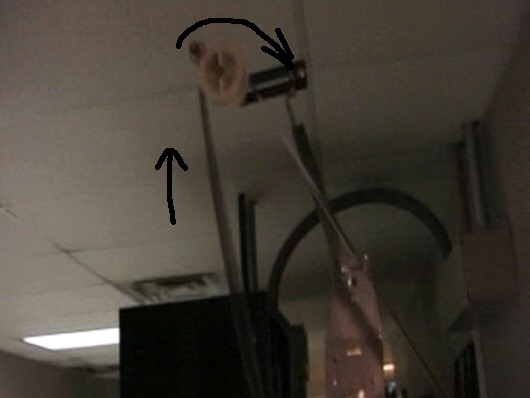
The bottom part of the loop goes around the projector's upper constant feed sprocket, back up through the top of the projector, behind the two digital penthouse readers, and over the roller that normally carries the film on its way to the projector from the platter. Here's a screen capture showing the top part of the loop.

 -

You're right that the loop does bounce quite a bit after I added the cue. That's basically the cue tape stiffening part of the film and causing the bounce when it goes over that top roller. It should be noted that that is exactly what happens when a cue on a print travels over that roller. Then when the cue goes through the reader, it happens again, except it's a bit more of an intense bounce, as the video shows. Because I'm running a loop, the bouncing becomes rhythmic in nature. On an actual print, the rollers bounce a few times as the cue goes through, then they settle back down.

The first digital test on the video (without the cue) is much more stable, although there is still a very very slight warble. But I'm also curious as to why it sounds like a higher pitch than the analog version of the Dolby tone. It doesn't sound like the right pitch until I shut the motor off at the end of the video. I've never noticed movies playing at a higher pitch than they should, so I'm really puzzled as to why the Dolby tone loop sounds like that.

Thanks again.
 
Posted by Ken Jacquart (Member # 369) on 02-28-2006, 12:15 PM:
 
Mark,

As you've observed and heard, a film speed change will cause a pitch change. The recovery time of a film bobble will depend upon things mentioned earlier in this thread of messages. Check to be sure that you're airpot piston assembly is not broken. Additionally, if it is not calibrated correctly, that will present a problem.

The Dolby Digital tone on the Cat. No. 69T loop is a 1K tone. The analog track "Dolby Tone" is somewhere around 850Hz. That is the difference that you were hearing. The reason for the different frequency on our Dolby Tone loop is mostly as an identifier that it is "our" loop. You'll also hear that repeating "blip" during the tone. This is also an identifier.

-ken
 
Posted by Brad Miller (Member # 2) on 02-28-2006, 03:37 PM:
 
In looking at that video, pay attention to the top right SDDS roller. Wow! On page 2 someone said this...

quote: Brad Miller
There is a spring loaded roller on the 2000 series reader that will wreak havoc on any digital penthouse also mounted on the projector if the "entire path" is threaded. Instead, change your offset on the cat702 reader such that you thread "straight down" the front instead of zig zagging back and forth to eliminate running over that roller.
That may not eliminate all of your problem, but it sure as shit will knock a LOT of it out. Re-watch that video. [Razz]
 
Posted by Mark J. Marshall (Member # 1409) on 03-03-2006, 09:43 AM:
 
Yeah yeah yeah, I hear ya.

Undaunted by Brad's [Razz] , I ran the exact same loop on a CP65 / DA20 setup, since in theory, they should all work the same way. Guess what... no warble. I can't even force it to warble by pushing the rollers up and down. Video here. What gives?

Oh, and just for you Brad, the second part of that video is me running the same loop on a different CP650, bypassing your spring loaded roller completely. Guess what... warble all over the freakin place.

The tests on this video were done at a different theater that is experiencing the same problem. There is also a third theater down the road having this problem with their CP650, and NOT with their CP65. In all cases the CP650 is running with a CAT 702 reader. One of the CP65s is running with a CAT 700 reader. I can't remember what the other reader is, but it is a white light reader. The only thing left that I can do is switch the readers around and see if the problem moves, which is a last resort, and we're not planning to do that at the moment.

So I guess since we're all in agreement that the pitch will shift if the film bounces, my question now becomes... why is the CP65 / DA20 setup doing such a better job of handling that piece of film? The film does appear steadier in the reader, but I can't even force a warble on that unit. Why not? What is it doing differently?

Regarding the airpot/dashpot/whatever-it-is... how often do they break or go bad? Is this something that needs replacing once a year or so? At least in our case, this is a problem we've been having since it was installed. The other two were installed around the same time as well. Possibly a bad set of units? The CP65s have been in use since The Lion King.

By the way, I know you're reading this Rob, and before you blow a gasket, I'm already working with Dave. Rest easy.

Thanks again for the replies.

Edit: Thank you, Brad. --Mark

[ 03-03-2006, 11:46 PM: Message edited by: Mark J. Marshall ]
 
Posted by Brad Miller (Member # 2) on 03-03-2006, 03:24 PM:
 
Flip the readers between those houses and let's see what happens.
 
Posted by Ken Jacquart (Member # 369) on 03-04-2006, 09:56 AM:
 
Yes, Mark, if you could swap out those two Readers, it would be most helpful information at this point. That is the next logical thing to do in order to come closer to any conclusion. Thanks-
 
Posted by System Notices (Member # 2357) on 08-22-2008, 04:38 PM:
 

It has been 902 days since the last post.


Posted by Tony Bandiera Jr (Member # 2365) on 08-22-2008, 04:38 PM:
 
Found this thread from the other one on readers..

I'm willing to bet the wow problem is coming from a simple fact in the design change between the CAT699/700 and later readers..the change in the illumination source.

The white light readers featured a "spot" of white light, that would fairly evenly illuminate the entire interperf area. Constant intensity over the entire data block would possibly mean more robust reading of that block.

Now the new LED illuminators place a "slit" of light across the data block area, so now instead of essentially getting a snapshot of the entire data block, you're now doing a "scan" of a portion of the block as it moves, which would seem to mean that it would now react more to any variations of speed.

Sam, your thoughts on this? Enquiring minds would like to know...
 
Posted by Steve Guttag (Member # 268) on 08-22-2008, 08:39 PM:
 
How much are you bettin'? Your theory doesn't hold...either light source is essentially scanned one line at a time. The LEDs are more apt to give you a more uniform light from end-to-end though you will be able to "see" the individual LED dots. With a white light reader, you didn't get the dots but you were at the mercy of the light pipe and how it was polished and how it aged and how the lamp was aimed at the light pipe as to how even an illumination you got.

Now, the CCD did prefer the white light reader...if you target one of them at 4.5Vp-p on the Whiter-than-white signal, you will obtain a better result (lower error number).

Steve
 
Posted by Tony Bandiera Jr (Member # 2365) on 08-27-2008, 01:35 PM:
 
Thanks for that info Steve. [Smile]

Now a question for you: I have an older Component Engineering Dolby Digital reader that was used with the light pipe...can it be used with a red LED? I noticed there are two jumpers on the top of the CCD board..do those set overall gain?

Or am I gonna have to pay for a newer reader?

The CCD board is a Dolby CAT 654R.
 
Posted by Mark J. Marshall (Member # 1409) on 08-27-2008, 09:29 PM:
 
Following up on the posts above the soup nazi, I never did get cooperation from our engineering folks to swap out the reader heads, so I have no idea if this would have moved the problem or not. And unfortunately I no longer have access to that theater.

Last I checked, the problem seemed a bit more subtle, but still there. I'm not sure if Dolby tweaked something in their code between now and then or not, but something seems like it improved a bit (and we did nothing to the equipment).

Anyway, I'm no longer there, so at the moment, I have no further info.

Carry on.
 
Posted by Tony Bandiera Jr (Member # 2365) on 09-02-2008, 06:31 PM:
 
Steve or Sam, any comments to my last post? I'd really like to know if I can use that older reader with an LED... [Smile]
 
Posted by Steve Guttag (Member # 268) on 09-02-2008, 09:27 PM:
 
My suspicion is that it WILL work. You will likely need to refocus the lens (adjust its distance to the CCD) to obtain 100% scan. You will also likely need to reset the jumpers to get the gain.

When the conversion from IR to visible occurred....CE DID change out the digital assys but had you retain the analog assy so there may be something that I'm overlooking here.

Note, the new CCD boards are not that expensive AND they have the status LED on them for a quick visual indication of adequate video level. If you do get the board, get it from CE...they use gold connectors that, in some areas, make all the difference in reliability. Note too...it is entirely possible, though unlikely, that CE has a trade-up program still in effect for the older readers...it WAS some time ago.

Steve
 
Posted by Tony Bandiera Jr (Member # 2365) on 09-02-2008, 09:50 PM:
 
Thanks Steve, I'll give it another try.

I did already make an attempt to get it to work, but, since my lateral guide's rubber pressure roller was bad, I had a huge amount of jitter (Simplex SH-1000) (In excess of 5-8%) so I could not get a signal lock. Yes I was using the DRAS software and not a scope. [Smile] I could not get a steady enough lock to find the corners.

Before I get too crazy trying to refocus to the CCD I'll see if CE still has that exchange program. I do like the idea of getting the updated CCD board, since it has those signal LED's.

This is for my personal projector which is why I'm hoping to avoid spending too much on it right now. [Smile]
 
Posted by Fred Tucker (Member # 4482) on 09-30-2008, 09:10 AM:
 
I habe the same problem on both of my CP650 houses. It is most noticeable when the projector is first started since the theatre's coming soon snipe is musical. Most of the time I end up running in SR instead of SRD, I know its film done wrong but whats a guy to do when your GM is never going to OK a basement reader tha will fix the problem?
 
Posted by Mark J. Marshall (Member # 1409) on 09-30-2008, 03:44 PM:
 
NO KIDDING!?!?

Welcome to it, Fred. And good luck getting it fixed. We ran everything in SR or SDDS whenever I was running it. Playing an SR analog soundtrack in SR is NOT Film Done Wrong. Film Done Wrong would be playing the sound through in a warbling sound system, digital or analog.

Good luck!


Powered by Infopop Corporation
UBB.classicTM 6.3.1.2